Azure-docs: User-initiated reboot or shutdown actions. Who did it?
I am aware that an Azure VM which was rebooted/shut down in the OS level can be viewed in the OS System logs. Is there "another" way to check
who did it without logging in to the Azure VM just to verify the System logs? Your response will be very much appreciated.
Document Details
⚠ Do not edit this section. It is required for docs.microsoft.com ➟ GitHub issue linking.
- ID: e8f6fcef-f877-2ac5-17e1-5ff05f5255c0
- Version Independent ID: ca70415e-9f26-17ef-617d-84e1fc4e07bb
- Content: Understand a system reboot for Azure Windows VM
- Content Source: articles/virtual-machines/windows/understand-vm-reboot.md
- Service: virtual-machines-windows
- GitHub Login: @genlin
- Microsoft Alias: genli
 joe392018
All 9 comments
Thanks for the question! We are investigating and will update you shortly.
 mimckitt
on 28 Jun 2018
mimckitt
on 28 Jun 2018
@joe392018 if the user initiates are reboot from within the VM itself then you will need to check the system logs. Otherwise, if a reboot or shutdown operation is initiated via the portal you can check the activity logs. These are located by clicking on the VM and then selecting "Activity Logs". You will see a column named "initiated By". Here is where you can see who initiated the operation.
mimckitt
on 28 Jun 2018
I will close this out for now. If you need additional help please let me know and we can reopen and continue.
mimckitt
on 29 Jun 2018
Can we use a first party option available in Azure like Log Analytics or OMS to monitor alerts? We really want to pro actively find out who did what on our Azure VM Servers.
joe392018
on 29 Jun 2018
@joe392018 yes absolutely. You should be able to bring in information from the activity log into Log Analytics or OMS.
You can also setup alerts on the Activity logs page to get notifications when a specific action happens.
mimckitt
on 29 Jun 2018
Great! Thanks! But it is only for the activity logs in Azure Portal and not the system logs inside the OS level of the VM?
joe392018
on 30 Jun 2018
Yes and no. What I was referring to was just the activity logs from the portal. But you can enable guest OS diagnostics and integrate them into monitoring solutions as well:
I am not sure about the exact logs you can query from diagnostics but we do have it available. So you should be able to play around within them and find some useful logs and setup alerts.
mimckitt
on 30 Jun 2018
Hi All,
What we can do, just enable event collection for system source in OMS and set an alert for event IDs. Generally we have 6008 event ID for unexpected Reboot so this can work like a charm here. But you also need deep dig your event viewer to check if you have another event IDs as well as these IDs also depend on Server OS versions
Hope this helps :)
 INGourav
on 15 Oct 2018
INGourav
on 15 Oct 2018
Hi All,
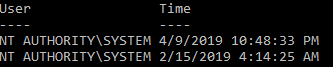
To know who restarted your VM, please login to your VM and execute the below powershell query
gwmi win32_ntlogevent -filter "LogFile='System' and EventCode='1074' and Message like '%restart%'" | select User,@{n="Time";e={$_.ConvertToDateTime($_.TimeGenerated)}}
Result:
 dilv0055
on 22 Apr 2019
dilv0055
on 22 Apr 2019
Related issues
 behnam89
·
3Comments
behnam89
·
3Comments
 monteledwards
·
3Comments
monteledwards
·
3Comments
 Favna
·
3Comments
Favna
·
3Comments
 JeffLoo-ong
·
3Comments
JeffLoo-ong
·
3Comments
 paulmarshall
·
3Comments
paulmarshall
·
3Comments
Most helpful comment
Hi All,
To know who restarted your VM, please login to your VM and execute the below powershell query
gwmi win32_ntlogevent -filter "LogFile='System' and EventCode='1074' and Message like '%restart%'" | select User,@{n="Time";e={$_.ConvertToDateTime($_.TimeGenerated)}}Result:
