Would be great if you could show how to connect via kafkacat for faster access.
Document Details
⚠ Do not edit this section. It is required for docs.microsoft.com ➟ GitHub issue linking.
- ID: bd1ea4ea-2221-3a5e-5a78-ba94596305d8
- Version Independent ID: eeddad65-1e80-1ff9-ffbc-3e5730265a1f
- Content: Stream into Azure Event Hubs for Kafka Ecosystem
- Content Source: articles/event-hubs/event-hubs-quickstart-kafka-enabled-event-hubs.md
- Service: event-hubs
- Product: unspecified
- GitHub Login: @basilhariri
- Microsoft Alias: bahariri
 martenlindblad
All 11 comments
@martenlindblad Thanks for the feedback! I have assigned the issue to the content author to evaluate and update as appropriate.
 vasivara-MSFT
on 22 May 2018
vasivara-MSFT
on 22 May 2018
@martenlindblad We are currently working on several tutorials/examples including the Kafka command line - we'll look into including kafkacat as well!
Until then, you can still give it a try with kafkacat without too much trouble. The basic idea to connect with Event Hubs for Kafka is to take any given Kafka client (e.g. your baseline kafkacat client) and include the following configurations to make the switch.
bootstrap.servers={YOUR.EVENTHUBS.FQDN}:9093
security.protocol=SASL_SSL
sasl.mechanism=PLAIN
sasl.jaas.config=org.apache.kafka.common.security.plain.PlainLoginModule required username="$ConnectionString" password="{YOUR.EVENTHUBS.CONNECTION.STRING}";
Feel free to give that a try, we'd love to hear about your experience!
 basilhariri
on 31 May 2018
basilhariri
on 31 May 2018
Here is a step by step using Kafka Client
wget http://ftp.unicamp.br/pub/apache/kafka/1.1.0/kafka_2.12-1.1.0.tgz
tar -zxvf kafka_2.12-1.1.0.tgz
update below file same as @basilhariri instructions(Thanks!)
/kafka_2.12-1.1.0/config/producer.properties
####################### Producer Basics
bootstrap.servers=_replace_namespace_name_.servicebus.windows.net:9093
security.protocol=SASL_SSL
sasl.mechanism=PLAIN
sasl.jaas.config=org.apache.kafka.common.security.plain.PlainLoginModule required username="$ConnectionString" password="Endpoint=sb://_replace_namespace_name_.servicebus.windows.net/;SharedAccessKeyName=RootManageSharedAccessKey;SharedAccessKey=_uq3bMa---removed---0LjOA=_";
Run:
./kafka_2.12-1.1.0/bin/kafka-console-producer.sh --broker-list _replace_namespace_name_.servicebus.windows.net:9093 --topic test --producer.config ./kafka_2.12-1.1.0/config/producer.properties
 wxwr
on 13 Jun 2018
wxwr
on 13 Jun 2018
thanks @wagsousa, I followed your instructions but nothing happens, maybe something's wrong in my event hub.
May I ask a couple of questions?
- I can see that topic is set to "test", what does it mean in Event hub terms?
- Do I have to create an Event hub just after I created the event hub namespace? It's not clear to me
Thanks
 robymes
on 14 Jun 2018
robymes
on 14 Jun 2018
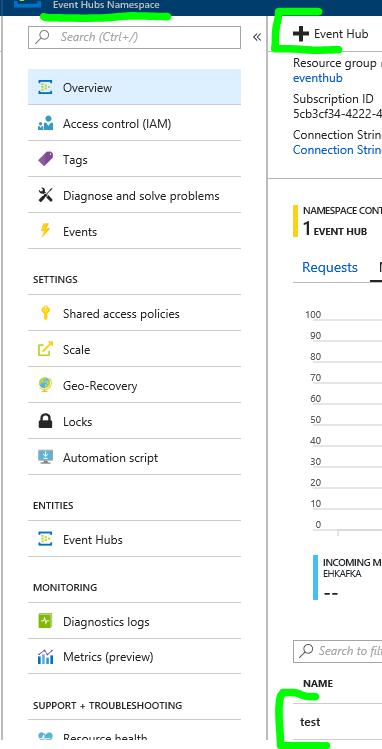
test is the hub name
Yes, if you were able to run the github sample successfully it will be already created, if not you will need to create it mannually.
wxwr
on 14 Jun 2018
Thanks @wagsousa, but no luck, I have to understand why it doesn't work, it seems to me I carefully followed your instructions, but nothing happens (event hubs list is still empty)
robymes
on 14 Jun 2018
You can either put your logs here or open a case through the Azure Portal (just scroll down on the Overview panel until "New Support Request") if you need some help to troubleshoot it.
wxwr
on 14 Jun 2018
Thanks, resolved: port 9093 closed on company firewall :-)
robymes
on 15 Jun 2018
please-close
basilhariri
on 20 Aug 2018
If you still want to use kafkacat (I find it simpler to use than kafka-console-consumer), this configuration works for me:
kafkacat \
    -b <your-hub-name>.servicebus.windows.net:9093 \
    -X security.protocol=sasl_ssl \
    -X sasl.mechanism=PLAIN \
    -X sasl.username='$ConnectionString' \
    -X sasl.password='Endpoint=sb://<your-hub-name>.servicebus.windows.net/;SharedAccessKeyName=RootManageSharedAccessKey;SharedAccessKey=<primary-key>' \
    -L
You can change -L to whatever you need for produce, consume, metadata query, etc...
sasl-password is basically "Connection-string primary key" to be found in "Shared access policies" view of your event hub.
This is version of kafkacat I am using:
Version 1.4.0 (JSON) (librdkafka 1.0.0 builtin.features=gzip,snappy,ssl,sasl,regex,lz4,sasl_gssapi,sasl_plain,sasl_scram,plugins,zstd)
 krzwalko
on 21 May 2019
krzwalko
on 21 May 2019
I havea question I've done the same only insert port 9092 didnt worked for me.
1 sasl.password should be the event_Hub ~ 'topic' primary key or namespace?
 noa1697
on 7 Jul 2020
noa1697
on 7 Jul 2020
Related issues
 ianpowell2017
·
3Comments
ianpowell2017
·
3Comments
 varma31
·
3Comments
varma31
·
3Comments
 jebeld17
·
3Comments
jebeld17
·
3Comments
 Ponant
·
3Comments
Ponant
·
3Comments
 DeepPuddles
·
3Comments
DeepPuddles
·
3Comments
Most helpful comment
If you still want to use kafkacat (I find it simpler to use than kafka-console-consumer), this configuration works for me:
kafkacat \
    -b <your-hub-name>.servicebus.windows.net:9093 \
    -X security.protocol=sasl_ssl \
    -X sasl.mechanism=PLAIN \
    -X sasl.username='$ConnectionString' \
    -X sasl.password='Endpoint=sb://<your-hub-name>.servicebus.windows.net/;SharedAccessKeyName=RootManageSharedAccessKey;SharedAccessKey=<primary-key>' \
    -L
You can change
-Lto whatever you need for produce, consume, metadata query, etc...sasl-password is basically "Connection-string primary key" to be found in "Shared access policies" view of your event hub.
This is version of kafkacat I am using:
Version 1.4.0 (JSON) (librdkafka 1.0.0 builtin.features=gzip,snappy,ssl,sasl,regex,lz4,sasl_gssapi,sasl_plain,sasl_scram,plugins,zstd)