Trying to establish a query against the contacts in my Xero instance and I am coming up with the following error when trying to preview or the import the mappings.
"UserError: The provided properties are insufficient to read data from data source, please provide at least a 'query'.
I have provided the query attribute as per the documentation, please see below:
{
    "name": "xero-test",
    "properties": {
        "activities": [
            {
                "name": "copyXeroContacts",
                "type": "Copy",
                "policy": {
                    "timeout": "7.00:00:00",
                    "retry": 0,
                    "retryIntervalInSeconds": 30,
                    "secureOutput": false
                },
                "typeProperties": {
                    "source": {
                        "type": "XeroSource",
                        "query": "SELECT * FROM Contacts"
                    },
                    "sink": {
                        "type": "SqlSink",
                        "writeBatchSize": 10000
                    },
                    "enableStaging": false,
                    "cloudDataMovementUnits": 0
                },
                "inputs": [
                    {
                        "referenceName": "dsXero",
                        "type": "DatasetReference"
                    }
                ],
                "outputs": [
                    {
                        "referenceName": "XeroContacts",
                        "type": "DatasetReference"
                    }
                ]
            }
        ]
    }
}
Any ideas?
Document Details
⚠ Do not edit this section. It is required for docs.microsoft.com ➟ GitHub issue linking.
- ID: 0f04a295-e4b9-a23b-02e7-232aab5db7ce
- Version Independent ID: cbcadc03-205b-c383-fd3d-7aa4d763f122
- Content: Copy data from Xero using Azure Data Factory (Beta)
- Content Source: articles/data-factory/connector-xero.md
- Service: data-factory
- GitHub Login: @linda33wj
- Microsoft Alias: jingwang
 xmark
xmark
All 7 comments
@xmark Thanks for the feedback! We are currently investigating and will update you shortly.
 mimckitt
on 23 Apr 2018
mimckitt
on 23 Apr 2018
Hi @xmark, thanks for reporting this to us. Could you please try copy with Xero directly? The copy should work now.
Currently, we do not support preview or import schema using the query specified in advanced tab. Sorry. Preview and import schema will be available in one or two months.
If you have to do column mapping, you can new columns in a dataset manually and then import them in a activity for use.
Regards.
 gadongji
on 23 Apr 2018
gadongji
on 23 Apr 2018
thanks for the reply @gadongji
Can you give me some guidance on what the schema actually is from Xero? There are no details on the fields that come from the Xero connector.
Also, can you please give me some more detail on your advice? Im not sure what you mean by "you can new columns in a dataset manually and then import them in a activity for use"
Thanks.
xmark
on 24 Apr 2018
Hi @xmark, there are more than 80 tables supported related to account, bank transaction, contact, credit, expense, invoice, manual, journal and etc. Sorry the doc is not ready yet. You can try Accounts table first and see if it works for you. This table should contain Account_ID, Bank_Account_Number, Bank_Account_Type, Class, Code, Currency_Code, Enable_Payments_To_
Account, Has_Attachments, Name, Reporting_Code, Reporting_Code_Name, Show_In_Expense_
Claims, Status, Tax_Type, Type and Updated_Date_UTC columns.
If your table schema may differ, you can get the table schema by: create a Blob dataset with "Source files contain column names in the first row" as below and copy one row from Accounts to the Blob.
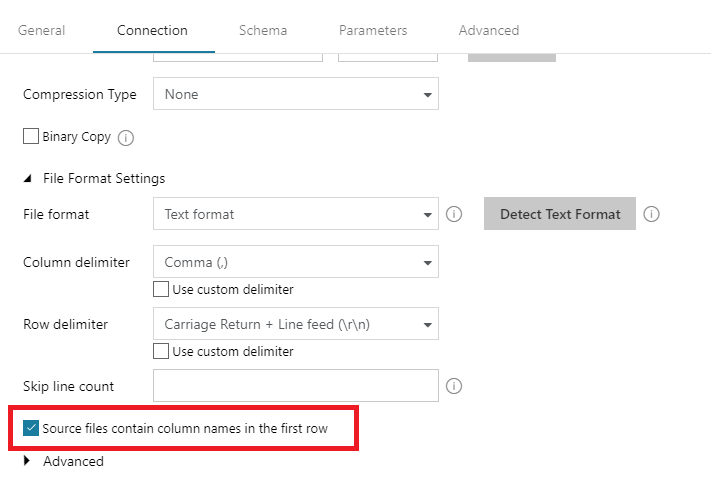
Please let me know which tables you are interested in and I can tell you more details.
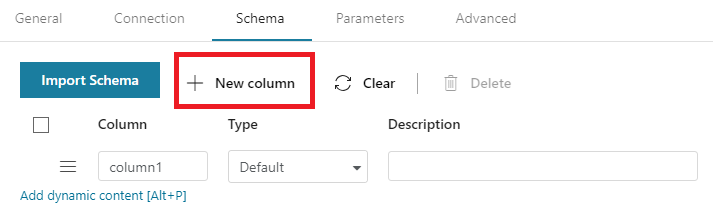
New column feature is available with Datasets, you need to click the "New column" button and then enter the actual column name. The columns need to be added in order and the types can be left as default.
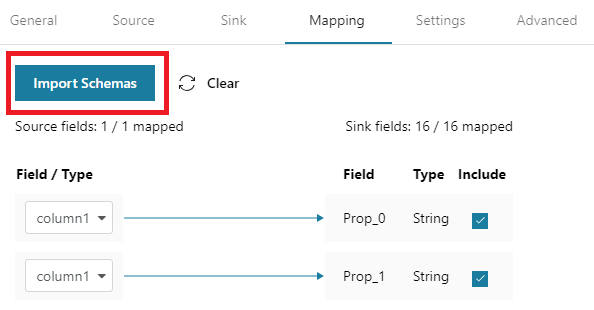
Then you can click "Import Schemas" button in your activity and the schema you created will be imported, you can specify mapping with that.
Regards.
gadongji
on 25 Apr 2018
thank you very much for such a detailed reply @gadongji
I have tried what you suggested and it worked, I can see all the columns in the first line of the blob created, which I then used to create my DB table (dataset). Which I then used as the sink for the copy activity.. and it worked!
My last question on this is, how do I know the schema/data type for each column from Xero? For example, the Account_ID looks like a non-nullable GUID, Code is a string(?) etc.? Do you have details you can share on this?
xmark
on 26 Apr 2018
Hi @xmark good to know it helps.
In Accounts table, all columns are of string type except that: Enable_Payments_To_Account, Has_Attachments and Show_In_Expense_Claims are of bit type and Updated_Date_UTC is a timestamp.
I know table structures of each table but too many details to put here. You can ask and I can answer.
Good news is that we will enable preview and schema features for Xero recently 😃
gadongji
on 26 Apr 2018
The UI has been improved to support browsing tables and preview data/schema. Hope it eases the authoring experience.
please-close
 linda33wj
on 4 May 2018
linda33wj
on 4 May 2018
Related issues
 DeepPuddles
·
3Comments
DeepPuddles
·
3Comments
 Ponant
·
3Comments
Ponant
·
3Comments
 spottedmahn
·
3Comments
spottedmahn
·
3Comments
 bdcoder2
·
3Comments
bdcoder2
·
3Comments
 JamesDLD
·
3Comments
JamesDLD
·
3Comments
Most helpful comment
Hi @xmark, there are more than 80 tables supported related to account, bank transaction, contact, credit, expense, invoice, manual, journal and etc. Sorry the doc is not ready yet. You can try Accounts table first and see if it works for you. This table should contain Account_ID, Bank_Account_Number, Bank_Account_Type, Class, Code, Currency_Code, Enable_Payments_To_
Account, Has_Attachments, Name, Reporting_Code, Reporting_Code_Name, Show_In_Expense_
Claims, Status, Tax_Type, Type and Updated_Date_UTC columns.
If your table schema may differ, you can get the table schema by: create a Blob dataset with "Source files contain column names in the first row" as below and copy one row from Accounts to the Blob.

Please let me know which tables you are interested in and I can tell you more details.
New column feature is available with Datasets, you need to click the "New column" button and then enter the actual column name. The columns need to be added in order and the types can be left as default.

Then you can click "Import Schemas" button in your activity and the schema you created will be imported, you can specify mapping with that.

Regards.