I tried following these instructions, and I think I followed them exactly, but when I visit the https:// version, my browser says it's insecure, and the certificate being used is "Kubernetes Ingress Controller Fake Certificate".
Document Details
⚠ Do not edit this section. It is required for docs.microsoft.com ➟ GitHub issue linking.
- ID: ada58160-dc50-b977-d3bc-65f92406e16d
- Version Independent ID: 5c596e04-fddb-effe-3b72-575f4df42d4e
- Content: Configure ingress with Azure Container Service (AKS) cluster
- Content Source: articles/aks/ingress.md
- Service: container-service
- GitHub Login: @neilpeterson
- Microsoft Alias: nepeters
 m1o1
m1o1
All 7 comments
@andrew-dinunzio Thanks for the feedback! We are currently investigating and will update you shortly.
 mimckitt
on 4 Apr 2018
mimckitt
on 4 Apr 2018
@andrew-dinunzio I followed the document and at the end I was able to see that I was provided a certificate from Let's Encrypt Authority:
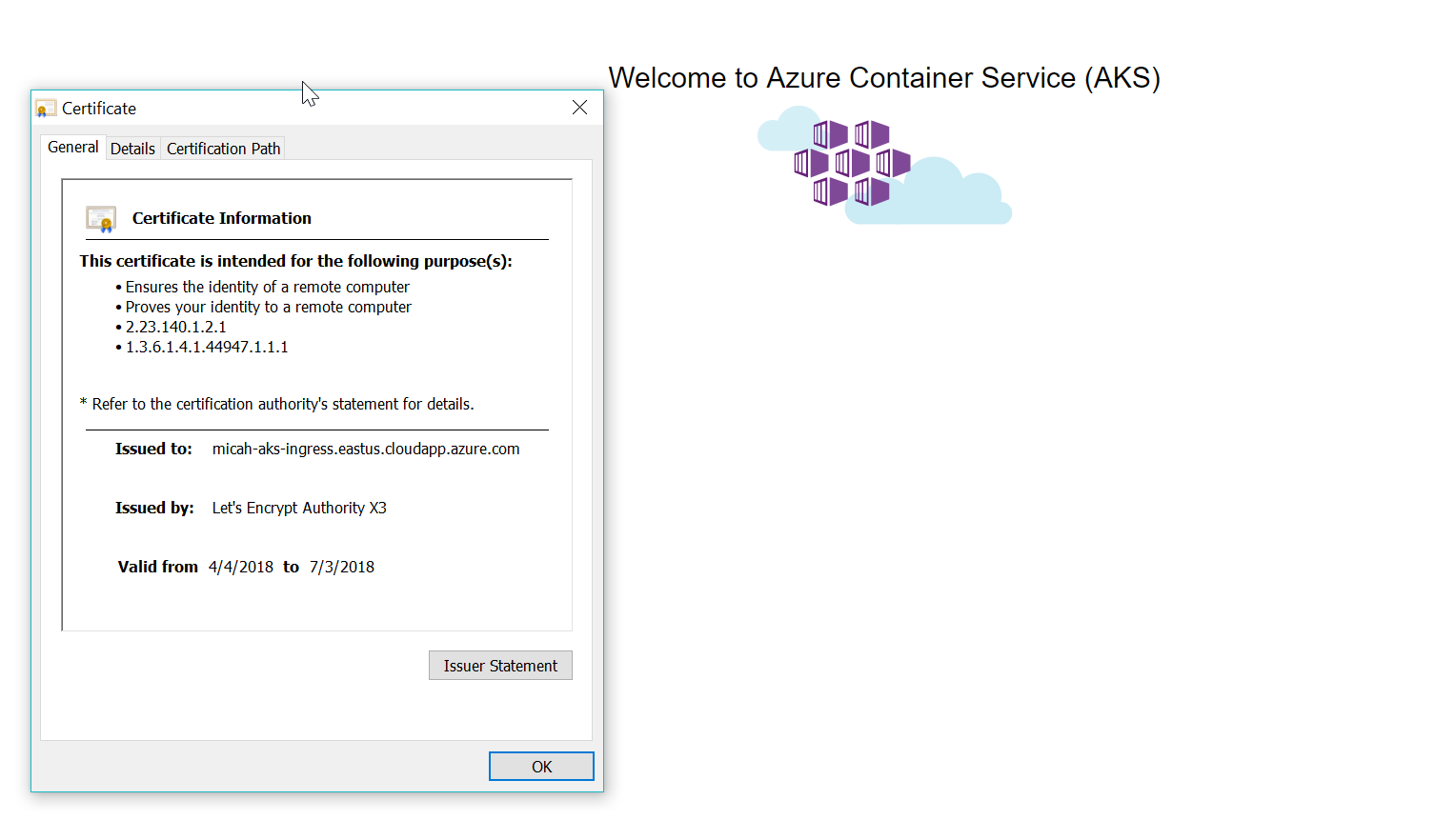
So I am thinking you might have missed a step. Previously to trying this doc I followed this doc to setup my AKS cluster with the exception of the Run the Application Step.
Could you try following the doc once again to ensure you did not miss anything and get back to me?
mimckitt
on 5 Apr 2018
@andrew-dinunzio you may be able to pinpoint the issue by by pulling logs from the kube-lego pod. To do so, get a list of pods:
kubectl get pods
and pull the logs from the pod running kube-lego:
kubectl logs <pod name>
Let us know the result and we can assist.
 neilpeterson
on 5 Apr 2018
neilpeterson
on 5 Apr 2018
Yes, I tried it again and it worked this time! Thanks. I think when I ran it the first time, I forgot to change the hosts in the Ingress. Then when I went back to fix it and redeploy the hello-world-ingress.yaml file, it still didn't work. Deleting everything and starting over seemed to do the trick.
m1o1
on 5 Apr 2018
@andrew-dinunzio thanks for the update! Glad to hear you were able to get it to work :)
mimckitt
on 5 Apr 2018
I got the same problem - the fake certificate. I did configure the hosts correctly in the ingress. The domain is correct, I could reach it in my browser before the ACME challenge started.
Logs from acme-lego:
timw@phobos:~$ kubectl logs -f joyous-dingo-kube-lego-57f8ff6474-g5dvw
time="2018-06-21T19:39:58Z" level=info msg="kube-lego 0.1.6-4eb6cd03 starting" context=kubelego
time="2018-06-21T19:39:58Z" level=info msg="connecting to kubernetes api: https://10.0.0.1:443" context=kubelego
time="2018-06-21T19:39:59Z" level=info msg="successfully connected to kubernetes api v1.9.6" context=kubelego
time="2018-06-21T19:39:59Z" level=info msg="server listening on http://:8080/" context=acme
time="2018-06-21T19:52:39Z" level=info msg="Queued item \"buildit-jenkins/buildit-jenkins-ingress\" to be processed immediately" context=kubelego
time="2018-06-21T19:52:40Z" level=info msg="process certificate requests for ingresses" context=kubelego
time="2018-06-21T19:52:40Z" level=info msg="no cert associated with ingress" context=ingress_tls name=buildit-jenkins-ingress namespace=buildit-jenkins
time="2018-06-21T19:52:40Z" level=info msg="requesting certificate for timw-aks-ingress.eastus.cloudapp.azure.com" context=ingress_tls name=buildit-jenkins-ingress namespace=buildit-jenkins
time="2018-06-21T19:52:41Z" level=info msg="if you don't accept the TOS (https://letsencrypt.org/documents/LE-SA-v1.2-November-15-2017.pdf) please exit the program now" context=acme
time="2018-06-21T19:52:41Z" level=info msg="created an ACME account (registration url: https://acme-v01.api.letsencrypt.org/acme/reg/36988085)" context=acme
time="2018-06-21T19:52:41Z" level=info msg="Secret successfully stored" context=secret name=kube-lego-account namespace=default
time="2018-06-21T19:58:28Z" level=warning msg="authorization failed after 5m0s: reachability test failed: Get http://timw-aks-ingress.eastus.cloudapp.azure.com/.well-known/acme-challenge/_selftest: dial tcp: lookup timw-aks-ingress.eastus.cloudapp.azure.com on 10.0.0.10:53: no such host" context=acme domain=timw-aks-ingress.eastus.cloudapp.azure.com
time="2018-06-21T19:58:28Z" level=error msg="Error while processing certificate requests: no domain could be authorized successfully" context=kubelego
time="2018-06-21T19:58:28Z" level=error msg="worker: error processing item, requeuing after rate limit: no domain could be authorized successfully" context=kubelego
 timwebster9
on 21 Jun 2018
timwebster9
on 21 Jun 2018
nevermind the above - I had the wrong domain after all :-/
timwebster9
on 21 Jun 2018
Related issues
 jharbieh
·
3Comments
jharbieh
·
3Comments
 behnam89
·
3Comments
behnam89
·
3Comments
 Ponant
·
3Comments
Ponant
·
3Comments
 spottedmahn
·
3Comments
spottedmahn
·
3Comments
 ianpowell2017
·
3Comments
ianpowell2017
·
3Comments
Most helpful comment
@andrew-dinunzio you may be able to pinpoint the issue by by pulling logs from the kube-lego pod. To do so, get a list of pods:
and pull the logs from the pod running kube-lego:
Let us know the result and we can assist.