Azure-docs: Having issues creating webapp with python runtime
Hello I tried the steps outlined in this document and when I try create az webapp create command iam seeing the following error runtime python|3.4 was throwing error
Document Details
⚠ Do not edit this section. It is required for docs.microsoft.com ➟ GitHub issue linking.
- ID: ac1cd213-5a9f-ae10-73b5-96061bfbd9d9
- Version Independent ID: cec78ca0-f4c0-970e-dde0-44db72d3819f
- Content: Create a Python web app in Azure
- Content Source: articles/app-service/app-service-web-get-started-python.md
- Service: app-service-web
- GitHub Login: @cephalin
- Microsoft Alias: cephalin;cfowler
 usharam73
All 17 comments
Thanks for your feedback! We will investigate and update as appropriate.
 MohitGargMSFT
on 21 Mar 2018
MohitGargMSFT
on 21 Mar 2018
@usharam73 we have gone ahead and assigned this to the doc author to provide feedback as necessary.
@cephalin Can you please investigate this? I'm unable to repro this due to not having the necessary hardware for this doc.
 BryanTrach-MSFT
on 22 Mar 2018
BryanTrach-MSFT
on 22 Mar 2018
I ran the command without the runtime option and I later created an extension for python and was able to successfully deploy the hello world to the azure web app service.
usharam73
on 22 Mar 2018
Tracking this internally at https://mseng.visualstudio.com/TechnicalContent/_workitems/edit/1215703
 cephalin
on 22 Mar 2018
cephalin
on 22 Mar 2018
@usharam73 Thanks for your feedback! By chance, are you using the Azure CLI from a PowerShell window?
 SyntaxC4
on 24 Mar 2018
SyntaxC4
on 24 Mar 2018
Possibly related to #5957
SyntaxC4
on 24 Mar 2018
Experiencing this too from my local Bash terminal (azure CLI tools installed with homebrew).
@usharam73 how did you create the web app without a runtime?
I get usage error: must specify --runtime | --deployment-container-image-name
 foucdeg
on 26 Mar 2018
foucdeg
on 26 Mar 2018
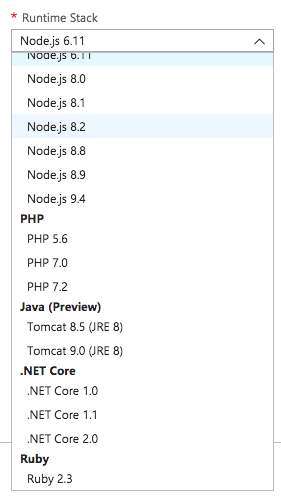
Also, both Python options are unavailable to me in the web interface:
foucdeg
on 26 Mar 2018
@ahmedelnably Can you assist here?
SyntaxC4
on 27 Mar 2018
Python is only available on Windows App Service, @foucdeg The runtime list that you are showing is the Linux runtime list, you need to make sure that your app is a Windows app, for the command to work.
 ahmedelnably
on 27 Mar 2018
ahmedelnably
on 27 Mar 2018
@usharam73 Can you confirm that you were attempting to create an App Service on Linux? Thanks!
SyntaxC4
on 27 Mar 2018
@ahmedelnably worked with Windows, thanks. But I still have @usharam73 's issue with the CLI.
foucdeg
on 28 Mar 2018
@usharam73 I believe the original error was related to running the CLI command in the PowerShell cloud shell. The tutorial is now updated with PowerShell specific syntax. #please-close
cephalin
on 18 Apr 2018
@cephalin @BryanTrach-MSFT @MohitGargMSFT I still have the same issue. Here is what I have been trying
- OS : Mac
- Cloud Shell : Bash
- Runtime : Python 2.7
- Command :
az webapp create -g <resource> -n <name> -p <plan> --runtime "python|2.7" --deploy-local-git - Error : Linux Runtime 'python|2.7' is not supported.Please invoke 'list-runtimes' to cross check
az webapp list-runtimes | grep python: "python|2.7"
I have also tried to use PowerShell escape character(with in PowerShell) as per #5957 but no luck. I get the same error.
To me it doesn't look like issue with type of cloud shell. Can you please assist ?
 prasdeva
on 20 Apr 2018
prasdeva
on 20 Apr 2018
@prasdeva by the way --deploy-local-git should be --deployment-local-git. Also, I cannot reproduce the error with a Windows App Service plan. If you use it in a Linux App Service plan then you'd get an error. To see what runtime support Linux, use
az webapp list-runtimes --Linux
@cephalin Thanks for pointing this out. I didn't realise that, there could be differences in Windows and Linux runtime.
does that mean Linux python web apps will not be supported on Azure ?
prasdeva
on 24 Apr 2018
App Service on Linux uses container technology, so you can run python web apps in a custom image/container. See https://docs.microsoft.com/en-us/azure/app-service/containers/tutorial-docker-python-postgresql-app. the list-runtimes command shows you all available built-in images, which doesn't contain a python image at the moment.
cephalin
on 24 Apr 2018
Related issues
 JeffLoo-ong
·
3Comments
JeffLoo-ong
·
3Comments
 jamesgallagher-ie
·
3Comments
jamesgallagher-ie
·
3Comments
 mrdfuse
·
3Comments
mrdfuse
·
3Comments
 Favna
·
3Comments
Favna
·
3Comments
 spottedmahn
·
3Comments
spottedmahn
·
3Comments