Azure-devops-docs: The use of environment agents for multi-stage YAML pipelines is not documented and can't be automated
I'm trying to automate the agent install for Azure DevOps environments (which are enabled by opting into multi-stage YAML pipelines), also automating tags applied to the agent instance.
The portal generates a script:
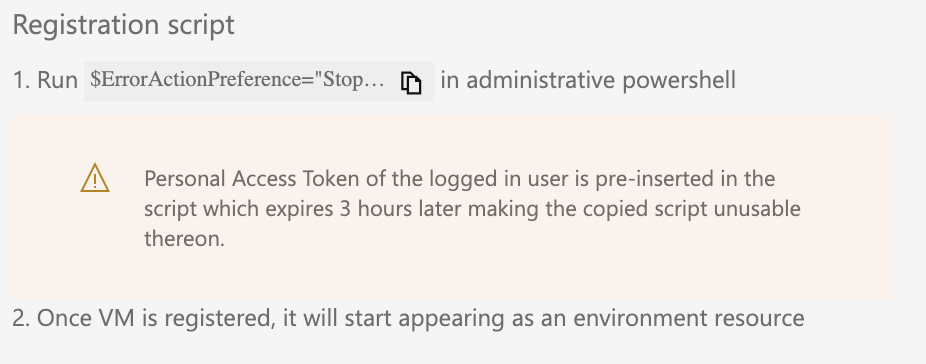
This script uses the regular agent:
https://docs.microsoft.com/en-us/azure/devops/pipelines/agents/v2-windows?view=azure-devops
But with some undocumented switches:
.\config.cmd --environment --environmentname "test"
.\config.cmd --help doesn't yield any help how to use this e.g. with tags even though the documentation states that this 'always lists the latest required and optional responses'.
Specifically using the --unattended switch is rejected icw --environment, blocking automation.
Document Details
⚠ Do not edit this section. It is required for docs.microsoft.com ➟ GitHub issue linking.
- ID: 43799c5d-2f13-cc76-a1c0-a3f850e16d4e
- Version Independent ID: 97a5b73f-faf7-f9c0-9269-fc79984616d6
- Content: Deploy an Azure Pipelines agent on Windows - Azure Pipelines
- Content Source: docs/pipelines/agents/v2-windows.md
- Product: devops
- Technology: devops-cicd-agents
- GitHub Login: @steved0x
- Microsoft Alias: sdanie
 geekzter
All 2 comments
Replying to my own question with the approach I took to solve this.
There is still no documented way to install an environment VM agent apart from the generated script. I used dotpeek to disassemble Agent.Listener.CommandLine.dll, later I discovered the source on GitHub as well:
https://github.com/microsoft/azure-pipelines-agent/blob/master/src/Agent.Listener/CommandLine/ConfigureAgent.cs
This gives you all the arguments the agent accepts at config time. As there is no Azure VM extension (yet?), I used this to create a script for the CustomScript extension:
https://github.com/geekzter/azure-vdc/blob/master/terraform/modules/iis-app/scripts/host/install_agent.ps1
When you install agents in the same pipeline as you're using them, you can have a race condition: the agent needs to be online in time for the pipeline to succeed. For this I created a script that polls the REST api using 'az devops invoke' until they're online:
https://github.com/geekzter/azure-vdc/blob/master/scripts/wait_for_agents.ps1
geekzter
on 25 May 2020
Are there any updates?
It's almost 4 months of silence.
 vladimirglazkov
on 8 Jul 2020
vladimirglazkov
on 8 Jul 2020
Related issues
 EM1L
·
3Comments
EM1L
·
3Comments
 dannyvv
·
3Comments
dannyvv
·
3Comments
 mikedouglasdev
·
3Comments
mikedouglasdev
·
3Comments
 csutorasr
·
3Comments
csutorasr
·
3Comments
 letmaik
·
3Comments
letmaik
·
3Comments