Azure-devops-docs: It is unclear how to do variable substitution on json file
I came to this page looking for documentation on how to substitute variables (using a yaml build file) in my appsettings.json file from a variable group.
The part that is confusing to me is that in the "File transformations" section it says this is only supported for xml. Then later in the "Variable substitution" section it says both xml and json are supported but it appears that the xmlTransformationRules property is a required argument.
Document Details
⚠ Do not edit this section. It is required for docs.microsoft.com ➟ GitHub issue linking.
- ID: 064f48ba-1c34-6422-5fe3-c3e88d2803c4
- Version Independent ID: c38f5761-4718-9aae-bc83-063257a78eb3
- Content: File Transform task - Azure Pipelines
- Content Source: docs/pipelines/tasks/utility/file-transform.md
- Product: devops
- Technology: devops-cicd
- GitHub Login: @RoopeshNair
- Microsoft Alias: ronai
 chillbilly79
All 12 comments
how do i see the result of the File Transform, its a task in release but can not see how i can see the results of the files which it has or has not applied to. FFS i really wish there were more examples of how 99% of people would be setting up builds and releases.
 Seabizkit
on 12 Dec 2019
Seabizkit
on 12 Dec 2019
Yes I too would like to see an example using key vault values substituted into appsettings.json
It is confusing because the JSON supports the "dot" notation, e.g, Data.DefaultConnection.ConnectionString but the key vault does not support secrets containing "."
I'm looking for an example on setting up secrets in a Key Vault and then read those secrets in a release pipeline such that the appsettings.json gets modifed from:
"Twilio": {
"SubaccountSID": "get from keyvault",
"SID": "get from keyvault",
"KEY": "get from keyvault"
},
I've been able to set these values using pipeline variables named Twilio.SubaccountSID, Twilio.SID, Twilio.KEY but would rather have those values in a key vault.
 multco-malan
on 24 Dec 2019
multco-malan
on 24 Dec 2019
I'm facing an issue in the same vain.
The part that is confusing to me is that in the "File transformations" section it says this is only supported for xml. Then later in the "Variable substitution" section it says both xml and json are supported but it appears that the xmlTransformationRules property is a required argument.
- task: FileTransform@2
inputs:
enableXmlTransform: false
folderPath: '$(System.DefaultWorkingDirectory)/**/*.zip'
jsonTargetFiles: '**\*environment'
I'm getting the error Cannot perform XML transformations on a non-Windows platform, which doesn't really make sense, considering I have enableXmlTransforms: false. I've also tried omitting that value, but I get the same results.
As the OP has requested, please clarify.
 djbreen7
on 30 Dec 2019
djbreen7
on 30 Dec 2019
I'm facing an issue in the same vain.
The part that is confusing to me is that in the "File transformations" section it says this is only supported for xml. Then later in the "Variable substitution" section it says both xml and json are supported but it appears that the xmlTransformationRules property is a required argument.
- task: FileTransform@2 inputs: enableXmlTransform: false folderPath: '$(System.DefaultWorkingDirectory)/**/*.zip' jsonTargetFiles: '**\*environment'I'm getting the error
Cannot perform XML transformations on a non-Windows platform, which doesn't really make sense, considering I haveenableXmlTransforms: false. I've also tried omitting that value, but I get the same results.As the OP has requested, please clarify.
I did eventually get it to work like this:
- task: FileTransform@1
inputs:
folderPath: '$(System.DefaultWorkingDirectory)'
fileType: json
targetFiles: appsettings.json
I did find a working solution by utilizing the "Azure DevOps" section of this post:
https://medium.com/cheranga/transform-configurations-in-a-net-core-2-2-web-api-using-azure-devops-8febc8796713
multco-malan
on 31 Dec 2019
Thanks @chillbilly79! That's working for me
djbreen7
on 1 Jan 2020
I'm using the solution provided by @chillbilly79 and receive a weird error message even though the JSON substitution works flawlessly:
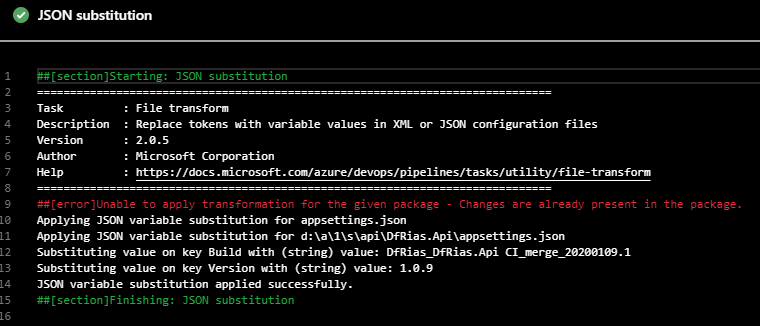
My pipeline step:
- task: FileTransform@2
condition: and(succeeded(), not(startsWith(variables['Build.SourceBranch'], 'refs/heads/feature/')))
displayName: JSON substitution
inputs:
folderPath: '$(System.DefaultWorkingDirectory)/api/DfRias.Api/'
fileType: json
jsonTargetFiles: 'appsettings.json'
 RobinZergiebel
on 9 Jan 2020
RobinZergiebel
on 9 Jan 2020
I got the changes already present message when directly targeting the source folder. The idea is that the build package is edited by this task so configuration is updated before test or deployment.
This worked for me (note the **/):
steps:
- task: FileTransform@1
displayName: 'File Transform: appsettings.json'
inputs:
folderPath: '$(System.DefaultWorkingDirectory)'
fileType: json
targetFiles: '**/appsettings.json'
 tfks
on 3 Feb 2020
tfks
on 3 Feb 2020
To prevent the error that @djbreen7 experienced:
Cannot perform XML transformations on a non-Windows platform
...you need to specify an empty xmlTransformationRules. This works against a Linux app service:
- task: FileTransform@2
  inputs:
    folderPath: $(Pipeline.Workspace)/path-to/my-package.zip
    jsonTargetFiles: appsettings.json
    xmlTransformationRules: '' # disabled
 sharpjs
on 26 Feb 2020
sharpjs
on 26 Feb 2020
I got the changes already present message when directly targeting the source folder. The idea is that the build package is edited by this task so configuration is updated before test or deployment.
This worked for me (note the **/):
steps:
- task: FileTransform@1
displayName: 'File Transform: appsettings.json'
inputs:
folderPath: '$(System.DefaultWorkingDirectory)'
fileType: json
targetFiles: '**/appsettings.json'
Not directly targeting the source folder makes it easier to apply to other projects, but unfortunately I still get the same error :(.
Cheers,
Robin
RobinZergiebel
on 27 Feb 2020
Just wanted to add that this has caused me hours of headache today.
Please update the Azure documentation with clear examples on how to do JSON variable substitution alone.
Or perhaps the better design would be to separate the 2 tasks entirely, XmlFileTransform, JsonFileTransform?
 safoster88
on 25 Oct 2020
safoster88
on 25 Oct 2020
I'm just throwing my hat in the ring on this one to. The JSON Variable Substitution section doesn't actually show how you accomplish the substitution. It gives some preliminary information, skips how to actually setup the substitution, then goes right to showing a regular JSON config file which tells you nothing about how to setup substitution. A complete example would have a JSON example prior to substitution, then an example of setting up the substitution, then the resulting file. Showing only the resulting file doesn't provide any insight into how the substitution is setup. This could be caught by having an entry level dev go through the docs and try to accomplish these tasks themselves.
I've noticed legitimate unresolved issues have started being Closed due to inactivity. This is unfortunate. We've taken the time out of our busy days to point out these gaps in documentation. Simply because no one has acted on it, doesn't mean it's not an issue still. You're throwing away the effort we've put into coming here and trying to accurately describe issues. This is a long pattern going back to Microsoft Connect of disregarding valuable feedback.
You're just encouraging unnecessary noise in order for us to keep legitimate issues open. If no one actually took an action that would address the issue, don't close it.
 AaronLS
on 25 Nov 2020
AaronLS
on 25 Nov 2020
Related issues
 csutorasr
·
3Comments
csutorasr
·
3Comments
 dtamai
·
3Comments
dtamai
·
3Comments
 kieronlanning
·
3Comments
kieronlanning
·
3Comments
 anlatsko
·
3Comments
anlatsko
·
3Comments
 dannyvv
·
3Comments
dannyvv
·
3Comments
Most helpful comment
To prevent the error that @djbreen7 experienced:
...you need to specify an empty
xmlTransformationRules. This works against a Linux app service: