Azure-devops-docs: Secret Variables value cannot be used in pipeline
Your document states "We will not ever mask substrings of secrets. If, for example, "abc123" is set as a secret, "abc" will not be masked from the logs." This isn't true.
This works: *
This does not work:
This works: *
The value can't be used in Azure Powershell
- task: AzurePowerShell@4
env:
  MY_MAPPED_ENV_VAR: $(secret)
inputs:
azureSubscription: '******************'
ScriptType: 'FilePath'
ScriptPath: '$(System.DefaultWorkingDirectory)*******.ps1'
azurePowerShellVersion: 'LatestVersion'
Only "*" can be seen from the script when calling "$($env:MY_MAPPED_ENV_VAR)" When trying to use this secret in creating key vault secrets fails.
Document Details
⚠ Do not edit this section. It is required for docs.microsoft.com ➟ GitHub issue linking.
- ID: dd7e0bd3-1f7d-d7b6-cc72-5ef63c31b46a
- Version Independent ID: dae87abd-b73d-9120-bcdb-6097d4b40f2a
- Content: Variables - Azure Pipelines
- Content Source: docs/pipelines/process/variables.md
- Product: devops
- Technology: devops-cicd
- GitHub Login: @juliakm
- Microsoft Alias: jukullam
 placidseven
All 10 comments
When I attempt to use the secret to create key vault secret:
Set-AzureKeyVaultSecret -VaultName $vmVaultName -Name $vmName -SecretValue $env:MY_MAPPED_ENV_VAR -ErrorAction SilentlyContinue
[error]Cannot bind parameter 'SecretValue'. Cannot convert the "*" value of type "System.String" to type "System.Security.SecureString".
How am I supposed to use the secret?
placidseven
on 21 Nov 2019
@placidseven -- Thank you for your feedback. Here are a couple of options where you might consider asking your question:
@juliakm -- please look into this potential documentation issue.
 WilliamAntonRohm
on 22 Nov 2019
WilliamAntonRohm
on 22 Nov 2019
Agreed. I created a variable group with an API Key var in it, marked as Secret.
In my powershell script, I used $($env:apikey) as my call, and, even when debugging by using Write-Host to spit it out, I got nothing.
When I changed the var to be non-secret, I was able to use it in my script as I expected. There doesn't seem to be a way to get at variables in variable groups when marked as Secret from powershell.
 bc3tech
on 6 Dec 2019
bc3tech
on 6 Dec 2019
@WilliamAntonRohm Are you serious? Your going to site StackOverflow as documentation? I shouldn't have to go ask the question else where. This is an issue of lack of documentation, and all documentation should be sourced from this repository. There should be sufficient examples for use cases within the documentation.
If the documentation says I can set my secret variable as an environment variable to be called within the script then it should be able to do so. If not it should be documented how to use these secret variables within an environment.
Also the bot you pointed me to only request I open a support ticket. So....(y)
placidseven
on 18 Dec 2019
I'll circle back around to tell people how I ended up getting this to work...
Per the docs, the only way to use secrets is to inject them in to your pipeline and use them as _environment variables_ like this:
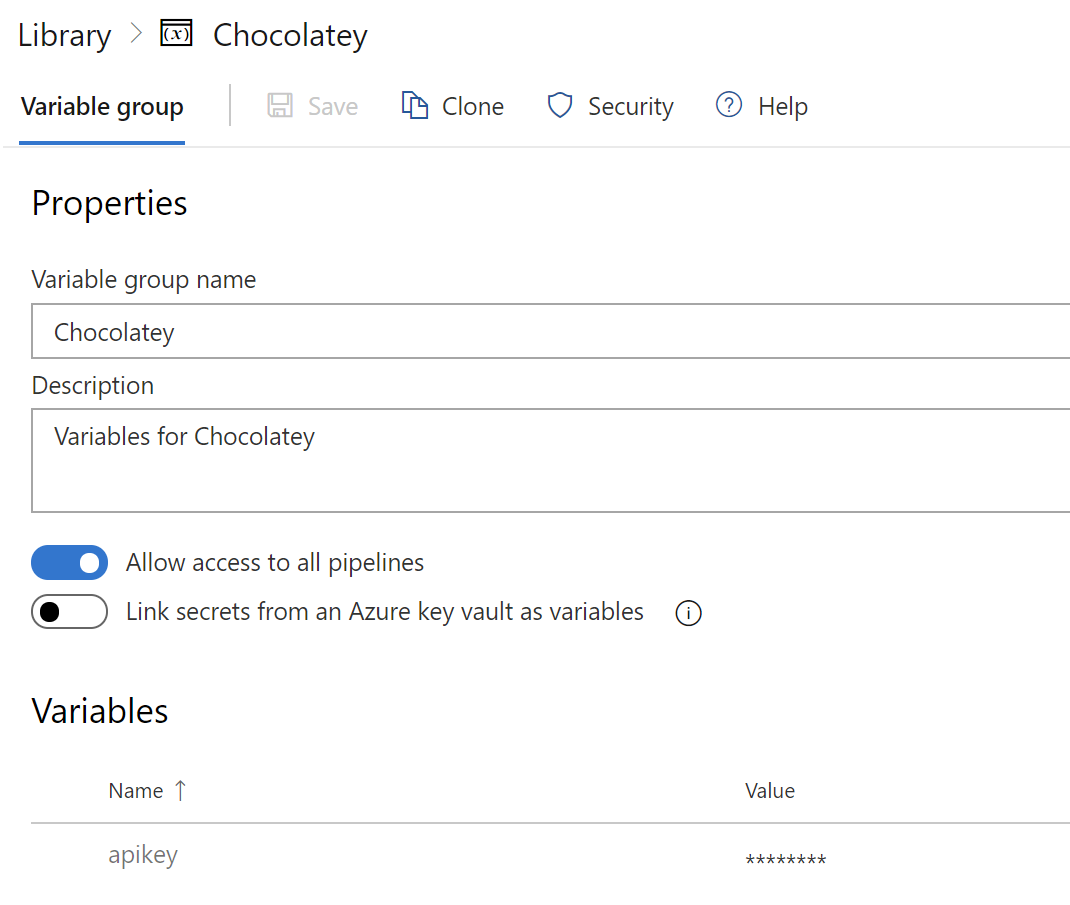
- Variable group with secret value:
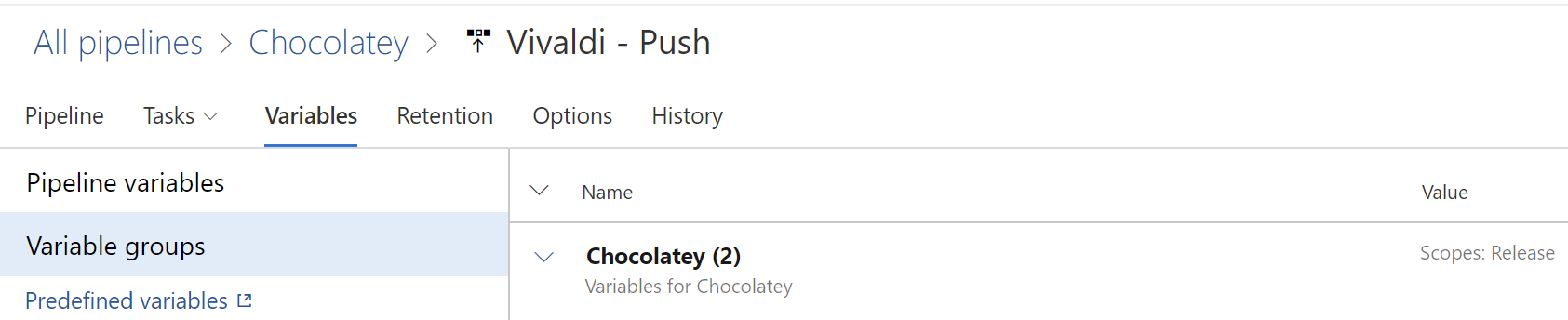
- Attach the var group to the build/release:
- Inject the secret vars as env variables:

This is equivalent to the OP's
env:
MY_MAPPED_ENV_VAR: $(secret)
- Use them just like any other env var:

hopefully this helps. I think people were missing one/more of these steps.
bc3tech
on 18 Dec 2019
To the point of this GitHub issue, the documentation could be much clearer on the steps needed for secrets - that they must be piped in to Env Variables as part of the pipeline before being used - which aren't clear in the current samples/examples (IMO because they all focus on just printing out YAML which isn't in itself verbose enough to be documentation)
bc3tech
on 18 Dec 2019
It complicates matters that different PowerShell cmdlets use secure strings differently. There doesn't seem to be any sort of consistency on use of types.
Example:
$adminPassword = ConvertTo-SecureString -String $password -AsPlainText -Force
Set-AzKeyVaultSecret -VaultName $vmVaultName -Name $secretName -SecretValue $adminPassword
versus
$adminPassword = ConvertTo-SecureString "$password" -AsPlainText -Force
 Export-PfxCertificate -Cert $cert -FilePath "C:\Temp\$vmName\$vmName.pfx" -Password $adminPassword
The differences are subtle but important. I know this isn't the place to address this issue, but to be honest for this reason I wouldn't use powershell if it wasn't a requirement for us.
placidseven
on 19 Dec 2019
@placidseven, @bc3tech -- thank you for your feedback. Apologies for the delay in responding.
@juliakm -- please look into this potential documentation issue.
WilliamAntonRohm
on 8 Jan 2020
Thanks for flagging this area of confusion. I've added a more detailed example on using secret variables in variable groups. See this section.
 juliakm
on 14 Jan 2020
juliakm
on 14 Jan 2020
Hm. That's somewhat repetitive of the section above it:
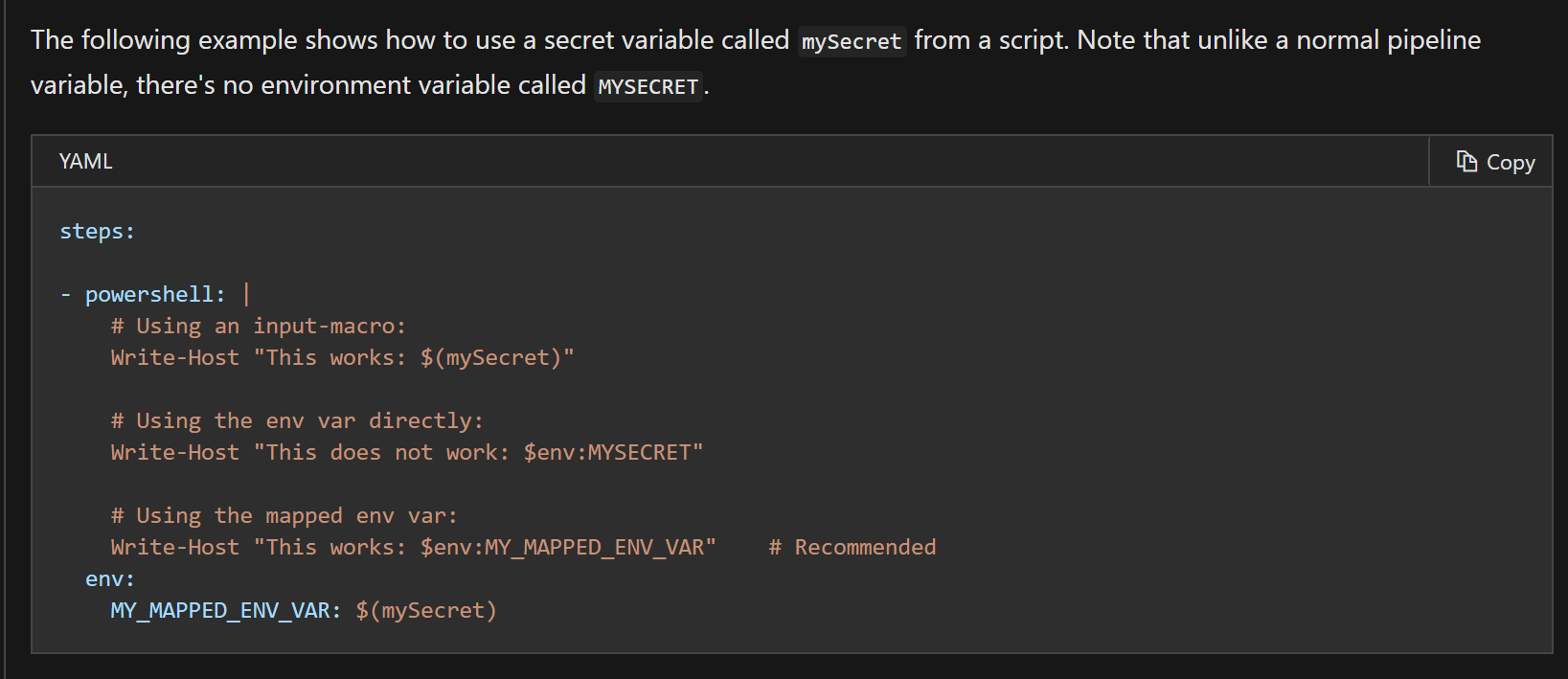
which is actually not correct; the usage of secret variable in the powershell script as $(mySecret) will in fact _not_ work, despite what the output shows in this section of the docs.
And, in fact, saying "It is recommended that you use the script's environment in order to pass secrets to the script" misleads the user to thinking it's an option to _not_ do this, when in fact it's not; it's a _requirement_ to do it this way.
I also feel the new block also kinda buries the lead.
bc3tech
on 18 Jan 2020
Related issues
 kieronlanning
·
3Comments
kieronlanning
·
3Comments
 robinmanuelthiel
·
3Comments
robinmanuelthiel
·
3Comments
 sevaa
·
3Comments
sevaa
·
3Comments
 Naphier
·
3Comments
Naphier
·
3Comments
 KacperMucha
·
3Comments
KacperMucha
·
3Comments