Azure-devops-docs: Could rejection not fail the pipeline?
To prevent every push to trigger an update of infrastructure we have put approvals in place to validate the changes. Rejecting a change can simply be because we do not want change out yet, but we still want to check that changes are ok (terraform plan looks good). It is a bit annoying when the pipeline then shows as failed and our success rate is quite poor. Could rejection have a different status and not failed to show that it was rejected?
Document Details
⚠ Do not edit this section. It is required for docs.microsoft.com ➟ GitHub issue linking.
- ID: b067a175-f640-7503-9c1e-f0130c6dbeda
- Version Independent ID: ff743c7b-a103-eae6-4478-62ba995a4b36
- Content: Pipeline deployment approvals - Azure Pipelines
- Content Source: docs/pipelines/process/approvals.md
- Product: devops
- Technology: devops-cicd
- GitHub Login: @shashankbansal
- Microsoft Alias: shashban
 tesharp
All 18 comments
@tesharp Thank you for the question.
I think this functionality currently covered by the use of build Tags.
Having additional build statuses added would require starting a dialog with the product team, see Suggest a feature in the Azure DevOps Community.
 msebolt
on 17 Oct 2019
msebolt
on 17 Oct 2019
Thanks @msebolt. Could you elaborate a bit more on build tags though?
I looked at build tags and thought it could be useful if I for instance could tag the build with "deploy" before approving to indicate that this build should be deployed. If I did not tag it and approved it would simply return false on job condition. Build would show as successful, but only selected builds would run deployment.
However.. I don't see build tags in any of the predefined variables. So how to check on build tag in condition?
Also it would be great to see the tags in pipeline overview.
(We are using multi-stage pipelines with deployment defined in yaml)
tesharp
on 18 Oct 2019
@tesharp These are good questions, assigning this to the author now.
msebolt
on 22 Oct 2019
I am supporting this request. In our situation Tags will not solve this. In our pipeline the app is deployed to QA environment first. Next stage is release to customer's sandbox, but this must be approved based on result of testing in QA. But Rejection doesn't mean necessarily that the build failed. It just mean we are skipping the release to sandbox from any reason (e.g. another build is ready to deploy shortly etc.). I just want to "Skip" this stage. Could I somehow if rejected still mark the build as succeeded?
 kine
on 22 Oct 2019
kine
on 22 Oct 2019
Running into this as well. Also as long as you don't reject or approve anything the status will be waiting. So the result is build now wait endlessly for a approval that never comes.
 Barsonax
on 25 Oct 2019
Barsonax
on 25 Oct 2019
@msebolt @shashban Any update on this? This is seriously breaking our workflows, and making us question our decision to move to YAML deployments in the first place.
 dotnetcanuck
on 5 Nov 2019
dotnetcanuck
on 5 Nov 2019
Thanks for your question. It looks like your question isn't an issue with the documentation, but an issue or question specific to your implementation or a bug in the product itself.
For help with a specific task, here are a couple of options where you might consider asking your question:
If you've encountered an issue with the product itself, to make sure it gets in front of the right people, please submit your bug here.
If you have an idea for improving the product, please submit your idea here.
 mijacobs
on 8 Nov 2019
mijacobs
on 8 Nov 2019
@tesharp @kine @Barsonax I've posted a feature request for this to be changed.
cc @shashban @mijacobs @msebolt
dotnetcanuck
on 13 Dec 2019
Thanks @msebolt. Could you elaborate a bit more on build tags though?
I looked at build tags and thought it could be useful if I for instance could tag the build with "deploy" before approving to indicate that this build should be deployed. If I did not tag it and approved it would simply return false on job condition. Build would show as successful, but only selected builds would run deployment.
However.. I don't see build tags in any of the predefined variables. So how to check on build tag in condition?
Also it would be great to see the tags in pipeline overview.
(We are using multi-stage pipelines with deployment defined in yaml)
@tesharp did you figure it out in the end or are you waiting for the above feature request to be implemented?
 nadworny
on 6 May 2020
nadworny
on 6 May 2020
Thanks @msebolt. Could you elaborate a bit more on build tags though? ...
@nadworny We didn’t really solve this no. Tried for a bit to only run certain stages in master, so we could test releases in branches. However problem then was if we actually wanted to deploy something from a branch we had to merge to master.
In the end we changed it to only run those stages if a build variable was set. So when manually triggering build in DevOps you had to set a variable “Deploy” = “true”. Could be done from any branch, only drawback was that it ran all stages again.
Haven’t looked at it since so don’t know if anything has changes since then. Always new features and tweaks in DevOps..
tesharp
on 6 May 2020
@msebolt it's apparently in the roadmap but no release date yet
nadworny
on 6 May 2020
@nadworny Thank you for the update.
Please follow this in the Developer community at https://developercommunity.visualstudio.com/idea/855198/yaml-pipeline-approvals-rejection-fails-build.html and we can update the documentation once released.
msebolt
on 6 May 2020
Agree with author. It's a good question. I also need a tool allowing me to mark build successful on reject. But when I think about it more and more I understand that it is reasonable behavior. What we really need is good approval/trigger system like was previously in classic mode. For example if "Build A" came from branch "dev" then we trigger deployment to dev 'stage' (now we have 'environments' instead). Other 'stages' just not trigger. Or It looks very similar to what we have now in 'condition'. We just need to construct a good condition for such 'environments' or stages.
 VerdonTrigance
on 15 May 2020
VerdonTrigance
on 15 May 2020
I also agree with the author of this ticket. Approval expiring is not deployment fail. As well as deployment rejection cannot be considered as fail, too. It seems that adding an additional step status (e.g., Not approved) looks like the best solution for this usability issue.
 alxoldman
on 21 May 2020
alxoldman
on 21 May 2020
The thing that the old (non-yaml) pipelines have that yaml pipelines lack is the ability to "Cancel" a deployment to a particular stage. I think the point of this issue is that rejection should act more like "Cancel" and less like an error with the execution of the deployment itself.
 infogulch
on 21 May 2020
infogulch
on 21 May 2020
Sometimes I have to wait some dev deploys to promote to prod.
I really would like to reject a deploy without fail my pipeline.
For instance (dev reject):
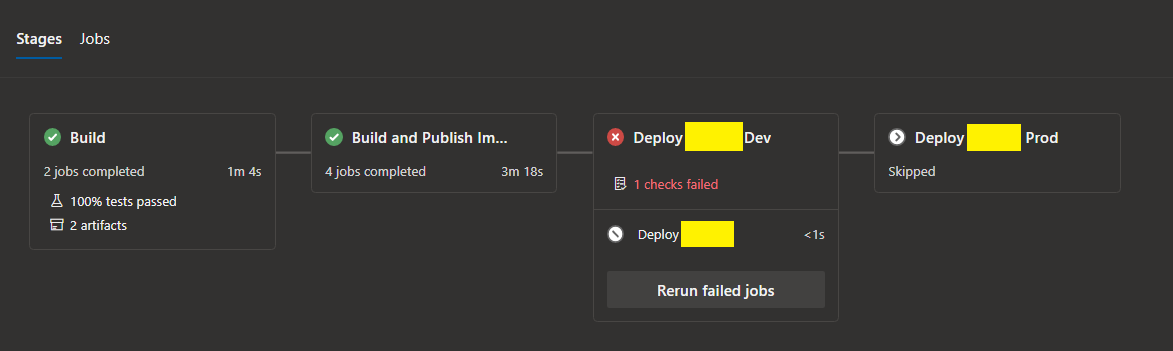
It's horrible to see this:

 willsbctm
on 6 Jun 2020
willsbctm
on 6 Jun 2020
@willsbctm Please upvote and comment on the feature request on Microsoft's developer community site.
This is on their roadmap, but they haven't said anything about an ETA yet.
dotnetcanuck
on 6 Jun 2020
Sometimes I have to wait some dev deploys to promote to prod.
I really would like to reject a deploy without fail my pipeline.For instance (dev reject):
It's horrible to see this:
Previously I had similar pipeline, but now I use condition in front of stage (like "if branch name is r-*" continue deploy to preprod and so on). Main problem is detect if it possible in compile time to make such condition. I guess in cases when it's not - such feature as "decline" step wold be helpful. But before this, try to use condition.
VerdonTrigance
on 9 Jun 2020
Related issues
 mikedouglasdev
·
3Comments
mikedouglasdev
·
3Comments
 anlatsko
·
3Comments
anlatsko
·
3Comments
 MJECloud
·
3Comments
MJECloud
·
3Comments
 michhar
·
3Comments
michhar
·
3Comments
 cijujoseph
·
3Comments
cijujoseph
·
3Comments
Most helpful comment
@msebolt @shashban Any update on this? This is seriously breaking our workflows, and making us question our decision to move to YAML deployments in the first place.