Azure-devops-docs: Missing mention of "Allow project-scoped builds"
I was directed to this page from https://docs.microsoft.com/en-us/azure/devops/pipelines/artifacts/nuget?view=azure-devops&tabs=yaml#publish-your-packages where I was unable to set up permissions for a build. Turns out that when setting up pipleine publishing to the feed, there are useful options under the ellipsis menu to Allow project-scoped builds and Allow builds and releases. Since the users mentioned in "Package permissions in Azure Pipelines" do not appear in the auto-complete (for my organization, at least), I could not add the permissions I was expecting. These dropdowns not only gave access to the user, but set up the role correctly, automatically! It would be incredibly helpful if these options were mentioned in the documentation rather than just the principle names.
Terms I was searching for, in case anyone else needs to find this issue, included "azure devops pipeline publishVstsFeed permissions".
Document Details
⚠ Do not edit this section. It is required for docs.microsoft.com ➟ GitHub issue linking.
- ID: 0e77774e-012a-45cc-d566-7170d86003cd
- Version Independent ID: 778dafea-bf98-3292-f451-d82ce8db5bbc
- Content: Secure and share packages using feed permissions
- Content Source: docs/artifacts/feeds/feed-permissions.md
- Product: devops
- Technology: devops-artifacts
- GitHub Login: @chasewilson
- Microsoft Alias: phwilson
 mdekrey
All 4 comments
Screenshot for completeness:
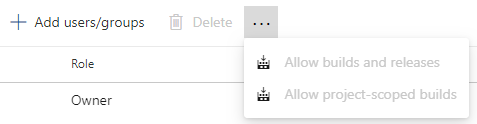
Note the options are disabled because I have already selected them.
mdekrey
on 6 Oct 2019
Dude! This TOTALLY needs to be added to the docs! Thank you for finding this.
 eavonius
on 4 Dec 2019
eavonius
on 4 Dec 2019
You just need to add a section at the end of that paragraph that mentions how to set up the permissions for the project-scoped build identity automatically.
Under feeds settings > permissions, you can click on the ellipsis on top to get a menu where you can click on Allow project-scoped builds. The comment by mdekrey has the screenshot for this
 aasim
on 22 May 2020
aasim
on 22 May 2020
@mdekrey Thank you for the great feedback. The updated article will go live shortly.
 ramiMSFT
on 11 Jun 2020
ramiMSFT
on 11 Jun 2020
Related issues
 sevaa
·
3Comments
sevaa
·
3Comments
 robinmanuelthiel
·
3Comments
robinmanuelthiel
·
3Comments
 o-o00o-o
·
3Comments
o-o00o-o
·
3Comments
 cijujoseph
·
3Comments
cijujoseph
·
3Comments
 Naphier
·
3Comments
Naphier
·
3Comments
Most helpful comment
Screenshot for completeness:

Note the options are disabled because I have already selected them.