Azure-devops-docs: Requirement mentioned in requirements.txt file is not getting installed automatically.
I was following these steps to install my flask app which is having just sample application.py with some sample dependencies to some data science packages. The dependencies are mentioned in requirements.txt and as per step 8 it says the requirements will be installed automatically. Please note that I am not using a custom container image as done in the github sample project (python-sample-vscode-flask-tutorial) mentioned in this document. Also I tried to add a pip install command as post deployment inline script, pip3.6 install -r requirements.txt which fails with permission denied in kudu during deployment. Please let me know how to proceed on this.
Document Details
⚠ Do not edit this section. It is required for docs.microsoft.com ➟ GitHub issue linking.
- ID: eefdcb17-b1e5-141c-aef8-36795c9983af
- Version Independent ID: 007ebfcf-12bf-755c-858b-540d0fc59f96
- Content: Build and deploy Python web apps - Azure Pipelines
- Content Source: docs/pipelines/ecosystems/python-webapp.md
- Product: devops
- Technology: devops-cicd
- GitHub Login: @kraigb
- Microsoft Alias: kraigb
 MishalValiyakath
All 5 comments
Thanks. I'm investigating; see https://github.com/MicrosoftDocs/vsts-docs/issues/5545, which is related.
 kraigb
on 4 Oct 2019
kraigb
on 4 Oct 2019
I've ran into the same issue. My problem was that I created an app service manually for Python and there is this parameter that gets added when you create a Python App Service from command line that is not created when you set up an App Service for Python manually.
{
"name": "SCM_DO_BUILD_DURING_DEPLOYMENT",
"value": "True",
"slotSetting": false
}
You'll need to go to App Service -> Configuration -> Application Settings -> New Application Setting and add it there.
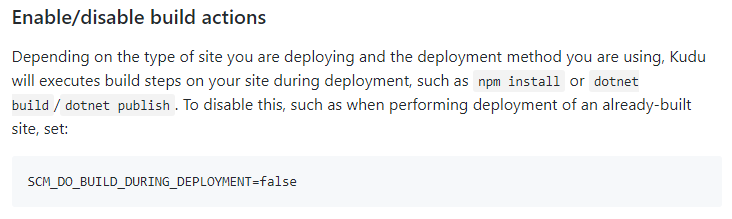
Source: Enable/disable build actions (Configurable settings)
https://github.com/projectkudu/kudu/wiki/Configurable-settings#enabledisable-build-actions
 Dann1112
on 21 Oct 2019
Dann1112
on 21 Oct 2019
I've ran into the same issue. My problem was that I created an app service manually for Python and there is this parameter that gets added when you create a Python App Service from command line that is not created when you set up an App Service for Python manually.
{
"name": "SCM_DO_BUILD_DURING_DEPLOYMENT",
"value": "True",
"slotSetting": false
}You'll need to go to App Service -> Configuration -> Application Settings -> New Application Setting and add it there.
Source: Enable/disable build actions (Configurable settings)
https://github.com/projectkudu/kudu/wiki/Configurable-settings#enabledisable-build-actions
@Dann1112 Looks like that resolved the issue of installing the requirements. Now I can see a .tar.gz file in the wwwroot folder with all the packages in it. Thanks :)
MishalValiyakath
on 21 Oct 2019
I spent a couple of days trying to figure that out! It's good to know that helped @MishalValiyakath ! Cheers !
Dann1112
on 22 Oct 2019
Please, mention this early on in this tutorial! The requirements.txt not being installed is a recurring and very confusing issue. Because the deployment script requires you to have a requirements.txt present in your repo, but it does not automatically make use of it.
 niowniow
on 24 Apr 2020
niowniow
on 24 Apr 2020
Related issues
 atrauzzi
·
3Comments
atrauzzi
·
3Comments
 MJECloud
·
3Comments
MJECloud
·
3Comments
 mikedouglasdev
·
3Comments
mikedouglasdev
·
3Comments
 sandeepzgk
·
3Comments
sandeepzgk
·
3Comments
 cijujoseph
·
3Comments
cijujoseph
·
3Comments
Most helpful comment
I've ran into the same issue. My problem was that I created an app service manually for Python and there is this parameter that gets added when you create a Python App Service from command line that is not created when you set up an App Service for Python manually.
{
"name": "SCM_DO_BUILD_DURING_DEPLOYMENT",
"value": "True",
"slotSetting": false
}
You'll need to go to App Service -> Configuration -> Application Settings -> New Application Setting and add it there.
Source: Enable/disable build actions (Configurable settings)
https://github.com/projectkudu/kudu/wiki/Configurable-settings#enabledisable-build-actions