Azure-devops-docs: Manual approval for pipeline stages
If possible show an example of how we can add an operator approval step on a stage in yaml. Workflow similar to Dev -> Staging -> Wait for operator approval -> Production.
Document Details
⚠ Do not edit this section. It is required for docs.microsoft.com ➟ GitHub issue linking.
- ID: b067a175-f640-7503-9c1e-f0130c6dbeda
- Version Independent ID: ff743c7b-a103-eae6-4478-62ba995a4b36
- Content: Pipeline deployment approvals - Azure Pipelines
- Content Source: docs/pipelines/process/approvals.md
- Product: devops
- Technology: devops-cicd
- GitHub Login: @shashankbansal
- Microsoft Alias: shashban
 rustyautopsy
All 13 comments
+1 for this issue. It's mentioned here that approvals available via environments, but there's no reference I can find demonstrating how it would be implemented in yaml. It should just be a stage setting as it is in the legacy release pipelines.
 once-returner
on 18 Sep 2019
once-returner
on 18 Sep 2019
There is no step, you get approvals by declaring a deployment job with the attribute environment. You then define a "check" on the environment (pipelines -> environments). See https://docs.microsoft.com/en-us/azure/devops/pipelines/process/deployment-jobs?view=azure-devops for a yaml reference of deployments.
 mkajerski
on 18 Sep 2019
mkajerski
on 18 Sep 2019
@rustyautopsy @once-returner Does the solution suggested by @mkajerski help in your case? If not can you email me at moala [at] microsoft [dot] com with a link to this issue. I would love to understand your scenario better and see if there are any gaps in the existing product.
 raiyanalam
on 18 Sep 2019
raiyanalam
on 18 Sep 2019
@raiyanalam I wanted to capture this part of the conversation publicly as I feel it may help others right now. Further details/discussions will be via email as requested.
@mkajerski We are POCing Pipelines and we are trying to encapsulate our entire workflow via code. Breaking out into the GUI to add additional steps isn't the best solution. Also, Environments don't seem to work for us since we are deploying immutable infrastructure via Terraform and Environments seem to want to use/depend on existing resources. Even if we could use a "blank" env it doesn't solve the loss of visibility/collaboration into operator actions when pivoting away from code into GUI space.
In TeamCity we can easily create an approval step by defining a job as a "deploy" type and ensuring there are no triggers set on that job. That defaults to a "manual deploy". Simple.
In AWS CodePipeLine we achieve the same results via the following: https://docs.aws.amazon.com/codepipeline/latest/userguide/approvals.html. Also very simple.
⬆️ We use both of the above services to manage multiple production workloads.
My current workaround to this is to set a Pipeline Environment variable similar to DEPLOY_STAGING=false and ensure that the first job in the Staging stage checks that variable. If false return a non-zero exit code and ensure all other jobs in the stage have a condition() set to the first jobs exit status.
🤞 for not needing this workaround forever ;)
rustyautopsy
on 18 Sep 2019
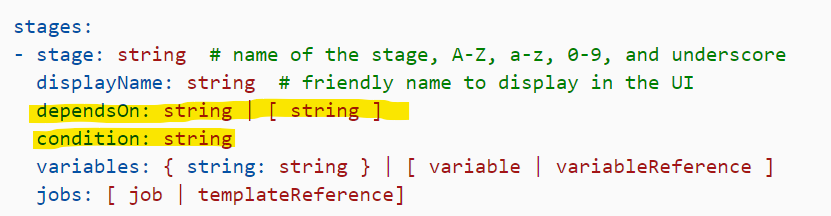
@raiyanalam @mkajerski @rustyautopsy I agree that environments aren't the proper place to configure pre-deployment approvals due to the fact that they don't map to all organizations' use cases... in the legacy UI, stages are where pre-deployment approvals are set.
I believe the stage is where approvals should be set in the yaml structure as well (which would match the legacy UI behavior and wouldn't require the implementation of environments).
once-returner
on 22 Sep 2019
@once-returner With move to config as code (YAML), we believe the pipelines get exposed to more users for modifications. At the same time, it is undesirable to allow contributors to modify the approvals. We hence are trying to keep approval configuration segregated from pipeline process and defined by the infrastructure. We have started with Environments, and would extend to other infrastructure elements like service connections, agent pools etc.
Could you help with a few queries to understand your recommendation better.
- In your mind, who can modify the approvals in the pipelines? With approval in YAML, how would you control?
- Do you come across scenarios where a resource (service connection for instance) is used in multiple pipelines and for governance there is a need to ensure all deployments with this connection must have approvals?
 shashban
on 23 Sep 2019
shashban
on 23 Sep 2019
@shashban I understand the need to "control" approvals, however, the yaml used by the pipeline should be "controlled" by your standard Git workflow. Branch, code, submit for review. Setup protected branches on the repo's that house the IaC and ensure only those who have to approve the PRs can change those setting in the GUI.
Wouldn't you say that proper vcs use would negate the need to set up further complicated access controls?
rustyautopsy
on 23 Sep 2019
@once-returner With move to config as code (YAML), we believe the pipelines get exposed to more users for modifications. At the same time, it is undesirable to allow contributors to modify the approvals. We hence are trying to keep approval configuration segregated from pipeline process and defined by the infrastructure. We have started with Environments, and would extend to other infrastructure elements like service connections, agent pools etc.
Could you help with a few queries to understand your recommendation better.
- In your mind, who can modify the approvals in the pipelines? With approval in YAML, how would you control?
- Do you come across scenarios where a resource (service connection for instance) is used in multiple pipelines and for governance there is a need to ensure all deployments with this connection must have approvals?
Suggestion:
Create "Approvals" in the UI like you do with "Service Connections". Then the yaml can just reference the "Approval" by name.
In the UI an "Approval" should have the same options that were available in classic Release Pipelines, email address, timeout before it fails automatically, etc. Much like the way we use service connections in our org, this abstracts away the underlying resource being utilised, and someone with ill intent would have to correctly guess the name of the service connection to be able to change it.
Also .. bring back "Manual intervention task"!
 adriantorrie
on 25 Sep 2019
adriantorrie
on 25 Sep 2019
As i understand it currently, I can assign two roles to a Service Connection... User or Administrator.
That would imply if my account has neither of these Roles on a service connection and I run a Multistage Release Pipeline which references that Service Connection for some tasks what will be the behavior? The Descriptions of the permissions refer to authoring rather than consuming the connections.
If i can control who can consume the Service Connections and abstract that away from the code would be great.
Dummy environments for security purposes isn't a valid security model as if the environment is just an empty shell then the developer can just drop it altogether from his pipeline and thus skip any gated approvals.
Also as far as i could tell there isn't any notification configuration for environment approvals yet.
 alexevansigg
on 30 Sep 2019
alexevansigg
on 30 Sep 2019
What I ended up doing is adding empty Environments and configuring the approval checks there. I then reference the "Environment" in YAML to add the approval gates to the stages I needed.
Problems with this approach are:
- Our only reason for using the Environments feature is to configure these approvals. This means adoption of YAML pipelines across the org will depend on someone setting them up properly in each project of ours.
- Any individual user who is added to a given Environment's approval check has to approve 100% of code moves to that Environment. In the previous UI, it was possible to configure approvals on a per-pipeline basis. In order to work around this limitation, I configured the approval checks based on the default user groups (e.g. Build Administrators) rather than individual users. This way, anyone on the team can approve moves to the Dev / QA stages whereas Production is more protected and explicit in the approvals.
- There is no explicit configuration in the YAML for approvals. Since the build pipeline will create any referenced Environment(s) if they don't already exist (without the approvals configured), it's possible for someone to copy my build script into a new project and accidentally trigger a deployment of some test repo all the way to production by accident. I think there should be configuration options available in the YAML that let me specify "N users must approve" at the stage level as a simple but effective security feature to prevent others who might use my pipeline from making mistakes. Not everyone in the org is capable of building these pipelines, and I am trying to make them completely generic so that they can be shared among other development teams for similar architectures.
That all being said, we do have approvals working now on a per-stage basis for the new pipelines. It's just a shame that approvals are the only part of our build process that I can't keep in code. In my mind, there should be nothing related to builds/deployments that needs to be configured in the UI rather than the YAML if the process is truly "configuration as code".
once-returner
on 7 Oct 2019
@shashban Here are my responses to your questions, sorry for the delay.
- In your mind, who can modify the approvals in the pipelines? With approval in YAML, how would you control?
In the spirit of DevOps, the team would manage the approvals themselves. For us, approvals are not a form of red tape. They're simply sanity checks between environments (stages) so that a team member can perform any manual testing, verification, etc. that is needed before promoting code to the next environment (stage). Just because a pull request got approved doesn't mean it's fine to go all the way up to production. Being able to pause, check out what happened in a lower environment, and then approve the next stage is a very natural and needed part of the build/deployment process.
In YAML, I would like to control approvals by at least specifying a required N number of approvals. I might not care who does the approval, but someone needs to. This is similar to branch policies that can be applied to the git repos themselves. That way, I could generically specify that a given stage in my reusable YAML pipeline needs to have 1 approval whereas a later stage might require 2 approvals. I know the pipeline could be changed after the fact to remove the requirement, but it's possible to prevent certain users/groups from editing pipelines altogether so it can remain a hard requirement.
Alternatively (or in addition) to specifying N number of approvals in the YAML, it might be a good idea just to be able to reference some of the default user groups or a specific named group in the pipeline. For instance, I might specify "1 approval from Build Administrators, 1 approval from Project Administrators" in the pipeline.
- Do you come across scenarios where a resource (service connection for instance) is used in multiple pipelines and for governance there is a need to ensure all deployments with this connection must have approvals?
I could see that being a need, yes. However, I think flexibility for organizations on how they want to implement these policies is key. Some small organizations might want a couple specific names of people they trust to approve deployments, some organizations might want a user group dedicated to governance. The legacy UI for builds/releases gave a lot of control to the organization and I think that's important to retain going forward.
Hope this helps.
once-returner
on 7 Oct 2019
@once-returner This is super helpful. Thank you.
Our current design for approvals has an enforcement tilt to it, as against the flexible validation. We will be taking up a feature to fill that gap and provide a lighter weight, less compliance oriented version to enable manual validations by peers during the pipelines.
Closing this issue for now. We got the feedback and would address it in near future.
shashban
on 7 Oct 2019
@shashban is there any update on where we can follow where you plan to address this in the future?
adriantorrie
on 15 Apr 2020
Related issues
 atrauzzi
·
3Comments
atrauzzi
·
3Comments
 sevaa
·
3Comments
sevaa
·
3Comments
 csutorasr
·
3Comments
csutorasr
·
3Comments
 kieronlanning
·
3Comments
kieronlanning
·
3Comments
 anlatsko
·
3Comments
anlatsko
·
3Comments
Most helpful comment
@once-returner This is super helpful. Thank you.
Our current design for approvals has an enforcement tilt to it, as against the flexible validation. We will be taking up a feature to fill that gap and provide a lighter weight, less compliance oriented version to enable manual validations by peers during the pipelines.
Closing this issue for now. We got the feedback and would address it in near future.