Azure-devops-docs: clarification request: YAML triggers, path filters - are variables supported?
Can we do something like:
trigger:
  paths:
    include:
    - $(ProjectName)/src/

variables:
  ProjectName: foo
Is that supported?
Document Details
⚠ Do not edit this section. It is required for docs.microsoft.com ➟ GitHub issue linking.
- ID: 7458d5b2-1bb7-7d87-7ce6-2b0c430b0155
- Version Independent ID: edf5bbd3-a3f0-5426-e985-31290f8afd05
- Content: YAML schema - Azure Pipelines
- Content Source: docs/pipelines/yaml-schema.md
- Product: devops
- Technology: devops-cicd
- GitHub Login: @vtbassmatt
- Microsoft Alias: macoope
 NenoLoje
All 16 comments
I don't recall off-hand if that works. This should, though:
trigger:
  paths:
    include:
    - ${{ variables.ProjectName }}/src/

variables:
  ProjectName: foo
(Only works because the variable is statically defined, though - if it was queue-time or computed somehow, it would not work.)
 vtbassmatt
on 29 Aug 2019
vtbassmatt
on 29 Aug 2019
@vtbassmatt - Yes, it's a static variable.
However, when I tried your code I get an error message:
1183: "/LibraryA/azure-pipelines.yml (Line: 13, Col: 7): A template expression is not allowed in this context"
Any idea? Any other prerequisite to make this work?
NenoLoje
on 29 Aug 2019
D'OH! We don't allow expressions in triggers for mumble mumble reasons. There's not a good workaround for the scenario - sorry 😞 You mind filing a request at https://developercommunity.visualstudio.com/spaces/21/index.html ?
vtbassmatt
on 29 Aug 2019
Sure, if it helps. :) Here you go: https://developercommunity.visualstudio.com/idea/717570/pipelines-support-variables-in-yaml-trigger-path-f.html
NenoLoje
on 29 Aug 2019
Can we add a note to the docs to reflect that it's not possible to use variables today?
NenoLoje
on 2 Sep 2019
Thanks for your question. It looks like your question isn't an issue with the documentation, but an issue or question specific to your implementation or a bug in the product itself.
For help with a specific task, here are a couple of options where you might consider asking your question:
If you've encountered an issue with the product itself, to make sure it gets in front of the right people, please submit your bug here.
If you have an idea for improving the product, please submit your idea here.
 mijacobs
on 8 Nov 2019
mijacobs
on 8 Nov 2019
@mijacobs Did the docs get fixed/clarified as the outcome of this issue?
That primary intent of this issue was to make it clear in the docs what is/isn't supported today.
NenoLoje
on 11 Nov 2019
HI @NenoLoje,
I'm sorry, this issue was miscategorized; I've re-categorized and re-opened it.
mijacobs
on 11 Nov 2019
This feature would be very helpful !!
 ayoubeddafali
on 18 Nov 2019
ayoubeddafali
on 18 Nov 2019
This feature would be very helpful !!
Great. If you want it, make sure to add your vote at: https://developercommunity.visualstudio.com/idea/717570/pipelines-support-variables-in-yaml-trigger-path-f.html
That's where your voice counts. :)
NenoLoje
on 18 Nov 2019
Fix in progress
vtbassmatt
on 19 Nov 2019
@vtbassmatt
I see this issue has been closed. Does that mean the fix is out?
And by chance would it also work for variables defined through the interface rather than in the yaml file?
 AlexDenton
on 5 Jan 2020
AlexDenton
on 5 Jan 2020
The docs are fixed, reflecting the reality that variables and templates are not parsed in triggers.
vtbassmatt
on 6 Jan 2020
Got it. Thank you!
AlexDenton
on 6 Jan 2020
friendly reminder for anyone else trying to achieve single consolidated yml file for multiple pipeline definitions...
we can set the triggers up at the GRAPHICAL pipeline settings (and then leave that out of the yml)
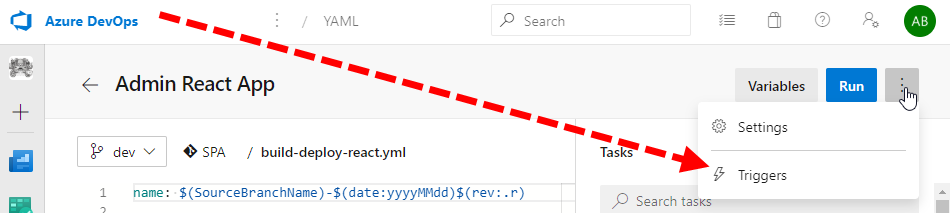
gathering all the links i found while looking:
- https://github.com/MicrosoftDocs/vsts-docs/issues/5409
- https://github.com/MicrosoftDocs/vsts-docs/issues/2691
- https://developercommunity.visualstudio.com/idea/717570/pipelines-support-variables-in-yaml-trigger-path-f.html
- https://developercommunity.visualstudio.com/content/problem/380221/yaml-build-pipeline-path-triggers-do-not-support-v.html
 Beej126
on 28 Jan 2020
Beej126
on 28 Jan 2020
Our branching strategy uses a new branch (Fork for Git guys) for every iteration and every release. We have dozens of builds, for each microservice and web portal. It is best for us to use a single release variable where we can change the path to the current iteration or release branch in one place instead of in each of the dozens of builds.
 Haddox19
on 20 Oct 2020
Haddox19
on 20 Oct 2020
Related issues
 robinmanuelthiel
·
3Comments
robinmanuelthiel
·
3Comments
 LennartAJansson
·
3Comments
LennartAJansson
·
3Comments
 cijujoseph
·
3Comments
cijujoseph
·
3Comments
 sevaa
·
3Comments
sevaa
·
3Comments
 michhar
·
3Comments
michhar
·
3Comments
Most helpful comment
Can we add a note to the docs to reflect that it's not possible to use variables today?