Azure-devops-docs: DevOps Server doesn't have personal UI Theme preference
When selecting Azure DevOps Server 2019 on this page, the content doesn't change. However, there is no option to change the UI Theme preference in the place described on the on-prem product.
Document Details
⚠ Do not edit this section. It is required for docs.microsoft.com ➟ GitHub issue linking.
- ID: d28a6661-50d4-527e-9727-ab5974da951d
- Version Independent ID: fdac329a-b9b4-77d0-916a-dee6d2576379
- Content: View, change user preferences - Azure DevOps
- Content Source: docs/organizations/settings/set-your-preferences.md
- Product: devops
- Technology: devops-settings
- GitHub Login: @chcomley
- Microsoft Alias: chcomley
 cjwhitsitt
All 3 comments
Hi @cjwhitsitt, Thanks so much for your feedback. It looks like I need to add some versioning and new screenshots to the content. I've created a user story to capture this work. Thanks again!
 chcomley
on 3 Jul 2019
chcomley
on 3 Jul 2019
Hi @cjwhitsitt, I've just completed a PR, which will go live sometime between today and Monday morning. In the meantime, here's where you go to change the UI theme: Open your profile menu, and then select Theme.
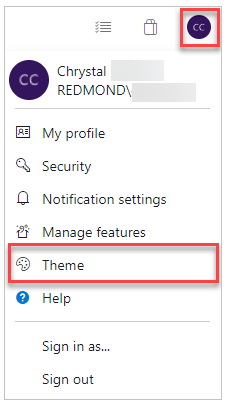
From there you can choose between dark and light. Thanks again for the feedback and have a great weekend!
chcomley
on 13 Jul 2019
Might be good to mention that the Theme isn't available till Update 1 of 2019. I know the moniker ranges don't currently support the updates as a version though
 nschonni
on 15 Jul 2019
nschonni
on 15 Jul 2019
Related issues
 anlatsko
·
3Comments
anlatsko
·
3Comments
 LennartAJansson
·
3Comments
LennartAJansson
·
3Comments
 o-o00o-o
·
3Comments
o-o00o-o
·
3Comments
 KacperMucha
·
3Comments
KacperMucha
·
3Comments
 dannyvv
·
3Comments
dannyvv
·
3Comments
Most helpful comment
Might be good to mention that the Theme isn't available till Update 1 of 2019. I know the moniker ranges don't currently support the updates as a version though