Azure-devops-docs: Docs say .NET Core's restore command automatically handles Azure Artifacts auth, but it doesn't
In Azure Pipelines, use the .NET Core step's restore command, which automatically handles authentication to Azure Artifacts feeds.
This doesn't make it clear that feedRestore needs to be specified. There's no documentation on how to use that parameter, and it's not obvious from looking at the source code. Through trial and error, I determined that it takes the name of the feed, not URL or a feed name qualified with an organization name (e.g., organization/feed).
Without feedRestore:
Build FAILED.

       "/home/vsts/work/1/s/SomeCompany.SomeApp.sln" (Restore target) (1) ->
       (Restore target) ->
         /home/vsts/work/1/s/SomeCompany.SomeApp.Common/SomeCompany.SomeApp.Common.csproj : error NU1101: Unable to find package SomeCompany.Annotations. No packages exist with this id in source(s): NuGetOrg [/home/vsts/work/1/s/SomeCompany.SomeApp.sln]
         /home/vsts/work/1/s/SomeCompany.SomeApp.Data/SomeCompany.SomeApp.Data.csproj : error NU1101: Unable to find package SomeCompany.Annotations. No packages exist with this id in source(s): NuGetOrg [/home/vsts/work/1/s/SomeCompany.SomeApp.sln]
         /home/vsts/work/1/s/SomeCompany.SomeApp.Initialization/SomeCompany.SomeApp.Initialization.csproj : error NU1101: Unable to find package SomeCompany.Annotations. No packages exist with this id in source(s): NuGetOrg [/home/vsts/work/1/s/SomeCompany.SomeApp.sln]
         /home/vsts/work/1/s/SomeCompany.SomeApp.Background/SomeCompany.SomeApp.Background.csproj : error NU1101: Unable to find package SomeCompany.Annotations. No packages exist with this id in source(s): NuGetOrg [/home/vsts/work/1/s/SomeCompany.SomeApp.sln]
         /home/vsts/work/1/s/SomeCompany.SomeApp.Security/SomeCompany.SomeApp.Security.csproj : error NU1101: Unable to find package SomeCompany.Annotations. No packages exist with this id in source(s): NuGetOrg [/home/vsts/work/1/s/SomeCompany.SomeApp.sln]
         /home/vsts/work/1/s/SomeCompany.SomeApp.Services/SomeCompany.SomeApp.Services.csproj : error NU1101: Unable to find package SomeCompany.Annotations. No packages exist with this id in source(s): NuGetOrg [/home/vsts/work/1/s/SomeCompany.SomeApp.sln]
         /home/vsts/work/1/s/SomeCompany.SomeApp.Web/SomeCompany.SomeApp.Web.csproj : error NU1101: Unable to find package SomeCompany.Annotations. No packages exist with this id in source(s): NuGetOrg [/home/vsts/work/1/s/SomeCompany.SomeApp.sln]

    0 Warning(s)
    7 Error(s)
Document Details
⚠ Do not edit this section. It is required for docs.microsoft.com ➟ GitHub issue linking.
- ID: a1a158fb-d1e3-a0d9-492e-3f78dde5d97c
- Version Independent ID: 71055426-3ba1-27f3-11db-cadb688ae123
- Content: Use dotnet with Azure Artifacts feeds
- Content Source: docs/artifacts/nuget/dotnet-exe.md
- Product: devops
- Technology: devops-artifacts
- GitHub Login: @chasewilson
- Microsoft Alias: phwilson
 Zenexer
All 18 comments
Zenexer thanks for the insight on this, very misleading documentation
 ivcafe413
on 25 Jul 2019
ivcafe413
on 25 Jul 2019
Hi @Zenexer
can you please provide a sample how to use feedRestore?
I can not figure it out how to use it where.
Thanks
 kirkone
on 20 Sep 2019
kirkone
on 20 Sep 2019
@kirkone
If your Azure DevOps organization URL is https://dev.azure.com/YourOrganization/', and your solution file isYourOrganization.YourApplication.sln`:
steps:
  - task: DotNetCoreInstaller@0
    inputs:
      version: '3.0.100-rc1-014190'

  - task: DotNetCoreCLI@2
    inputs:
      command: restore
      projects: YourOrganization.YourApplication.sln
      feedRestore: YourOrganization
It's a bit concerning that this ticket has been around for ~6 months with no response. We just spent a pile of time on the same issue.
 kevbry
on 8 Jan 2020
kevbry
on 8 Jan 2020
Iе appears to me that dotnet.exe ignores whatever the documentation (see here or here) says:
dotnet.exe tool install -g dotnet-reportgenerator-globaltool
C:\Program Files\dotnet\sdk\3.1.101\NuGet.targets(123,5): error : Unable to load the service index for source https://myproj.pkgs.visualstudio.com/_packaging/MyFeed/nuget/v3/index.json. [c:\Temp\4vnyki2a.wq2\restore.csproj]
C:\Program Files\dotnet\sdk\3.1.101\NuGet.targets(123,5): error : Response status code does not indicate success: 401 (Unauthorized). [c:\Temp\4vnyki2a.wq2\restore.csproj]
The tool package could not be restored.
Tool 'dotnet-reportgenerator-globaltool' failed to install. This failure may have been caused by:
- You are attempting to install a preview release and did not use the --version option to specify the version.
- A package by this name was found, but it was not a .NET Core tool.
- The required NuGet feed cannot be accessed, perhaps because of an Internet connection problem.
- You mistyped the name of the tool.
For more reasons, including package naming enforcement, visit https://aka.ms/failure-installing-tool
 abatishchev
on 11 Feb 2020
abatishchev
on 11 Feb 2020
Also running in to the doc inconsistencies on site with Cx right now. Hopefully the aforementioned YAML works for us. (cc @steveng57 )
 brandonh-msft
on 4 Mar 2020
brandonh-msft
on 4 Mar 2020
Thanks to @Zenexer for pointing out the deficiencies in the feedRestore documentation. Though I found that I had to specify the feed id for feedRestore, not the organization (as suggested by Zenexer's example) to get this to work.
 seanprince
on 28 Apr 2020
seanprince
on 28 Apr 2020
This issue hasn't been updated in more than 180 days, so we've closed it. If you feel the issue is still relevant and needs fixed, please reopen it and we'll take another look. We appreciate your feedback and apologize for any inconvenience.
 cxwtool
on 25 Nov 2020
cxwtool
on 25 Nov 2020
Hi @mijacobs, @ramiMSFT do you know of the doc has been updated? 180 days passed since.
abatishchev
on 25 Nov 2020
If you feel the issue is still relevant and needs fixed, please reopen it and we'll take another look. We appreciate your feedback and apologize for any inconvenience.
I do feel like this issue still relevant. I would reopen it, but I lack the permission, which is definitely inconvenient.
 TysonMN
on 25 Nov 2020
TysonMN
on 25 Nov 2020
@Zenexer My apologizes for the delayed response and thank you for your feedback. A backlog item has been created and I will be updating the article shortly . Filing the issue under the appropriate article will allow it to be triaged appropriately. This issue should've been filed under .NET Core CLI task
 ramiMSFT
on 9 Dec 2020
ramiMSFT
on 9 Dec 2020
Related: microsoft/azure-pipelines-tasks#11315
ramiMSFT
on 9 Dec 2020
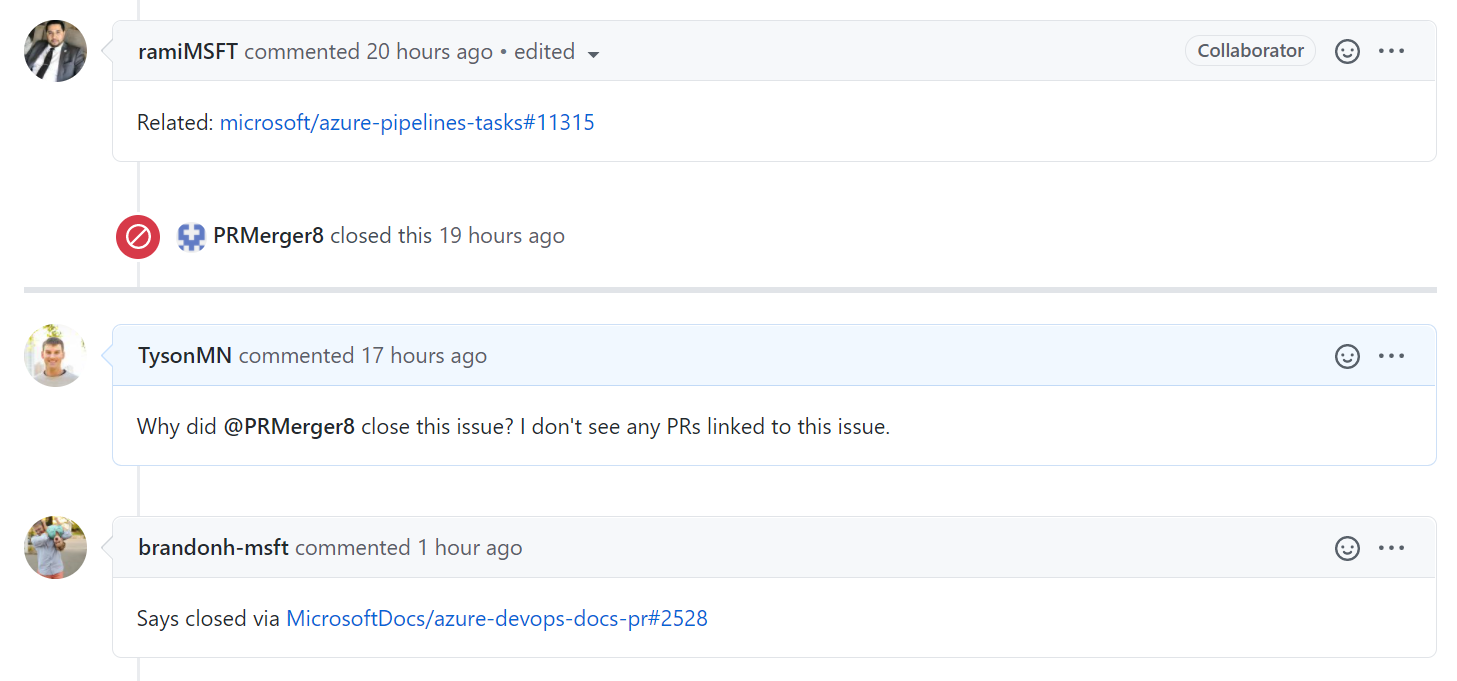
Why did @PRMerger8 close this issue? I don't see any PRs linked to this issue.
TysonMN
on 10 Dec 2020
Says closed via https://github.com/MicrosoftDocs/azure-devops-docs-pr/pull/2528
brandonh-msft
on 10 Dec 2020
I don't see that said anywhere and that link returns 404.
TysonMN
on 10 Dec 2020
ah - k. Probably the internal pipeline for doc updates. Suffice to say you should see a change in the docs soon :)
brandonh-msft
on 10 Dec 2020
Here is what I see.
TysonMN
on 10 Dec 2020
Yeah that's just cuz the other repo is private. no worries :)
brandonh-msft
on 10 Dec 2020
Related issues
 anlatsko
·
3Comments
anlatsko
·
3Comments
 robinmanuelthiel
·
3Comments
robinmanuelthiel
·
3Comments
 KacperMucha
·
3Comments
KacperMucha
·
3Comments
 o-o00o-o
·
3Comments
o-o00o-o
·
3Comments
 sevaa
·
3Comments
sevaa
·
3Comments
Most helpful comment
@kirkone
If your Azure DevOps organization URL is
https://dev.azure.com/YourOrganization/', and your solution file isYourOrganization.YourApplication.sln`: