Azure-devops-docs: multi-stage deploy documentation is lacking around triggering
if I create a multi-stage pipeline... ci_build, deploy_dev, deploy_qa, deploy_uat, deploy_staging, deploy_prod... I should be able to (and can in non-YAML pipelines today) set it up so deploy_dev runs automatically when ci_build succeeds, and subsequent deploy steps are manual...
the documentation does not indicate how to do this in YAML
here's the YAML snippet I'm testing with (just of 1 deploy_step, for brevity)... and it runs all steps, the documentation doesn't indicate how to switch it to manually triggered
-   stage: 'Deploy_Dev'
    jobs:
    -   deployment: 'Deploy_Dev'
        environment: dev
        strategy:
            runOnce:
                deploy:
                    steps:
Document Details
⚠ Do not edit this section. It is required for docs.microsoft.com ➟ GitHub issue linking.
- ID: 5aeeaace-1c5b-a51b-e41f-f25b806155b8
- Version Independent ID: fd7ff690-b2e4-41c7-a342-e528b911c6e1
- Content: Deployment jobs - Azure Pipelines
- Content Source: docs/pipelines/process/deployment-jobs.md
- Product: devops
- Technology: devops-cicd
- GitHub Login: @shashankbarsin
- Microsoft Alias: shasb
 af4jm
af4jm
All 17 comments
@af4jm I know that approval gates for YAML are in development, I'm assuming that's what will enable this functionality. Hopefully we can approval gate the remainder deploy tasks, so you can click "Approve" and continue through them. Says Q2 2019, though I'm not holding my breath...
https://dev.azure.com/mseng/AzureDevOpsRoadmap/_workitems/edit/1510336
For now my workaround is to just set up multiple different YAML pipelines. I have one that triggers on PRs that is "what if" only, "master" triggers staging deployments, and anything pushed to the "production" branch triggers a production deployment. You could just remove the triggers so that you have to manually run them.
For us, we have branch policies that require PR and PR approvals, so the PR process serves as the "Approval" gate for now.
EDIT: This assumes you are doing Trunk-Based Development with GitLab Flow: https://docs.gitlab.com/ee/workflow/gitlab_flow.html, but the same concepts could be adapted to most other branching strategies.
 JustinGrote
on 30 May 2019
JustinGrote
on 30 May 2019
Manual deploy action is on our backlog. Adding @vtbassmatt for time-lines
 RoopeshNair
on 19 Jun 2019
RoopeshNair
on 19 Jun 2019
Any updates on this? We would really like to move to yaml deployments, being able to manually deploy to staging and production is pretty important. Is there any workaround for a full dev to prod workflow right now with yaml pipelines?
 ghost
on 8 Jul 2019
ghost
on 8 Jul 2019
I currently use a condition test for the branch. But since way to manually to revert to previous release, this is not the same as in the "Release Pipelines"
- stage: prod
  condition: and(succeeded('test'), eq(variables['Build.SourceBranch'], 'refs/heads/master'))
  jobs:
 StefanSchoof
on 8 Jul 2019
StefanSchoof
on 8 Jul 2019
Approval gates are now available for YAML pipelines. You don't define the gates in the pipeline but configure them on the environment.
In your example, if you use a deployment job for deploy_qa and configure an approval on the underlying environment. The pipeline would automatically _pause_ before starting deploy_qa for an approval.
Having said that, the ability to manually start a stage of a run is being worked on to provide parity with the features in the "Release pipelines".
 shashban
on 30 Jul 2019
shashban
on 30 Jul 2019
This is good progress, thank you shashank.
One comment: I don't understand why the approvals aren't written in the
YAML. It seems from the documentation the intent was to prevent people from
"bypassing" checks by rewriting the YAML, however what's to stop me from
just renaming all my steps and stages to bypass it?
On Mon, Jul 29, 2019 at 11:18 PM shashank bansal notifications@github.com
wrote:
Approval gates
https://docs.microsoft.com/en-us/azure/devops/pipelines/process/checks?view=azure-devops
are now available for YAML pipelines. You don't define the gates in the
pipeline but configure them on the environment.
In your example, if you use a deployment job for deploy_qa and configure
an approval on the underlying environment. The pipeline would automatically
pause before starting deploy_qa for an approval.
Having said that, the ability to manually start a stage of a run is being
worked on to provide parity with the features in the "Release pipelines".—
You are receiving this because you commented.
Reply to this email directly, view it on GitHub
https://github.com/MicrosoftDocs/vsts-docs/issues/4174?email_source=notifications&email_token=ADUNKUSOVIFY75EIITS44EDQB7MKPA5CNFSM4HLRU2E2YY3PNVWWK3TUL52HS4DFVREXG43VMVBW63LNMVXHJKTDN5WW2ZLOORPWSZGOD3C426A#issuecomment-516279672,
or mute the thread
https://github.com/notifications/unsubscribe-auth/ADUNKURUOP5QD2ICLEBGKKDQB7MKPANCNFSM4HLRU2EQ
.
JustinGrote
on 30 Jul 2019
Will approvals come to the YAML as well? It would be great to be able to put it in stage that has a condition so that it only runs when the previous step fails. The use case being that if the Test stage fails, it asks if you want to deploy anyway. (say sometimes one test fails and time constraints mean we have to deploy some fix for something else anyway)
 Jon889
on 7 Aug 2019
Jon889
on 7 Aug 2019
This is good progress, thank you shashank. One comment: I don't understand why the approvals aren't written in the YAML. It seems from the documentation the intent was to prevent people from "bypassing" checks by rewriting the YAML, however what's to stop me from just renaming all my steps and stages to bypass it?
That is precisely one of the reason for segregating checks from deployment process. We believe checks are defined by infrastructure admins as policies for any deployment to their environments, and those should not be bypassed by changes developers can do in their pipelines. As a dev, I can rename all steps and stages, but as long as I am targeting the environment, the checks gets auto-applied.
shashban
on 7 Aug 2019
Will approvals come to the YAML as well? It would be great to be able to put it in stage that has a condition so that it only runs when the previous step fails. The use case being that if the Test stage fails, it asks if you want to deploy anyway. (say sometimes one test fails and time constraints mean we have to deploy some fix for something else anyway)
We'll be adding capability for manual intervention in YAML for the purpose like this. The difference between approvals and interventions is about actors who can act on it. Approvals have a well defined users (admins) who can act on them, while interventions can be acted by all pipeline users (team members).
shashban
on 7 Aug 2019
Closing this issue. We got the input from here and would be taking up a couple of features.
- An ability to add manual validations (interventions) in yaml files
- An ability to specify certain stages for a manual start only in yaml files
shashban
on 7 Oct 2019
Hi @shashban,
the problem with the approval gates vs the feature in the classic deployment pipelines is, that you can't approve deployment jobs individually from one another. Is there a solution for that?
I opened up a ticket in the developer community
 jonnylangefeld
on 8 Oct 2019
jonnylangefeld
on 8 Oct 2019
You need a different stage per environment. We do this now.
ghost
on 8 Oct 2019
Thanks for the tip @devkws, I actually tried that too, however stages are sequential. You only can go through one at a time. And while the first stage is not approved, you can't go further. If you reject the first stage, all other regions won't run at all.

So also here I would not have the possibility to approve ece, while amap has to wait.
jonnylangefeld
on 8 Oct 2019
@jonnylangefeld I confirmed this morning our pipeline is NOT sequential using multiple stages and checks.
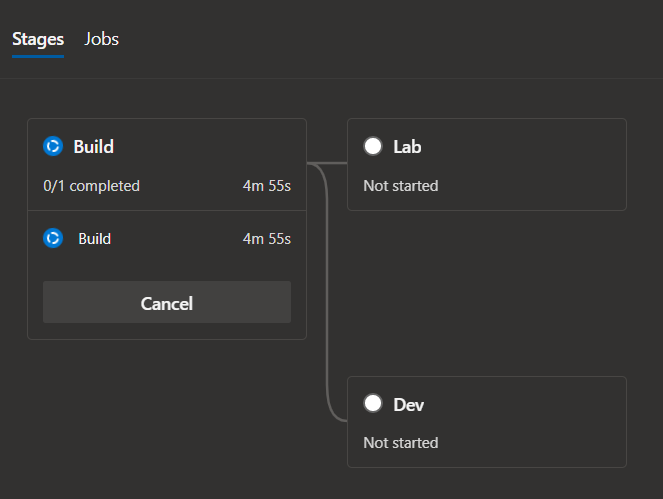
ghost
on 10 Oct 2019
@devkws wow this looks good! Do you have a small yaml snipped that explains shows this principle?
jonnylangefeld
on 10 Oct 2019
@jonnylangefeld here is a basic version without any steps, hope it helps.
trigger:
  - master

variables:
  vmImageName: "ubuntu-latest"

stages:
  - stage: Build
    displayName: Build
    jobs:
      - job: Build
        pool:
          vmImage: $(vmImageName)
        steps:
  - stage: DeployLab
    displayName: Lab
    dependsOn: Build
    jobs:
      - deployment: Deploy
        pool:
          vmImage: $(vmImageName)
        strategy:
          runOnce:
            deploy:
              steps:
  - stage: DeployDev
    displayName: Dev
    dependsOn: Build
    jobs:
      - deployment: Deploy
        pool:
          vmImage: $(vmImageName)
        strategy:
          runOnce:
            deploy:
              steps:
wow this is amazing! Thanks @devkws you helped us a lot! It was the dependsOn, and then a deployment Job inside the stage.
here are the official docs.
jonnylangefeld
on 10 Oct 2019
Related issues
 KacperMucha
·
3Comments
KacperMucha
·
3Comments
 atrauzzi
·
3Comments
atrauzzi
·
3Comments
 MJECloud
·
3Comments
MJECloud
·
3Comments
 cijujoseph
·
3Comments
cijujoseph
·
3Comments
 adnanebrahimi
·
3Comments
adnanebrahimi
·
3Comments
Most helpful comment
Approval gates are now available for YAML pipelines. You don't define the gates in the pipeline but configure them on the environment.
In your example, if you use a deployment job for deploy_qa and configure an approval on the underlying environment. The pipeline would automatically _pause_ before starting deploy_qa for an approval.
Having said that, the ability to manually start a stage of a run is being worked on to provide parity with the features in the "Release pipelines".