Azure-devops-docs: Advice on how to update already published extensions to test them before mass releasing
This page has a lot of great information, but it's missing a critical piece for extensions that are actively worked on. If I am using Azure DevOps (not TFS on-prem) and have my extension already published as public and many people using it, how can I push out a new version for just myself (or specific organizations) to test it, before making it public for everyone?
I know that I could roll all of the tasks in my Build/Release pipeline extension to v2, so if there are issues it wouldn't break in my users' systems _right away_ until they flipped the task to use v2. However, I typically only want to increment the task version when there is a breaking change to it. Also, that still wouldn't address the issue of "I don't want ANY users to use the new version until I've tested it out first", as that could result in problems for my users and bad ratings/reviews.
My initial thought was to flip the galleryFlags attribute from "Public" to "Preview" and push a new version, but I'm not certain if that will remove my extension from the marketplace, which I don't want to do.
Instructions on how I can publish a new beta version that I can share just with my organization for testing would be very valuable here, or if that's not possible, then what the next-best recommendations are.
Thanks!
Document Details
⚠ Do not edit this section. It is required for docs.microsoft.com ➟ GitHub issue linking.
- ID: 3d3bc9b6-7944-5d58-7ec8-156a5ed81cdc
- Version Independent ID: 8f466811-4c19-9d69-68a8-5b715cabb50e
- Content: Package, publish, & unpublish extensions
- Content Source: docs/extend/publish/overview.md
- Product: devops
- Technology: devops-ecosystem
- GitHub Login: @elbatk
- Microsoft Alias: elbatk
 deadlydog
All 14 comments
I also found these 2 related Stack Overflow posts showing that some additional guidance here would be appreciated: https://stackoverflow.com/questions/47834199/vsts-publish-extension-to-private-collection-for-testing and https://stackoverflow.com/questions/49782022/how-to-publish-a-prod-build-of-our-vsts-extensions-package-to-my-dev-vsts-not-p?rq=1
deadlydog
on 7 May 2019
Hi @deadlydog, Thanks for the valuable feedback! I’ve created a user story for my backlog to address this. We’ll be in touch, thanks!
 chcomley
on 7 May 2019
chcomley
on 7 May 2019
Thanks @chcomley , FYI I've also created this StackOverflow post at the request of the @AzureDevOps twitter folks so they can offer some advice there as well.
deadlydog
on 7 May 2019
I've added the guidance and patterns I see from the usage of the Azure DevOps Extension Tasks and the collective experience of the ALM Rangers to the StackOverflow post.
There are a couple of unfortunate things to how extension publishing works and a lot of the information lives in the heads of a couple of extension publishers.
I presented on different options at the Microsoft MVP summit last march to a large crowd of other MVP's and Microsoft employees that publish extensions and I haven't heard of any other patterns in the community.
The presentation is shared here:
And I've written out the guidance in the linked StackOverflow post here:
And I have a couple of blog posts here:
 jessehouwing
on 8 May 2019
jessehouwing
on 8 May 2019
Hi @deadlydog, Just following up on old issues that have somehow slipped away. I've determined that the article doesn't necessarily need an update, rather you can find help within the links provided above. If this isn't the case, please @mention me and I'll reopen and investigate further. You can also go here and Report a problem or Suggest a feature. These issues are triaged daily. Thank you!
chcomley
on 7 Apr 2020
@chcomley Links posted generously by @jessehouwing that you must happen to find by thinking of opening the comments section doesn't seem very discoverable to me. I would appreciate if microsoft could just give their official reccomendation for this scenario in the main article instead of letting us figure it all out for ourselves..
 Mobrockers
on 15 May 2020
Mobrockers
on 15 May 2020
The extension documentation is about to undergo an overhaul, so this has been included within a user story which captures that work. Thank you.
chcomley
on 18 May 2020
The extension documentation is about to undergo an overhaul, so this has been included within a user story which captures that work. Thank you.
Do you think there's any way you can give a rough estimate as to when this starts/is published? 😀 I've heard the same for the past year since the reworking to the new UI framework which is totally understandable of course, but ye know. Still kinda a long time overdue.
Mobrockers
on 19 May 2020
Adding @jtpetty and @zachariahcox for further guidance/assistance, thank you!
chcomley
on 3 Jun 2020
Hi @deadlydog, I've been in touch with an engineer who gave me the following guidance about how the process in question can be done.
Publishers generally publish two extensions - example: publisher.extension and publisher.extension-dev
publisher.extension is made public in the Marketplace and customers can install it in their Azure DevOps organizations. publisher.extension-dev is kept private on Marketplace and is shared with an organization that the publisher owns and controls.
That way the '-dev' extension is generally updated in Marketplace first with newer changes and a version bump. If the validations go fine, the same changes are made to the 'production version' of the public extension and are pushed to the Marketplace.
To achieve this, you need not necessarily maintain two copies of source code of the extension. You can maintain two manifest files - one for each extension and during packaging of the extension you can provide the respective manifest file to the tfx-cli tool.
I hope this helps. If it's helpful, I'll add it to the article. If it isn't helpful, please let me know. Thanks!
chcomley
on 24 Jun 2020
The extension documentation is about to undergo an overhaul, so this has been included within a user story which captures that work. Thank you.
Do you think there's any way you can give a rough estimate as to when this starts/is published? 😀 I've heard the same for the past year since the reworking to the new UI framework which is totally understandable of course, but ye know. Still kinda a long time overdue.
Yes @Mobrockers, the documentation is STILL overdue for updates. Timing and allocation for this is TBD. I'm sorry that's all I have at the moment. Thank you for participating in helping to make these articles as useful as possible.
chcomley
on 24 Jun 2020
Thanks @chcomley , that was essentially the approach I took. Rather than having a separate manifest file in source control, I just override the Extension name (so it shows up as a different extension) and Task id (to avoid task conflicts if both the private and public extension are installed in the same organization) at deploy time using the Publish Extension:
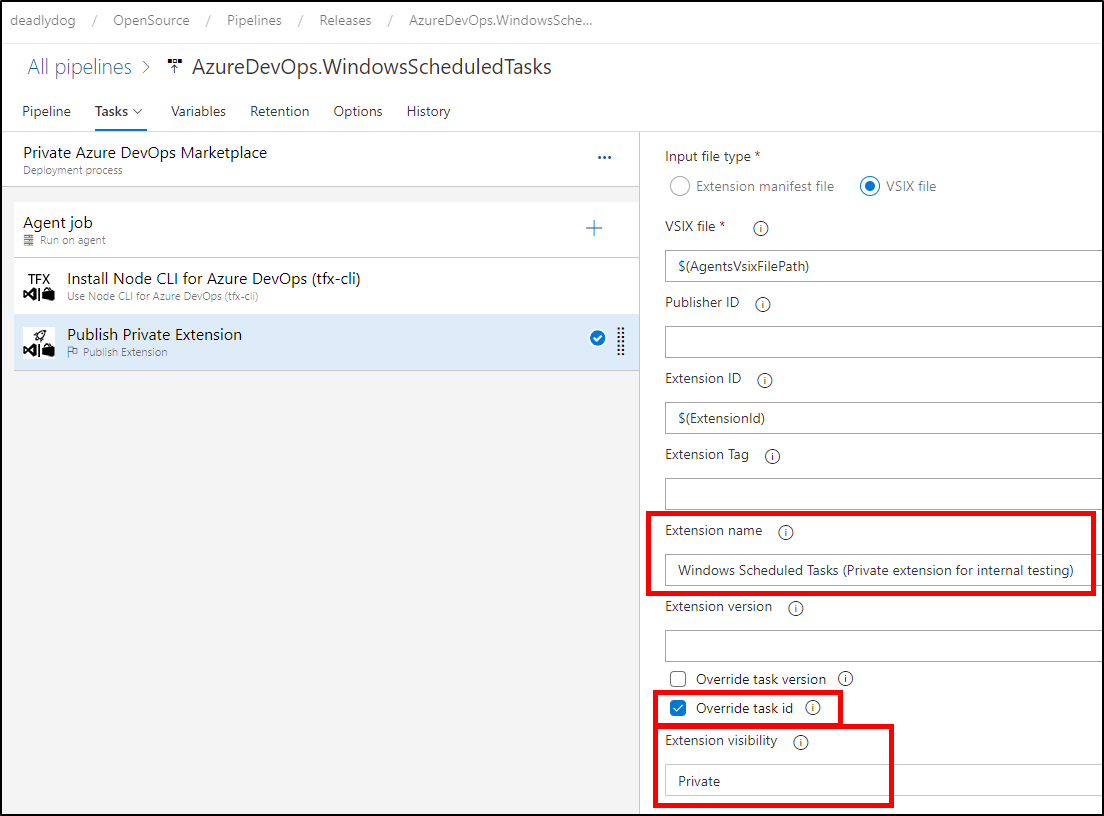
Having a separate manifest file in source control might be a better approach though.
But yeah, I use the above to publish the private extension, validate it, and then publish the same artifacts to the public marketplace using the same extension, just with those 3 highlighted fields cleared out.
deadlydog
on 24 Jun 2020
@deadlydog, That's great, thank you. I'm updating the article today. Once it's published, it will close this issue. Thanks for your feedback and input!
chcomley
on 24 Jun 2020
Thanks @chcomley , that was essentially the approach I took. Rather than having a separate manifest file in source control, I just override the
Extension name(so it shows up as a different extension) andTask id(to avoid task conflicts if both the private and public extension are installed in the same organization) at deploy time using thePublish Extension:
Having a separate manifest file in source control might be a better approach though.
But yeah, I use the above to publish the private extension, validate it, and then publish the same artifacts to the public marketplace using the same extension, just with those 3 highlighted fields cleared out.
You would only need to update the task IDs when you are pushing the dev and test version to the same azure DevOps account.
What I do, is I have a jessehouwing account, using only the public extensions and used to build my extensions.
Ant jessehouwing-dev to which I publish the private dev extension for testing.
Only when you push both your public and private extensions to the same account,would you need to update the task IDs.
For a few good setups for maintaining multiple manifests, check out my stack overflow answer for a few options to set that up with minimal code duplication.
jessehouwing
on 25 Jun 2020
Related issues
 michhar
·
3Comments
michhar
·
3Comments
 robinmanuelthiel
·
3Comments
robinmanuelthiel
·
3Comments
 Naphier
·
3Comments
Naphier
·
3Comments
 MJECloud
·
3Comments
MJECloud
·
3Comments
 adnanebrahimi
·
3Comments
adnanebrahimi
·
3Comments
Most helpful comment
Yes @Mobrockers, the documentation is STILL overdue for updates. Timing and allocation for this is TBD. I'm sorry that's all I have at the moment. Thank you for participating in helping to make these articles as useful as possible.