Azure-devops-docs: How to consume secret variables?
I have yet to find a good example for how to consume Variables marked secret in the designer.
I have a "Run a Python script" task that needs to consumes secrets via environment variables.
How do I expose the SECRET environment variables I created under the pipeline Variables tab to my "Run a Python script" task as environment variables?
Python aside, the documentation above for consuming secrets is lacking some detail. As someone new to Azure Devops build pipeline, I am looking for something more concrete than "To pass a secret to a script, use the Environment section of the scripting task's input variables."
If this were the first place I looked, I would keep looking. But I have been scouring the web for a decent example for quite some time without finding anything helpful. So, leaving the feedback here, which seems a reasonable place since you are documenting Variables :)
Thanks!
Document Details
⚠ Do not edit this section. It is required for docs.microsoft.com ➟ GitHub issue linking.
- ID: dd7e0bd3-1f7d-d7b6-cc72-5ef63c31b46a
- Version Independent ID: dae87abd-b73d-9120-bcdb-6097d4b40f2a
- Content: Variables - Azure Pipelines
- Content Source: docs/pipelines/process/variables.md
- Product: devops
- Technology: devops-cicd
- GitHub Login: @andyjlewis
- Microsoft Alias: alewis
 jaryder
All 12 comments
+1 my variable values just get passed as "*"
 darrenferguson
on 26 Jun 2019
darrenferguson
on 26 Jun 2019
+1 same for me, very annoying
 maddylliieeee
on 5 Jul 2019
maddylliieeee
on 5 Jul 2019
I've found out that the variables are being passed, they are just being masked to * in the console output.
I'd suggest this is documented someplace or instead out outputting , output something explicit like *MASKED
darrenferguson
on 5 Jul 2019
I cannot confirm this. Of course, they are being mapped as * but also the real value resolves to * then. It is not working as far as I can tell.
maddylliieeee
on 16 Jul 2019
I can confirm that is how it works. If you attempt to print/echo/log the secret value, the platform does its best to mask it with *. They touched on this in the updated version of the page.
The article focuses on YAML definitions, which I have never edited directly. So I will also add that you can map in your secrets under the Environment Variables section by creating an environment variable with the value of your secret's name. I'm working with a Linux a build agent and a sample secret mapping looks like this:
In the pipeline's Variables section, define: Name: MY_SECRET, Value: the_secret
In the task's Environment Variables section, add: Name: MY_SECRET, Value: $(MY_SECRET)
Note that "Name" under Environment Vairables can be whatever you like but I choose to map mine to the same as the name used in the pipeline's Variables section.
Thank you for updating the article with the additional information for consuming the secrets!
jaryder
on 16 Jul 2019
Hello @jaryder - why are you closing issues, which are apparently not solved??
This is NOT working. I just get * as the actual value.
maddylliieeee
on 14 Aug 2019
Hi @maddylliieeee - I closed it because this is working for me.
How are you using the secrets?
How are you confirming * as the value?
It should only be * in the logs. It should be the actual secret where you are using it.
jaryder
on 14 Aug 2019
Hi @jaryder !
I am using them in an Azure DevOps release pipeline.
The pipeline deploys several applications into a k8s cluster thereby relying on environment variables for configuration.
The values are read from env and used to modify generic docker files according to the use case.
As soon as I switch the password variable to "secret" it disappears from the output of "env", which I inserted for troubleshooting purposes.
Result in my application is that the password is simply missing/empty.
Best regards
Marius
maddylliieeee
on 19 Aug 2019
Hi @maddylliieeee ,
Did you map the (secret) variables into the task's environment?
There is a configuration section in most tasks where you can set environment variables for the task.
I am using them in an Azure DevOps build pipeline but I would be highly surprised if they worked any differently in the release pipeline...
jaryder
on 19 Aug 2019
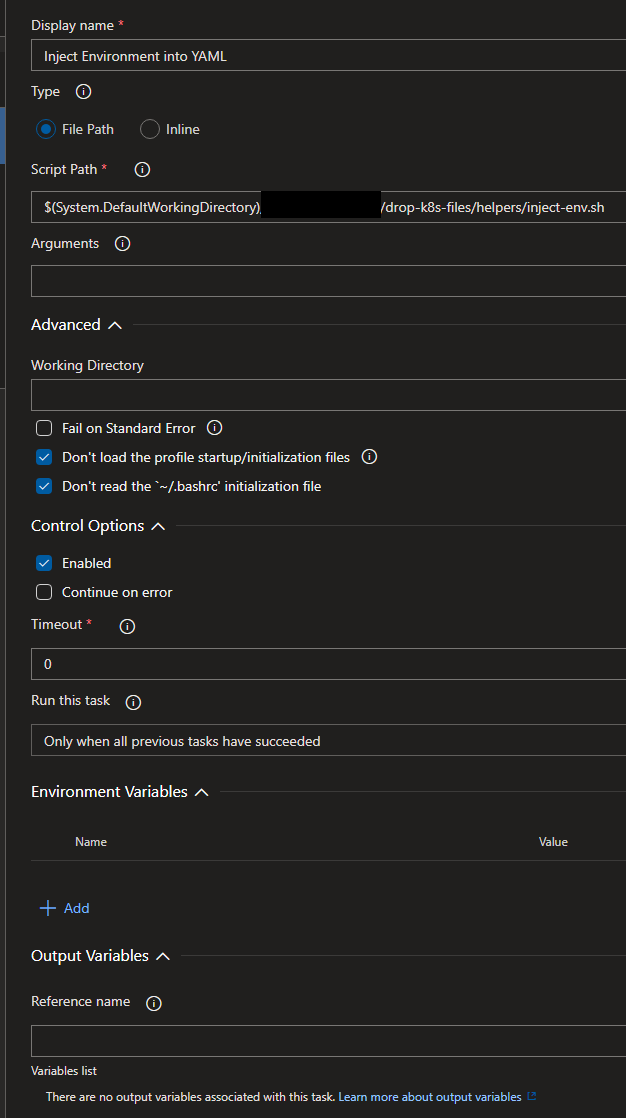
Hm the documentation to map them is not very good in my opinion. I am using the classic release pipeline editor and not the YAML one. Can't seem to find a way to map them into a Bash task.
My task has an environment section but how to map an existing secret pipeline-scope variable?
maddylliieeee
on 22 Aug 2019
Hi,
1) Click + Add
2) Give it a name (this is the name it will have in the task's environment)
3) Give it a value like: $(
For example:
Assume in the pipeline's Variables section the following variable has been defined:
Name: MY_SECRET, Value: the_secret
In the task's Environment Variables section, add:
Name: MY_SECRET, Value: $(MY_SECRET)
Best,
jaryder
jaryder
on 22 Aug 2019
This works perfectly, just that one has to consider case sensitivity.
E.g. pipeline variable Public is being translated into ENV variable SECRET, whereas variable Secret set via Environment of the task is being translated into Secret.
So it must be mapped explicitly to SECRET in order to have my script pick it up correctly.
And the documentation - in my opinion - is rather poor.
But besides this - works great! Thanks for your patience @jaryder!
maddylliieeee
on 27 Aug 2019
Related issues
 o-o00o-o
·
3Comments
o-o00o-o
·
3Comments
 KacperMucha
·
3Comments
KacperMucha
·
3Comments
 letmaik
·
3Comments
letmaik
·
3Comments
 EM1L
·
3Comments
EM1L
·
3Comments
 anlatsko
·
3Comments
anlatsko
·
3Comments