Azure-devops-docs: Can't use DOWNLOADSECUREFILE_SECUREFILEPATH outside PowerShell?
I've spend far too long on something I thought would be simple. I've only been able to get the full path using the DOWNLOADSECUREFILE_SECUREFILEPATH variable when writing it out using a powershell task using $env:DOWNLOADSECUREFILE_SECUREFILEPATH. I haven't been able to emit it using bash or the Gradle task where i'm trying to pass it as a parameter.
I see the following in debug output which suggests that the variable name is actually "secureFilePath" and never any mention of DOWNLOADSECUREFILE_SECUREFILEPATH anywhere, which suggests that there is some "magic" happening after that task runs. Attempting to use "secureFilePath" as a variable hasn't worked either.
##[debug]Downloaded secure file contents to: /Users/vsts/agent/2.146.0/work/_temp/foo.bat
##[debug]set secureFilePath=/Users/vsts/agent/2.146.0/work/_temp/foo.bar
##[debug]Processed: ##vso[task.setvariable variable=secureFilePath;issecret=false;]/Users/vsts/agent/2.146.0/work/_temp/foo.bar
Document Details
⚠ Do not edit this section. It is required for docs.microsoft.com ➟ GitHub issue linking.
- ID: 2a5f8376-3654-0ed4-d9f8-d15f28350783
- Version Independent ID: f393daba-6515-6c26-71ac-b557e8c8dad1
- Content: Download Secure File task - Azure Pipelines
- Content Source: docs/pipelines/tasks/utility/download-secure-file.md
- Product: devops
- GitHub Login: @andyjlewis
- Microsoft Alias: alewis
 craigktreasure
All 5 comments
I guess I learned what output variables are today. I don't know why the documentation leans so heavily towards accessing the variable via PowerShell, but the variable is made available to other tasks using $(DownloadSecureFile.secureFilePath), which unfortunately is nowhere to be found.
craigktreasure
on 20 Feb 2019
Commented something similar here as well:
https://github.com/MicrosoftDocs/vsts-docs/pull/472
The $env: Powershell syntax could be confusing for those not using Powershell
 PatMyron
on 11 May 2019
PatMyron
on 11 May 2019
HOORAY for @craigktreasure!!
My 'script' task succeeds on Hosted 2017!!
- script: |
   echo Write your commands here
   echo %JWT_KEY_FILE%
   sfdx force:auth:jwt:grant --clientid %CONSUMERKEY% --username %USERNAME% --jwtkeyfile %JWT_KEY_FILE%
   echo Use the environment variables input below to pass secret variables to this script
  displayName: 'sfdx force:auth:jwt:grant'
  env:
    CONSUMERKEY: $(CONSUMERKEY)
    USERNAME: $(USERNAME)
    JWT_KEY_FILE: $(DownloadSecureFile.secureFilePath)
 bkwdesign
on 5 Jun 2019
bkwdesign
on 5 Jun 2019
I can use it a normal Command Line step. Here's what I do move a code signing PFX into a folder I need it in:
move %DOWNLOADSECUREFILE_SECUREFILEPATH% src\MyTargetFolder\
I think it's easy to confuse the difference between the environment variable , which is
%DOWNLOADSECUREFILE_SECUREFILEPATH%
and the output variable .secureFilePath that you can prefix the name with a custom value:
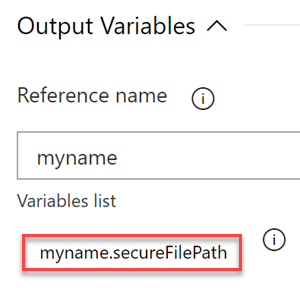
When you have multiple secure files, this comes in handy. For example, if you wanted to use two secure files in the same pipeline:
$(myname.secureFilePath)
$(mysecondname.secureFilePath)
 LanceMcCarthy
on 9 Jun 2019
LanceMcCarthy
on 9 Jun 2019
Thanks for everyone's help. This has been improved in the documentation which should be live in a couple of days.
 davidstaheli
on 5 Jul 2019
davidstaheli
on 5 Jul 2019
Related issues
 kieronlanning
·
3Comments
kieronlanning
·
3Comments
 cijujoseph
·
3Comments
cijujoseph
·
3Comments
 letmaik
·
3Comments
letmaik
·
3Comments
 KacperMucha
·
3Comments
KacperMucha
·
3Comments
 anlatsko
·
3Comments
anlatsko
·
3Comments
Most helpful comment
HOORAY for @craigktreasure!!
My 'script' task succeeds on Hosted 2017!!