Azure-devops-docs: Cannot browse upstream source packages in Visual Studio
I have followed the "Windows: Add the feed to your NuGet configuration" instructions above with no success inside Visual Studio version 15.9.5. I have unselected the nuget.org from the "Available package sources" in VS2017 Tools -> Options -> NuGet Package Manager -> Package Sources. I followed the "upstream sources" instructions (steps 1-3) above to run the "Install-Package AutoMapper -Version 8.0.0" command in Package Manager Console. The AutoMapper shows up in my Installed list of packages but never in my Browse list of packages (even if I uninstall it from my solution). Any help getting nuget.org packages into my private package feed would be helpful. We are trying to create a single source for our NuGet packages by using this feature but we cannot browse upstream sources and get the packages into our private feeds.
Document Details
⚠ Do not edit this section. It is required for docs.microsoft.com ➟ GitHub issue linking.
- ID: 899a78d6-9d08-7744-108d-10add2ba7e2c
- Version Independent ID: 6ab31e96-fed8-4335-ed81-b97663d8300f
- Content: Consume NuGet packages in Visual Studio
- Content Source: docs/artifacts/nuget/consume.md
- Product: devops
- GitHub Login: @elbatk
- Microsoft Alias: elbatk
 teamboyd
All 5 comments
Hi @teamboyd , you'd probably get better traction with product issues at the Azure DevOps Developer Community, as it's actively monitored by the product team. I'll add @mitchdenny to take a look for ya cause we want to get it figured out! I'd still probably post to the dev community though just in case :)
 elbatk
on 7 Feb 2019
elbatk
on 7 Feb 2019
Upstreams doesn't pass search requests on to the upstream source. So if you want to install a package that is coming in from an upstream you need to explicitly add it.
 mitchdenny
on 11 Feb 2019
mitchdenny
on 11 Feb 2019
Is this on the feature list going forward? Without upstream searches, the developer experience is less than acceptable.
teamboyd
on 12 Feb 2019
This seems to be a product issue and has been/should be passed to the Azure DevOps Developer Community. If there is any further feedback on the docs site please open a new issue.
Thank you all for the feedback!
 chasewilson
on 12 Jun 2019
chasewilson
on 12 Jun 2019
@teamboyd I don't know if this discussion was continued in a topic at Azure DevOps Developer Community but I've made a way around by configuring a single source in my nuget.config file but keeping both nuget.org and a private source in my solution.
nuget.config
<?xml version="1.0" encoding="utf-8"?>
<configuration>
  <packageSources>
    <clear />
    <add key="feed-poc-03062020" value="******" />
  </packageSources>
</configuration>
solution sources
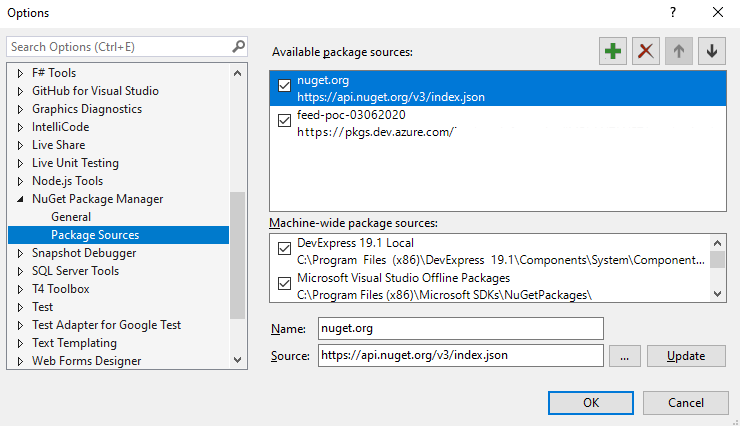
This way, you can install packages by using nuget.org gallery but the first nuget restore or dotnet restore command will download the package into your private source to be used by your application, and all restores after this one will download the package from your private source.
 thfsilvab
on 3 Jun 2020
thfsilvab
on 3 Jun 2020
Related issues
 michhar
·
3Comments
michhar
·
3Comments
 sandeepzgk
·
3Comments
sandeepzgk
·
3Comments
 Naphier
·
3Comments
Naphier
·
3Comments
 csutorasr
·
3Comments
csutorasr
·
3Comments
 dtamai
·
3Comments
dtamai
·
3Comments
Most helpful comment
Is this on the feature list going forward? Without upstream searches, the developer experience is less than acceptable.