Azure-devops-docs: How to Ignore Kubectl AlreadyExists Errors
I want run to a few commands like kubectl create namespace. However, the second time they run, they fail with an exit code of 1:
> Error from server (AlreadyExists): namespaces "foo" already exists
I have enabled 'Continue on error' however, this still results in the Azure Pipelines release showing yellow warnings, suggesting that there were propblems with the release. Is there a way to stop the warnings? The only way I can think of to do this is to write yaml files and use kubectl apply on them.
As an aside, is it possibly to provide this task with a bash file containing several kubectl commands?
Document Details
⚠ Do not edit this section. It is required for docs.microsoft.com ➟ GitHub issue linking.
- ID: dcbb25d1-a706-e8fc-61e4-d5b86aa54f47
- Version Independent ID: 5634d9dd-fd92-761c-24b8-5e32ed6c6c35
- Content: Deploy to Kubernetes task - Azure Pipelines & TFS
- Content Source: docs/pipelines/tasks/deploy/kubernetes.md
- Product: devops
- GitHub Login: @erickson-doug
- Microsoft Alias: dastahel
 RehanSaeed
All 13 comments
I'm missing this feature too. Also it would be great if secrets had option for TLS and not just container registry and generic.
 JonnewDev
on 19 Dec 2018
JonnewDev
on 19 Dec 2018
I would like secrets to also support TLS option in addition to already supported ACR and generic. This is could be a way to add TLS certificates (from Azure Keyvault for example) from Azure DevOps as a kubernetes TLS secret. So one could run "kubectl get secrets my-secret" and create / update TLS secret.
JonnewDev
on 19 Dec 2018
@RehanSaeed Unfortunately the current K8s deploy task is a wrapper on top of kubectl and the behavior you describe is the default kubectl. We are working on a couple of features and that will solve the issue you have. Will you be interested in giving us some early feedback by using/reviewing them?
 azooinmyluggage
on 21 Jan 2019
azooinmyluggage
on 21 Jan 2019
@JonnewDev Thanks for the feedback. I have added it to the backlog and we will get it done.
https://kubernetes.github.io/ingress-nginx/user-guide/tls/
We are working on a couple of K8s features. Will you be interested in giving us some early feedback by using/reviewing them?
azooinmyluggage
on 21 Jan 2019
I was trying to create namespaces and roles for Tiller as part of a Helm installation. I've since moved to using Helm to generate my yaml and running that directly without the use of Tiller at all. With that said @azooinmyluggage what is the solution you are testing?
RehanSaeed
on 21 Jan 2019
Same issue here.
 dweissenborn
on 29 Jan 2019
dweissenborn
on 29 Jan 2019
I managed to use kubectl apply with an inline configuration file:
apiVersion: v1
kind: Namespace
metadata:
  name: $(KubernetesNamespace)
This doesn't error if the namespace already exists.
RehanSaeed
on 18 Feb 2019
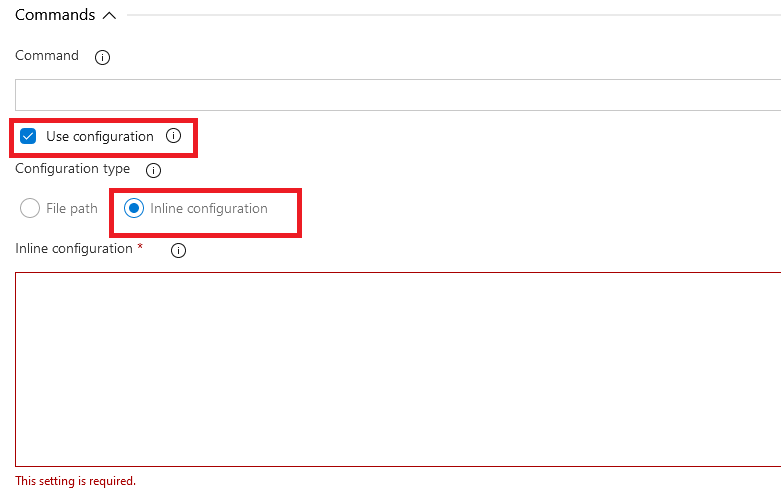
@RehanSaeed How do you supply an inline config? I don't see any mention of that on the Kubectl task page (apart from a comment at the bottom asking for more details!)
 howardjones
on 17 Apr 2020
howardjones
on 17 Apr 2020
@howardjones just check "Use configuration"
 lgmorand
on 27 Apr 2020
lgmorand
on 27 Apr 2020
How about in the Pipeline YAML file?
howardjones
on 27 Apr 2020
How about in the Pipeline YAML file?
useConfigurationFile: true
configurationType: inline
inline: |
apiVersion: v1
kind: Namespace
metadata:
  name: $(KubernetesNamespace)
 MarvinSchenkel
on 22 Sep 2020
MarvinSchenkel
on 22 Sep 2020
Interesting. Neither inline or configurationType are mentioned on https://docs.microsoft.com/en-us/azure/devops/pipelines/tasks/deploy/kubernetes?view=azure-devops
howardjones
on 22 Sep 2020
Interesting. Neither
inlineorconfigurationTypeare mentioned on https://docs.microsoft.com/en-us/azure/devops/pipelines/tasks/deploy/kubernetes?view=azure-devops
Interesting indeed. I used the visual pipeline editor like @lgmorand suggested and generated yaml from there. Works for me 👍
MarvinSchenkel
on 22 Sep 2020
Related issues
 letmaik
·
3Comments
letmaik
·
3Comments
 MJECloud
·
3Comments
MJECloud
·
3Comments
 michhar
·
3Comments
michhar
·
3Comments
 mikedouglasdev
·
3Comments
mikedouglasdev
·
3Comments
 sevaa
·
3Comments
sevaa
·
3Comments
Most helpful comment
I managed to use
kubectl applywith an inline configuration file:This doesn't error if the namespace already exists.