Azure-devops-docs: Downloading Multiple Secure Files issues
I'm having a hard time understanding how to format my variables for downloading multiple secureFiles. The documentation says that if your downloading multiple files it will be downloaded to $(Agent.TempDirectory). But when adding that variable to my task it fails to work. I'm sure I just have something incorrectly formatted. I have already switched my branch to another and back to reload the files according to the link provided from the errors I received. Below is my yml file along with the two errors I'm getting. I'm simply just wanting to use my certificate file and provisioning file to sign my ios app. Help is much appreciated!
azure-pipelines.yml
pool:
  vmImage: 'macOS-10.13'
steps:
- task: NodeTool@0
  inputs:
    versionSpec: '8.x'
  displayName: 'Install Node.js'

# Download Secure File
# Download a secure file to a temporary location on the build or release agent
- task: DownloadSecureFile@1
  inputs:
    secureFile: feedme.keystore

- task: DownloadSecureFile@1
  inputs:
    secureFile: CertificatesDevelopmentPush.p12

- task: DownloadSecureFile@1
  inputs:
    secureFile: VS_PushNotification_Profile_Distribution2.mobileprovision

# Install Apple Certificate
# Install an Apple certificate required to build on a macOS agent
- task: InstallAppleCertificate@2
  inputs:
    certSecureFile: $(Agent.TempDirectory)/CertificatesDevelopmentPush.p12
    certPwd: $(P12password)
    #keychain: 'temp' # Options: default, temp, custom
    #keychainPassword: # Required when keychain == Custom || Keychain == Default
    #customKeychainPath: # Required when keychain == Custom
    #deleteCert: # Optional
    #deleteCustomKeychain: # Optional
    #signingIdentity: # Optional

# Install Apple Provisioning Profile
# Install an Apple provisioning profile required to build on a macOS agent
- task: InstallAppleProvisioningProfile@1
  inputs:
    provisioningProfileLocation: 'secureFiles' # Options: secureFiles, sourceRepository
    provProfileSecureFile: $(Agent.TempDirectory)/VS_PushNotification_Profile_Distribution2.mobileprovision # Required when provisioningProfileLocation == SecureFiles
    #provProfileSourceRepository: # Required when provisioningProfileLocation == SourceRepository
    #removeProfile: true
Errors in PipeLine
Job Job1: Step input certSecureFile references secure file $(Agent.TempDirectory)/CertificatesDevelopmentPush.p12 which could not be found. The secure file does not exist or has not been authorized for use. For authorization details, refer to https://aka.ms/yamlauthz.
Job Job1: Step input provProfileSecureFile references secure file $(Agent.TempDirectory)/VS_PushNotification_Profile_Distribution2.mobileprovision which could not be found. The secure file does not exist or has not been authorized for use. For authorization details, refer to https://aka.ms/yamlauthz.
Document Details
⚠ Do not edit this section. It is required for docs.microsoft.com ➟ GitHub issue linking.
- ID: 2a5f8376-3654-0ed4-d9f8-d15f28350783
- Version Independent ID: f393daba-6515-6c26-71ac-b557e8c8dad1
- Content: Download Secure File task - Azure Pipelines & TFS
- Content Source: docs/pipelines/tasks/utility/download-secure-file.md
- Product: devops
- GitHub Login: @andyjlewis
- Microsoft Alias: alewis
 brownkevg
All 5 comments
I just created a test with the situation you described but I can use multiple files in one pipeline. Do you use the "output variable" option? Then you know, your path is correct.
Download files
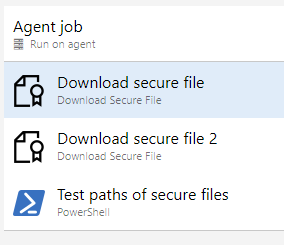
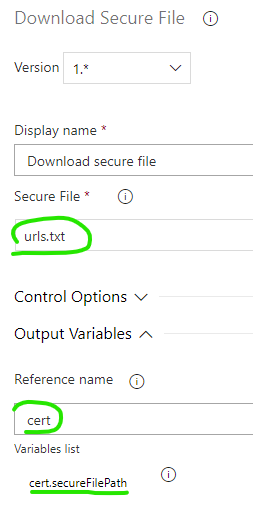
(same for second task for downloading a secret file)
Test files with powershell
In the powershell task:
Write-Host "secret file 1 in path: $(cert.secureFilePath)"
Test-Path -Path '$(cert.secureFilePath)'
Write-Host "secret file 2 in path: $(cert2.secureFilePath)"
Test-Path -Path '$(cert2.secureFilePath)'
Outcome of powershell
2018-12-12T14:55:03.4264596Z secret file 1 in path: C:\agent_work_temp\urls.txt
2018-12-12T14:55:03.4743805Z True
2018-12-12T14:55:03.4759565Z secret file 2 in path: C:\agent_work_temp\harvest_time_report_from2018-11-01to2018-11-30.pdf
2018-12-12T14:55:03.4768736Z True
Files on agent (local agent for easier test)
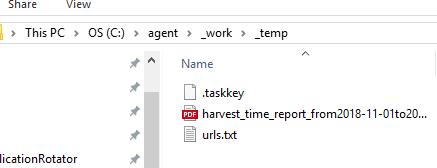
 LockTar
on 12 Dec 2018
LockTar
on 12 Dec 2018
@LockTar I have used this option in the 'GUI' version, but cannot work out how to do the same in yaml.
The documentation and examples for using yml is appalling.
 CZEMacLeod
on 20 Dec 2018
CZEMacLeod
on 20 Dec 2018
@CZEMacLeod you are doing this in build or release pipeline?
LockTar
on 20 Dec 2018
@LockTar In the build pipeline. I did eventually work out that the task name property maps to the Output Variables Reference Name field but it wasn't documented anywhere I could find...
steps:
- task: DownloadSecureFile@1
  name: app_pfx
  displayName: 'Download Code-Signing certificate file for digital signing'
  inputs:
    secureFile: 'xxxxxxxx-xxxx-xxxx-xxxx-xxxxxxxxxxxx'
You can then use $(app_pfx.secureFilePath) as the variable name (in my example).
If you have multiple files like @brownkevg did, you just assign a name: to each download then use that as the prefix.
CZEMacLeod
on 20 Dec 2018
@LockTar I ended up only needing to download my keystore file as I found out I can just reference what I'm assuming are the secure file ids for the certificate and provisioning profile tasks instead of downloading those files. Found these ids through setting up the same tasks in the GUI and looking at the yml it generated. Seems like the best way to figure out how to write the yml file is to see what yml the GUI generates. Like CZEMacLeod said
The documentation and examples for using yml is appalling.
would have added the name attribute and referenced like @CZEMacLeod and @LockTar said if I ended up needing to actually download multiple files.
brownkevg
on 16 Jan 2019
Related issues
 robinmanuelthiel
·
3Comments
robinmanuelthiel
·
3Comments
 sevaa
·
3Comments
sevaa
·
3Comments
 mikedouglasdev
·
3Comments
mikedouglasdev
·
3Comments
 dtamai
·
3Comments
dtamai
·
3Comments
 adnanebrahimi
·
3Comments
adnanebrahimi
·
3Comments
Most helpful comment
@LockTar In the build pipeline. I did eventually work out that the task name property maps to the Output Variables Reference Name field but it wasn't documented anywhere I could find...
You can then use $(app_pfx.secureFilePath) as the variable name (in my example).
If you have multiple files like @brownkevg did, you just assign a
name:to each download then use that as the prefix.