Azure-devops-docs: Unclear where these are found
It is not clear in this document where we can set/view these parameters in Azure DevOps. There are build pipelines and release pipelines, but I find no parameters view for either. Variables, yes, but parameters? Trying to set Parameters.WebsiteName to something else than "Default Web Site"...
Document Details
⚠ Do not edit this section. It is required for docs.microsoft.com ➟ GitHub issue linking.
- ID: 214c853e-63ba-240c-9cff-7ea3ab7a788c
- Version Independent ID: 781b5018-0c34-353a-a035-5d84af3994a0
- Content: Process parameters - Azure Pipelines & TFS
- Content Source: docs/pipelines/process/parameters.md
- Product: devops
- GitHub Login: @andyjlewis
- Microsoft Alias: alewis
 krilbe
All 17 comments
Yes, I know a way to do that by edititing the release definition/YAML file. But it's good to have them configurable in UI.
 prabhakarreddy1234
on 24 Oct 2018
prabhakarreddy1234
on 24 Oct 2018
Only option I have in the UI is to "unlink All" which removes all step level variables...
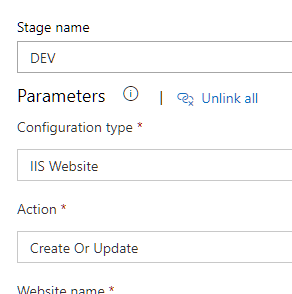
This feature needs much better UI support so that you can define variables which can be linked and select a variable to link within the step...
Right now, that feels very lackluster, I actually couldn't figure out why I cannot change certain properties in a Manage IISWebsite task...
 MichaCo
on 21 Jan 2019
MichaCo
on 21 Jan 2019
This issue has been automatically marked as stale because it has not had recent activity. It will be closed if no further activity occurs. Thank you for your contributions.
![stale[bot] picture](https://avatars3.githubusercontent.com/in/1724?v=4&s=40) stale[bot]
on 21 Apr 2019
stale[bot]
on 21 Apr 2019
I don´t know were to set.
I reinforce:
"It is not clear in this document where we can set/view these parameters in Azure DevOps. There are build pipelines and release pipelines, but I find no parameters view for either. Variables, yes, but parameters? Trying to set Parameters.WebsiteName to something else than "Default Web Site"..."
 danieleusebio
on 21 Jun 2019
danieleusebio
on 21 Jun 2019
Thank you for the question. Apologies for the very delayed response. Heads up to @steved0x
 andyjlewis
on 1 Jul 2019
andyjlewis
on 1 Jul 2019
How do I create a pipeline parameter?
 edgariscoding
on 24 Jul 2019
edgariscoding
on 24 Jul 2019
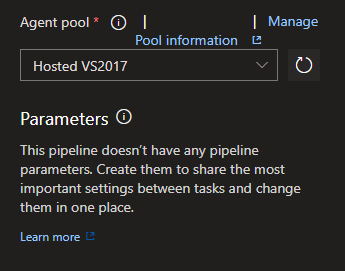
Still an issue. No option to link new parameters.
 cd83
on 13 Aug 2019
cd83
on 13 Aug 2019
Ack. Documentation on process parameters needs improvements. Please note, setting process parameters is supported only in build pipelines and not in release pipelines. [Docs].
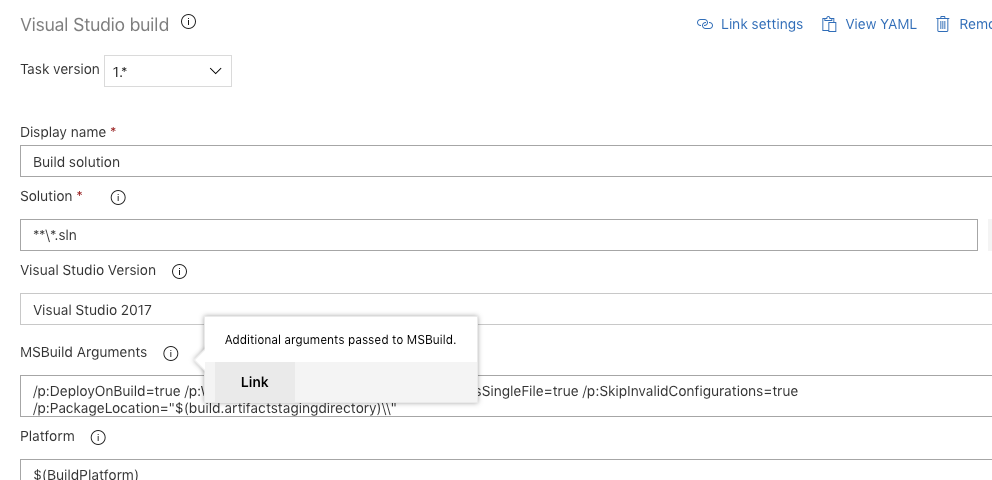
If you'd like to promote a task input as a process parameter, click on "i" icon next to the field and click on "Link". You can optionally customize the "Display name", when done, the input field will show up as a process parameter on the
Promote the input field as process parameter
Link the input field
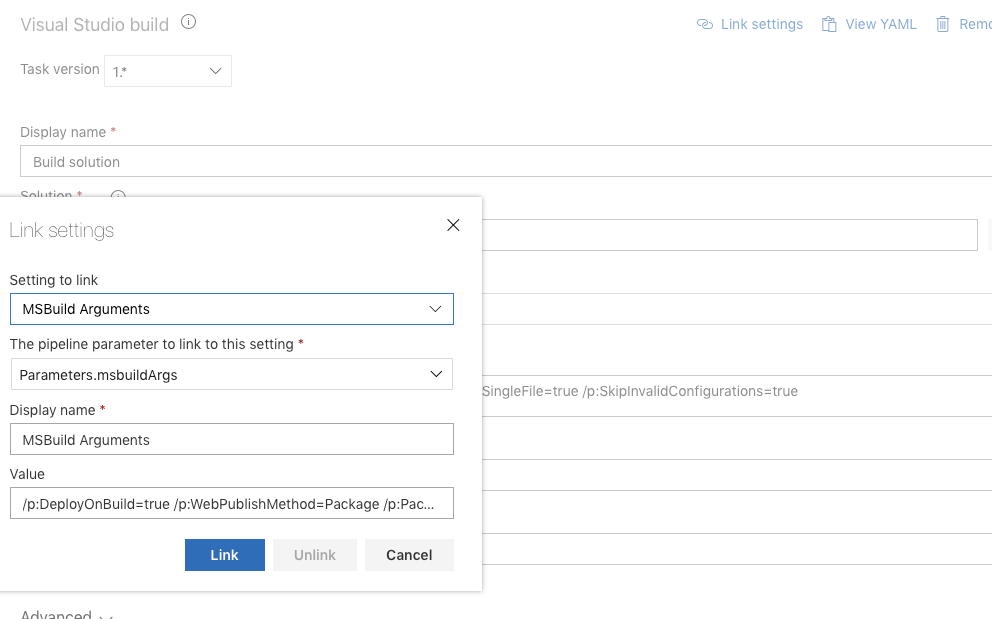
Process parameter now shows the promoted fields
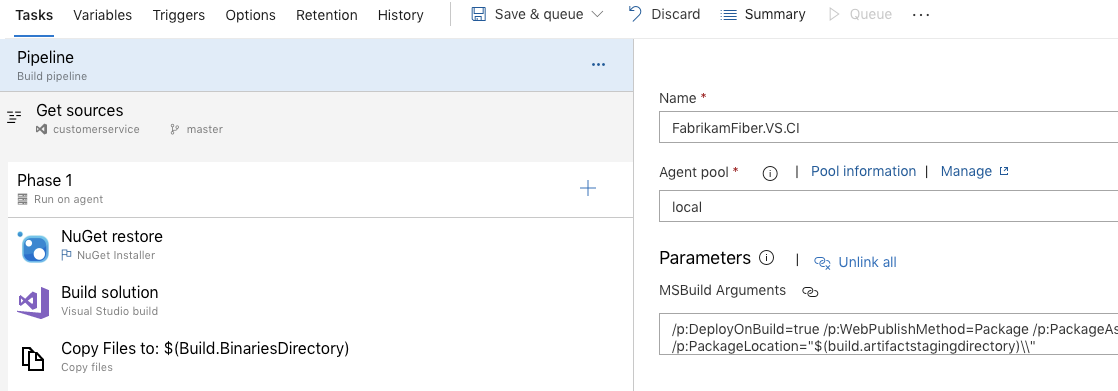
 RoopeshNair
on 14 Aug 2019
RoopeshNair
on 14 Aug 2019
How do we link settings from a task group? It's all well and good adding individual tasks repeatedly for those who enjoy it but I'd rather use a task group but not able to link any settings. Is that available?
 abelal83
on 18 Sep 2019
abelal83
on 18 Sep 2019
Thank you @RoopeshNair for your detailed comment. That really helped.
 BoJoe22
on 4 Oct 2019
BoJoe22
on 4 Oct 2019
Create a task like ".Net build" under agent. This task will have an option "Link settings" at the top.Click the "Link settings" option, select required parameters and click on Link button. It will be available in the build pipeline parameters now.
 dev-arjunan
on 31 Dec 2019
dev-arjunan
on 31 Dec 2019
How do you add these parameters if they got deleted? I don't have an option to "link" in the 'i' tooltip.
 tdopun
on 20 Jan 2020
tdopun
on 20 Jan 2020
@tdopun - are you trying to link in build or release? Note update "RoopeshNair commented on 14 Aug 2019 "
RoopeshNair
on 21 Jan 2020
I'm facing a similar issue.
I have created an IIS Deployment release pipeline. The IIS Web App Manage task has Website name fixed as 'Default Web Site'. The link thing states "This setting is linked to the 'Website name' (Parameters.WebsiteName) pipeline parameter."
I just _cannot_ figure out how to access this Parameters.WebsiteName setting
 andrewrandsbluestone
on 30 Jan 2020
andrewrandsbluestone
on 30 Jan 2020
I'm facing a similar issue.
I have created an IIS Deployment release pipeline. The IIS Web App Manage task has Website name fixed as 'Default Web Site'. The link thing states "This setting is linked to the 'Website name' (Parameters.WebsiteName) pipeline parameter."
I just _cannot_ figure out how to access this Parameters.WebsiteName setting
@andrewrandsbluestone did you manage it?
 adhamenaya
on 17 Mar 2020
adhamenaya
on 17 Mar 2020
@adhamenaya Eventually, after much sharing of screen shots ! The recipe should build a pipeline that has this structure:
Stage 1 (deployment process)
-- IIS Deployment
---- IIS Web App Manage
---- IIS Web App Deploy
Website name is at the 'Stage 1' level, which isn't at all obvious.
andrewrandsbluestone
on 17 Mar 2020
As usual, Microsoft knows how to take the simplest concepts and turns it into a nightmare! What the hell is a Parameter? How is it different from a Variable? Why have two different names for the same concept? Where do I read and set the Parameter?
I looked through Microsoft's documentation and as usual, it's terrible! First, the site's search sucks, so you have to use Google. When you do find the topic you're looking for, there's a bunch of verbose preamble text telling you what the page will cover without ever getting to the topic you're looking for. You have to navigate a bunch of outgoing links sending you to a dead end hell. The team or person who is responsible for the documentation needs to stop. Please stop! You've done enough damaged. We've been thoroughly punished, no need for more brutality.
I wish I could say it's the worst part of Azure DevOps, but it's not. The user interface is horrid. It's like a evil game of _Where's Waldo_ and hide and seek with booby traps at every corner! Whoever designed this interface needs to retire and grow turnips in Antartica where they can't cause no further damage!
Microsoft's mediocrity is a direct result of hiring people based on whiteboard interviews.
 Joebeazelman
on 4 Jul 2020
Joebeazelman
on 4 Jul 2020
Related issues
 adnanebrahimi
·
3Comments
adnanebrahimi
·
3Comments
 anlatsko
·
3Comments
anlatsko
·
3Comments
 sevaa
·
3Comments
sevaa
·
3Comments
 o-o00o-o
·
3Comments
o-o00o-o
·
3Comments
 michhar
·
3Comments
michhar
·
3Comments
Most helpful comment
Only option I have in the UI is to "unlink All" which removes all step level variables...
This feature needs much better UI support so that you can define variables which can be linked and select a variable to link within the step...
Right now, that feels very lackluster, I actually couldn't figure out why I cannot change certain properties in a
Manage IISWebsitetask...