Azure-devops-docs: Need Help understanding apk signing keystore file path
Hi Team,
I am currently working in Azure DevOps, and xamarin android application development.
I am able to create build pipeline and build android source successfully. but when I try to sign my android apk I am facing challenges to give android keystore file.
Note: I have placed my keystore file in my project android source code and main source code path as well. now i really don't know how to specify this keystore file path in my pipeline.yml file. Below is my yml content.
_# Xamarin.Android
Build a Xamarin.Android project.
Add steps that test, sign, and distribute an app, save build artifacts, and more:
https://docs.microsoft.com/azure/devops/pipelines/languages/xamarin
pool:
vmImage: 'macOS 10.13'
variables:
buildConfiguration: 'Release'
outputDirectory: '$(build.binariesDirectory)/$(buildConfiguration)'
steps:
- task: NuGetToolInstaller@0
task: NuGetCommand@2
inputs:
restoreSolution: '*/.sln'task: XamarinAndroid@1
inputs:
projectFile: '*/droid*.csproj'
outputDirectory: '$(outputDirectory)'
configuration: '$(buildConfiguration)'task: AndroidSigning@3
inputs:
apkFiles: '$(outputDirectory)/*.apk'
apksign: true
apksignerKeystoreFile: '$(build.sourcesDirectory)/pockeystore.keystore'
apksignerKeystorePassword: 'pockeystore'
apksignerKeyPassword: 'pockeystore'
zipalign: falsetask: PublishBuildArtifacts@1
inputs:
pathtoPublish: '$(outputDirectory)'_
Please help me to setup keystore file path.
Joy
Innovation Lead
Document Details
⚠ Do not edit this section. It is required for docs.microsoft.com ➟ GitHub issue linking.
- ID: 4b1fbcd8-d799-879e-d672-9dee164401ef
- Version Independent ID: 7208d03d-9042-7753-ab4d-d1ad8e99ef1d
- Content: Android signing build and release task
- Content Source: docs/pipelines/tasks/build/android-signing.md
- Product: devops
- GitHub Login: @andyjlewis
- Microsoft Alias: alewis
 joychandru
All 6 comments
I have upload my android keystore file in Library-> SecureFiles Section. Then i try to use it in Build Task but its showing error message Job Job1: Step input secureFile references secure file pockeystore.keystore which could not be found. The secure file does not exist or has not been authorized for use. For authorization details, refer to https://aka.ms/yamlauthz.
My Yaml script is:
Xamarin.Android
Build a Xamarin.Android project.
Add steps that test, sign, and distribute an app, save build artifacts, and more:
https://docs.microsoft.com/azure/devops/pipelines/languages/xamarin
pool:
vmImage: 'macOS 10.13'
variables:
buildConfiguration: 'Release'
outputDirectory: '$(build.binariesDirectory)/$(buildConfiguration)'
steps:
- task: NuGetToolInstaller@0
task: NuGetCommand@2
inputs:
restoreSolution: '*/.sln'task: XamarinAndroid@1
inputs:
projectFile: '*/droid*.csproj'
outputDirectory: '$(outputDirectory)'
configuration: '$(buildConfiguration)'task: DownloadSecureFile@1
inputs:
secureFile: 'pockeystore.keystore'task: AndroidSigning@3
inputs:
apkFiles: '$(outputDirectory)/*.apk'
apksign: false
zipalign: falseapksignerKeystoreFile: 'pockeystore.keystore'
apksignerKeystorePassword: 'pockeystore'
apksignerKeyPassword: 'pockeystore'
task: PublishBuildArtifacts@1
inputs:
pathtoPublish: '$(outputDirectory)'
joychandru
on 9 Oct 2018
This issue has been automatically marked as stale because it has not had recent activity. It will be closed if no further activity occurs. Thank you for your contributions.
![stale[bot] picture](https://avatars3.githubusercontent.com/in/1724?v=4&s=40) stale[bot]
on 28 Feb 2019
stale[bot]
on 28 Feb 2019
Keep-alive
 davidstaheli
on 10 Mar 2019
davidstaheli
on 10 Mar 2019
@joychandru thank you for reporting this and apologies for the confusion. The Android Signing docs have been updated to address this and will be live within a couple of days. If you still face the problem that the secure file "has not be authorized for use", please visit https://aka.ms/yamlauthz or click on the secure file and set it to be authorized for use by all pipelines:

davidstaheli
on 5 Jul 2019
Hi @davidstaheli !
I have a similar issue, where the builds are (I think) not being signed. I checked "Pipeline permissions" on the "Secure files" tab, and tried turning it on. But it is always turned back to off.
Strangely, when I change the setting, the "Save"-button (can be seen in your screenshot) does not turn on. This is even though I am the administrator of my project (since I created it).
Do you experience the same issue?
 aaRopi
on 7 Aug 2019
aaRopi
on 7 Aug 2019
Hi @davidstaheli !
I have a similar issue, where the builds are (I think) not being signed. I checked "Pipeline permissions" on the "Secure files" tab, and tried turning it on. But it is always turned back to off.
Strangely, when I change the setting, the "Save"-button (can be seen in your screenshot) does not turn on. This is even though I am the administrator of my project (since I created it).
Do you experience the same issue?
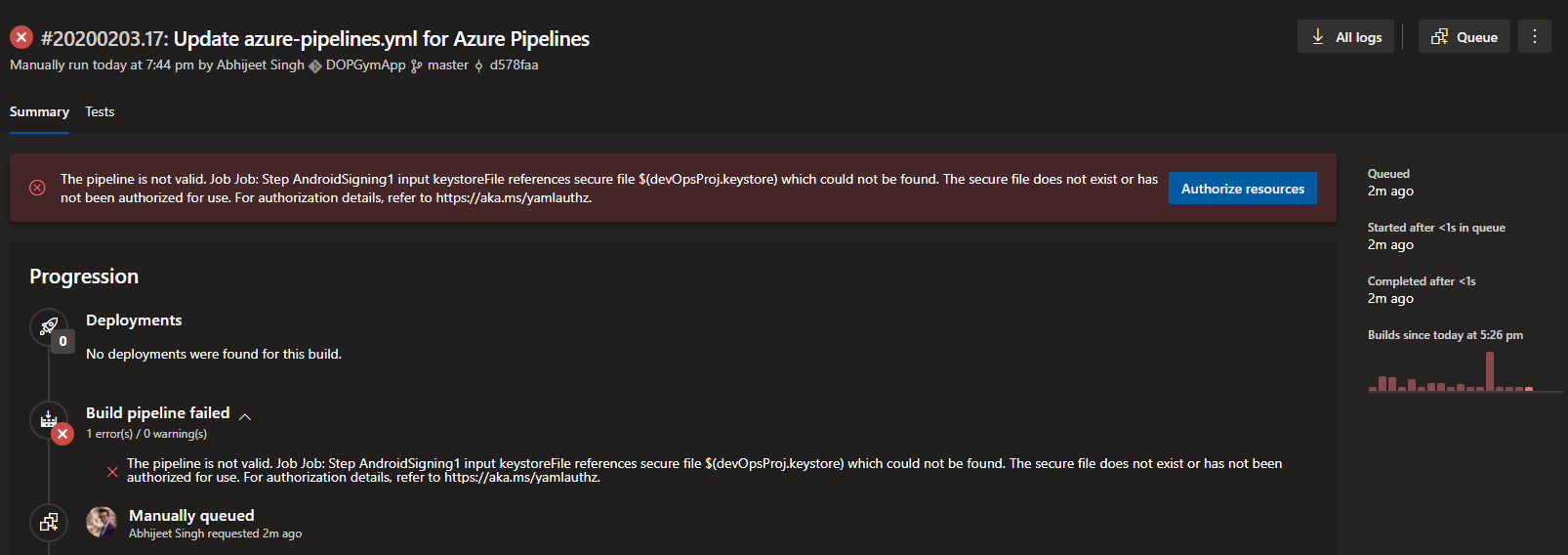
I'm also experiencing the same issue, even though I have turned on the pipeline permission.
Although this works when I use the classical mode for signing the apk.

 AbhiAbzs
on 3 Feb 2020
AbhiAbzs
on 3 Feb 2020
Related issues
 dannyvv
·
3Comments
dannyvv
·
3Comments
 cijujoseph
·
3Comments
cijujoseph
·
3Comments
 KacperMucha
·
3Comments
KacperMucha
·
3Comments
 LennartAJansson
·
3Comments
LennartAJansson
·
3Comments
 Naphier
·
3Comments
Naphier
·
3Comments
Most helpful comment
I'm also experiencing the same issue, even though I have turned on the pipeline permission.

Although this works when I use the classical mode for signing the apk.