Azure-devops-docs: "Web app for Containers" is missing from App type
When I try to select "Web App for Containers" under step 3 when adding a release stage of Deploy Azure App Service, all I get is "Web App" and the containerized web app is missing from the dropdown for "App service name". This is a Free Trial sub, is that limited?
Document Details
⚠ Do not edit this section. It is required for docs.microsoft.com ➟ GitHub issue linking.
- ID: 593c3abc-7b38-6673-62b6-7787d0dda4dd
- Version Independent ID: cbb2b875-b220-596c-7b4d-c2cf6c644335
- Content: Deploy a Docker container app to an Azure Web App
- Content Source: docs/pipelines/apps/cd/deploy-docker-webapp.md
- Product: devops
- GitHub Login: @alexhomer1
- Microsoft Alias: ahomer
 holotrek
All 8 comments
Thank you for your feedback. I have passed this on to the product team for advice.
 alexhomer1
on 20 Sep 2018
alexhomer1
on 20 Sep 2018
You need to select the "Preview" version which is 4.0.
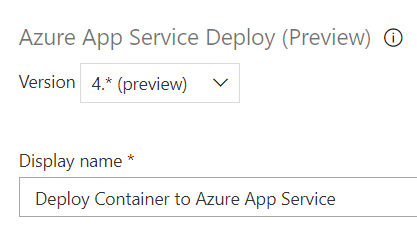
The drop-down list where you select the version of the task is at the top of the page when you are editing a task.
 seesharprun
on 20 Sep 2018
seesharprun
on 20 Sep 2018
When will there be the addition of a compose file or k8s deploy file?
 chazguerrero
on 27 Sep 2018
chazguerrero
on 27 Sep 2018
Tried to deploy with dotnet core Project. Just a dummy app. Followed the recipe all the steps except step 3 (which does not find web app container that I created in azure portal) and tried to run web app wtih multi containers. Uploaded a docker compose script and got an error saying that the image was not found, also when I tried to deploy a container as a web app from acr. It did not even work, still got the same problem with image not found...
Running locally works and please fix this problem.
 kkho
on 11 Oct 2018
kkho
on 11 Oct 2018
@kkho We have improved the task. Please try the 4.0 version.
The multi-container support is under development.
Let me know if you have any other feedback for improving container support.
 azooinmyluggage
on 21 Jan 2019
azooinmyluggage
on 21 Jan 2019
This issue has been automatically marked as stale because it has not had recent activity. It will be closed if no further activity occurs. Thank you for your contributions.
![stale[bot] picture](https://avatars3.githubusercontent.com/in/1724?v=4&s=40) stale[bot]
on 21 Apr 2019
stale[bot]
on 21 Apr 2019
Any update on multi container support please
 ceemafour
on 4 May 2019
ceemafour
on 4 May 2019
we have added support for Azure Web app - multi-container scenario.
azooinmyluggage
on 23 Jul 2019
Related issues
 KacperMucha
·
3Comments
KacperMucha
·
3Comments
 MJECloud
·
3Comments
MJECloud
·
3Comments
 o-o00o-o
·
3Comments
o-o00o-o
·
3Comments
 Naphier
·
3Comments
Naphier
·
3Comments
 EM1L
·
3Comments
EM1L
·
3Comments
Most helpful comment
You need to select the "Preview" version which is 4.0.
The drop-down list where you select the version of the task is at the top of the page when you are editing a task.