Azure-devops-docs: Multiple phases do run in sequence on TFS 2018.2
> Multiple phases you add to a build definition run in parallel. Multiple phases you add to a release definition run in sequence. You cannot configure the order of dependencies between phases in this version of TFS.
This is not correct, they run in sequence, or I configured it wrong :(
I want to build on windows, mac and linux in parallel, but can't get it configured correctly. For now I need to use multiple builds.
Dokumentdetails
⚠ Bearbeiten Sie diesen Abschnitt nicht. Er ist für die Verknüpfung von Problemen docs.microsoft.com ➟ GitHub erforderlich.
- ID: a14fc554-e74e-2c76-34d1-37a2e0dd7b2f
- Version Independent ID: e95259f4-61ef-5e99-a492-eb77d7d1e657
- Content: Workflow using multiple phases in Build and Release Management
- Content Source: docs/pipelines/process/multiple-phases.md
- Product: devops
- GitHub Login: @alexhomer1
- Microsoft Alias: ahomer
 biohazard999
All 14 comments
Thank you for your feedback. I have passed this on to the product team for advice.
 alexhomer1
on 5 Jul 2018
alexhomer1
on 5 Jul 2018
Support for running phases in parallel in release is still few months away (~5-6 months tentatively). On VSTS build supports running phases in parallel, for support in TFS @vijayma
 RoopeshNair
on 5 Jul 2018
RoopeshNair
on 5 Jul 2018
Can you confirm my understanding of your setup?
- You are using TFS 2018.2.
- You have a build definition with three phases.
- There are no dependencies specified between these phases (you can configure the dependencies when you select the phase in the editor).
- You are seeing that the phases run in sequence.
If so, this is not expected, and we would like to follow up with you.
 vijayma
on 6 Jul 2018
vijayma
on 6 Jul 2018
@vijayma
- I am using 16.131.27701.1 -> so I assume this is TFS 2018.2
- Yes
- I can't define dependencies at all. All I can do is set custom preconditions which I set to: always()
- Yes
biohazard999
on 6 Jul 2018
I can confirm this behaviour.
I have a build definition with 3 phases. I want 2 to run in parallel and the 3rd to wait for previous to succeed.
Phase 1 & Phase 2 have no Dependencies and are set to 'Even if a previous Phase has failed'.
3rd Phase has Phase 1 & 2 as Dependencies and set to 'Only when all previous phases have succeeded'
When I queue a build, they all run in sequence. Phase 1 & 2 do not run in parallel
 oneillci
on 16 Jul 2018
oneillci
on 16 Jul 2018
+1. I also noticed the same behavior in Release using VSTS. It appears the Phases in Build will run in parallel, but Phases in Release will run in sequence, even if I put true in the custom condition
 anblanco
on 26 Jul 2018
anblanco
on 26 Jul 2018
Thanks for pointing this out. We went and checked again in 2018.2, and indeed found that the ability to run phases in parallel did not exist in 2018.2. That feature missed 2018.2 by a very narrow margin. Sorry about the confusion. We are fixing the doc to clarify this.
vijayma
on 27 Jul 2018
To clarify, I'm seeing the behaviour of build phases running in sequence and not in parallel on vsts and not tfs.
oneillci
on 28 Jul 2018
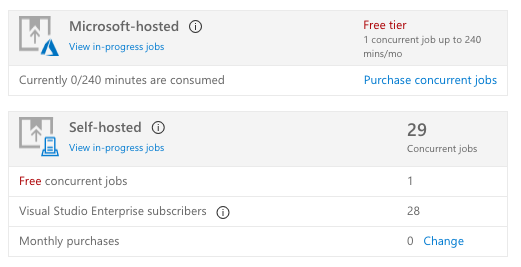
@oneillci, I was responding to the original question by @biohazard999. Regarding your issue in VSTS, to run both the jobs in parallel, you need a concurrency of 2 jobs. My guess is that you do not. You can check the concurrency limits you have by going to Project settings -> Build and Release -> Concurrency. You can purchase additional concurrency if you desire. Another possibility is that you do not have "Build with multiple queues" preview feature enabled. You can check that in your user profile -> Preview features -> Account features.
vijayma
on 28 Jul 2018
@vijayma, if I'm looking at the correct setting, I do have enough concurrent jobs permitted:
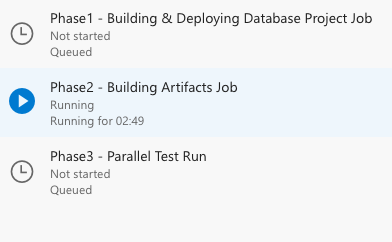
When running my build, my agent phases are not running in parallel. In this example, phase 1 and 2 do not have any dependencies, but phase 3 depends on both 1 & 2. All phases are set to run on the same agent queue. Do I need to have multiple agents running in that queue or does this look like I'm doing something else wrong?
oneillci
on 30 Jul 2018
I've tried adding more agents to my pool and now have them running parallel :) Have submitted some content feedback on that page as this was no clear from the existing documentation.
oneillci
on 30 Jul 2018
I am on TFS 2018.3 and this still seems to be a problem. I have a build definition with two phases and they do not run in parallel. Is there any update on this?
 tomaustin700
on 10 Oct 2018
tomaustin700
on 10 Oct 2018
I can also verify this. We are running TFS 2018.3 in production with a new install on the test server. Even in BUILDS (nevermind the release pipeline), phases not only run serially, the dependencies setting on the phase properties isn't even there. It is there in Azure DevOps. Not in an on-premises installation. There does not seem to be any means of using parallelism usefully in an on-premises installation of TFS 2018.3.....
 SteveSims2
on 18 Oct 2018
SteveSims2
on 18 Oct 2018
Also verified. Running TFS 2018.3 and cannot find any way to run Phases in parallel. This is a serious issue for us as it is making our Releases run extraordinarily long. Please advise when this is going to be resolved for on-prem or a workaround?
 ExcaliburVT
on 6 Dec 2018
ExcaliburVT
on 6 Dec 2018
Related issues
 sevaa
·
3Comments
sevaa
·
3Comments
 sandeepzgk
·
3Comments
sandeepzgk
·
3Comments
 KacperMucha
·
3Comments
KacperMucha
·
3Comments
 kieronlanning
·
3Comments
kieronlanning
·
3Comments
 letmaik
·
3Comments
letmaik
·
3Comments
Most helpful comment
Also verified. Running TFS 2018.3 and cannot find any way to run Phases in parallel. This is a serious issue for us as it is making our Releases run extraordinarily long. Please advise when this is going to be resolved for on-prem or a workaround?