Azure-devops-docs: How to Archive multiple file and folder
How to Archive multiple file and folder
My working directory is /Root
I want to archive folder "/Root/folder1" and files "/Root/file1.js", "/Root/file2.json" in one.zip file without create multiple task.
Document Details
⚠ Do not edit this section. It is required for docs.microsoft.com ➟ GitHub issue linking.
- ID: add63018-4f2c-f258-76ea-9f76aa43ff09
- Version Independent ID: c71f17c9-9a78-396e-7a0f-ad8b52b01724
- Content: Archive Files
- Content Source: docs/pipelines/tasks/utility/archive-files.md
- Product: devops
- GitHub Login: @andyjlewis
- Microsoft Alias: alewis
 PoppyPham
All 6 comments
I am running into the same issue. I have two Archive Files tasks setup, and that works fine, but in the Extract Files task on the release it fails with what is described here: https://github.com/Microsoft/azure-pipelines-tasks/issues/7243
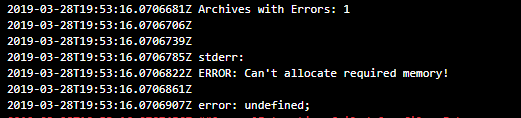
It throws this error: ERROR: Can't allocate required memory!
Which I understand to be because the Extract Files has two zips in the same location.
 andywarren
on 17 Jan 2019
andywarren
on 17 Jan 2019
Getting this same error - ERROR: Can't allocate required memory! - for now just going to use powershell script with 7z node package.
PS/NPM Workaround
npm install -g 7zip
$env:Path += ";$env:APPDATA\npm"
gci C:\myPath -recurse -Filter *.zip| % { 7z x -aoa -o"$([IO.Path]::Combine($_.DirectoryName, 'zip-content'))" $_.FullName }
The task just needs an option to add the 7zip -aoa CLI flag and we can drop this workaround.
 alohaninja
on 28 Mar 2019
alohaninja
on 28 Mar 2019
This is an insanely common use case. Having to copy multiple directories into a subdirectory just to zip them up together is wasteful and overly complicated. Please fix this.
 spcaswell-mindbody
on 1 May 2019
spcaswell-mindbody
on 1 May 2019
There is the option "Replace existing archive": If an existing archive exists, specify whether to overwrite it. Otherwise, files will be added to it as long as it is not a compressed tar.
 buckleyGI
on 24 Jul 2019
buckleyGI
on 24 Jul 2019
So we have to create a separate zip step for each file we want to add not under a directory we want to add in its entirety and for each directory we do want to add in entirety. This is not better. Instead of X copy steps plus one zip step we just have X zip steps. Every compression tool takes a file list as a parameter for a reason. A file list option should be standard input from ADO.
Now I'm nitpicking with this next bit but, the wording for the inline help on "Replace existing archive" could be improved: "If enabled any existing archive file of the same filename will be deleted; otherwise the specified root folder or file to archive will be appended to the archive file." The current help also does not indicate an exception for compressed tar files.
spcaswell-mindbody
on 24 Jul 2019
@PoppyPham, it looks like you've encountered an issue with the product itself, rather than an issue with the documentation. We apologize that it's taken so long to address this issue. To make sure it gets in front of the right people, please submit your bug here.
 mijacobs
on 6 Nov 2019
mijacobs
on 6 Nov 2019
Related issues
 o-o00o-o
·
3Comments
o-o00o-o
·
3Comments
 mikedouglasdev
·
3Comments
mikedouglasdev
·
3Comments
 cijujoseph
·
3Comments
cijujoseph
·
3Comments
 KacperMucha
·
3Comments
KacperMucha
·
3Comments
 kieronlanning
·
3Comments
kieronlanning
·
3Comments
Most helpful comment
So we have to create a separate zip step for each file we want to add not under a directory we want to add in its entirety and for each directory we do want to add in entirety. This is not better. Instead of X copy steps plus one zip step we just have X zip steps. Every compression tool takes a file list as a parameter for a reason. A file list option should be standard input from ADO.
Now I'm nitpicking with this next bit but, the wording for the inline help on "Replace existing archive" could be improved: "If enabled any existing archive file of the same filename will be deleted; otherwise the specified root folder or file to archive will be appended to the archive file." The current help also does not indicate an exception for compressed tar files.