Azure-devops-docs: Dependency Version Issues
See https://pastebin.com/zPCRVhKW (DGML) My project https://github.com/vbjay/TFS-Release-Notes is a powershell module that will generate release notes from workitems on VSTS. The dependency version issues are causing problems. Please fix dependency issues.
I have tried updating nuget packages to the latest and they still have the same issues.
Get-WorkItemChangesets : Could not load file or assembly 'System.Net.Http.Formatting, Version=5.2.2.0, Culture=neutral, PublicKeyToken=31bf3856ad364e35' or one of its dependencies. The system cannot find the file
specified.
At E:AppsGitFG TFS-Release-NotesbuildoutputChange Request generator.ps1:51 char:1
- Get-WorkItemChangesets -TFSCollection $tfs -WorkItemIDs $workitems -GetSubWorkIt ...
~~~~~~~~~~~~~~~~
- CategoryInfo : NotSpecified: (:) [Get-WorkItemChangesets], FileNotFoundException
- FullyQualifiedErrorId : System.IO.FileNotFoundException,TFS_Release_Notes.GetWorkItemChangesets
Get-WorkItemFiles : Could not load file or assembly 'System.Net.Http.Formatting, Version=5.2.2.0, Culture=neutral, PublicKeyToken=31bf3856ad364e35' or one of its dependencies. The system cannot find the file
specified.
At E:AppsGitFG TFS-Release-NotesbuildoutputChange Request generator.ps1:54 char:1
- Get-WorkItemFiles -TFSCollection $tfs -WorkItemIDs $workitems -GetSubWorkItems | ...
~~~~~~~~~~~~~~~~~~
- CategoryInfo : NotSpecified: (:) [Get-WorkItemFiles], FileNotFoundException
- FullyQualifiedErrorId : System.IO.FileNotFoundException,TFS_Release_Notes.GetWorkItemFiles
Get-WorkItemAttachments : Could not load file or assembly 'System.Net.Http.Formatting, Version=5.2.2.0, Culture=neutral, PublicKeyToken=31bf3856ad364e35' or one of its dependencies. The system cannot find the file
specified.
At E:AppsGitFG TFS-Release-NotesbuildoutputChange Request generator.ps1:57 char:1
- Get-WorkItemAttachments -TFSCollection $tfs -WorkItemIDs $workitems -GetSubWorkI ...
~~~~~~~~~~~~~~~~
- CategoryInfo : NotSpecified: (:) [Get-WorkItemAttachments], FileNotFoundException
- FullyQualifiedErrorId : System.IO.FileNotFoundException,TFS_Release_Notes.GetWorkItemAttachments
Document Details
⚠ Do not edit this section. It is required for docs.microsoft.com ➟ GitHub issue linking.
- ID: 413163f0-28c3-a2a7-d626-fcb81bcb2257
- Version Independent ID: 57c127da-2b1e-d29e-9abb-a3c258762ccf
- Content: .NET Client Libraries for VSTS (and TFS)
- Content Source: docs/integrate/concepts/dotnet-client-libraries.md
- Product: devops
- GitHub Login: @elbatk
- Microsoft Alias: elbatk
 vbjay
vbjay
All 13 comments
*** Assembly Binder Log Entry  (6/4/2018 @ 11:33:20 PM) ***

The operation failed.
Bind result: hr = 0x80070002. The system cannot find the file specified.

Assembly manager loaded from:  C:\Windows\Microsoft.NET\Framework64\v4.0.30319\clr.dll
Running under executable  C:\Windows\System32\WindowsPowerShell\v1.0\powershell_ise.exe
--- A detailed error log follows.

=== Pre-bind state information ===
LOG: DisplayName = System.Net.Http.Formatting, Version=5.2.2.0, Culture=neutral, PublicKeyToken=31bf3856ad364e35
 (Fully-specified)
LOG: Appbase = file:///C:/Windows/System32/WindowsPowerShell/v1.0/
LOG: Initial PrivatePath = NULL
LOG: Dynamic Base = NULL
LOG: Cache Base = NULL
LOG: AppName = powershell_ise.exe
Calling assembly : Microsoft.VisualStudio.Services.WebApi, Version=15.0.0.0, Culture=neutral, PublicKeyToken=b03f5f7f11d50a3a.
===
LOG: This bind starts in LoadFrom load context.
WRN: Native image will not be probed in LoadFrom context. Native image will only be probed in default load context, like with Assembly.Load().
LOG: Using application configuration file: C:\Windows\System32\WindowsPowerShell\v1.0\powershell_ise.exe.Config
LOG: Using host configuration file:
LOG: Using machine configuration file from C:\Windows\Microsoft.NET\Framework64\v4.0.30319\config\machine.config.
LOG: Post-policy reference: System.Net.Http.Formatting, Version=5.2.2.0, Culture=neutral, PublicKeyToken=31bf3856ad364e35
LOG: GAC Lookup was unsuccessful.
LOG: Attempting download of new URL file:///C:/Windows/System32/WindowsPowerShell/v1.0/System.Net.Http.Formatting.DLL.
LOG: Attempting download of new URL file:///C:/Windows/System32/WindowsPowerShell/v1.0/System.Net.Http.Formatting/System.Net.Http.Formatting.DLL.
LOG: Attempting download of new URL file:///C:/Windows/System32/WindowsPowerShell/v1.0/System.Net.Http.Formatting.EXE.
LOG: Attempting download of new URL file:///C:/Windows/System32/WindowsPowerShell/v1.0/System.Net.Http.Formatting/System.Net.Http.Formatting.EXE.
LOG: Attempting download of new URL file:///D:/git/Release Notes Sample/build/output/TFS-Release-Notes/System.Net.Http.Formatting.DLL.
LOG: Assembly download was successful. Attempting setup of file: D:\git\Release Notes Sample\build\output\TFS-Release-Notes\System.Net.Http.Formatting.dll
LOG: Entering run-from-source setup phase.
LOG: Assembly Name is: System.Net.Http.Formatting, Version=5.2.6.0, Culture=neutral, PublicKeyToken=31bf3856ad364e35
WRN: Comparing the assembly name resulted in the mismatch: Build Number
ERR: The assembly reference did not match the assembly definition found.
ERR: Run-from-source setup phase failed with hr = 0x80131040.
LOG: Attempting download of new URL file:///D:/git/Release Notes Sample/build/output/TFS-Release-Notes/System.Net.Http.Formatting/System.Net.Http.Formatting.DLL.
LOG: Attempting download of new URL file:///D:/git/Release Notes Sample/build/output/TFS-Release-Notes/System.Net.Http.Formatting.EXE.
LOG: Attempting download of new URL file:///D:/git/Release Notes Sample/build/output/TFS-Release-Notes/System.Net.Http.Formatting/System.Net.Http.Formatting.EXE.
LOG: All probing URLs attempted and failed.
Call stack
Microsoft.TeamFoundation.Client.dll!Microsoft.TeamFoundation.Client.TfsConnection.CreateVssConnection(Microsoft.VisualStudio.Services.Common.VssHttpRequestSettings requestSettings)
Microsoft.TeamFoundation.Client.dll!Microsoft.TeamFoundation.Client.TfsConnection.ValidateAndPrepareGetClient
Microsoft.TeamFoundation.Client.dll!Microsoft.TeamFoundation.Client.TfsConnection.GetClient
Microsoft.TeamFoundation.Git.Client.dll!Microsoft.TeamFoundation.Git.Client.WebServiceLayer.WebServiceLayer(Microsoft.TeamFoundation.Client.TfsTeamProjectCollection projectCollection)
Microsoft.TeamFoundation.Git.Client.dll!Microsoft.TeamFoundation.Git.Client.GitRepositoryService.Initialize(Microsoft.TeamFoundation.Client.TfsTeamProjectCollection projectCollection)
Microsoft.TeamFoundation.Client.dll!Microsoft.TeamFoundation.Client.TfsTeamProjectCollection.InitializeTeamFoundationObject(string fullName, object instance)
Microsoft.TeamFoundation.Client.dll!Microsoft.TeamFoundation.Client.TfsConnection.CreateServiceInstance(System.Reflection.Assembly assembly, string fullName)
Microsoft.TeamFoundation.Client.dll!Microsoft.TeamFoundation.Client.TfsConnection.GetService(System.Type serviceType)
Microsoft.TeamFoundation.Client.dll!Microsoft.TeamFoundation.Client.TfsConnection.GetService
TFS Release Notes.dll!TFS_Release_Notes.WorkItemCmdlet.BeginProcessing() Line 47
at D:gitRelease Notes SampleTFS-Release-NotesTFS Release NotesCmdletsWorkItemsWorkItemCmdlet.vb(47)
Exception details
System.IO.FileNotFoundException
HResult=0x80070002
Message=Could not load file or assembly 'System.Net.Http.Formatting, Version=5.2.2.0, Culture=neutral, PublicKeyToken=31bf3856ad364e35' or one of its dependencies. The system cannot find the file specified.
Source=Microsoft.VisualStudio.Services.WebApi
StackTrace:
at Microsoft.VisualStudio.Services.WebApi.VssConnection..ctor(Uri baseUrl, VssHttpMessageHandler innerHandler, IEnumerable`1 delegatingHandlers, Boolean allowUnattributedClients)
at Microsoft.TeamFoundation.Client.TfsConnection.CreateVssConnection(VssHttpRequestSettings requestSettings)
at Microsoft.TeamFoundation.Client.TfsConnection.ValidateAndPrepareGetClientT
at Microsoft.TeamFoundation.Client.TfsConnection.GetClientT
at Microsoft.TeamFoundation.Git.Client.WebServiceLayer..ctor(TfsTeamProjectCollection projectCollection)
at Microsoft.TeamFoundation.Git.Client.GitRepositoryService.Initialize(TfsTeamProjectCollection projectCollection)
at Microsoft.TeamFoundation.Client.TfsTeamProjectCollection.InitializeTeamFoundationObject(String fullName, Object instance)
at Microsoft.TeamFoundation.Client.TfsConnection.CreateServiceInstance(Assembly assembly, String fullName)
at Microsoft.TeamFoundation.Client.TfsConnection.GetService(Type serviceType)
at Microsoft.TeamFoundation.Client.TfsConnection.GetServiceT
at TFS_Release_Notes.WorkItemCmdlet.BeginProcessing() in D:gitRelease Notes SampleTFS-Release-NotesTFS Release NotesCmdletsWorkItemsWorkItemCmdlet.vb:line 47
at System.Management.Automation.Cmdlet.DoBeginProcessing()
at System.Management.Automation.CommandProcessorBase.DoBegin()
Redirects
Snippet
<runtime>
          <assemblyBinding xmlns="urn:schemas-microsoft-com:asm.v1">
                <dependentAssembly>
                     <assemblyIdentity name="System.Net.Http.Formatting" publicKeyToken="31bf3856ad364e35" culture="neutral" />
                     <bindingRedirect oldVersion="0.0.0.0-5.2.6.0" newVersion="5.2.6.0" />
                </dependentAssembly>
                <dependentAssembly>
                     <assemblyIdentity name="Microsoft.ServiceBus" publicKeyToken="31bf3856ad364e35" culture="neutral" />
                     <bindingRedirect oldVersion="0.0.0.0-3.0.0.0" newVersion="3.0.0.0" />
                </dependentAssembly>
                <dependentAssembly>
                     <assemblyIdentity name="Newtonsoft.Json" publicKeyToken="30ad4fe6b2a6aeed" culture="neutral" />
                     <bindingRedirect oldVersion="0.0.0.0-11.0.0.0" newVersion="11.0.0.0" />
                </dependentAssembly>
                <dependentAssembly>
                     <assemblyIdentity name="Microsoft.IdentityModel.Clients.ActiveDirectory" publicKeyToken="31bf3856ad364e35" culture="neutral" />
                     <bindingRedirect oldVersion="0.0.0.0-3.19.6.14301" newVersion="3.19.6.14301" />
                </dependentAssembly>
                <dependentAssembly>
                     <assemblyIdentity name="System.IdentityModel.Tokens.Jwt" publicKeyToken="31bf3856ad364e35" culture="neutral" />
                     <bindingRedirect oldVersion="0.0.0.0-5.2.2.0" newVersion="5.2.2.0" />
                </dependentAssembly>
                <dependentAssembly>
                     <assemblyIdentity name="Microsoft.IdentityModel.Clients.ActiveDirectory.Platform" publicKeyToken="31bf3856ad364e35" culture="neutral" />
                     <bindingRedirect oldVersion="0.0.0.0-3.19.6.14301" newVersion="3.19.6.14301" />
                </dependentAssembly>
                <dependentAssembly>
                     <assemblyIdentity name="System.ValueTuple" publicKeyToken="cc7b13ffcd2ddd51" culture="neutral" />
                     <bindingRedirect oldVersion="0.0.0.0-4.0.3.0" newVersion="4.0.3.0" />
                </dependentAssembly>
          </assemblyBinding>
     </runtime>
Powershell is not redirecting.
Sample project is found here. https://github.com/vbjay/TFS-Release-Notes-Sample Alter the
$tfs=get-tfs -ServerURL https://Your_VSTS_Here.visualstudio.com/DefaultCollection -VSTSToken $token
line in the .Change Request generator.ps1 file to point to your VSTS
vbjay
on 5 Jun 2018
I did fix the ad nuget mismatch by doing this. https://github.com/vbjay/TFS-Release-Notes/commit/a7664ff55aebade33d9a5f7e2a6560a92f6533e5
vbjay
on 5 Jun 2018
This looks like a good question for the product team. Adding @alexmullans to help out!
 elbatk
on 5 Jun 2018
elbatk
on 5 Jun 2018
I'll try an experiment of upgrading framework version. I will let you know how it goes.
vbjay
on 5 Jun 2018
I upgraded to 4.7 and all packages and reverted the ad package mismatch like I did above. I still get the same issue.
vbjay
on 5 Jun 2018
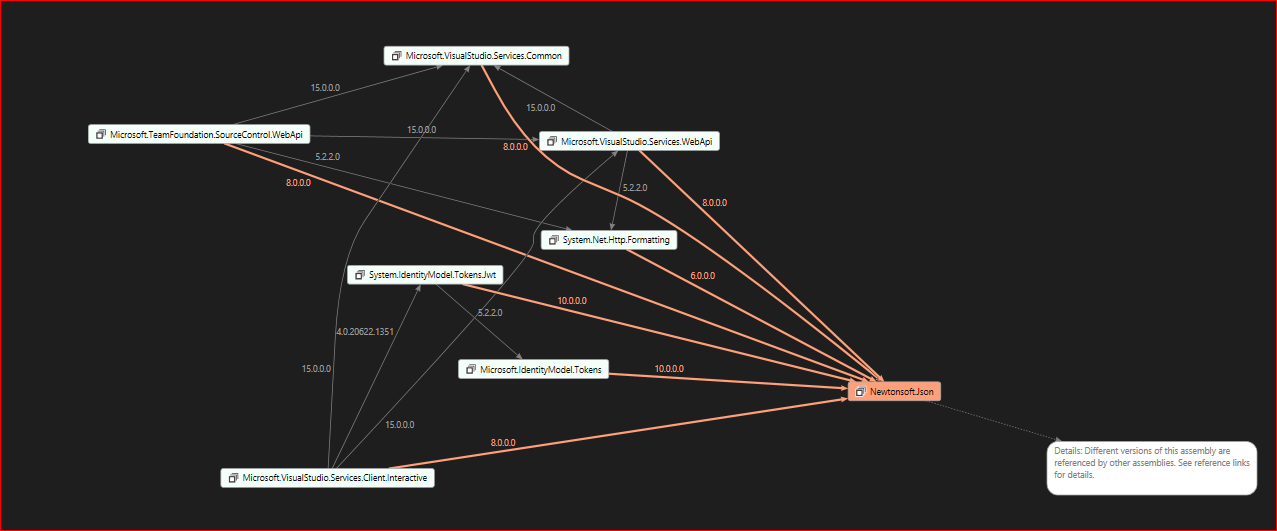
FYI. https://www.marss.co.ua/2017/05/reference-conflicts-analyzer-visual.html Dependency Conflict Analyzer
vbjay
on 5 Jun 2018
I am going to try this http://vunvulearadu.blogspot.com/2014/10/powershell-and-assembly-dll-how-to.html.
vbjay
on 5 Jun 2018
It does not work. https://github.com/vbjay/TFS-Release-Notes/commit/9df2a26c62060df2469dc432534a1070e29effaf.
vbjay
on 5 Jun 2018
So frustrating. Trying to us the teamfoundation client from an existing WPF app. Where is the API documentation?!? all the links lead back to the sample page that requires the VSS nuget packages which don't work with .net standard.
 jeffkotula
on 19 Sep 2018
jeffkotula
on 19 Sep 2018
This issue has been automatically marked as stale because it has not had recent activity. It will be closed if no further activity occurs. Thank you for your contributions.
![stale[bot] picture](https://avatars3.githubusercontent.com/in/1724?v=4&s=40) stale[bot]
on 28 Feb 2019
stale[bot]
on 28 Feb 2019
No stale.
vbjay
on 28 Feb 2019
I'm trying to create a function with the Client Package(s) mentioned in this article and I'm running into a very similar issue. When I try and establish a new VssConnection, I am presented with:
Method not found: 'Newtonsoft.Json.JsonSerializerSettings System.Net.Http.Formatting.BaseJsonMediaTypeFormatter.get_SerializerSettings()'.
Lots of articles I'm reading are pointing towards System.Http.Formatting referencing an older Newtonsoft.Json ref. I believe that is what this GitHub is saying.
 mswilson4040
on 22 Jan 2020
mswilson4040
on 22 Jan 2020
This issue hasn't been updated in more than 180 days, so we've closed it. If you feel the issue is still relevant and needs fixed, please reopen it and we'll take another look. We appreciate your feedback and apologize for any inconvenience.
 cxwtool
on 25 Nov 2020
cxwtool
on 25 Nov 2020
Related issues
 mikedouglasdev
·
3Comments
mikedouglasdev
·
3Comments
 sevaa
·
3Comments
sevaa
·
3Comments
 LennartAJansson
·
3Comments
LennartAJansson
·
3Comments
 robinmanuelthiel
·
3Comments
robinmanuelthiel
·
3Comments
 dannyvv
·
3Comments
dannyvv
·
3Comments