Azure-devops-docs: Linked WorkItems not Shown
Hi,
The linked work items are not displayed on TFS work item if the linking is done using following ways:
- If we try linking work items using Visual Studio Team Explorer for GIT code development then those commits are not linked with TFS work item
- If we use git-commit command and include work item id in the comment like "Changes for #xxxx" even then the commits are not linked with TFS work item.
Please suggest why the commits are not getting linked with TFS work item for GIT using above mentioned ways.
Document Details
⚠ Do not edit this section. It is required for docs.microsoft.com ➟ GitHub issue linking.
- ID: 3167d770-e6d3-dde7-2a9f-89967fb49c58
- Version Independent ID: 66c7f3b8-6de6-47ad-c1fa-94fb98bdac69
- Content: Link work items to support traceability - VSTS & TFS
- Content Source: docs/work/track/link-work-items-support-traceability.md
- Service: unspecified
- GitHub Login: @KathrynEE
- Microsoft Alias: kaelli
 sawhneyapurva
All 7 comments
@KathrynEE Please loop me in on this one if you need - have you seen this before?
@sawhneyapurva When linking a work item to a commit, the link isn't added until the commit is pushed, just as a quick check, is the link to the work items not showing up after you push the commit?
 steved0x
on 9 May 2018
steved0x
on 9 May 2018
@steved0x , @KathrynEE Yes, I have pushed my commits and still they are not linking.
sawhneyapurva
on 11 May 2018
Having the same issue here.
Addin #ID to the commit message or linking the work item on the Team Explorer does not reflect on linked items section of the VSTS's backlog item.
 andre-f-paggi
on 20 Aug 2018
andre-f-paggi
on 20 Aug 2018
We're also having this issue...
 Allendorf231
on 10 Sep 2018
Allendorf231
on 10 Sep 2018
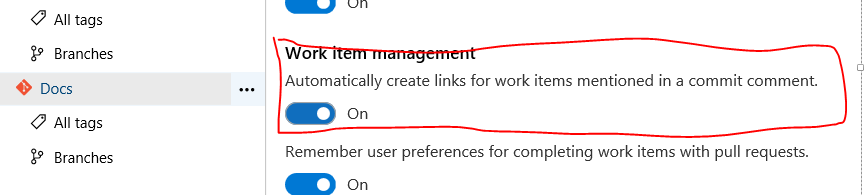
Found it!
Navigate to:
Project Settings > Code > Repositories > %Your repository% > Options
Now enable Work item management
Allendorf231
on 11 Sep 2018
@Allendorf231 This worked for me too!
Thank you very much for sharing the solution.
andre-f-paggi
on 11 Sep 2018
This issue has been automatically marked as stale because it has not had recent activity. It will be closed if no further activity occurs. Thank you for your contributions.
![stale[bot] picture](https://avatars3.githubusercontent.com/in/1724?v=4&s=40) stale[bot]
on 28 Feb 2019
stale[bot]
on 28 Feb 2019
Related issues
 csutorasr
·
3Comments
csutorasr
·
3Comments
 EM1L
·
3Comments
EM1L
·
3Comments
 adnanebrahimi
·
3Comments
adnanebrahimi
·
3Comments
 KacperMucha
·
3Comments
KacperMucha
·
3Comments
 Naphier
·
3Comments
Naphier
·
3Comments
Most helpful comment
Found it!
Navigate to:
Project Settings > Code > Repositories > %Your repository% > Options
Now enable Work item management