Azure-devops-docs: How to properly publish artifacts from multi-configuration setup?
Please provide a guide using best practices for the multi-configuration build approach.
Document Details
⚠ Do not edit this section. It is required for docs.microsoft.com ➟ GitHub issue linking.
- ID: 6c028a99-45f1-3609-3219-89789dc6b966
- Version Independent ID: f626f40e-1bab-4d8a-cd19-ab3b5da4be0a
- Content: Artifacts in Team Build
- Content Source: docs/build-release/concepts/definitions/build/artifacts.md
- Service: unspecified
- GitHub Login: @andyjlewis
- Microsoft Alias: alewis
 Advanium
All 6 comments
@Advanium can you provide some additional details on this one? I assume you are referring to executing a build that runs for multiple configurations (thus producing multiple sets of outputs), is that correct? And you are looking to understand the process for publishing all artifacts from all configs there, do I have it correct?
 mlearned
on 20 Jun 2018
mlearned
on 20 Jun 2018
@mlearned Yes, I was wondering if there is any guidance on multi-configuration builds using f.e. the BuildConfiguration and BuildPlatform modifiers. I especially like to have more insights on how to configure the steps involved in supporting multi-configuration builds: how to configure output directories, debug symbol packaging and artifact publishing.
I found it hard to grasp how to set up the folder structure in case of multi-configuration builds and accidently overwrote build output in the first couple of tries.
I also ran into issues with parallel builds having the "clean" option of the build solution task enabled. As each build wasn't run in isolation, files were deleted and the build would fail. It would be great to be notified that in multi-configuration mode, cleaning specific directories will have side effects.
In the end, I had like 30 changes of my build configuration until the build pipeline worked.
I think single artifact builds tend to be easier to setup and would appreciate a section dedicated to multi-configuration builds and how to deploy specific artifacts.
Advanium
on 25 Jun 2018
This Task is very slow. According to this (https://docs.microsoft.com/de-de/vsts/pipelines/tasks/utility/publish-build-artifacts?view=vsts) there is an option for parallel which is false on default. Is this the case for VSTS and is it possible to activate parallel copy?
 ttsdevelopers
on 23 Jul 2018
ttsdevelopers
on 23 Jul 2018
@mlearned We use multi-configuration to build and publish multiple projects from a solution.
Essentially:
- Create variable called
Projectswith value of:MySolution.Client,MySolution.Admin,MySolution.API - Set a phase to multi-configuration, using the
Projectsvariable as the multipler, with 3 agents (we want to build all three configurations at once). - Note you can apparently double up on multipliers (e.g.
ProjectsandBuildConfigurationeg. Debug/Release - resulting in x*y number of jobs ran) - Publish the packaged builds using the variable
$(Projects)for path and and artifact name.
The process, as an example, looks like this:

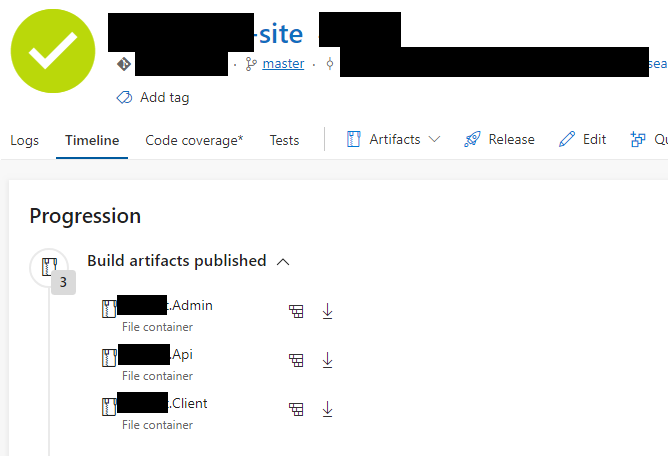
Resulting build shows 3 separate artifacts, which can then be individually consumed by release pipeline stages:
 iyerusad
on 26 Jul 2018
iyerusad
on 26 Jul 2018
@Advanium, thanks for the feedback and I'm sorry for the late response! Have you updated to use the publishPipielineArtifacts and are you still struggling with the same issues?
 chasewilson
on 4 Sep 2019
chasewilson
on 4 Sep 2019
@chasewilson Thank you. I didn't have the chance to try the build pipeline again, but the steps provided by @iyerusad sound reasonable and look like a good approach to parallel multi-configuration builds.
I figure that it's more of a lack of experience with the product than a lack in documentation, so I'll close this issue.
Advanium
on 4 Sep 2019
Related issues
 EM1L
·
3Comments
EM1L
·
3Comments
 sandeepzgk
·
3Comments
sandeepzgk
·
3Comments
 dannyvv
·
3Comments
dannyvv
·
3Comments
 letmaik
·
3Comments
letmaik
·
3Comments
 dtamai
·
3Comments
dtamai
·
3Comments
Most helpful comment
@mlearned We use multi-configuration to build and publish multiple projects from a solution.
Essentially:
Projectswith value of:MySolution.Client,MySolution.Admin,MySolution.APIProjectsvariable as the multipler, with 3 agents (we want to build all three configurations at once).ProjectsandBuildConfigurationeg. Debug/Release - resulting in x*y number of jobs ran)$(Projects)for path and and artifact name.The process, as an example, looks like this:

Resulting build shows 3 separate artifacts, which can then be individually consumed by release pipeline stages:
