Azure-devops-cli-extension: az devops security permission update doesn't work as expected
Describe the bug
I run below command to set the permission for a group, but nothing changes.
"az devops security permission update --allow-bit 7 --namespace-id [ID of security namespace] --subject [User Email ID or Group descriptor.] --token [your token]"
To Reproduce
Azure Cli Version: 2.0.77
Azure-Devops extension version: 0.15.0
Steps to reproduce the behavior:
- login using az login
- Run command
"az devops security permission update --allow-bit 7 --namespace-id [ID of security namespace] --subject [User Email ID or Group descriptor.] --token [your token]"
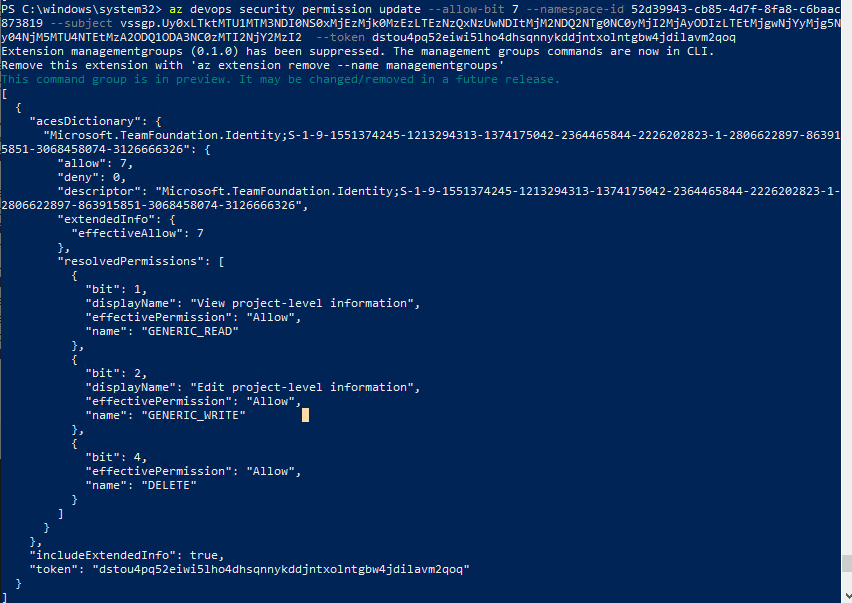
- There is no error but no effect. The group's permissions don't change.
Expected behavior
The group's permissions should be set as expected

Screenshots
See above ones
Additional context
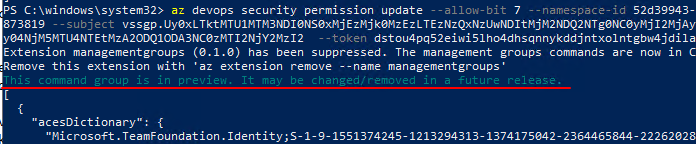
There is a line of dark green words “This command group is in preview. It may be changed/removed in a future release”. I’m not sure this command is still working. Please advise.
 AlexChongMicrosoft
All 13 comments
Hi @AlexChongMicrosoft ,
Your security token is incorrect.
I am guessing you are entering PAT token instead of security token.
Please replace it with security token , for project namespace it should be something like this,
$PROJECT:vstfs:///Classification/TeamProject/PROJECT_ID
Here, project ID would be the identifier of the project, you want to update permissions for.
You can get more information here
 ishitam8
on 3 Dec 2019
ishitam8
on 3 Dec 2019
@ishitam8
Thank you for attention. Yes, my token is my PAT. Seems it's wrong. I will have a try later and let you know the result.
AlexChongMicrosoft
on 3 Dec 2019
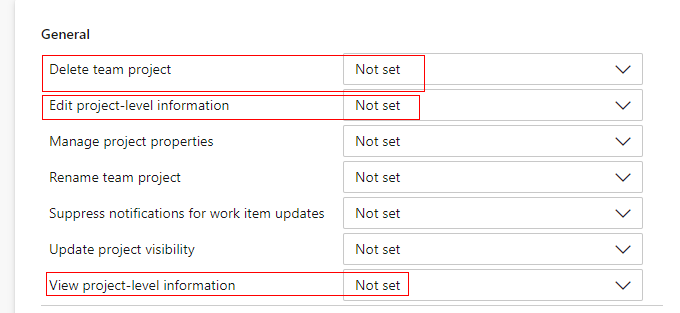
@ishitam8 Hi, still no luck.

After refreshing the page, nothing changed.
AlexChongMicrosoft
on 4 Dec 2019
Additionally, there is another user facing the same issue.
AlexChongMicrosoft
on 4 Dec 2019
@AlexChongMicrosoft , please pass the token in quotes. Since you are using powershell, $PROJECT is treated as variable instead of string constant.
You can verify the list of tokens for user/group with
az devops security permission list --subject <DESCRIPTOR> --id <namespaceID>
There should be an entry for "$PROJECT:vstfs:///Classification/TeamProject/PROJECT_ID" in this list.
If you are still facing the issue.
Could you please the share output of the 'az devops security permission list' command ?
Also, run the "az devops security permission update" with --debug switch and share the logs.
ishitam8
on 4 Dec 2019
Hi, @ishitam8 is there any way to make it easier? I followed the doc but still face so many difficulties.
1.I tried this command az devops security permission list --subject
2.Could you tell me how to use quote of this token? I find a method input token for az devops login. Not sure whether I can use the same way to input token for this az devops security permission update command.

3.I run the command with --debug already. Please see this attachment.
debugoutput.txt
4.Really appreciate your warm hands.
AlexChongMicrosoft
on 5 Dec 2019
Hi @AlexChongMicrosoft ,
As mentioned earlier and also verified from your debug logs, you are passing incorrect security token.
It should be $PROJECT:vstfs:///Classification/TeamProject/73d2ba69-da36-4d82-abb1-778c867bc350
Few things to note here:
- Since you are not passing quotes along with your token, $PROJECT:vstfs: is not passed as part of your token to the command.
- List command (az devops security permission list) is just to verify the existing tokens. Its not necessary that token you want to add will be present in the list. But it's always a good practice to verify if the token is present or not before updating the permissions.
- Security token and PAT token are not related anyway.
1.I tried this command az devops security permission list --subject --id , got a lot of different tokens. How could I detect which one is correct?
You can query by project ID, and check the output of 'az devops security permission list' and look for the project ID.
For PROJECT namespace, you can follow below steps:
[Note that this differs for different namespace since security token is different for namespaces]
- Get project ID
az devops project list -o json --query "value[?name=='<PROJECTNAME>'].id"
[This should return 73d2ba69-da36-4d82-abb1-778c867bc350 for you] Form a security token:
Append project ID to $PROJECT:vstfs:///Classification/TeamProject/
Which would give : $PROJECT:vstfs:///Classification/TeamProject/73d2ba69-da36-4d82-abb1-778c867bc350So, your final command would be:
az devops security permission update --allow-bit 7 --namespace-id 52d39943-cb85-4d7f-8fa8-c6baac873819 --subject vssgp.Uy0xLTktMTU1MTM3NDI0NS0xMjEzMjk0MzEzLTEzNzQxNzUwNDItMjM2NDQ2NTg0NC0yMjI2MjAyODIzLTEtMjgwNjYyMjg5Ny04NjM5MTU4NTEtMzA2ODQ1ODA3NC0zMTI2NjY2MzI2 --token '$PROJECT:vstfs:///Classification/TeamProject/73d2ba69-da36-4d82-abb1-778c867bc350'
Please note that the security token is wrapped within single quotes.
'$PROJECT:vstfs:///Classification/TeamProject/73d2ba69-da36-4d82-abb1-778c867bc350'
You can check the debug logs as well and see that the token argument is not correct
Command arguments: ['devops', 'security', 'permission', 'update', '--allow-bit', '7', '--namespace-id', '52d39943-cb85-4d7f-8fa8-c6baac873819', '--subject', 'vssgp.Uy0xLTktMTU1MTM3NDI0NS0xMjEzMjk0MzEzLTEzNzQxNzUwNDItMjM2NDQ2NTg0NC0yMjI2MjAyODIzLTEtMjgwNjYyMjg5Ny04NjM5MTU4NTEtMzA2ODQ1ODA3NC0zMTI2NjY2MzI2', '--token', '///Classification/TeamProject/73d2ba69-da36-4d82-abb1-778c867bc350', '--debug']
ishitam8
on 5 Dec 2019
Hi @ishitam8 Thank you so much for your patience!
I finally get a big progress, it's unbelievable that the root cause is the difference of " and '.
I change the command from "$PROJECT:vstfs:///Classification/TeamProject/73d2ba69-da36-4d82-a
bb1-778c867bc350" to '$PROJECT:vstfs:///Classification/TeamProject/73d2ba69-da36-4d82-a
bb1-778c867bc350' and it works for me.
How stupied I am. I never thought about this. Will have double test and let you know the progress! Thanks a lot.
AlexChongMicrosoft
on 5 Dec 2019
Hi, now I'm facing a new issue about "To use a personal access token, set the AZURE_DEVOPS_EXT_PAT environment variable at the process level". Should I continue working here or separate a new issue when necessary?
AlexChongMicrosoft
on 10 Dec 2019
Sorry, I didn't get what is the new issue. Can you share the debug logs (Use --debug switch with whatever command you facing issue with)?
ishitam8
on 27 Dec 2019
@ishitam8 Thank you for attention. Actually,in my testing, only on Linux it doesn't work well, but in windows everything is fine. We choose another way as a workaround. Thank you anyway.
AlexChongMicrosoft
on 30 Dec 2019
@AlexChongMicrosoft , Glad that I could help.
ishitam8
on 30 Dec 2019
@ishitam8 Thank you very much!
AlexChongMicrosoft
on 30 Dec 2019
Related issues
 fidou
·
5Comments
fidou
·
5Comments
 f00-beerd
·
3Comments
f00-beerd
·
3Comments
 timmkrause
·
3Comments
timmkrause
·
3Comments
 atbagga
·
3Comments
atbagga
·
3Comments
 bramvanhautte
·
6Comments
bramvanhautte
·
6Comments