Azure-devops-cli-extension: az devops login fails with "InitError: Failed to create the collection: Prompt dismissed.."
Describe the bug
Command Name
az devops login
Extension Name: azure-devops. Version: 0.12.0.
Errors:
The command failed with an unexpected error. Here is the traceback:


Failed to create the collection: Prompt dismissed..
Traceback (most recent call last):
  File "/usr/lib64/az/lib/python2.7/site-packages/knack/cli.py", line 206, in invoke
    cmd_result = self.invocation.execute(args)
  File "/usr/lib64/az/lib/python2.7/site-packages/azure/cli/core/commands/__init__.py", line 603, in execute
    raise ex
InitError: Failed to create the collection: Prompt dismissed..
To Reproduce:
Steps to reproduce the behavior. Note that argument values have been redacted, as they may contain sensitive information.
az devops login
Expected Behavior
Perform a successful login
Environment Summary
Linux-5.0.16-100.fc28.x86_64-x86_64-with-fedora-28-Twenty_Eight
Python 2.7.15
Shell: bash

azure-cli 2.0.71

Extensions:
azure-devops 0.12.0
Additional Context
 BenjaminHerbert
All 18 comments
@BenjaminHerbert : Thanks for reporting this, can you please share debug logs?
add --debug to your existing command and then share..
please make sure to remove any secrets your log might contain
 gauravsaralMs
on 26 Aug 2019
gauravsaralMs
on 26 Aug 2019
DEBUG: Command arguments: ['devops', 'login', '--debug']
DEBUG: Event: Cli.PreExecute []
DEBUG: Event: CommandParser.OnGlobalArgumentsCreate [<function on_global_arguments at 0x7fb2039a06e0>, <function on_global_arguments at 0x7fb2034ffb18>, <function on_global_arguments at 0x7fb20328f848>]
DEBUG: Event: CommandInvoker.OnPreCommandTableCreate []
DEBUG: Installed command modules ['acr', 'acs', 'advisor', 'ams', 'appconfig', 'appservice', 'backup', 'batch', 'batchai', 'billing', 'botservice', 'cdn', 'cloud', 'cognitiveservices', 'configure', 'consumption', 'container', 'cosmosdb', 'deploymentmanager', 'dla', 'dls', 'dms', 'eventgrid', 'eventhubs', 'extension', 'feedback', 'find', 'hdinsight', 'interactive', 'iot', 'iotcentral', 'keyvault', 'kusto', 'lab', 'managedservices', 'maps', 'monitor', 'natgateway', 'netappfiles', 'network', 'policyinsights', 'privatedns', 'profile', 'rdbms', 'redis', 'relay', 'reservations', 'resource', 'role', 'search', 'security', 'servicebus', 'servicefabric', 'signalr', 'sql', 'sqlvm', 'storage', 'vm']
DEBUG: Loaded module 'acr' in 0.004 seconds.
DEBUG: Loaded module 'acs' in 0.004 seconds.
DEBUG: Loaded module 'advisor' in 0.001 seconds.
DEBUG: Event: CommandLoader.OnLoadCommandTable []
DEBUG: Loaded module 'ams' in 0.005 seconds.
DEBUG: Loaded module 'appconfig' in 0.001 seconds.
DEBUG: Loaded module 'appservice' in 0.026 seconds.
DEBUG: Loaded module 'backup' in 0.002 seconds.
DEBUG: Event: CommandLoader.OnLoadCommandTable []
DEBUG: Loaded module 'batch' in 0.007 seconds.
DEBUG: Loaded module 'batchai' in 0.002 seconds.
DEBUG: Loaded module 'billing' in 0.001 seconds.
DEBUG: Loaded module 'botservice' in 0.002 seconds.
DEBUG: Event: CommandLoader.OnLoadCommandTable []
DEBUG: Loaded module 'cdn' in 0.002 seconds.
DEBUG: Loaded module 'cloud' in 0.001 seconds.
DEBUG: Loaded module 'cognitiveservices' in 0.001 seconds.
DEBUG: Loaded module 'configure' in 0.001 seconds.
DEBUG: Loaded module 'consumption' in 0.001 seconds.
DEBUG: Loaded module 'container' in 0.001 seconds.
DEBUG: Loaded module 'cosmosdb' in 0.006 seconds.
DEBUG: Loaded module 'deploymentmanager' in 0.002 seconds.
DEBUG: Loaded module 'dla' in 0.003 seconds.
DEBUG: Loaded module 'dls' in 0.002 seconds.
DEBUG: Loaded module 'dms' in 0.001 seconds.
DEBUG: Loaded module 'eventgrid' in 0.002 seconds.
DEBUG: Loaded module 'eventhubs' in 0.003 seconds.
DEBUG: Loaded module 'extension' in 0.001 seconds.
DEBUG: Loaded module 'feedback' in 0.000 seconds.
DEBUG: Loaded module 'find' in 0.000 seconds.
DEBUG: Loaded module 'hdinsight' in 0.001 seconds.
DEBUG: Loaded module 'interactive' in 0.000 seconds.
DEBUG: Loaded module 'iot' in 0.004 seconds.
DEBUG: Loaded module 'iotcentral' in 0.001 seconds.
DEBUG: Loaded module 'keyvault' in 0.005 seconds.
DEBUG: Loaded module 'kusto' in 0.001 seconds.
DEBUG: Loaded module 'lab' in 0.002 seconds.
DEBUG: Loaded module 'managedservices' in 0.001 seconds.
DEBUG: Loaded module 'maps' in 0.001 seconds.
DEBUG: Loaded module 'monitor' in 0.004 seconds.
DEBUG: Loaded module 'natgateway' in 0.001 seconds.
DEBUG: Event: CommandLoader.OnLoadCommandTable []
DEBUG: Loaded module 'netappfiles' in 0.002 seconds.
DEBUG: Loaded module 'network' in 0.026 seconds.
DEBUG: Loaded module 'policyinsights' in 0.001 seconds.
DEBUG: Loaded module 'privatedns' in 0.003 seconds.
DEBUG: Loaded module 'profile' in 0.001 seconds.
DEBUG: Loaded module 'rdbms' in 0.005 seconds.
DEBUG: Loaded module 'redis' in 0.001 seconds.
DEBUG: Loaded module 'relay' in 0.002 seconds.
DEBUG: Loaded module 'reservations' in 0.001 seconds.
DEBUG: Loaded module 'resource' in 0.006 seconds.
DEBUG: Loaded module 'role' in 0.004 seconds.
DEBUG: Loaded module 'search' in 0.001 seconds.
DEBUG: Loaded module 'security' in 0.002 seconds.
DEBUG: Loaded module 'servicebus' in 0.004 seconds.
DEBUG: Loaded module 'servicefabric' in 0.001 seconds.
DEBUG: Loaded module 'signalr' in 0.001 seconds.
DEBUG: Loaded module 'sql' in 0.006 seconds.
DEBUG: Loaded module 'sqlvm' in 0.001 seconds.
DEBUG: Event: CommandLoader.OnLoadCommandTable []
DEBUG: Loaded module 'storage' in 0.029 seconds.
DEBUG: Loaded module 'vm' in 0.014 seconds.
DEBUG: Loaded all modules in 0.212 seconds. (note: there's always an overhead with the first module loaded)
DEBUG: Extensions directory: '/home/redacted/.azure/cliextensions'
DEBUG: Found 1 extensions: ['azure-devops']
DEBUG: Extensions directory: '/home/redacted/.azure/cliextensions'
DEBUG: Extension compatibility result: is_compatible=True cli_core_version=2.0.71 min_required=2.0.49 max_required=None
DEBUG: Extensions directory: '/home/redacted/.azure/cliextensions'
DEBUG: Loaded extension 'azure-devops' in 0.019 seconds.
DEBUG: Event: CommandInvoker.OnPreCommandTableTruncate [<function init_command_file_logging at 0x7fb2032be050>]
INFO: az_command_data_logger : command args: devops login --debug
DEBUG: metadata file logging enabled - writing logs to '/home/redacted/.azure/commands'.
DEBUG: Event: CommandInvoker.OnPreArgumentLoad [<function add_subscription_parameter at 0x7fb209259c80>]
DEBUG: Event: CommandInvoker.OnPostArgumentLoad []
DEBUG: Event: CommandInvoker.OnPostCommandTableCreate [<function add_ids_arguments at 0x7fb2031d3ed8>, <function add_cache_arguments at 0x7fb2059c7c08>]
DEBUG: Event: CommandInvoker.OnCommandTableLoaded []
DEBUG: Event: CommandInvoker.OnPreParseArgs [<function _documentdb_deprecate at 0x7fb200dc4578>]
DEBUG: Event: CommandInvoker.OnPostParseArgs [<function handle_output_argument at 0x7fb2034ffb90>, <function handle_query_parameter at 0x7fb20328f8c0>, <function parse_ids_arguments at 0x7fb2031d3e60>, <function handler at 0x7fb200c8c938>, <function post_parse_args at 0x7fb2004868c0>]
DEBUG: Extensions directory: '/home/redacted/.azure/cliextensions'
DEBUG: Extensions directory: '/home/redacted/.azure/cliextensions'
INFO: az_command_data_logger : extension name: azure-devops
INFO: az_command_data_logger : extension version: 0.12.0
INFO: keyring.backend : Loading KWallet
INFO: keyring.backend : Loading SecretService
INFO: keyring.backend : Loading Windows
INFO: keyring.backend : Loading chainer
INFO: keyring.backend : Loading macOS
DEBUG: Keyring backend : keyring.backends.SecretService.Keyring (priority: 5)
DEBUG: handling generic error
ERROR: cli.azure.cli.core.util : The command failed with an unexpected error. Here is the traceback:
ERROR: The command failed with an unexpected error. Here is the traceback:
ERROR: cli.azure.cli.core.util : Failed to create the collection: Prompt dismissed..
Traceback (most recent call last):
File "/usr/lib64/az/lib/python2.7/site-packages/knack/cli.py", line 206, in invoke
cmd_result = self.invocation.execute(args)
File "/usr/lib64/az/lib/python2.7/site-packages/azure/cli/core/commands/__init__.py", line 603, in execute
raise ex
InitError: Failed to create the collection: Prompt dismissed..
ERROR: Failed to create the collection: Prompt dismissed..
Traceback (most recent call last):
File "/usr/lib64/az/lib/python2.7/site-packages/knack/cli.py", line 206, in invoke
cmd_result = self.invocation.execute(args)
File "/usr/lib64/az/lib/python2.7/site-packages/azure/cli/core/commands/__init__.py", line 603, in execute
raise ex
InitError: Failed to create the collection: Prompt dismissed..
WARNING: cli.azure.cli.core.util :
To open an issue, please run: 'az feedback'
WARNING:
To open an issue, please run: 'az feedback'
INFO: az_command_data_logger : exit code: 1
INFO: Suppress exception Return value is not string
INFO: telemetry.save : Save telemetry record of length 2463 in cache
WARNING: telemetry.check : Negative: The /home/redacted/.azure/telemetry.txt was modified at 2019-08-26 15:05:11.378089, which in less than 600.000000 s
INFO: command ran in 6.042 seconds.
@BenjaminHerbert : This error is coming from keyring library which we use for credentials management.
Will need some more information
please run
- pip uninstall keyring (this might fail, ignore failure)
- pip install keyring~=17.1.1
Then in a file named something like temp.py
add this code
import keyring
def _only_builtin(backend):
return (
backend.__module__.startswith('keyring.backends.') and
'chain' not in backend.__module__
)
keyring.core.init_backend(_only_builtin)
print('Keyring backend : %s', keyring.get_keyring())
old_token = keyring.get_password('fake key', 'Personal Access Token')
if old_token is not None:
keyring.delete_password('fake key', 'Personal Access Token')
keyring.set_password('fake key', 'Personal Access Token', 'fake token')
Try running this file using python temp.py
Let us know if temp.py is working fine or not and share error in case of any
cc: @ishitam8
gauravsaralMs
on 27 Aug 2019
It doesn't work, as far as I can tell:
$ python temp.py
('Keyring backend : %s', <keyring.backends.SecretService.Keyring object at 0x7f2771754fd0>)
Traceback (most recent call last):
File "temp.py", line 12, in <module>
old_token = keyring.get_password('fake key', 'Personal Access Token')
File "/usr/lib/python2.7/site-packages/keyring/core.py", line 57, in get_password
return _keyring_backend.get_password(service_name, username)
File "/usr/lib/python2.7/site-packages/keyring/backends/SecretService.py", line 64, in get_password
collection = self.get_preferred_collection()
File "/usr/lib/python2.7/site-packages/keyring/backends/SecretService.py", line 54, in get_preferred_collection
raise InitError("Failed to create the collection: %s." % e)
keyring.errors.InitError: Failed to create the collection: Prompt dismissed..
Hi @BenjaminHerbert ,
Thanks for verifying that the problem is with keyring library.
I am suspecting that auto-login is enabled on your system?
Could you please verify the same?
Context :
When auto-login is disabled, keyring uses system password to unlock the keyvault for you.
But when auto-login is enabled, you don't provide any password to login into the system , so in-turn keyring prompts for the password from user to access the secrets.
 ishitam8
on 27 Aug 2019
ishitam8
on 27 Aug 2019
Hi @ishitam8,
could you tell me how I can check/verify if auto-login is disabled or enabled?
BenjaminHerbert
on 27 Aug 2019
Hi @BenjaminHerbert ,
Can you check if you have AutomaticLoginEnable entry in .conf file in your /etc/gdm/ directory ?
If yes, what is the value for the same?
ishitam8
on 27 Aug 2019
@ishitam8 There is no gdm on this system installed and /etc/gdm/ directory does not exist.
Are you talking about autologin (login without entering a password?) to the linux system that I use to run the commands? No, I have to properly authenticate against my system. I am not logged in automatically.
BenjaminHerbert
on 27 Aug 2019
@ishitam8 @gauravsaralMs Could it be that the azure devops cli extension only works with python newer than my currently installed 2.7.15?
BenjaminHerbert
on 4 Sep 2019
@BenjaminHerbert : This is an issue between keyring library (which we use to secure the way password is stored) and auto login disabled.
In the meantime to unblock yourself, can you try setting PAT in an environment variable (AZURE_DEVOPS_EXT_PAT) and try?
Details: https://github.com/Azure/azure-devops-cli-extension/blob/master/doc/samples.md#log-in-via-azure-devops-personal-access-token-pat
gauravsaralMs
on 4 Sep 2019
Hi @BenjaminHerbert ,
Apologies for late reply.
Keyring stores secrets on Seahorse UI tool.
Did you get any password prompt while running "az devops login" command ?
If yes,
--- and if this is the first time you are using Seahorse, you would have to set up a Password for
Seahorse tool, which will be used for subsequent access to keyring.
--- otherwise, use the password which you must have setup when using Seahorse for the first time.If there was no prompt
-- Seems like Seahorse/Keyring collection was unintentionally locked for you. You will need to manually unlock the collection.Can you try following steps: Go to Apps -> Seahorse [Gnome Keyring] -- Passwords -> Login and/or Default - Unlock this collection if its locked [you will need the password which was used by you to set up the keyring for the first time] You should be able to run “az devops login” command successfully after this.
ishitam8
on 18 Oct 2019
Hi @ishitam8,
sorry, I can't remember if I was prompted to enter a password, it's almost two months ago.
I do not remember setting up a password to access Seahorse/keyring.
When I open Seahorse, there is no password section on the left:

When I enter az devops login --org .... I am prompted to enter a token.
When I enter a PAT, I get the following error:
keyring.backend : Loading KWallet
keyring.backend : Loading SecretService
keyring.backend : Loading Windows
keyring.backend : Loading chainer
keyring.backend : Loading macOS
Keyring backend : keyring.backends.SecretService.Keyring (priority: 5)
handling generic error
cli.azure.cli.core.util : The command failed with an unexpected error. Here is the traceback:
The command failed with an unexpected error. Here is the traceback:
cli.azure.cli.core.util : Failed to create the collection: Prompt dismissed..
Traceback (most recent call last):
File "/usr/lib64/az/lib/python2.7/site-packages/knack/cli.py", line 206, in invoke
cmd_result = self.invocation.execute(args)
File "/usr/lib64/az/lib/python2.7/site-packages/azure/cli/core/commands/__init__.py", line 603, in execute
raise ex
InitError: Failed to create the collection: Prompt dismissed..
Failed to create the collection: Prompt dismissed..
Traceback (most recent call last):
File "/usr/lib64/az/lib/python2.7/site-packages/knack/cli.py", line 206, in invoke
cmd_result = self.invocation.execute(args)
File "/usr/lib64/az/lib/python2.7/site-packages/azure/cli/core/commands/__init__.py", line 603, in execute
raise ex
InitError: Failed to create the collection: Prompt dismissed..
It looks like the az-cli can/does not properly access the keyring on (my) Linux? If it could, I'd expect it to set up Seahorse as you described and suppose usage of the cli tool would work. Any ideas?
BenjaminHerbert
on 21 Oct 2019
Hi @BenjaminHerbert ,
Ideally, keyring/Seahorse should have thrown a prompt after you entered PAT.
Something like this,
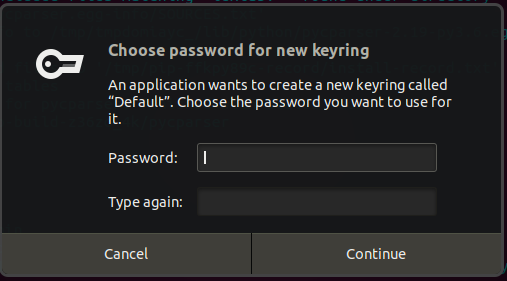
And when you click on cancel, then it throws the "Prompt dismissed errror."
Failed to create the collection: Prompt dismissed..
Traceback (most recent call last):
File "/home/ishi/.azure/cliextensions/azure-devops/secretstorage/util.py", line 47, in send_and_get_reply
return self._connection.send_and_get_reply(msg)
File "/home/ishi/.azure/cliextensions/azure-devops/jeepney/integrate/blocking.py", line 69, in send_and_get_reply
return future.result()
File "/home/ishi/.azure/cliextensions/azure-devops/jeepney/integrate/blocking.py", line 31, in result
raise value
jeepney.wrappers.DBusErrorResponse: [org.freedesktop.DBus.Error.UnknownMethod] ("No such interface 'org.freedesktop.DBus.Properties' on object at path /org/freedesktop/secrets/collection/Default",)
From your debug logs, it seems like the error is not coming from DBus package or Secretservice package.
Are you able to create a Seahorse collection of type "Password Keyring" in the Seahorse app manually? If yes, try creating one with name "Default", and verify if CLI is able to use the same.
Also, Can you check if Dbus-python package is available on machine, I think it's required for Keyring to function properly on Fedora?
ishitam8
on 24 Oct 2019
@ishitam8 Thank you for your reply.
- About your question regarding dbus python package:
The dbus-python package is installed on this machine.
dnf list --installed | grep dbus
python2-dbus.x86_64 1.2.4-13.fc28 @fedora
python3-dbus.x86_64 1.2.4-13.fc28 @fedora
- Regarding the seahorse/keyring:
At first I was not able to create a keyring at all. Regardless of the name) I received an error message:
Couldn't add keyring - No such secret collection at path: /
I could solve this problem, by running the following command and restarting seahorse . Without really understanding why this seems to solve the problem with keyring.
source /etc/X11/xinit/xinitrc.d/50-systemd-user.sh
(Source: https://bbs.archlinux.org/viewtopic.php?id=212196)
Afterwards, I could successfully run: az devops login :relieved:
Any ideas what is going wrong here and how to address this without causing this much confusion?
BenjaminHerbert
on 31 Oct 2019
@BenjaminHerbert ,
I am not sure why running the source command and restarting worked for you.
Since, the keyring library in linux uses different backends for different flavors of linux, users can run into different issues depending on their OS.
Currently we store credentials in file created in user home directory when secure keyring is not available on linux systems.
In your case, secure keyring is available but, it's malfunctioning or not configured properly.
Will it help if we bypass storing credential in keyring for such cases [where keyring is available but not configured appropriately] and fallback to storing credentials in file?
ishitam8
on 12 Nov 2019
Closing this issue since we have tackled this by including a fallback, even if keyring is not available/accessible. This is available in the latest release v0.15.0
 geverghe
on 15 Nov 2019
geverghe
on 15 Nov 2019
Apologies - the fix did not make it 0.15.0. It is planned for the next one.
geverghe
on 15 Nov 2019
Hi All, I am having the same issue when i try to login into azure devops using az devops login --org https://dev.azure.com/{ORGNAME} From within azcli container..But its working locally..Any additional changes needs to be done in the container?? This is the ouput.
Failed to store PAT using keyring; falling back to file storage.
You can clear the stored credential by running az devops logout.
Refer https://aka.ms/azure-devops-cli-auth to know more on sign in with PAT.
`bash-5.0# az --version
azure-cli 2.14.0
core 2.14.0
telemetry 1.0.6
Extensions:
azure-devops 0.18.0
Python location '/usr/local/bin/python'
Extensions directory '/root/.azure/cliextensions'
Python (Linux) 3.6.10 (default, May 21 2020, 05:54:39)
[GCC 9.2.0]
Legal docs and information: aka.ms/AzureCliLegal
Your CLI is up-to-date.
Please let us know how we are doing: https://aka.ms/azureclihats
and let us know if you're interested in trying out our newest features: https://aka.ms/CLIUXstudy`
 Sharath52
on 29 Oct 2020
Sharath52
on 29 Oct 2020
Related issues
 atbagga
·
5Comments
atbagga
·
5Comments
 bentterp
·
4Comments
bentterp
·
4Comments
 f00-beerd
·
3Comments
f00-beerd
·
3Comments
 benc-uk
·
4Comments
benc-uk
·
4Comments
 willsmythe
·
5Comments
willsmythe
·
5Comments
Most helpful comment
Hi All, I am having the same issue when i try to login into azure devops using
az devops login --org https://dev.azure.com/{ORGNAME}From within azcli container..But its working locally..Any additional changes needs to be done in the container?? This is the ouput.Failed to store PAT using keyring; falling back to file storage. You can clear the stored credential by running az devops logout. Refer https://aka.ms/azure-devops-cli-auth to know more on sign in with PAT.`bash-5.0# az --version
azure-cli 2.14.0
core 2.14.0
telemetry 1.0.6
Extensions:
azure-devops 0.18.0
Python location '/usr/local/bin/python'
Extensions directory '/root/.azure/cliextensions'
Python (Linux) 3.6.10 (default, May 21 2020, 05:54:39)
[GCC 9.2.0]
Legal docs and information: aka.ms/AzureCliLegal
Your CLI is up-to-date.
Please let us know how we are doing: https://aka.ms/azureclihats
and let us know if you're interested in trying out our newest features: https://aka.ms/CLIUXstudy`