Azure-cosmos-dotnet-v3: Large import failing mysteriously
Using .NET Core 3.1 + Microsoft.Azure.Cosmos 3.15.0
Azure Function > with BlobTrigger
Function listens to a blob size 0.5GB and imports around 2M documents to cosmosDB
Azure Function running under Premium plan > No timeout - always running
App insights integrated with Azure Function.
This is not a static Azure function. There is a known issues with DI with Azure Function V3. So I am using my custom implementation of DI and using only one instance of CosmosClient (a singleton).
Some perf tuning on SDK:
Current setting: Bulk is on, Retry default
Set EnableContentResponseOnWrite = false
Cosmos DB RU = Autoscale with 20K
Function App running in premium plan with sufficient nodes/CPU
Issues/Observations
- Azure Function in Azure cloud quietly dies/unresponsive/timing out (no application insights logs) even when logging explicitly. See below code.
- When ran Azure Function locally, it throws 408 (CPU high observed locally) - so this is fine
- CPU/Memory on Azure was high during the import but after scaling up and out, this is within the limits
- CosmosDB Metrics shows 429's and max RUs were around 20K. So, looks like bulk import is hitting too hard? It's not auto-throttling. How can we find out what is the batch size it's hitting? How can we throttle? How can we find out what is going on under the hood?
- This is very unpredictable. Some imports are successful while others failing
I cannot provide the complete code but here are some snippets that are in discussion.
Code:
CosmosClient client = clientBuilder.WithBulkExecution(true)
                                .WithConnectionModeDirect()
                                .Build();
Here's my bulk import code:
 List<Task> concurrentTasks = new List<Task>();
                foreach (var contact in contacts)
                {
                    concurrentTasks.Add(cosmosClient_registry.UpdateItemAsync(contact.contactnumber, contact).ContinueWith(async item => await AddImportMetadata(item, import)));
                }
                await Task.WhenAll(concurrentTasks);
Here's my logging code:
private async Task AddImportMetadata(Task<ItemResponse<Contact>> task, ContactImport import)
       object lockObj = new object();
            lock (lockObj)
            {
                try
                {
                    if (task.IsCompletedSuccessfully)
                    {
                        var response = task.Result;
                        import.TotalRequestUnitsUsed += response.RequestCharge;
                        import.TotalRecordsProcessed += 1;
                    }
                    else
                    {
                        log.LogError("Error saving Record # " + import.TotalRecordsProcessed);
                        AggregateException aggregateException = task.Exception;
                        foreach (var exception in aggregateException.InnerExceptions)
                        {
                            log.LogError($"Record Error {exception.Message} with id {task.Id}");
                        }
                    }
                }
                catch (Exception ex)
                {
                    log.LogError("Error saving Record # " + import.TotalRecordsProcessed);
                    log.LogError($"Record Error: " + ex.Message);
                }
            }
        }
Update code:
public async Task<ItemResponse<T>> UpdateItemAsync(string id, T item)
        {
            ItemRequestOptions itemRequestOptions = new ItemRequestOptions() { EnableContentResponseOnWrite = false };
            ItemResponse<T> itemResponse = await this._container.UpsertItemAsync<T>(item, new PartitionKey(id), itemRequestOptions);
            itemResponse.Diagnostics.ToString();
            return itemResponse;
        }
 manish-jain-1
All 8 comments
@manish-jain-1 can you please try using the 3.15.1 which was just released which contains a fix for bulk?
@ealsur do you have any suggestions?
 j82w
on 17 Dec 2020
j82w
on 17 Dec 2020
Have you contacted Azure Functions support? The fact that the environment shuts down should be investigated. What I have seen, depending on the Functions tier you are on, is that if you violate any of the limits, the execution is terminated.
A couple of things wrong with the code:
- Why are you only setting to retry once on 429s?
.WithThrottlingRetryOptions(TimeSpan.FromMinutes(10),1)
That configuration says that your max retry period is 10 minutes, but within those 10 minutes, you want to retry 1 time. So if you get 2 429s in 30 seconds, it will throw the exception. In my experience, if your provisioned RU is quite under the volume of data you are trying to save, you should instead use a high number of retries, because you will get throttled.
Your Task extension is modifying a shared variable
ContactImportand increasing values or modifying it, you need to be aware that these Tasks are executing in parallel, and there will be concurrency, and your code is not guarding against that.Is your Function code (outside of the code you shared) capturing unhandled exceptions with a global try/catch just in case any of your logic is failing?
Also, your ContinueWith is not observing the Task state, instead of merely testing for an Exception, verify
task.IsCompletedSuccessfullyand keep in mind that exceptions could be AggregateExceptions, in which case you'd need to Flatten and find the inner one.
Regarding your question on Autoscale: Bulk will send the operations as fast as it can, it is meant to exhaust the available throughput. If your provisioned throughput is not enough to handle the volume of data, you should either increase the available throughput or reduce the volume of data you process at a given time. SDK does not interact in any particular way with Autoscale, and Autoscale mechanism increasing the available RU might kick in independently. From the SDK we will receive 429s and retry on them, and that's it.
 ealsur
on 17 Dec 2020
ealsur
on 17 Dec 2020
Thanks @j82w I am upgrading to 3.15.1. Thanks @ealsur for your detailed response.
- I misunderstood this setting. Don't want to overload the server with default 9 retries, also, wanted to wait a little so don't run out RU's/sec. Default 30 sec seems too quick. With this, I am thinking set
WithThrottlingRetryOptions(TimeSpan.FromMinutes(5),3) - Yes, I am aware of that, I need to
lockmy resource, planning to do it. - Yes, there is a global error handler but haven't seen any errors logged.
- Great, I'll add
task.IsCompletedSuccessfullyandAggregateExceptions.
Regarding your last point, it will be nice to have a throttle setting something like 'send a batch of X records every Y seconds/minutes' and stay within the RUs/sec so import might take a little longer but it will not throw 429s.
I do have a MS Support ticket open and they are investigating Azure Functions part. I will keep you posted. Thanks for your help!
manish-jain-1
on 17 Dec 2020
Retry on Throttling is governed by the service. When the SDK receives a 429, we also receive a header set by the service that tells us how much to wait. You can see the logic here: https://github.com/Azure/azure-cosmos-dotnet-v3/blob/master/Microsoft.Azure.Cosmos/src/ResourceThrottleRetryPolicy.cs#L94
Regarding number 2. Adding a lock will potentially cause CPU bottleneck (what if a high number of operations are completing, you are locking the resource and they cannot complete and you cannot send new operations). Another option, which I used in this article: https://docs.microsoft.com/en-us/azure/cosmos-db/how-to-migrate-from-bulk-executor-library#capture-task-result-state is to basically return the state to the caller in the form of some Type. Then if you want to count the successful operations, you count over the results, not while the results are happening. This approach removes any locks.
ealsur
on 17 Dec 2020
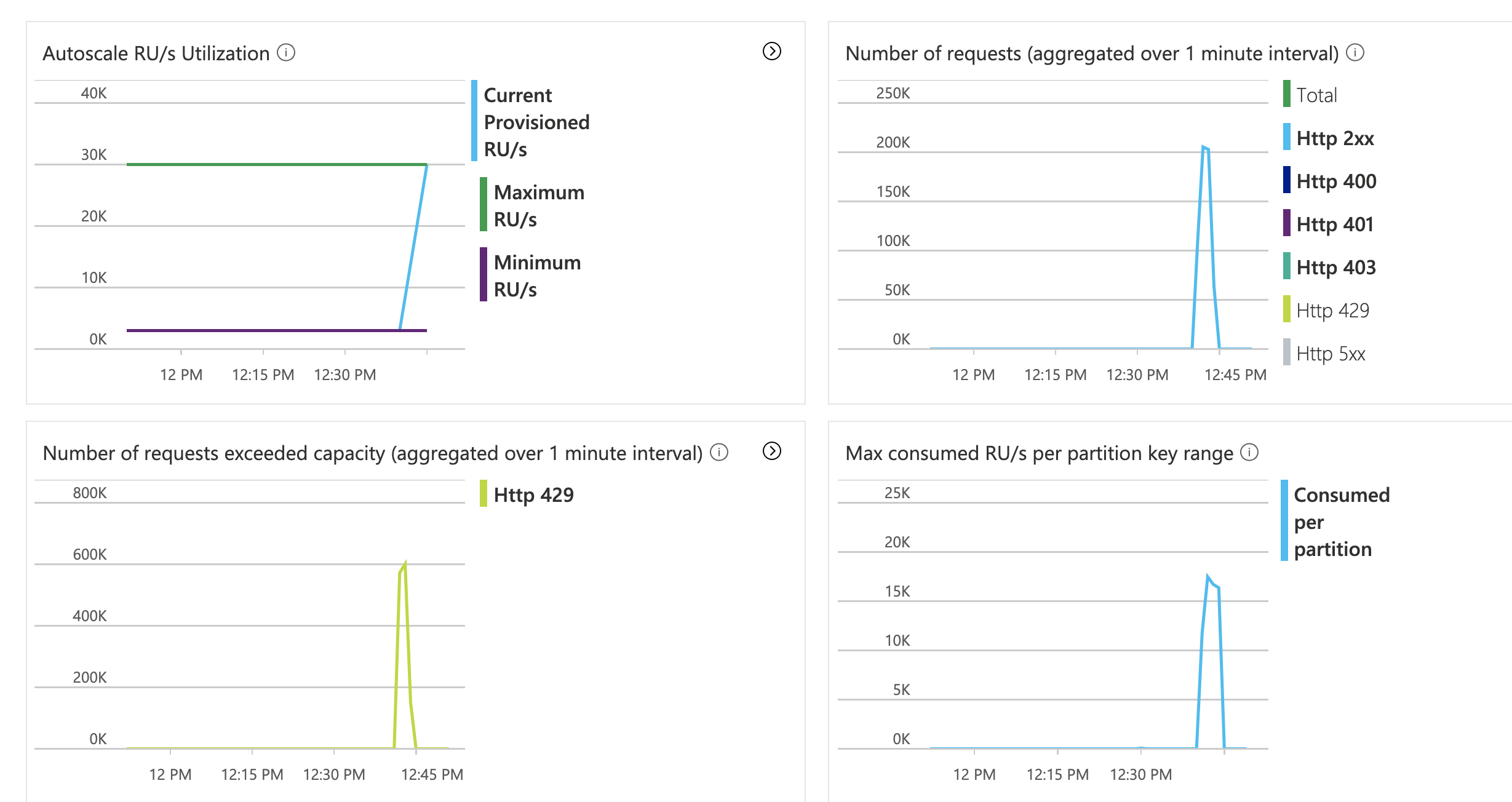
I increased max RUs to 30K but recent import failed again after importing 516K records (out of 2M). No logs in app-insights. If you look at the below graph, there are 600K 429's but the max consumed is well under 20K.
manish-jain-1
on 17 Dec 2020
AppInsight won't log TCP requests as far as I know, it only automatically logs HTTP requests.
The reason you are getting 429s is something I cannot know from the SDK perspective, from the library perspective we don't generate these 429s, we are just receiving it from the service. If they are there in the metrics, it means the client is receiving it, and retrying based on your configuration. The client cannot modify the backend behavior, if the backend returns 429 (for whatever reason), then the client needs to retry.
I don't know the Autoscale semantics regarding RU distribution, maybe @ThomasWeiss has more insights.
If you are trying to insert 2M items, assuming a single item consumes the less possible RU (5 RU/s for a 1Kb item), you are looking at 10M RU/s if you were to send them all at the same time. With 30K RU, it could potentially process 6K items per second without throttling (this is an estimation, and assumes a partition key value with high cardinality), but if the volume of data per second is higher, then you'd get throttled.
I would increase the retry count to 100, if the provisioned RU/s is well under the need for the volume of data.
ealsur
on 18 Dec 2020
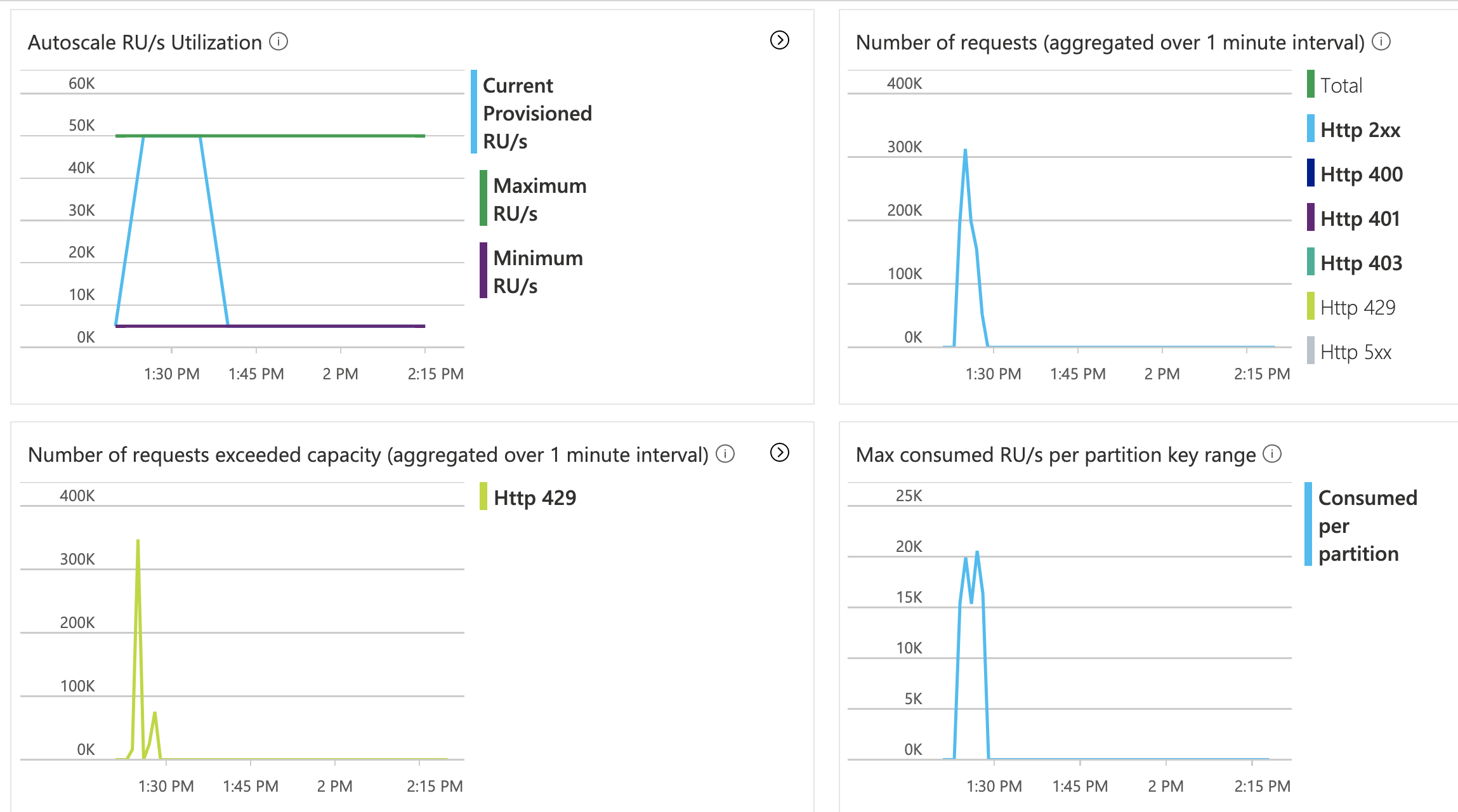
We were able to get App Insights logging working. Now with 50K RUs allocation, it's still failing. Azure function getting 408s after around 700K records and eventually crashes(?). CPU is high on Function App no matter how much I scale up (currently on P3V2). It keeps using all the available CPU. I tried to scale out but it's giving some other AF concurrency issues likely because of running the same import from multiple nodes. Interestingly this import works from a local PC connected to the same cosmos DB (CPU and memory maxed out but it keeps running). The partition key is the PK of the record so it's evenly distributed. So with 50K RU, it created 5 physical partitions. I also tried import with the bulk flag off but it stopped after around 2600 records.
2020-12-18T21:03:50.812 [Error] Response status code does not indicate success: RequestTimeout (408); Substatus: 0; ActivityId: ; Reason: (); with id 906833
manish-jain-1
on 19 Dec 2020
I would like to report this issue is now resolved. We are using around 60K RU's for this import. Also, we separated this Azure function into a new function app/app service plan that took care of high CPU issues. I still see some 429's in the logs but that is not a major issue. The only suggestion I have for this SDK is to go a little bit less aggressive for the bulk import. Thanks for your help!
manish-jain-1
on 23 Dec 2020
Related issues
 jriouxrandstadca
·
4Comments
jriouxrandstadca
·
4Comments
 kirankumarkolli
·
5Comments
kirankumarkolli
·
5Comments
 Liversage
·
7Comments
ealsur
·
6Comments
Liversage
·
7Comments
ealsur
·
6Comments
 darthmolen
·
4Comments
darthmolen
·
4Comments