Azure-cosmos-dotnet-v3: Queries not working in emulator
Describe the bug
When I run the CosmosDb emulator for local development and attempt to query, I get this error when reading results from a query using GetItemQueryIterator
Response status code does not indicate success: 400 Substatus: 0 Reason: (Response status code does not indicate success: 400 Substatus: 0 Reason: (Gateway Failed to Retrieve Query Plan: Unknown QueryFeatures: NonValueAggregateActivityId: f2ee3729-8021-4d23-a656-33a1ab830d92, Microsoft.Azure.Documents.Common/2.5.1, Windows/10.0.18362 cosmos-netstandard-sdk/3.2.1).).
Other methods like CreateItemAsync and ReadItemStreamAsync work. Furthermore, this error is isolated to the emulator. If I run this code against an Azure CosmosDb, I do not get the error.
To Reproduce
I have reproduced this on two machines regularly used for development with CosmosDb. We recently upgraded our .NET Framework project to use Azure Cosmos SDK v3. I was using version 2.4.5 of the emulator, and after upgrading to 2.5.6 (following steps at https://github.com/MicrosoftDocs/azure-docs/blob/master/articles/cosmos-db/local-emulator.md#troubleshooting) the issue persisted. Here is the code that produces the error
```c#
var cosmosDb = await Storage.GetCosmosDb();
var queryDefinition = new QueryDefinition($"SELECT * FROM projects project WHERE project.organization = '{CurrentUser.Organization}'");
var queryRequestOptions = new QueryRequestOptions
{
PartitionKey = new PartitionKey(CurrentUser.Organization),
};
var projectsQuery = cosmosDb.Containers[typeof(Project)]
.GetItemQueryIterator
var projects = new List
while (projectsQuery.HasMoreResults)
{
projects.AddRange(await projectsQuery.ReadNextAsync());
}
**Expected behavior**
The CosmosDb emulator should work for querying locally with `GetItemQueryIterator`.

**Actual behavior**
I get an exception with the error message above.

**Environment summary**
SDK Version: 3.2.0
OS Version; Windows 10 Home 1903

**Additional context**
Here's the stack trace from the route that calls `GetItemQueryIterator`:
at Microsoft.Azure.Cosmos.ResponseMessage.EnsureSuccessStatusCode()
at Microsoft.Azure.Cosmos.CosmosResponseFactory.CreateQueryFeedResponseHelperT
at Microsoft.Azure.Cosmos.CosmosResponseFactory.CreateQueryFeedResponseT
at Microsoft.Azure.Cosmos.FeedIteratorCore1.<ReadNextAsync>d__5.MoveNext()
--- End of stack trace from previous location where exception was thrown ---
at System.Runtime.CompilerServices.TaskAwaiter.ThrowForNonSuccess(Task task)
at System.Runtime.CompilerServices.TaskAwaiter.HandleNonSuccessAndDebuggerNotification(Task task)
at System.Runtime.CompilerServices.TaskAwaiter1.GetResult()
at DesignService.Controllers.ProjectController.
--- End of stack trace from previous location where exception was thrown ---
at System.Runtime.CompilerServices.TaskAwaiter.ThrowForNonSuccess(Task task)
at System.Runtime.CompilerServices.TaskAwaiter.HandleNonSuccessAndDebuggerNotification(Task task)
at System.Threading.Tasks.TaskHelpersExtensions.
--- End of stack trace from previous location where exception was thrown ---
at System.Runtime.CompilerServices.TaskAwaiter.ThrowForNonSuccess(Task task)
at System.Runtime.CompilerServices.TaskAwaiter.HandleNonSuccessAndDebuggerNotification(Task task)
at System.Web.Http.Controllers.ApiControllerActionInvoker.
--- End of stack trace from previous location where exception was thrown ---
at System.Runtime.CompilerServices.TaskAwaiter.ThrowForNonSuccess(Task task)
at System.Runtime.CompilerServices.TaskAwaiter.HandleNonSuccessAndDebuggerNotification(Task task)
at System.Web.Http.Controllers.ActionFilterResult.
--- End of stack trace from previous location where exception was thrown ---
at System.Runtime.CompilerServices.TaskAwaiter.ThrowForNonSuccess(Task task)
at System.Runtime.CompilerServices.TaskAwaiter.HandleNonSuccessAndDebuggerNotification(Task task)
at System.Web.Http.Dispatcher.HttpControllerDispatcher.
```
 sehcheese
All 9 comments
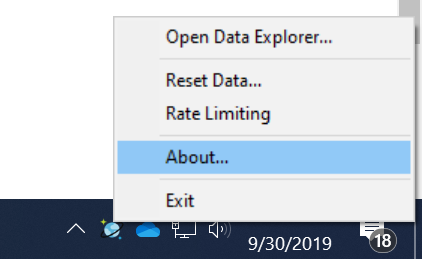
@sehcheese can you please go the emulator icon in the bottom tray. Right click and the about and verify you are running against the lastest 2.5.6.0? I just did a quick test with a similar query and completed successfully.
 j82w
on 30 Sep 2019
j82w
on 30 Sep 2019
@j82w Thanks for your response. I have verified I'm running 2.5.6.0 (733a5f35). Looking at the error text I posted, I noticed Microsoft.Azure.Documents.Common/2.5.1. What does this refer to and is that on the version it should be on?
sehcheese
on 30 Sep 2019
@bchong95 do you have any ideas on what would cause this?
j82w
on 30 Sep 2019
@sehcheese are you running the application on windows 64bit? You should only see this if it's going to the gateway to the query plan. If the application is x64 it can use the local dll to do it instead which is far faster.
j82w
on 30 Sep 2019
@j82w I am on Windows 64 bit, and "Azure Cosmos DB Emulator" appears in folder "C:\Program Files", not "C:\Program Files (x86)". Is there a setting somewhere I need to change to target the local dll, or should that happen automatically in the x64 Cosmos DB Emulator?
sehcheese
on 30 Sep 2019
It's not about the emulator. It's about the application. Most .NET framework application default targeting to x32 bit, and the service interop dll which is included with the SDK only works with x64 application running on Windows.
j82w
on 30 Sep 2019
I was able to get a repo of the issue. I'm still figuring out the root cause. You can switch your application to target x64 to get around the issue for now.

j82w
on 30 Sep 2019
@sehcheese I verified that the issue is the client has new feature that the emulator doesn't currently have. We are working on publishing a new emulator that will fix this issue.
j82w
on 1 Oct 2019
@sehcheese the latest emulator is released with the fix. Please download it and let me know if there is any issues.
j82w
on 4 Oct 2019
Related issues
 lbicknese
·
5Comments
lbicknese
·
5Comments
 darthmolen
·
4Comments
darthmolen
·
4Comments
 kirankumarkolli
·
5Comments
kirankumarkolli
·
5Comments
 johngallardo
·
4Comments
j82w
·
4Comments
johngallardo
·
4Comments
j82w
·
4Comments
Most helpful comment
@sehcheese I verified that the issue is the client has new feature that the emulator doesn't currently have. We are working on publishing a new emulator that will fix this issue.