Azure-cosmos-dotnet-v3: Could not load file or assembly Microsoft.Azure.Cosmos.Direct, Version=3.0.0.33
Describe the bug
Self contained and docker build won't start throwing FileNotFoundException: Could not load file or assembly 'Microsoft.Azure.Cosmos.Direct, Version=3.0.0.33, Culture=neutral, PublicKeyToken=31bf3856ad364e35'. The system cannot find the file specified.
'
Environment summary
SDK Version: Microsoft.Azure.Cosmos 3.0.0.18-preview
Microsoft.NETCore 3.0.0-preview6
 engbibi
All 21 comments
same here, got the error on dev ops build agent (hosted Ubuntu 1604). Works fine on local build.
netcoreapp2.2
 hendriksteinhorst
on 20 Jun 2019
hendriksteinhorst
on 20 Jun 2019
I'm seeing the same issue when trying to publish to Azure. I get a FileNotFoundException. This works fine locally however, so it was a surprise.
Using: netcoreapp2.2
SDK Version: Microsoft.Azure.Cosmos 3.0.0.18-preview
 BrianVallelunga
on 20 Jun 2019
BrianVallelunga
on 20 Jun 2019
Same problem running in xunit
 fuocor
on 20 Jun 2019
fuocor
on 20 Jun 2019
Is there a workaround for this? I'm surprised that the preview was released without working at all when hosted in Azure. Or perhaps it's a configuration setting of some sort?
BrianVallelunga
on 26 Jun 2019
@BrianVallelunga What is your deployment method? Our test pipeline runs on Azure DevOps, so we do restores on a daily basis of the Direct package.
Do you run Nuget restore as part of that pipeline? What is the Nuget version being used?
 ealsur
on 26 Jun 2019
ealsur
on 26 Jun 2019
@ealsur Currently I'm just right-click deploying from VS to an App Service. I was thinking maybe it's something to do with the App Service configuration. My csproj looks like this:
```
```
I'll add that I did not have this issue with preview 17.
BrianVallelunga
on 26 Jun 2019
@BrianVallelunga Are you deploying on App Service that uses Linux instances?
ealsur
on 27 Jun 2019
I created a NET Core 2.2 Web App and published to a Linux App Service, but I cannot seem to run into the issue.
ealsur
on 27 Jun 2019
@ealsur No, Windows. I'll retry everything tomorrow and see what happens. I even fully deleted the contents of the App Service directory to ensure no conflicting files.
Looking at the deployment settings, I have:
Configuration: Release
Target Framework: netcoreapp2.2
Deployment Mode: Framework-Dependent
Target Runtime: Portable
BrianVallelunga
on 27 Jun 2019
The files that are showing as being deployed (besides my app's dlls) are as follows:
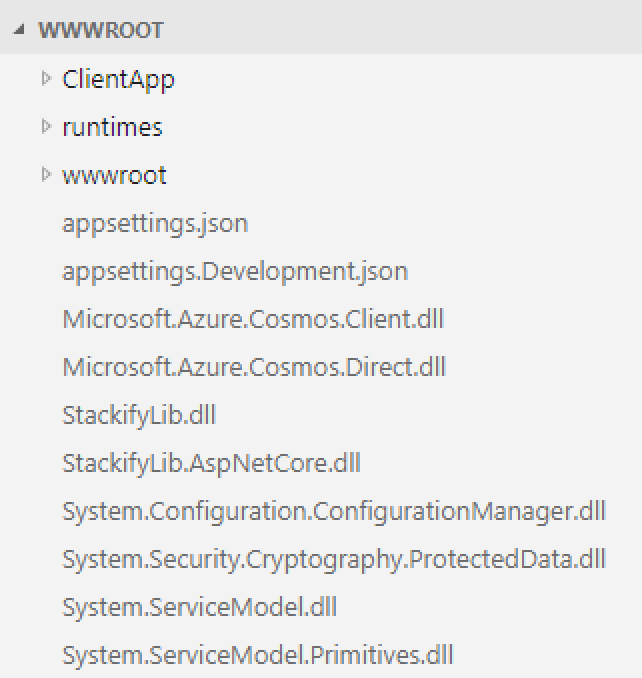
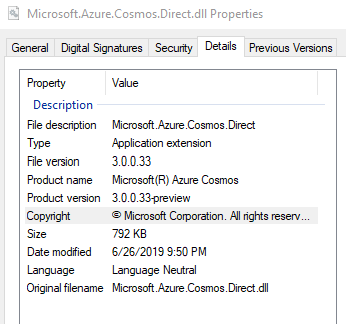
And the Microsoft.Azure.Cosmos.Direct file properties (that I manually downloaded from the deployment) are:
I've tried both the 32 and 64 bit settings and that does nothing either. The exact error message is:
[Error] Microsoft.AspNetCore.Diagnostics.ExceptionHandlerMiddleware: An exception was thrown attempting to execute the error handler.System.IO.FileNotFoundException: Could not load file or assembly 'Microsoft.Azure.Cosmos.Direct, Version=3.0.0.33, Culture=neutral, PublicKeyToken=31bf3856ad364e35'. The system cannot find the file specified.File name: 'Microsoft.Azure.Cosmos.Direct, Version=3.0.0.33, Culture=neutral, PublicKeyToken=31bf3856ad364e35'at Microsoft.Azure.Cosmos.CosmosClient..ctor
BrianVallelunga
on 27 Jun 2019
@ealsur I've attached a reproducible sample of a basic ASP.NET Core 2.2 project that shows the behavior when deployed to an Azure App Service, but not when debugging locally. It's basically File -> New Project with an injected CosmosDbService. Hitting the URL at /api/values will show the issue, which seems to happen in the in the CosmosDbService constructor on line 26.
BrianVallelunga
on 27 Jun 2019
@ausfeldt will take a look at this. Thank you for a full code repro.
 christopheranderson
on 27 Jun 2019
christopheranderson
on 27 Jun 2019
@BrianVallelunga @engbibi Was it working before updating to the latest version? If so, which is the version you were using before?
ealsur
on 28 Jun 2019
Seems prior version worked. Looking into it now.
 ausfeldt
on 28 Jun 2019
ausfeldt
on 28 Jun 2019
3.0.0.17 version is working for me. I haven't checked 3.0.0.19.
I've noticed that the dll is removed during publish phase. Even locally if you do dotnet publish then the file is not in the output folder.
 MikeyMCZ
on 29 Jun 2019
MikeyMCZ
on 29 Jun 2019
This seems to be working again on 19 😊
 paul-shell
on 30 Jun 2019
paul-shell
on 30 Jun 2019
Yes, 19 seems to fix the problem for me as well. Thanks.
BrianVallelunga
on 10 Jul 2019
19 and RC were validated to work.
In RC the packaging was little different and validated on both Windows & Linux to work.
Closing the issue for now.
Please re-open in-case needed.
 kirankumarkolli
on 10 Jul 2019
kirankumarkolli
on 10 Jul 2019
I am using 3.0.0-preview7.19362.6 in a simple proof of concept project where I am attempting to add an entity to the context and I am getting this exception on the .Add(entity) call:
Exception thrown: 'System.IO.FileNotFoundException' in System.Private.CoreLib.dll
An unhandled exception of type 'System.IO.FileNotFoundException' occurred in System.Private.CoreLib.dll
Could not load file or assembly 'Microsoft.Azure.Cosmos.Direct, Version=3.0.0.33, Culture=neutral, PublicKeyToken=31bf3856ad364e35'. The system cannot find the file specified.
 chad-chronotek
on 29 Jul 2019
chad-chronotek
on 29 Jul 2019
@chad-chronotek Could you update the SDK package to the latest version? The package has already GAed, you don't need to use the preview.
ealsur
on 29 Jul 2019
I just realized this original issue was with the Cosmos DB SDK team, I am using the EF Core Cosmos provider and getting this error which I believe is still only in preview right? I will post this over on their side, sorry about that...
chad-chronotek
on 29 Jul 2019
Related issues
 gegoodwin
·
7Comments
ealsur
·
4Comments
gegoodwin
·
7Comments
ealsur
·
4Comments
 JeremyLikness
·
7Comments
JeremyLikness
·
7Comments
 lukasz-pyrzyk
·
3Comments
kirankumarkolli
·
5Comments
lukasz-pyrzyk
·
3Comments
kirankumarkolli
·
5Comments
Most helpful comment
Seems prior version worked. Looking into it now.