Azure-cosmos-dotnet-v2: Contains a single character in a property returns inconsistent results from CosmosDB
I have just run into an issue when looking up documents in CosmosDB by checking if a property of the document contains a specific searched value. What I want to achieve was to show a list of results to the user on the user entry of each character of the desired searched value - so each user input would fire a request to the database with the changed searched value. So when trying to lookup up I would convert both the field and the searched value in either lower or upper case. The problem occurs when the searched term contains only one character as it would occasionally give results that do not contain that character in the corresponding property.
Here is an example:
The example data that the CosmosDB table holds:
{
    "entityType": 2,
    "org_id": "some guid",
    "identifier": "serialnumber1"
}
(I have stored documents with serialnumber1 to serialnumber12 just for testing purposes)
Linq query:
object => object .EntityType == 2 && object.OrgId == "some guid" &&
                      device.Identifier.ToUpper().Contains(identifier.ToUpper())
Also tried using SqlQuerySpec class as well to build a query to the database:
new SqlQuerySpec {
       QueryText = "SELECT TOP 10 * FROM Table t WHERE (t.entityType = @entityType AND t.org_id = @orgId AND CONTAINS(LOWER(t.identifier), @identifier))",
       Parameters = new SqlParameterCollection
        {    new SqlParameter("@entityType", 2),
             new SqlParameter("@orgId", orgId),
             new SqlParameter("@identifier", identifier.ToLower())
       }
}
The searched term that was used was a single character for example - "t" or "d" or "f" - and it would cause the occasional misbehavior. Pretty much every one in 10 tries would return a random response that I was not expecting as "t"/"d"/"f" are not contained within the string "serialnumber" that I had stored in the database.
If the searched term is longer than a single character, it seems to be working fine.
Thus, I was wondering what could be causing this behavior?
 kkostov5
All 10 comments
It took me under five minutes to write a unit test that confirms that this is in fact A MASSIVE BUG. Normally this might go weeks without a response, but I'm guessing that they'll be responding shortly.
 jackbond
on 5 Sep 2018
jackbond
on 5 Sep 2018
Hey @kkostov5. Thanks for reporting this.
Is it possible for you to share a runable project as a repro or some activity ids of these misbehaving requests (you can email me via the email in my github profile if you don't want to share them publicly)?
I've created a console app running against the emulator and left it running for a while trying to do what you did with the SqlQuerySpec. code sample. I left it running for 10 minutes and didn't have a repro. I tried both gateway and direct mode. I tried on indexed and non-indexed properties.
I could repro the behavior if I had an empty string (""), which is to be expected, but from the code snippet you shared, probably unlikely the case.
I've added both @kirankumarkolli to help assign this to someone once we've got a repro to chase it down and @bchong95 in case he has any ideas on why queries might misbehave in this way.
 christopheranderson
on 6 Sep 2018
christopheranderson
on 6 Sep 2018
ActivityId: 71e235c6-8ac8-400e-8e72-0c57c4c01d1a
With code that looked like this...
            var query = _DocumentClientRO
                        .CreateDocumentQuery<T>(CollectionUri)
                        .Where(predicate)
                        .Take(maxItemCount)
                        .AsDocumentQuery<T>();
I did a ToString() on query and it looked like this...
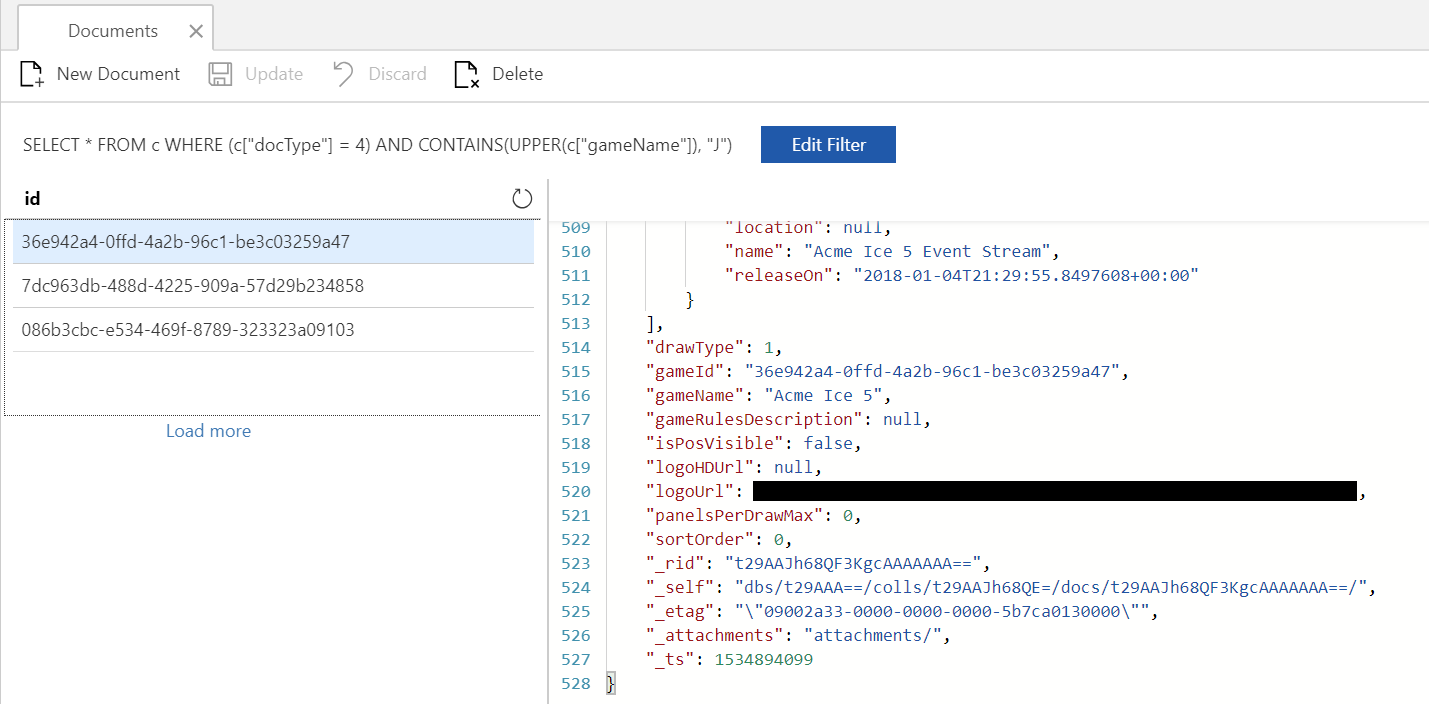
{"query":"SELECT TOP 1 * FROM root WHERE ((root[\"docType\"] = 4) AND CONTAINS(UPPER(root[\"gameName\"]), \"J\")) "}
Ok, I've now recreated this problem via the azure portal. I had to run the query multiple times, and most of the time I'd get back no results, but occasionally I'd get a result.
jackbond
on 6 Sep 2018
Folks, while someone looks into this deeper, could you check if HasMoreResults == true? Sometimes we return empty pages even though the query has more results. In this case lower or upper may lead to poor query performance leading to more pages. You can further troubleshoot query performance by looking at the query metrics documented here: https://docs.microsoft.com/en-us/azure/cosmos-db/sql-api-sql-query-metrics . You can see these in the portal as well (currently using special URL: https://portal.azure.com/?feature.dataexplorerquerymetrics=true )
 kirillg
on 6 Sep 2018
kirillg
on 6 Sep 2018
@kirillg I've got feature.dataexplorerquerymetrics=true in the querystring but I'm not seeing any additional information. My query also restricts the results to about 20 documents, i.e. c["docType"] = 4, and returns almost instantly, so I don't believe there are more results.
I'm also seeing the same behavior with LOWER in the query...
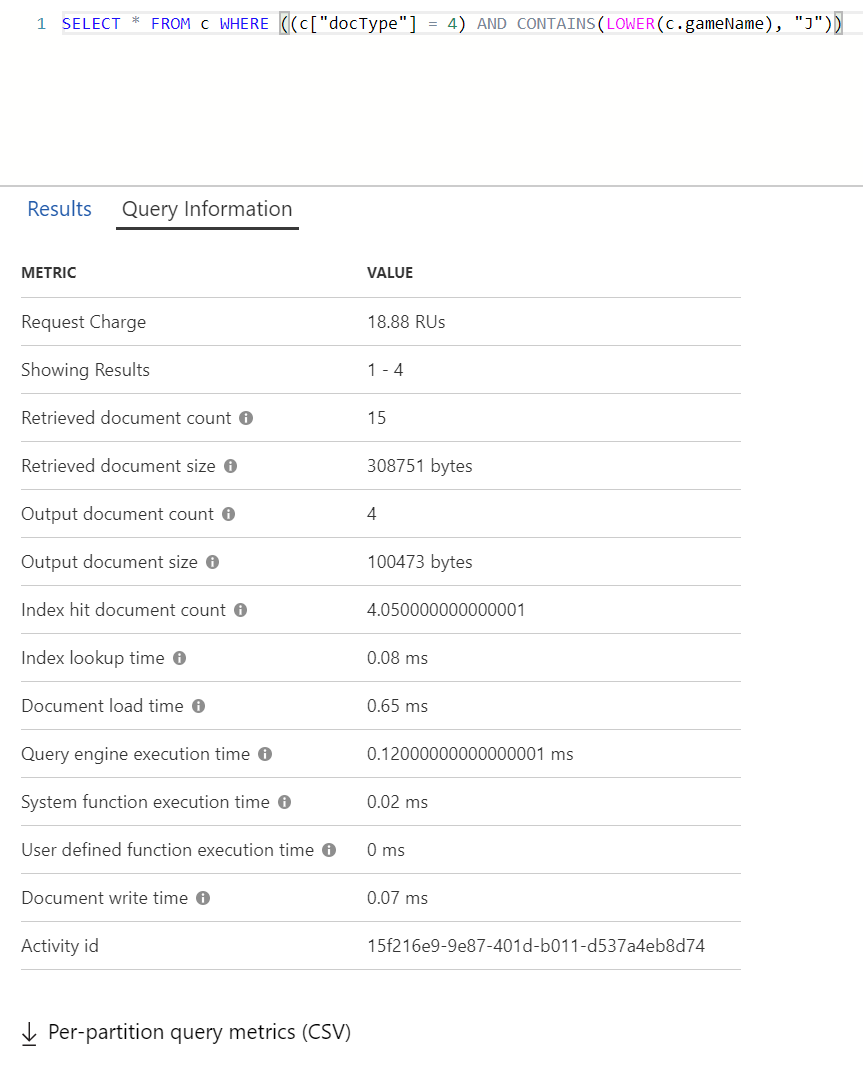
WHERE ((c["docType"] = 4) AND CONTAINS(LOWER(c.gameName), "J"))
It seems to be some weird incompatibility between the CONTAINS and UPPER/LOWER functions. I haven't been able to reproduce the problem with STARTSWITH or ENDSWITH.
jackbond
on 7 Sep 2018
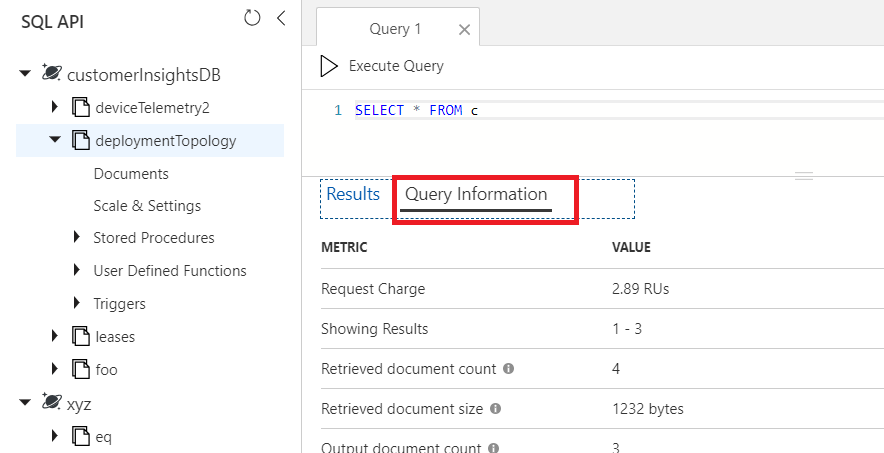
thanks Jack. Service some times will send an empty page with continuation token if the time limit or RU budget allocated to the current execution episode is exhausted. If the filter expression leads to poor performance (e.g. scan), this can happen even if you're not asking for lots of results. Try clicking "Load More" at the bottom in your current repro to see if there are more results. To see the query metrics, you need to run this query in a query tab which you get by clicking "New Query". once you have the results, click on Query Results tab (see image below)
kirillg
on 7 Sep 2018
The results were four game documents which didn't have a "J" in their names.
Activity Id: 15f216e9-9e87-401d-b011-d537a4eb8d74
jackbond
on 7 Sep 2018
Wow, it's great to see that you are working on Query Information UI, investigating query performance through test apps was very annoying)) thanks @kirillg
 ghost
on 7 Sep 2018
ghost
on 7 Sep 2018
@kkostov5 @jackbond this is confirmed to be a regression in our backend. Fix is partially deployed and will get fully deployed worldwide over the course of the next two weeks.
kirillg
on 10 Sep 2018
Closing this issue as the fix has been deployed.
 khdang
on 25 Jan 2019
khdang
on 25 Jan 2019
Related issues
 ryancole
·
6Comments
ryancole
·
6Comments
 Frankwayne
·
3Comments
Frankwayne
·
3Comments
 wingfeng
·
8Comments
wingfeng
·
8Comments
 Yonisha
·
5Comments
Yonisha
·
5Comments
 bowen5
·
4Comments
bowen5
·
4Comments
Most helpful comment
It took me under five minutes to write a unit test that confirms that this is in fact A MASSIVE BUG. Normally this might go weeks without a response, but I'm guessing that they'll be responding shortly.