Azure-cli: Az login - JavaScript is required to sign in
Describe the bug
az login causes command to hang in bash shell
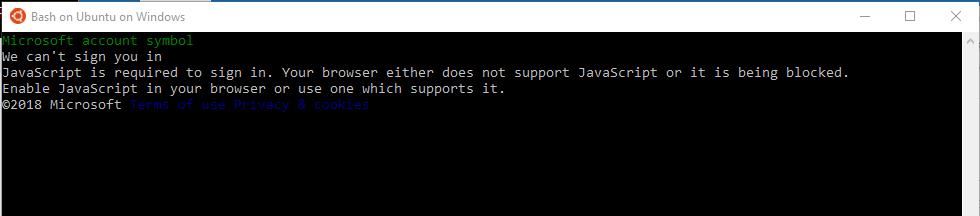
To Reproduce
Run az login from bash on Windows.
Expected behavior
az login to prompt for devicelogin
Environment summary
uday@DESKTOP-RGMO1N7:~$ az --version
azure-cli (2.0.41)
acr (2.0.28)
acs (2.1.3)
advisor (0.5.1)
ams (0.1.1)
appservice (0.1.36)
backup (1.1.2)
batch (3.2.4)
batchai (0.3.1)
billing (0.1.8)
cdn (0.0.14)
cloud (2.0.15)
cognitiveservices (0.1.13)
command-modules-nspkg (2.0.1)
configure (2.0.17)
consumption (0.3.1)
container (0.2.1)
core (2.0.41)
cosmosdb (0.1.21)
dla (0.1.0)
dls (0.0.22)
dms (0.0.1)
eventgrid (0.1.12)
eventhubs (0.1.3)
extension (0.1.0)
feedback (2.1.3)
find (0.2.11)
interactive (0.3.25)
iot (0.1.21)
keyvault (2.0.23)
lab (0.0.22)
maps (0.2.0)
monitor (0.1.8)
network (2.1.5)
nspkg (3.0.2)
policyinsights (0.1.0)
profile (2.0.27)
rdbms (0.2.5)
redis (0.2.14)
reservations (0.2.1)
resource (2.0.32)
role (2.0.26)
servicebus (0.1.2)
servicefabric (0.0.12)
sql (2.0.27)
storage (2.0.35)
vm (2.0.35)
Extensions:
dev-spaces-preview (0.1.6)
storage-preview (0.1.3)
Python location '/opt/az/bin/python3'
Extensions directory '/home/uday/.azure/cliextensions'
Python (Linux) 3.6.1 (default, Jul 2 2018, 18:43:15)
[GCC 4.8.4]
Additional context
Add any other context about the problem here.
 uday31in
All 5 comments
By default az login opens up a browser for you to authenticate yourself. If in your environment the condition is not fit you can use the command az login --use-device-code to fall back to a text-based interactive login.
 troydai
on 30 Aug 2018
troydai
on 30 Aug 2018
Many uses bash on Windows and this new default breaks authentication flow.
uday31in
on 30 Aug 2018
@uday31in, az login should work with bash on window, as CLI has particular logics for that, which was recommended by WSL team. Can you run uname -r and share with me the output?
 yugangw-msft
on 4 Sep 2018
yugangw-msft
on 4 Sep 2018
please reactivate with more info
yugangw-msft
on 19 Sep 2018
Close till more details are provided.
troydai
on 19 Sep 2018
Related issues
 ahmetb
·
3Comments
ahmetb
·
3Comments
 derekperkins
·
3Comments
derekperkins
·
3Comments
 oakeyc
·
3Comments
oakeyc
·
3Comments
 PrHar
·
3Comments
PrHar
·
3Comments
 williexu
·
3Comments
williexu
·
3Comments