Azure-cli: in devicelogin, redirected to http://localhost:8400/
Describe the bug
When tried to az login, new browser window opened. When tried to change account, redirected to localhost URL.
To Reproduce
az login- select account from list (already have multiple accounts logged in previously)
- click on back arrow at
password prompt pageto go back to the list of accounts - got redirected to http://localhost:8400/?error=access_denied&error_description=AADSTS90123%3a+Token+issuance+cannot+proceed+because+identity+or+claim+issuance+provider+denied+the+request.%0d%0aTrace+ID%3a+46d4a4fe-088b-44d4-82c4-65f537804700%0d%0aCorrelation+ID%3a+2169e8c8-d117-44f0-ae36-2ac59e2e99f7%0d%0aTimestamp%3a+2018-07-24+18%3a56%3a22Z&state=code
Expected behavior
- Display the list of previously used account to select for
az login
Environment summary
- Win 10
- azure-cli-2.0.42.msi used to install
Additional context
Screenshots of steps:
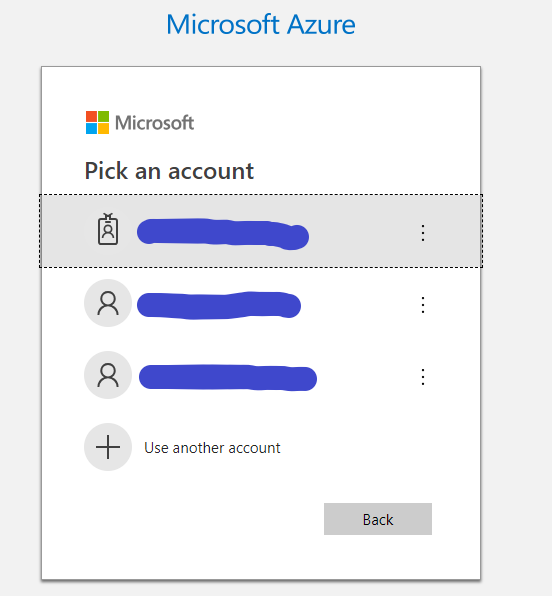
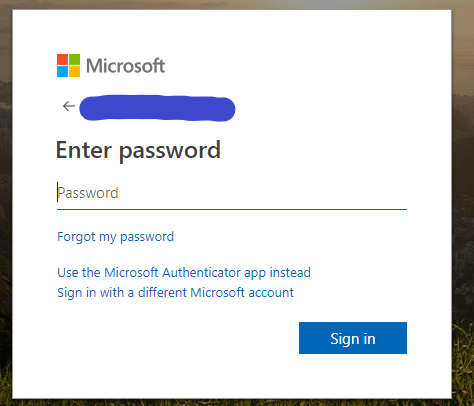

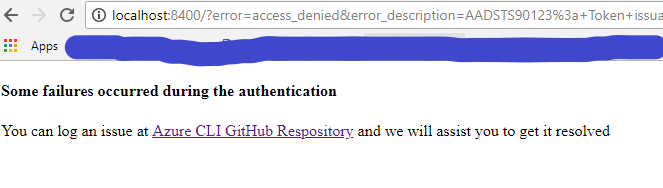
4- EXPECTED
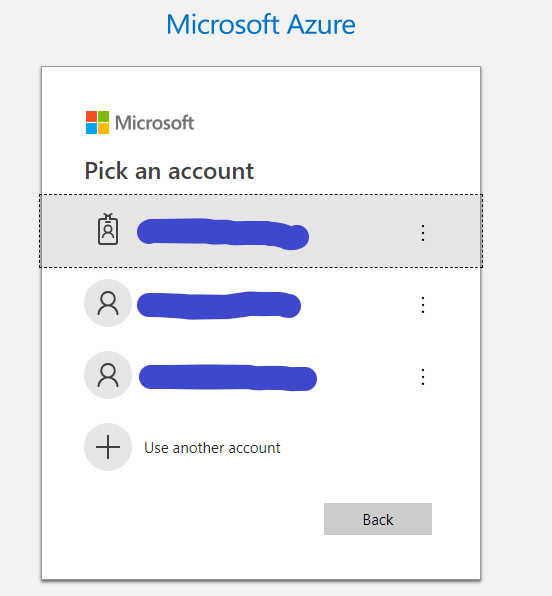
 iqan
iqan
All 10 comments
Thanks for reporting this. Before I fix this, you can ctrl+c to stop the cli command, and then rerun it.
 yugangw-msft
on 25 Jul 2018
yugangw-msft
on 25 Jul 2018
Thanks Yugang :)
iqan
on 28 Jul 2018
I am not able to reproduce this. Can you please try again? By default, account tile selection should not cause any errors, and should not post back to the CLI. This is a server end error trigger'd by browser page reload.
yugangw-msft
on 30 Jul 2018
Please reactivate when you have repro
yugangw-msft
on 1 Aug 2018
How can this be closed?
Azure cli is using code authorization when I try "login" and it is redirect to https://localhost:8400... This is a bug in the cli itself.
 assilabdulrahim
on 24 Dec 2018
assilabdulrahim
on 24 Dec 2018
I am seeing the same issue. Using a Chromebook, so probably related to the fact that I am running the command from a docker on the machine.
 mdangear
on 20 Jun 2019
mdangear
on 20 Jun 2019
@mdangear, when running inside docker, CLI will default to device code unless the image has UI browser, which is rare. But if you see the original issue, let me know and i will reopen the issue
yugangw-msft
on 22 Jun 2019
Intermittently upon issuing az login, I get this issue now after installing docker desktop for mac.
 ntaphadrian
on 26 Oct 2019
ntaphadrian
on 26 Oct 2019
I am also facing same issue. After giving command az login below URL is opened in browser. It has redirect_uri set to http://localhost:8400. I also have docker desktop for windows installed. Please note not issuing these commands from docker.
https://login.microsoftonline.com/common/oauth2/authorize?response_type=code&client_id=04b07795-8ddb-461a-bbee-02f9e1bf7b46&redirect_uri=http://localhost:8400&state=ja4dweq5o1lcixmxrxq8&resource=https://management.core.windows.net/&prompt=select_account
 iamrahul127
on 1 Feb 2020
iamrahul127
on 1 Feb 2020
Same problem here @iamrahul127
 ferpega
on 31 Mar 2020
ferpega
on 31 Mar 2020
Related issues
 troydai
·
3Comments
troydai
·
3Comments
 binderjoe
·
3Comments
binderjoe
·
3Comments
 FumiakiNagano
·
3Comments
FumiakiNagano
·
3Comments
 idkjs
·
3Comments
idkjs
·
3Comments
 derekperkins
·
3Comments
derekperkins
·
3Comments