Azuracast: File view of playlist does not display songs
Using Docker installation method
Yes
AzuraCast version
Powered by AzuraCast • v0.10.3, #e9c79f2 (2020-08-18 4:16) Rolling
Host Operating System
CentOS7
Describe the bug
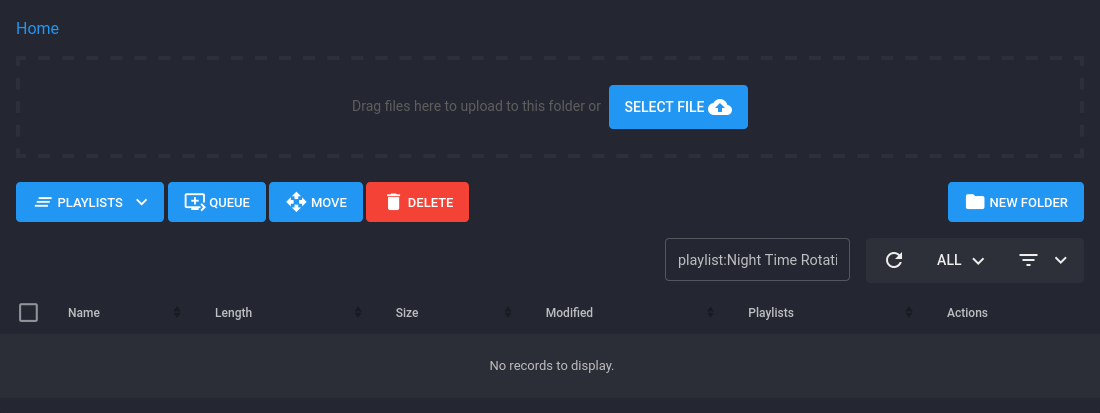
List view of playlist does not show tracks
To Reproduce
Steps to reproduce the behavior:
- Go to 'Playlists'
- Click on 'No. of Songs link'
- No songs are displayed
Expected behavior
A list of songs in the playlist (in this example, it should display 132 tracks)
Screenshots
 pixel-paul
All 8 comments
If you open your web inspector console (usually F12), then click "Network", then retry loading the page, you may be able to see an error message (if there is one).
In this case, I suspect it may also be caused by your playlist having spaces in its name.
 SlvrEagle23
on 20 Aug 2020
SlvrEagle23
on 20 Aug 2020
I get the same error. Firefox ESR 78.1.0 nothing in Network, but Console says
Source-Map-Fehler: Error: request failed with status 404
Ressourcen-Adresse: https://stream.eisradio.de/static/dist/lib/bootstrap/bootstrap-7fd2f04e75.bundle.min.js
Source-Map-Adresse: bootstrap.bundle.min.js.map
Source-Map-Fehler: Error: request failed with status 404
Ressourcen-Adresse: https://stream.eisradio.de/static/dist/lib/bootstrap-vue/bootstrap-vue-484d959dc2.min.js
Source-Map-Adresse: bootstrap-vue.min.js.map
Source-Map-Fehler: Error: request failed with status 404
Ressourcen-Adresse: https://stream.eisradio.de/static/dist/lib/moment/moment-7b3adc3f29.min.js
Source-Map-Adresse: moment.min.js.map
Source-Map-Fehler: Error: request failed with status 404
Ressourcen-Adresse: https://stream.eisradio.de/static/dist/lib/moment/locales-36c20445a3.min.js
Source-Map-Adresse: locales.min.js.map
EDIT: Tried it with Vivaldi 2.1.1337.51. Got the same error but nothing in Console or Network
My playlist have no spaces.
 LordHelmchen666
on 20 Aug 2020
LordHelmchen666
on 20 Aug 2020
It looks like the JSON response is empty:
GET https://my.stream.fm/api/station/1/files/list?internal=true&rowCount=0¤t=1&searchPhrase=playlist:Tuesday&file=
Response payload:
'{"current":1,"rowCount":0,"total":0,"rows":[]}'
In this case, there is 1 track in the playlist
pixel-paul
on 20 Aug 2020
@pixel-paul, if you just search for a file under Music Files, does that also return empty?
This commit seems to stop it looking in subfolders:
https://github.com/AzuraCast/AzuraCast/commit/0c7f19031405f4689ee3cf332fb845892a1c9a5c
In azuracast_web:/var/azuracast/www/src/Controller/Api/Stations/Files/ListAction.php
If you remove the extra clause:
//->andWhere('sm.path NOT LIKE :pathWithSubfolders')
And the associated parameter:
//->setParameter('pathWithSubfolders', $pathLike . '/%');
It seems to work again, @SlvrEagle23, I'm not sure what the optimization was for, will this be breaking search?
 beefour
on 22 Aug 2020
beefour
on 22 Aug 2020
@beefour, yes well spotted. That is exactly the case. The search filter does not return anything. I only ever use that function to list playlist contents!
pixel-paul
on 22 Aug 2020
@beefour Good catch. This optimization is helpful in the general file exploring sense (by avoiding pulling unnecessary media records when browsing the root directory of very large, hierarchical collections), but it does seem to have broken playlist searching.
Will work on this shortly.
SlvrEagle23
on 24 Aug 2020
This should be fixed as of the latest update.
SlvrEagle23
on 24 Aug 2020
Thanks @SlvrEagle23.
pixel-paul
on 24 Aug 2020
Related issues
 verdantsquare
·
3Comments
verdantsquare
·
3Comments
 Blazedallup
·
3Comments
Blazedallup
·
3Comments
 Vaalyn
·
4Comments
Vaalyn
·
4Comments
 ErnestPH
·
3Comments
SlvrEagle23
·
3Comments
ErnestPH
·
3Comments
SlvrEagle23
·
3Comments
Most helpful comment
This should be fixed as of the latest update.