Azuracast: Automatic Backup runs every hour; Disk out of space
Using Docker installation method
Yes
AzuraCast version
v0.10.3, #e9c79f2 (2020-08-18 4:16) Rolling • Docker • PHP 7.4
Host Operating System
Ubuntu 18.04
Describe the bug
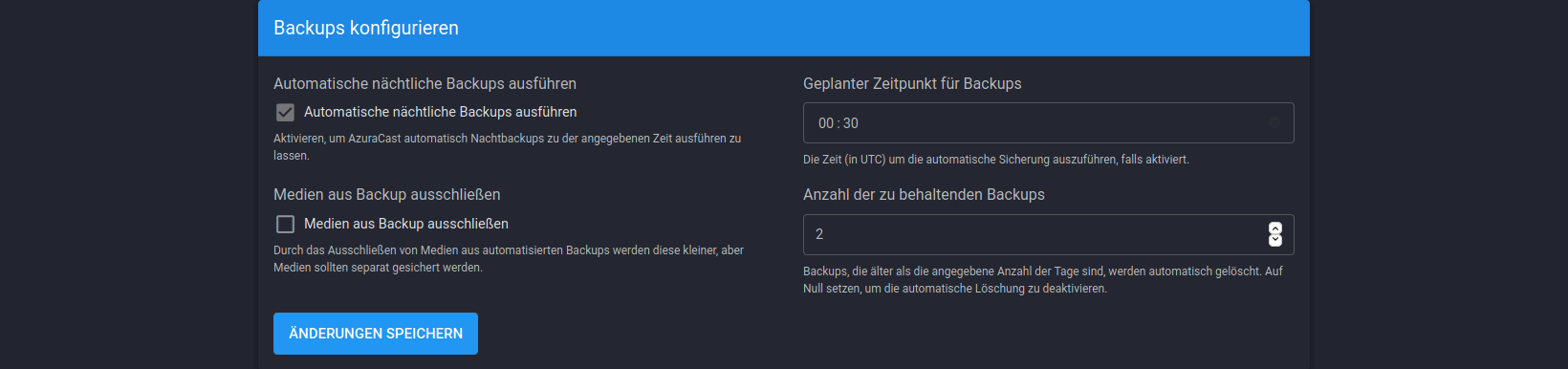
Automatic Backup runs to often. My settings: Backup all, run at 00:30, keep 2 Backups
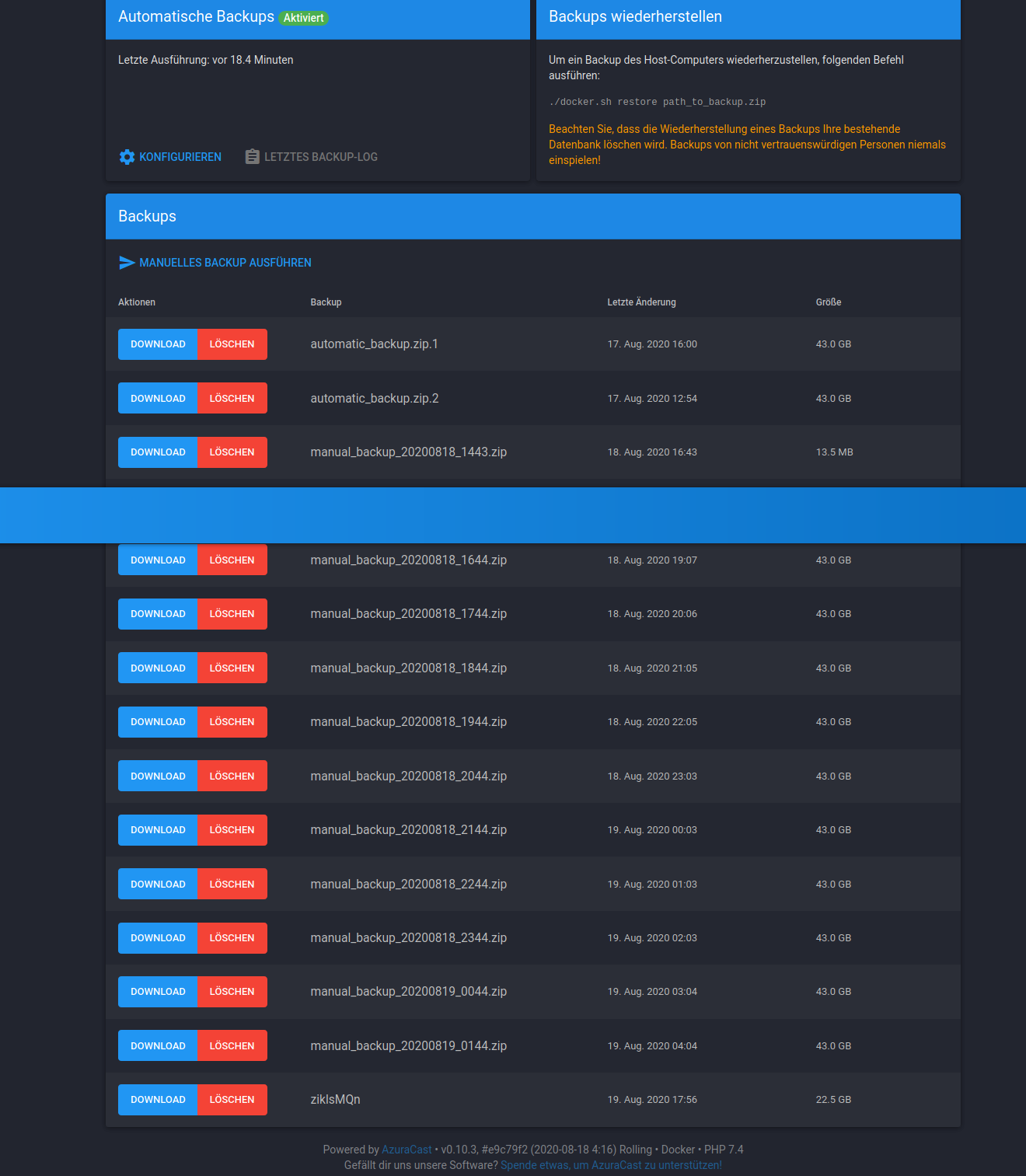
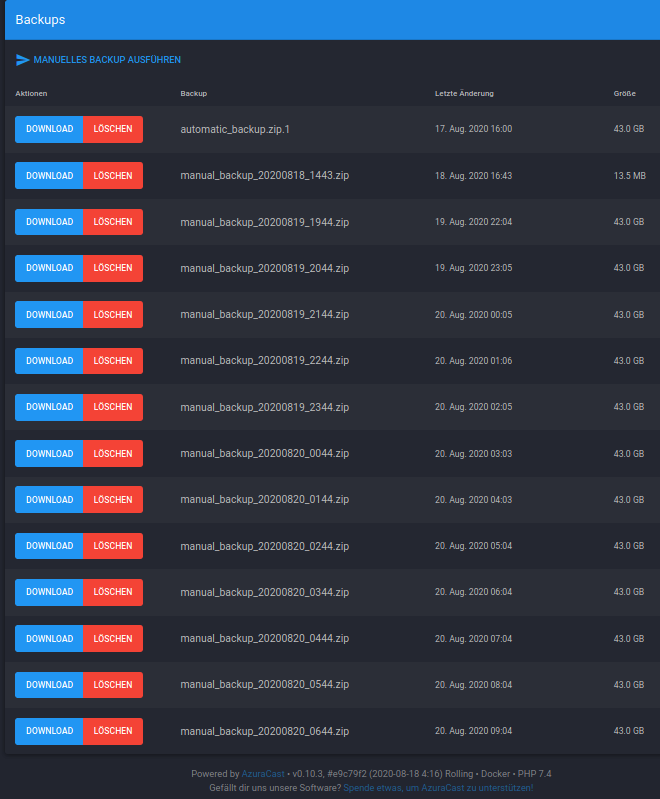
Now it runs hourly and name it "manual_backup*". I have done only one manual backup, others are done automaticly.
EDIT: Even when i deactivate backup it runs the backup.
Expected behavior
Do one backup at 00:30 and keep only 2 backups.
Screenshots
 LordHelmchen666
All 28 comments
I have deactivated backups, but it runs every hour until disk is full. Then my stream goes offline.
@SlvrEagle23
Any help please?
LordHelmchen666
on 20 Aug 2020
@LordHelmchen666 Those files are all named "manual_backup", not automatic backup...do you have a script that's running the backups via the CLI or otherwise?
 SlvrEagle23
on 20 Aug 2020
SlvrEagle23
on 20 Aug 2020
No i dont have a script or anything. I just used the browser. This behavior seems to exist since last update. I had never problems before.
LordHelmchen666
on 20 Aug 2020
Deactivated and activated with other settings. Until now it seems to be ok again. I will watch it and write here if it happens again.
LordHelmchen666
on 20 Aug 2020
No, it doesn't stop making backups every hour. I deactivated automatic backups and it runs every hour a full backup.
Can i force docker to reinstall all files without losing all data?
LordHelmchen666
on 22 Aug 2020
Bei mir taucht dieser Fehler auf, das Backup läuft in Dauerschleife. Wie kann ich manuell diese schleife unterbrechen?
With me this error appears, the backup runs in continuous loop. How can I manually interrupt this loop?
 Zellouser
on 27 Aug 2020
Zellouser
on 27 Aug 2020
No matter what i do backup runs once an hour. Even when i turn off backups.
There is no backup log. Could this causing it.
LordHelmchen666
on 27 Aug 2020
Nur zur Information . Ich benutze die Version v0.10.3, #d0ab57a (2020-08-26 16:36) Rolling • Docker • PHP 7.4. Durch das Dauerbackup ist die CPU Last hoch. Ich habe auch versucht die backups manuell zu löschen, aber sie werden wieder neu erstellt. Hoffentlich gib es bald eine Lösung.
Only for information . I'm using version v0.10.3, # d0ab57a (2020-08-26 16:36) Rolling • Docker • PHP 7.4. The CPU load is high due to the permanent backup. I've also tried deleting the backups manually, but they'll be rebuilt again. Hopefully there will be a solution soon. Greetings from Germany
Zellouser
on 27 Aug 2020
Meine Lösung quick and dirty:
- Kill the Zip process in CLI
- Backup löschen
- Manual Backup mit dem selben Namen des Files welcher in der
Dauerschleife läuft.
Das Manuelle Backup wird erstellt , mit Backuplog. Danach keine
Dauerbackups.
Ich hoffe es hilft jemanden.
My solution quick and dirty:
- Kill the Zip process in CLI
- Delete backup
- Manual backup with the same name as the file in the
Continuous loop is running.
The manual backup is created with the backup log. After that none
Continuous back ups.
I hope it will help.
Zellouser
on 28 Aug 2020
It's clear that we're getting a "runaway backups" problem for some people, but I currently have no information as to why that would be the case.
I'm keeping this issue open as "In Progress" since I assume it's a valid bug, I just don't know why it's happening yet, and once we can figure that out we can resolve it.
SlvrEagle23
on 29 Aug 2020
@LordHelmchen666 as a temporary solution delete any files older than X hours.
https://stackoverflow.com/questions/249578/how-to-delete-files-older-than-x-hours
 diego-vieira
on 7 Sep 2020
diego-vieira
on 7 Sep 2020
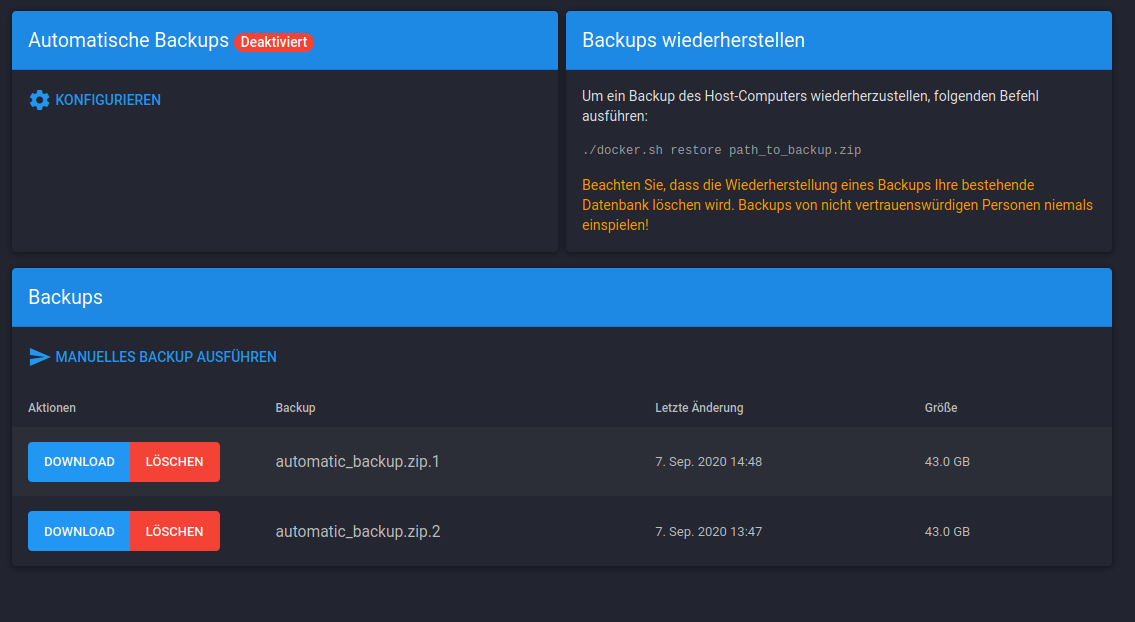
Disk space is not the problem anymore. But every hour a backup consumes lot of cpu power. I have deactivated automatic backups, but Azuracast does not respect the settings.
LordHelmchen666
on 7 Sep 2020
@LordHelmchen666 Nothing I'm seeing in the code is giving me any idea of why this would continue to be happening.
Apparently other people are experiencing it too (as another issue was created about the same problem) but I'm not seeing it on any installation I manage, development or production.
SlvrEagle23
on 10 Sep 2020
Meine Lösung rapide et sale:
- Tuez le processus Zip dans la CLI
- Sauvegarde Löschen
- Sauvegarde manuelle mit dem selben Namen des Files welcher in der
Dauerschleife läuft.
Das Manuelle Backup wird erstellt, mit Backuplog. Danach keine
Dauerbackups.
Ich hoffe es hilft jemanden.Ma solution rapide et sale:
- Tuez le processus Zip dans la CLI
- Supprimer la sauvegarde
- Une sauvegarde manuelle portant le même nom que le fichier de la
boucle continue est en cours d'exécution.
La sauvegarde manuelle est créée avec le journal de sauvegarde. Après cela, aucune
sauvegarde continue.
J'espère que cela aidera.
This procedure kills the process but we would say by refreshing the backup page a new process triggers ...
 fast97
on 13 Sep 2020
fast97
on 13 Sep 2020
same problem here!
no backups configured - still hourly manual backups.
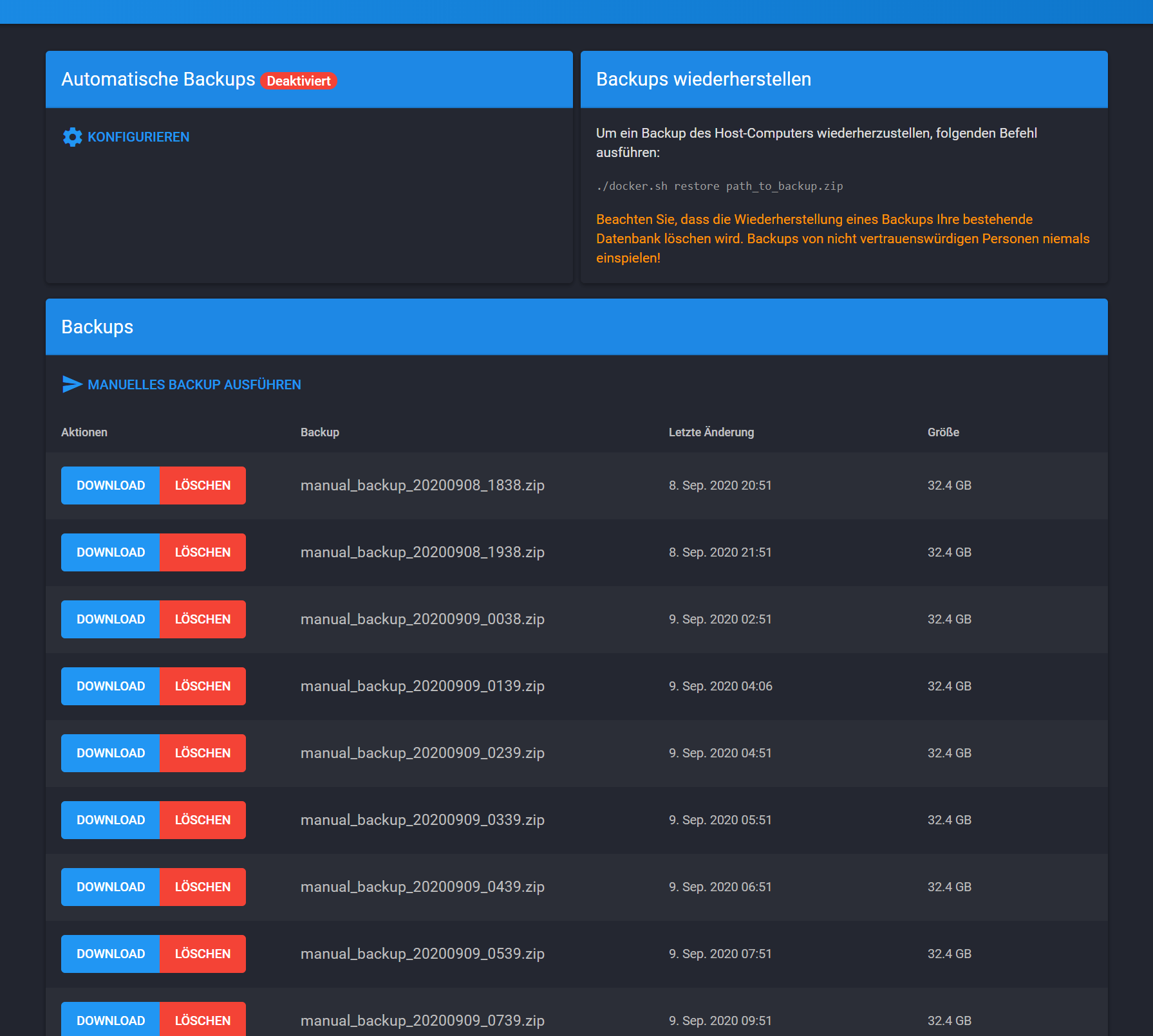
if this helps - I think, I actually did _ONE_ manual backup at around that time.
 h4de5
on 14 Sep 2020
h4de5
on 14 Sep 2020
I'm definitely aware of this issue and taking it very seriously, although I unfortunately have no leads whatsoever on why this is happening.
As long as automatic backups are disabled, the backup task should _never_ be triggering except when either the CLI command or the "Run Manual Backup" form is submitted.
I will take another run through things and see, but I need another set of eyes on this.
SlvrEagle23
on 14 Sep 2020
@SlvrEagle23 maybe this helps: I see that in my case, the first manual backup was done on 2020-09-08 at 16:38. As said, I remember that I actually pushed that button a while ago. So this would be ok.
According to file times, that backup finished at around 18:50 (so it took over an hour) in the meantime another backup process must have started at 17:38 - which took also more than an hour - and so on. The screenshot from op seems to have the same problem.
maybe the trigger is the initial manual backup. If you point me to the place in the code, I can lend you my eyes for a while ;)
/edit: is it possible that the event does not get consumed correctly? or is it retried automatically if its not done after an hour?
h4de5
on 14 Sep 2020
I've taken a look at all places that have a reference to the BackupMessage and from what I can see it should not be possible that a new BackupMessage is generated when automatic backups are disabled. The only place that triggers such a message without a user interaction is the Sync Task for running automatic backups but the first thing that the task does is check this here: https://github.com/AzuraCast/AzuraCast/blob/master/src/Sync/Task/Backup.php#L81-L85
So if the automatic backups are disabled it is not possible for the part that comes after that to run at all. When the red label that says disabled is visible we can be quite sure that this is the case since that label is controlled through the same setting, see here: https://github.com/AzuraCast/AzuraCast/blob/master/src/Controller/Admin/BackupsController.php#L50
I think it's safe to assume that AzuraCast itself is not generating a new BackupMessage so I've looked a bit into the Symfony Messenger Component which we are using for the messages and found that it will automatically re-sent a message if an exception is thrown while the message was consumed. This would be the most likely reason for a Backup to run multiple times without having automatic backups enabled. The documentation says this is by default configured to do 3 retries: https://symfony.com/doc/current/messenger.html#retries-failures
Could someone post their AzuraCast Application Log so that we can check that for error messages?
(Please make sure that the log contains entries from the time when this problem happens)
 Vaalyn
on 14 Sep 2020
Vaalyn
on 14 Sep 2020
I'm investigating this right now and I think I know exactly what's happening: a manual backup has been triggered, which spawns a message in the Message Queue dispatch service...but because the backup takes _so long_ to complete in some cases (over an hour, or even over 5 minutes in some cases) the message gets timed out, marked as unhandled and then re-handled by another process.
It seems that this is directly caused by running a manual backup that takes a little longer than the normal timeout process for the MessageQueue.
I'm working on a solution to this.
SlvrEagle23
on 14 Sep 2020
This should be significantly improved in the latest update; it turns out our message queue attempts to redeliver any messages that aren't already marked as handled every hour, so if your backup for any reason takes slightly longer than an hour, it'll just keep retrying it and stack up basically infinitely. I've moved this delay to be 86400 seconds (one day) so basically no installations should run into it, and even if it did happen it would be far less frequent.
SlvrEagle23
on 15 Sep 2020
@LordHelmchen666 If you don't mind, can you update and verify that the issue is resolved by our latest changes?
SlvrEagle23
on 16 Sep 2020
update made on my side. I deleted all the backups and azuracast all does an automatic backup as well.
Thank you
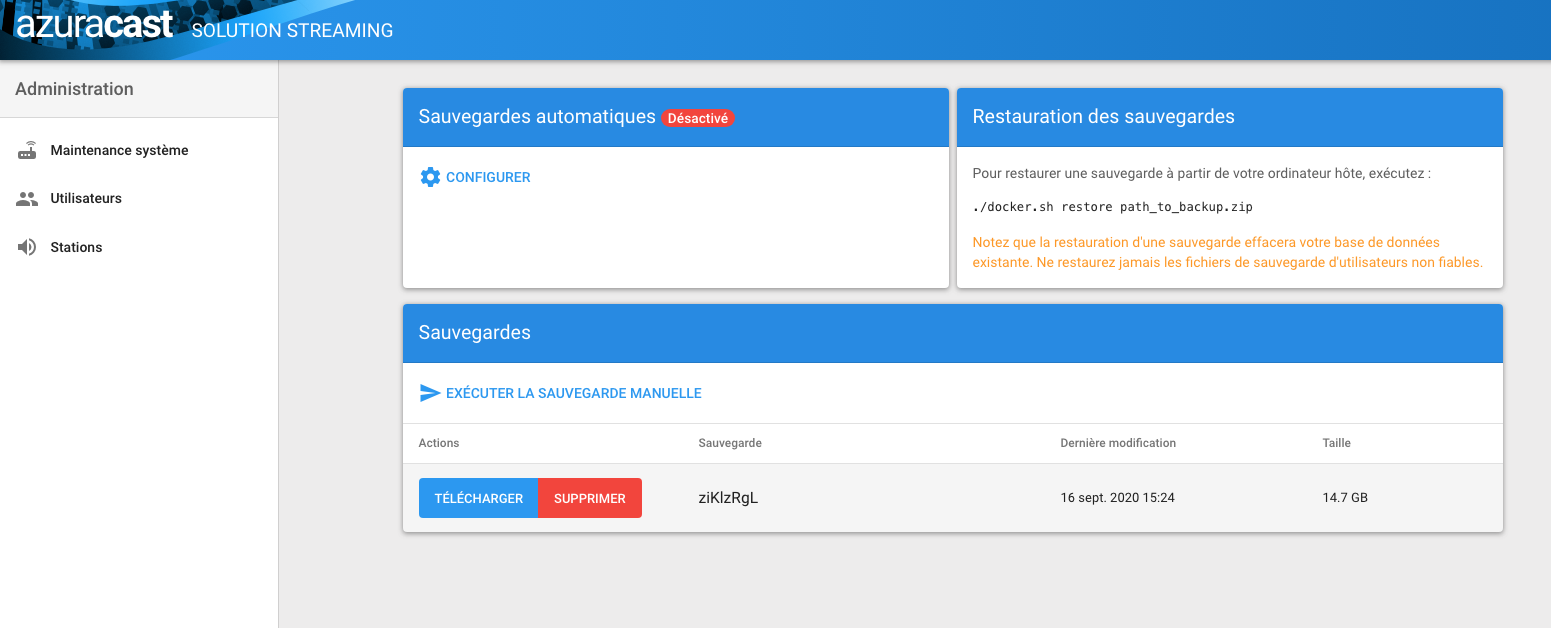
fast97
on 16 Sep 2020
@SlvrEagle23 I tried several manual backups now, but for some reason they are taking much less than an hour now - even thou they are just as big as before. Anyways: After the update I do not see the backups building up anymore. so fine for me.
h4de5
on 16 Sep 2020
@SlvrEagle23
I did an update already. Just a few minutes after the fix was public. The hourly backups have stopped. Now i'm just waiting for the automatic backup. I'll report it later if it work or not.
LordHelmchen666
on 16 Sep 2020
@SlvrEagle23
What i can say now. Hourly backups have stopped, but Azuracast does not respect automatic backup settings. Backups running every 24 hours even when i deactive them.
Also when i do a manual backup then every day there is a new file "manual_backup_date_time.zip". When i do a manual backup and name it "automatic_backup.zip" then it is working as expected, but it is also running when backups are deactivated.
LordHelmchen666
on 24 Sep 2020
@LordHelmchen666 From my investigations it appears you are in a rare edge case where your installation takes _so long_ to back up that it exceeds any reasonable time expectations we've built into the system. The best we can do in this scenario is to just increase the timeouts, as we have, to avoid exceeding our operational limits like that from causing so much damage to your overall disk space and server stability.
In cases such as yours, I have added two new changes to help mitigate this:
- Any update of AzuraCast will also clear the message queue, which will flush any backup tasks that may be lingering around, and
- The "System Debugger" page in system administration also has a "clear message queue" button that does the exact same thing anytime you need it to.
In any case, this is all largely a non-issue for any user for whom the backup process doesn't take substantially longer than an hour to complete.
SlvrEagle23
on 24 Sep 2020
This is a good solution. I'll make an update and give it a try.
Thank you very much!
LordHelmchen666
on 24 Sep 2020
@SlvrEagle23
I have updated to this commit a2c0637386765017c0553f81ab2dd2882ef699f7
Since this update automatic backups running as they should.
Thanks.
LordHelmchen666
on 7 Oct 2020
Related issues
 bo2008
·
3Comments
bo2008
·
3Comments
 Yusadolat
·
3Comments
Yusadolat
·
3Comments
 oussamatn
·
3Comments
oussamatn
·
3Comments
 susl16c
·
3Comments
susl16c
·
3Comments
 ErnestPH
·
3Comments
ErnestPH
·
3Comments
Most helpful comment
I'm investigating this right now and I think I know exactly what's happening: a manual backup has been triggered, which spawns a message in the Message Queue dispatch service...but because the backup takes _so long_ to complete in some cases (over an hour, or even over 5 minutes in some cases) the message gets timed out, marked as unhandled and then re-handled by another process.
It seems that this is directly caused by running a manual backup that takes a little longer than the normal timeout process for the MessageQueue.
I'm working on a solution to this.