Azuracast: Once per x Songs Not Working
Installation method
Docker but also happens with demo
Host OS (for Docker installations)
Ubuntu
Describe the bug
AutoDJ fails to play items to 'Once every x' playlist correctly.
To Reproduce
1 Create two playlist. One music playlist with a default weight. One jingles playlist to play after every 1 song.
2 Upload audio to each and restart everything
3 Only general music playlist will be played. Jingle rarely, if ever plays.
I check the log and nothing to indicate whats happening, also config looks correct.
Expected behavior
Item from jingle playlist to be played after every song from music playlist
Relevant Logs
Screenshots
Device(s):
- Device:
- OS:
- Browser:
- Version:
Additional context
 paulbonass
All 22 comments
@paulbonass Thank you for the report. This was a minor error caused by an omission in the updated AutoDJ code, and should be fixed as of the latest update.
 SlvrEagle23
on 19 Feb 2019
SlvrEagle23
on 19 Feb 2019
Ran the updater but it didn't come down so just manually changed the line and it works perfectly now. Thank for your lightning fast reply, amazing project!
paulbonass
on 20 Feb 2019
So, unfortunately I spoke to soon and still can't get this to work correctly, I'll often get long sweeps of songs with nothing from the 'jingle' playlist between them. Then randomly 3 will play back to back.
Is it possible in the liquidsoap config to manually set the rotation of playlists?
So if I've three playlists (Music A, Music B, Music C and Jingles) I can set something like.:
A, J, B, J, B, J, C, J, A, J, B, J, C, J, A
and just have it loop.
paulbonass
on 26 Feb 2019
@paulbonass I'm worried that your codebase isn't updating correctly, since you mentioned in the previous post that the code didn't change when you ran the updater.
Are you running the self-updater first? Like so:
./docker.sh update-self
./docker.sh update
That will ensure you have the latest version of the Docker Utility Script, which is necessary to help ensure updates go through correctly.
SlvrEagle23
on 26 Feb 2019
I moved away from docker and to the traditional install instead. Seemed to get worse with the .3 update today.
Spinning up a blank droplet now and fresh install. Will report back shortly.
Would still be amazing if there was some way of specifying the order of playlists, I assume it's not a native thing so I'll submit a feature request.
Thanks for everything so far man
paulbonass
on 26 Feb 2019
@paulbonass Moving from Docker to Traditional is the wrong way to be going; Docker installations are way easier for us to troubleshoot and update, and will cause you far less headache down the line as a result.
You absolutely can set your special playlists as "Advanced" playlists, and then in the Advanced Liquidsoap configuration, enter something like:
radio = rotate(weights=[1,1,5], [playlist_commercials, playlist_bumpers, radio])
(Adjusted for the proper variable names of your playlists, which defaults to the playlist name lowercased with spaces replaced by underscores.)
SlvrEagle23
on 26 Feb 2019
So I’ve rebuilt from scratch using the traditional install.
Then created a station with 4 playlists each containing 10 files of equal duration. (They’re actually all just tone files)
One of the playlists is set to play after ever 1 songs - yet it doesn’t.
I just created this droplet for testing so perhaps it would be easier to just give you access to assess yourself rather than screenshots etc
paulbonass
on 26 Feb 2019
@paulbonass I'll spin up a local instance and investigate further.
SlvrEagle23
on 26 Feb 2019
Think it may have something to do with the length of the jingle files. I've made some longer ones now (12 seconds each) and it's running slightly better, but still the occasional back to back jingle or song - every 10th or so.
Is there a minimum track duration for LS? Can't find anything documented online.
paulbonass
on 26 Feb 2019
For everyone reporting this issue, we are aware of the problem with the "once per x" playlists being processed correctly by AzuraCast and are working to investigate. Some issues with my local development stack have interrupted diagnosis and resolution of the issue.
A temporary workaround is to enable "Manual AutoDJ" mode in the advanced section under the AutoDJ tab of the station's profile.
SlvrEagle23
on 28 Feb 2019
For everyone reporting this issue, we are aware of the problem with the "once per x" playlists being processed correctly by AzuraCast and are working to investigate. Some issues with my local development stack have interrupted diagnosis and resolution of the issue.
A temporary workaround is to enable "Manual AutoDJ" mode in the advanced section under the AutoDJ tab of the station's profile.
noted on the temp fix…
Thanks!
 ErnestPH
on 28 Feb 2019
ErnestPH
on 28 Feb 2019
Hello all: I have made some fixes to how we handle the Liquidsoap metadata changes, so now even short jingles of less than 15 seconds should not wind up inadvertently looping indefinitely.
Let me know if this resolves your issues. Thank you all for your patience; my build environment completely went out of commission this week so I had to recreate it from scratch.
SlvrEagle23
on 28 Feb 2019
Morning,
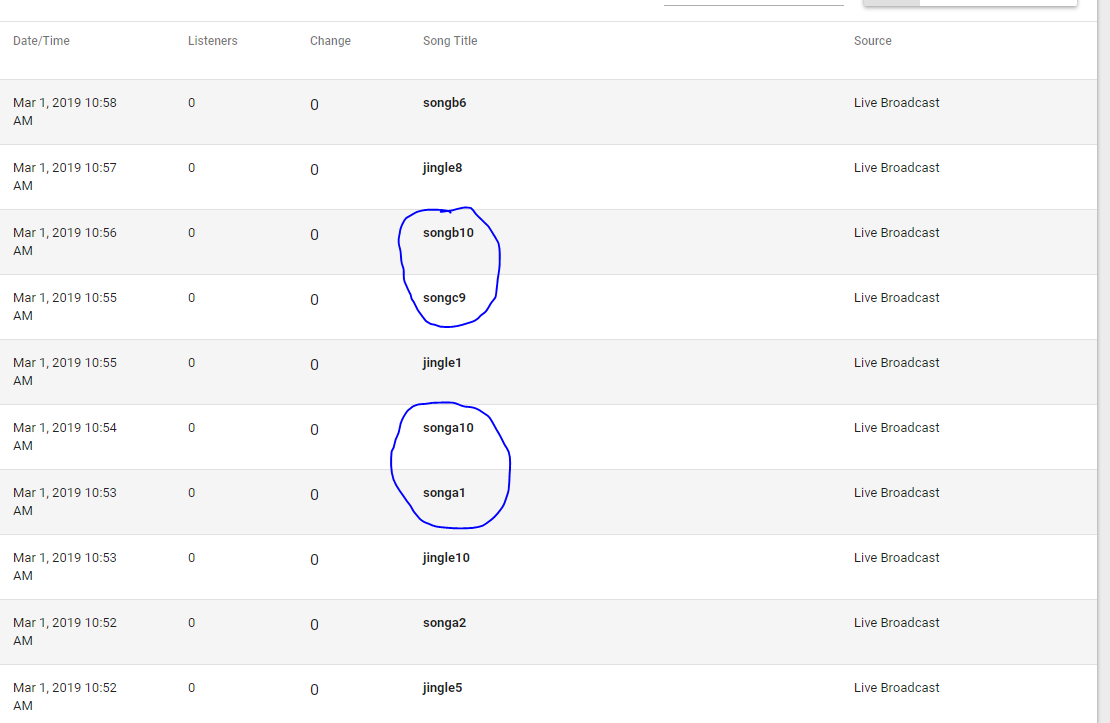
Thanks for the update. I ran a fresh traditional install this morning and set AutoDJ to manual but unfortunately I get the same issue.
It seems improved, but still within 10 items it'll play back to back songs, despite jingle being set to play every 1 song.
paulbonass
on 1 Mar 2019
Try to set it back to auto and see what happens. It's working fine here already. Thanks @SlvrEagle23
ErnestPH
on 1 Mar 2019
Thanks for the update. And thanks too for the tip, ErnestPH.
On Fri, 1 Mar 2019, 12:02 p.m. ErnestPH, notifications@github.com wrote:
Try to set it back to auto and see what happens. It's working fine here
already. Thanks @SlvrEagle23 https://github.com/SlvrEagle23—
You are receiving this because you are subscribed to this thread.
Reply to this email directly, view it on GitHub
https://github.com/AzuraCast/AzuraCast/issues/1198#issuecomment-468628665,
or mute the thread
https://github.com/notifications/unsubscribe-auth/AomxEYfJqTHogg0uEjB50a1SIE8-drIbks5vSQivgaJpZM4bDsre
.
 frankefe
on 1 Mar 2019
frankefe
on 1 Mar 2019
I actually think this might be fine and it's just the log that's incorrect.
I've monitored for a half hour now and while the log shows songs back to back, listening live is plays a jingle between.
I'll monitor a further.
paulbonass
on 1 Mar 2019
I actually think this might be fine and it's just the log that's incorrect.
I've monitored for a half hour now and while the log shows songs back to back, listening live is plays a jingle between.
I'll monitor a further.
Yes by turning to Manual mode… that's one of the feature that won't work anymore… as well as the "Playing next" feature.
ErnestPH
on 1 Mar 2019
This is actually with Manual Mode Switched Off.
I'll spin up another one now manual mode on too and monitor both.
paulbonass
on 1 Mar 2019
This is actually with Manual Mode Switched Off.
I'll spin up another one now manual mode on too and monitor both.
How long is your jingle file? I can confirmed that this is happening also… this could be a separate issue though…
ErnestPH
on 1 Mar 2019
I was testing with 20sec white noise files. I'm now using actual jingles of 10 seconds.
I'm assuming the log polls liquidsoap in some way at a set interval, and the jingles are so short it gets missed.
paulbonass
on 1 Mar 2019
@paulbonass That's what I've been fixing in the latest code updates.
SlvrEagle23
on 1 Mar 2019
Closing as this is most likely related to #1564. Please follow that issue for future updates to this problem.
 Vaalyn
on 3 Jun 2019
Vaalyn
on 3 Jun 2019
Related issues
 bebjakub
·
3Comments
bebjakub
·
3Comments
 bo2008
·
3Comments
bo2008
·
3Comments
 hecgua
·
3Comments
ErnestPH
·
3Comments
hecgua
·
3Comments
ErnestPH
·
3Comments
 adamderann
·
4Comments
adamderann
·
4Comments
Most helpful comment
Hello all: I have made some fixes to how we handle the Liquidsoap metadata changes, so now even short jingles of less than 15 seconds should not wind up inadvertently looping indefinitely.
Let me know if this resolves your issues. Thank you all for your patience; my build environment completely went out of commission this week so I had to recreate it from scratch.