Azerothcore-wotlk: vmap4extractor.exe couldn't complete it's task.
Current Behavior
When I start vmap4extractor.exe, it stops when it starts to extract objects.
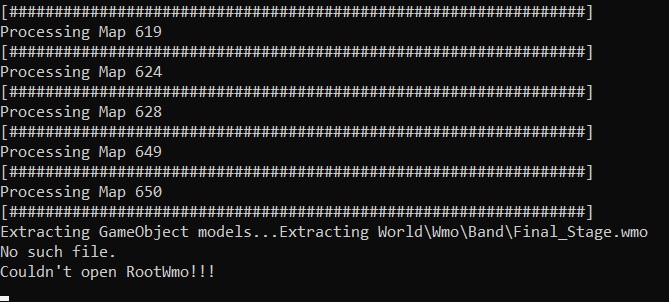
Expected Blizzlike behavior.
Needless to say.
STEPS TO REPRODUCE THE PROBLEM:
Get a clean client and after extracting maps/dbc, (as per the installation guide), execute vmaps4extractor.exe
EXTRA NOTES:
-My Client is located in disk D, not C.
-esMX language data.
AC HASH/COMMIT:
ab72d3c
Win 10 Pro
Want to back this issue? Post a bounty on it! We accept bounties via Bountysource.
 arielcami
All 12 comments
@arielcami thanks for your report, can you please checkout this version and see if it works?
Here the instructions:
1) git checkout a06bfa6e5b990d87f499f6671b93f098b47e3908
2) delete whatever you have already extracted
3) delete the extractors
4) re-run cmake with -DTOOLS=1
5) recompile
6) try use the newly-compiled extractors
see if it succeeds and please let us know.
 FrancescoBorzi
on 15 Dec 2020
FrancescoBorzi
on 15 Dec 2020
@FrancescoBorzi Hi there,
I followed all of you steps. New extractor didn't work either.
Exactly the same error.
arielcami
on 15 Dec 2020
@arielcami that's weird, then I think it's probably something on your side. Are you using an official client or modified?
FrancescoBorzi
on 15 Dec 2020
I think so, but I'm still unable to locate de problem, I'm using a client downloaded form a private server.
It have some custom patches, but I always remove them before so the client is default when I use the tools.
arielcami
on 15 Dec 2020
Downloaded the latest master branch, and can verify that this issue is present. Tested with:
Game client: TrueWoW 3.3.5a (identical to vanilla's files)
VS Compiler: 2019 x64
LibSSL: 1_1-x64
LibCrypto: 1_1-x64
MySQL: 5.7
This issue is not present on my previous, older master branch download. Entering the command git log shows the following output for it:
Edit: Turns out the error is present on my old branch.
commit 55deca60aa064a5cfd9717f2fddd030f4d0fdb93 (HEAD -> master, origin/master, origin/HEAD)
Author: AzerothCoreBot <[email protected]>
Date:   Wed Sep 30 08:27:29 2020 +0000

    chore(DB): import pending SQL update file

    Referenced commit(s): e651196f6b464f0f8e1d47a9baea9d5b9d48c469

commit e651196f6b464f0f8e1d47a9baea9d5b9d48c469
Author: Knindza <[email protected]>
Date:   Wed Sep 30 10:26:21 2020 +0200

    fix(DB/Dungeon): Dire Maul West (#3412)

commit a02d9e4c67710f1e23f59393b47144e7c511209b
Author: AzerothCoreBot <[email protected]>
Date:   Tue Sep 29 07:39:33 2020 +0000

    chore(DB): import pending SQL update file

    Referenced commit(s): 463384fe2ce111176223e9f78ee3b6f6ae560e97
 FiftyTifty
on 16 Dec 2020
FiftyTifty
on 16 Dec 2020
@FiftyTifty could you please also try this: https://github.com/azerothcore/azerothcore-wotlk/issues/3995#issuecomment-745373380 ?
So we can exclude the latest changes to the tools
FrancescoBorzi
on 16 Dec 2020
@FiftyTifty could you please also try this: #3995 (comment) ?
So we can exclude the latest changes to the tools
After testing my old branch again, this time keeping an eye on vamp4extractor's console output, the error is present on it. I'll try an even older commit, to see how far back this issue goes.
FiftyTifty
on 16 Dec 2020
@FiftyTifty thanks. If you think it was working fine before, it would be nice to catch which specific commit has broken it.
FrancescoBorzi
on 16 Dec 2020
@FiftyTifty thanks. If you think it was working fine before, it would be nice to catch which specific commit has broken it.
So I've checked a few commits:
16/12/2020 - 38bf355bf479dd3ec13913fc565e6182a747a666

25/11/2020 - b9c78740d9b102cd6e42cc545eb05d6fceeefff5

25/09/2020 - e651196f6b464f0f8e1d47a9baea9d5b9d48c469

25/08/2020 - a9b90c9a07678bad11d3acc9c98564c4ffcda603
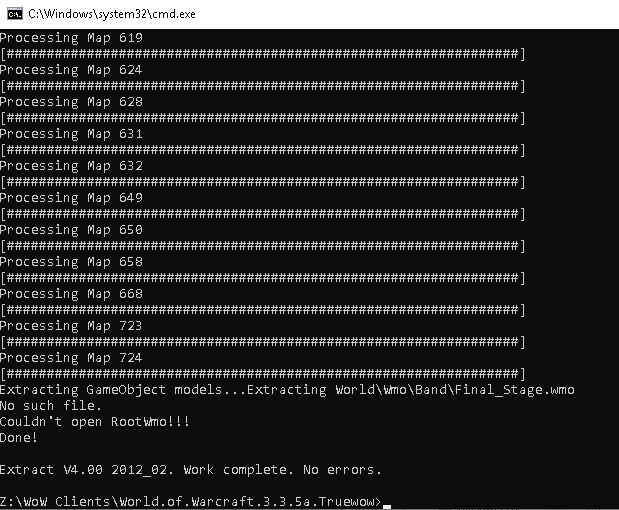
Now, while they all show the error, none of them stop processing. They all finish processing, which is different to @arielcami 's issue.
FiftyTifty
on 16 Dec 2020
This could be due to faulty clients missing files.
My tip: Test on a clean client
 Kitzunu
on 18 Dec 2020
Kitzunu
on 18 Dec 2020
This could be due to faulty clients missing files.
My tip: Test on a clean client
I Downloaded a clean client.
Pulled be4743b
cmake'd > compiled > same error after map 724.
arielcami
on 18 Dec 2020
@arielcami It's normal for the error to show. What isn't normal is for the processing to stop.
To make sure, download the TrueWoW client which has completely unmodified files.
FiftyTifty
on 18 Dec 2020
Related issues
 Maurowin
·
3Comments
Maurowin
·
3Comments
 fragcamp
·
4Comments
fragcamp
·
4Comments
 STARRHELD
·
4Comments
STARRHELD
·
4Comments
 fallen26
·
3Comments
fallen26
·
3Comments
 PolluxTroy0
·
3Comments
PolluxTroy0
·
3Comments
Most helpful comment
@arielcami It's normal for the error to show. What isn't normal is for the processing to stop.
To make sure, download the TrueWoW client which has completely unmodified files.