Azerothcore-wotlk: Server became unstable
Server became unstable after applying updates #2618, #2622, #2639, #2650
It crashes from time to time without a reason.
Server can work from 1-2 minutes to 2-3 hours
BRANCH(ES):
master
OPERATING SYSTEM:
Windows 7
 Bogir
Bogir
All 23 comments
I confirm - server gets stuck and doesn't fail after
See in the video
https://streamable.com/qm0f3
 diluh
on 8 Feb 2020
diluh
on 8 Feb 2020
does it happen even if you launch the worldserver and do nothing? (no login, no playing)
If so, can you reproduce it at the same time or not?
 BarbzYHOOL
on 8 Feb 2020
BarbzYHOOL
on 8 Feb 2020
does it happen even if you launch the worldserver and do nothing? (no login, no playing)
If so, can you reproduce it at the same time or not?
For me - ti is so. No matter if there is players or not. Today server crashed in 7 hours

Bogir
on 8 Feb 2020
I used #2618, #2622, and did not crash
 pklloveyou
on 8 Feb 2020
pklloveyou
on 8 Feb 2020
does it happen even if you launch the worldserver and do nothing? (no login, no playing)
If so, can you reproduce it at the same time or not?For me - ti is so. No matter if there is players or not. Today server crashed in 7 hours
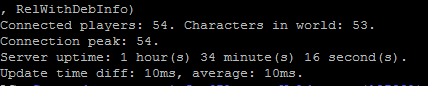
this shows 1 player online, also I have never seen this "X sessions" thing lol
BarbzYHOOL
on 8 Feb 2020
I removed the pr #2622 #2639 and apparently is normal
diluh
on 8 Feb 2020
I have never seen this
It is custom line
sLog->outBasic( "Online %u players with %u sessions.", sWorld->GetPlayerCount(), (uint32)(sWorld->GetActiveSessionCount()));
Also, if you noticed, I removed

if it no more 10 ms:
if (avgDiffTracker.getAverage() > 10)
sLog->outBasic("Average update time diff: %u. Players online: %u.", avgDiffTracker.getAverage(), (uint32)GetActiveSessionCount());
Bogir
on 8 Feb 2020
https://github.com/azerothcore/azerothcore-wotlk/pull/2622 is huge, seems more likely to be related
can you retry without this one only?
PS: what are players sessions @Bogir ?
BarbzYHOOL
on 9 Feb 2020
It is shows how many players loged in and staying on character selecting screen (don't know how to correctly describe it in English)
Bogir
on 9 Feb 2020
@BarbzYHOOL @Kaev I think it's related to this PR that you mentioned.
diluh
on 9 Feb 2020
@BarbzYHOOL In any case, at this time we have only 1confirmation of server crash. It is very little.
So I start to think that reason is in custom modules, not in the our core
Bogir
on 9 Feb 2020
- Just revert that big PR and retest
- List your modules, please (but you are not working together on the same server Diluh and Bogir?)
Offtopic:
It is shows how many players loged in and staying on character selecting screen (don't know how to correctly describe it in English)
ok but how can 1 player be connected TWICE on the character selection screen ?? 2 sessions
BarbzYHOOL
on 9 Feb 2020
No, I have mine test server))
Offtopic: 2 players connected to Login server (Auth server: 2 sessions) and 1 of them is staying on character selection screen (AFK-character disconnected from Game server or player still not decide which character hi wants to play)
Bogir
on 9 Feb 2020
list your modules guys!
offtopic: ah ok nice Bogir, I would make the clear distinction personally (authserver/worldserver) but it's cool
BarbzYHOOL
on 9 Feb 2020
mod-autobalance-master
mod-solo-lfg-master
They are combined together to 1 module, and I think the reason is somewhere here. Perhaps I have some conflict with #2622
Bogir
on 9 Feb 2020
@BarbzYHOOL Could you add label "Need confirm" for this issue? If nobody confirm it I'll close it soon
Bogir
on 9 Feb 2020
I don't have any of these modules mentioned, and I confirm this error, don't do the same thing they did with the Pets error, all saying that there was no error and in the end @vhiperdev showed the faulty commit and it was corrected.
diluh
on 9 Feb 2020
And why the others not confirm this crash? Maybe they have no errors/conflicts and we must test it on a clear cloned core? Simply run clear server and wait =)
Bogir
on 9 Feb 2020
So, now I cloned clear core lastest revision, compilled, started server and went to sleep =)
Tomorrow will se result
Bogir
on 9 Feb 2020
i am use commit b1bcd21 (30/01/2020) full modules.
No problems for me, check lasts changes 1-9 feb
 solidmaxtor
on 9 Feb 2020
solidmaxtor
on 9 Feb 2020

 Viste
on 9 Feb 2020
Viste
on 9 Feb 2020
I don't have any of these modules mentioned, and I confirm this error, don't do the same thing they did with the Pets error, all saying that there was no error and in the end @vhiperdev showed the faulty commit and it was corrected.
instead of complaining, you should help finding the bug like vhiper did, it's your role here, not just say "bug plz help slaves"
note: that I talked with vhiper many times during that bug
BarbzYHOOL
on 9 Feb 2020
I don't have any of these modules mentioned, and I confirm this error,

I had conflict with my customization and pr #2622 and fixed it.
To find where is your problem you can clone clear core, add 1-2 of your modules or customizations and test how server will be work.
Bogir
on 11 Feb 2020
Related issues
 STARRHELD
·
4Comments
STARRHELD
·
4Comments
 Franklampardst
·
4Comments
Franklampardst
·
4Comments
 wowissues
·
3Comments
wowissues
·
3Comments
 fragcamp
·
4Comments
fragcamp
·
4Comments
 wowmane
·
3Comments
wowmane
·
3Comments
Most helpful comment