Axe-core: vs code plugin downloads binary outside of extension code, which attempts to send usage data by an unsigned process every few seconds even after uninstalling plugin
Product: axe Linter
Expectation:
- Plugin does not spam the network pinging usage stats
- Plugin does not download binaries into the Downloads folder
Actual:
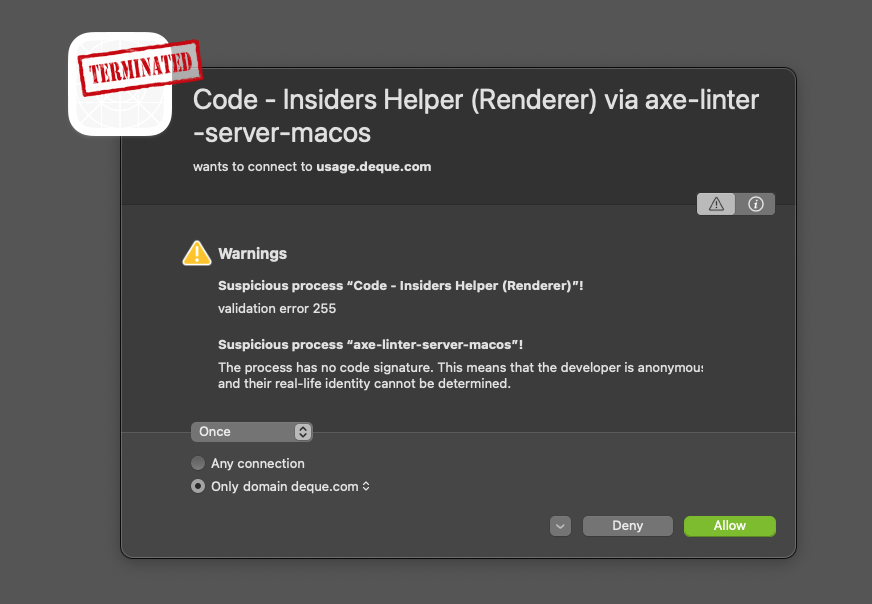
- After installing the VS Code extension (in VS Code Insiders), every 6 seconds or so Little Snitch notifies about this already-terminated network request:
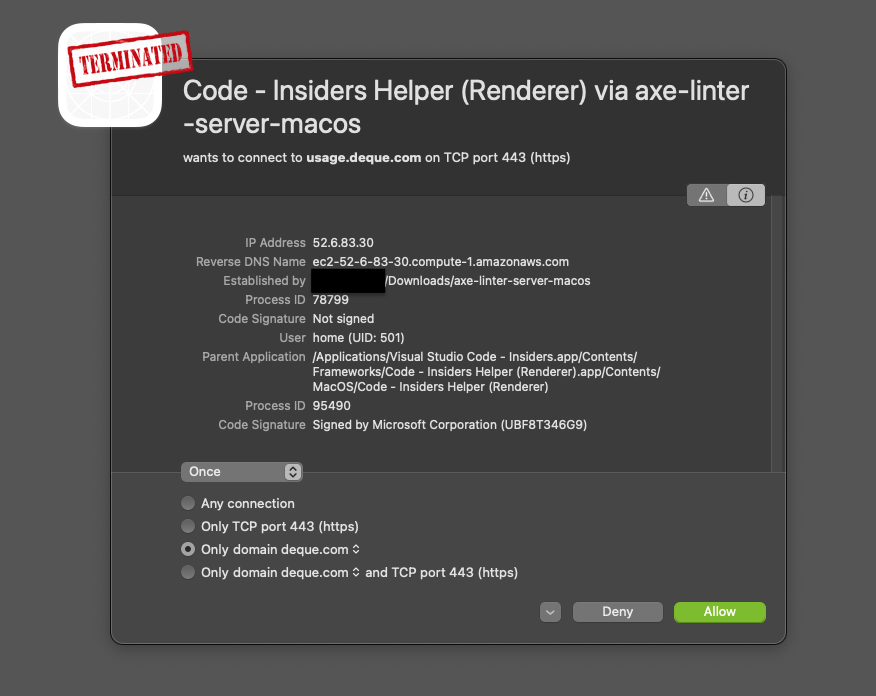
Code - Insiders Helper (Renderer) via axe-linter-server-macos
wants to connect to usage.deque.com on TCP port 443 (https)
Suspicious process “Code - Insiders Helper (Renderer)”!
validation error 255
Suspicious process “axe-linter-server-macos”!
The process has no code signature. This means that the developer is anonymous and their real-life identity cannot be determined.
    IP Address  52.6.83.30
    Reverse DNS Name    ec2-52-6-83-30.compute-1.amazonaws.com
    Established by  /Users/home/Downloads/axe-linter-server-macos
    Process ID  78799
    Code Signature  Not signed
    User    home (UID: 501)
    Parent Application  /Applications/Visual Studio Code - Insiders.app/Contents/Frameworks/Code - Insiders Helper (Renderer).app/Contents/MacOS/Code - Insiders Helper (Renderer)
    Process ID  95490
    Code Signature  Signed by Microsoft Corporation (UBF8T346G9)
This continues to happen after telling Little Snitch to allow all future requests from the "axe-linter-server-macos" VS Code Insiders process, and after telling Little Snitch to deny all future requests.
This continues after uninstalling the plugin.
Fix is to stop the two axe linter server processes. For good measure I deleted the binary the plugin downloaded to my Downloads folder.
Motivation: putting aside the question of whether a plugin should constantly send up usage data, it certainly should not after it's uninstalled. In addition the particular way it's implemented is tripping up Little Snitch in a way that makes the monitor unusable — the user has to choose between running Little Snitch and constantly closing notifications.
axe-core version: X.Y.Z
axe-webdriver, extension or other integration version: X.Y.Z

👆 whatever's in the VS Code extension v4.1.1

Browser and Assistive Technology versions

For Tooling issues:
- Node version: 14.16.0 running in VS Code Insiders 1.5.7.0-insider
- Platform:  macOS
 olets
olets
All 2 comments
Thanks for the issue. I'll let the appropriate people know about it.
 straker
on 12 May 2021
straker
on 12 May 2021
@olets Thank you for reporting this. After uninstall, the process isn't properly terminated. We are aware of this problem and plan to address it soon. I'm not familiar with Little Snitch, or why it would continue to prompt you even after you've told it to allow network access. We'll investigate, and keep the issue open in the mean time.
We're exploring other ways of working with the binary. Storing it in Downloads isn't ideal. Improving this is on our short term roadmap.
As for analytics, axe Linter does have analytics on by default. You should be able to turn this off by adding disableTracking: true to your axe-linter.yml file. I think that should solve the Little Snitch issue. Please let us know if it didn't. In the mean time I'll put in a PR to better document how to disable analytics.
 WilcoFiers
on 13 May 2021
WilcoFiers
on 13 May 2021
Related issues
 ttdmayshark
·
5Comments
ttdmayshark
·
5Comments
 chirag64
·
7Comments
chirag64
·
7Comments
 Seirdy
·
5Comments
Seirdy
·
5Comments
 sethkane
·
4Comments
sethkane
·
4Comments
 0ddfell0w
·
3Comments
0ddfell0w
·
3Comments
Most helpful comment
@olets Thank you for reporting this. After uninstall, the process isn't properly terminated. We are aware of this problem and plan to address it soon. I'm not familiar with Little Snitch, or why it would continue to prompt you even after you've told it to allow network access. We'll investigate, and keep the issue open in the mean time.
We're exploring other ways of working with the binary. Storing it in Downloads isn't ideal. Improving this is on our short term roadmap.
As for analytics, axe Linter does have analytics on by default. You should be able to turn this off by adding
disableTracking: trueto youraxe-linter.ymlfile. I think that should solve the Little Snitch issue. Please let us know if it didn't. In the mean time I'll put in a PR to better document how to disable analytics.