Awx: AWX cannot be created with an empty database: main_organization does not exist
ISSUE TYPE
- Bug Report
SUMMARY
Starting from scratch is not possible with this release.
ENVIRONMENT
- AWX version: 16.0.0
- AWX install method: docker compose on linux
- Ansible version: 2.10.4
- Operating System: Debian bullseye
- docker-ce:
5:20.10.0~3-0~debian-buster - docker-compose: 1.25.4
STEPS TO REPRODUCE
0.1. Run inside Python3 virtual env
0.2. Install latest ansible, wheel, docker-compose and redis with pip3
- Checkout 16.0.0 & create new build branch
- Modify installer/inventory with:
- awx_official=true
- docker_compose_dir=/some/folder
- host_port=
- logging_driver=journald
- pg_database=awx
- pg_hostname=
- pg_password=some_password
- pg_port=<
- pg_sslmode=require
- pg_username=awx
- postgres_data_dir=''
- project_data_dir=/some/other/folder
- secret_key=some_password
- use_docker_compose=true
- Restart PostgreSQL 10 AWX Cluster
- Build as root with:
export awx_version="16.0.0"
cd installer
ansible-playbook -i inventory install.yml
EXPECTED RESULTS
All AWX docker containers should be created & running smoothly
ACTUAL RESULTS
TASK [local_docker : Create Preload data] ********************************************************************************************************************
fatal: [localhost]: FAILED! => {"changed": false, "cmd": ["docker", "exec", "awx_task", "bash", "-c", "/usr/bin/awx-manage create_preload_data"], "delta": "0:00:03.326236", "end": "2020-12-11 09:57:09.591439", "msg": "non-zero return code", "rc": 1, "start": "2020-12-11 09:57:06.265203", "stderr": "Traceback (most recent call last):\n  File \"/var/lib/awx/venv/awx/lib/python3.6/site-packages/django/db/backends/utils.py\", line 84, in _execute\n    return self.cursor.execute(sql, params)\npsycopg2.errors.UndefinedTable: relation \"main_organization\" does not exist\nLINE 1: SELECT COUNT(*) AS \"__count\" FROM \"main_organization\"\n                                          ^\n\n\nThe above exception was the direct cause of the following exception:\n\nTraceback (most recent call last):\n  File \"/usr/bin/awx-manage\", line 8, in <module>\n    sys.exit(manage())\n  File \"/var/lib/awx/venv/awx/lib/python3.6/site-packages/awx/__init__.py\", line 154, in manage\n    execute_from_command_line(sys.argv)\n  File \"/var/lib/awx/venv/awx/lib/python3.6/site-packages/django/core/management/__init__.py\", line 381, in execute_from_command_line\n    utility.execute()\n  File \"/var/lib/awx/venv/awx/lib/python3.6/site-packages/django/core/management/__init__.py\", line 375, in execute\n    self.fetch_command(subcommand).run_from_argv(self.argv)\n  File \"/var/lib/awx/venv/awx/lib/python3.6/site-packages/django/core/management/base.py\", line 323, in run_from_argv\n    self.execute(*args, **cmd_options)\n  File \"/var/lib/awx/venv/awx/lib/python3.6/site-packages/django/core/management/base.py\", line 364, in execute\n    output = self.handle(*args, **options)\n  File \"/var/lib/awx/venv/awx/lib/python3.6/site-packages/awx/main/management/commands/create_preload_data.py\", line 17, in handle\n    if Organization.objects.count():\n  File \"/var/lib/awx/venv/awx/lib/python3.6/site-packages/django/db/models/manager.py\", line 82, in manager_method\n    return getattr(self.get_queryset(), name)(*args, **kwargs)\n  File \"/var/lib/awx/venv/awx/lib/python3.6/site-packages/django/db/models/query.py\", line 392, in count\n    return self.query.get_count(using=self.db)\n  File \"/var/lib/awx/venv/awx/lib/python3.6/site-packages/django/db/models/sql/query.py\", line 504, in get_count\n    number = obj.get_aggregation(using, ['__count'])['__count']\n  File \"/var/lib/awx/venv/awx/lib/python3.6/site-packages/django/db/models/sql/query.py\", line 489, in get_aggregation\n    result = compiler.execute_sql(SINGLE)\n  File \"/var/lib/awx/venv/awx/lib/python3.6/site-packages/django/db/models/sql/compiler.py\", line 1142, in execute_sql\n    cursor.execute(sql, params)\n  File \"/var/lib/awx/venv/awx/lib/python3.6/site-packages/django/db/backends/utils.py\", line 67, in execute\n    return self._execute_with_wrappers(sql, params, many=False, executor=self._execute)\n  File \"/var/lib/awx/venv/awx/lib/python3.6/site-packages/django/db/backends/utils.py\", line 76, in _execute_with_wrappers\n    return executor(sql, params, many, context)\n  File \"/var/lib/awx/venv/awx/lib/python3.6/site-packages/django/db/backends/utils.py\", line 84, in _execute\n    return self.cursor.execute(sql, params)\n  File \"/var/lib/awx/venv/awx/lib/python3.6/site-packages/django/db/utils.py\", line 89, in __exit__\n    raise dj_exc_value.with_traceback(traceback) from exc_value\n  File \"/var/lib/awx/venv/awx/lib/python3.6/site-packages/django/db/backends/utils.py\", line 84, in _execute\n    return self.cursor.execute(sql, params)\ndjango.db.utils.ProgrammingError: relation \"main_organization\" does not exist\nLINE 1: SELECT COUNT(*) AS \"__count\" FROM \"main_organization\"\n                                          ^", "stderr_lines": ["Traceback (most recent call last):", "  File \"/var/lib/awx/venv/awx/lib/python3.6/site-packages/django/db/backends/utils.py\", line 84, in _execute", "    return self.cursor.execute(sql, params)", "psycopg2.errors.UndefinedTable: relation \"main_organization\" does not exist", "LINE 1: SELECT COUNT(*) AS \"__count\" FROM \"main_organization\"", "                                          ^", "", "", "The above exception was the direct cause of the following exception:", "", "Traceback (most recent call last):", "  File \"/usr/bin/awx-manage\", line 8, in <module>", "    sys.exit(manage())", "  File \"/var/lib/awx/venv/awx/lib/python3.6/site-packages/awx/__init__.py\", line 154, in manage", "    execute_from_command_line(sys.argv)", "  File \"/var/lib/awx/venv/awx/lib/python3.6/site-packages/django/core/management/__init__.py\", line 381, in execute_from_command_line", "    utility.execute()", "  File \"/var/lib/awx/venv/awx/lib/python3.6/site-packages/django/core/management/__init__.py\", line 375, in execute", "    self.fetch_command(subcommand).run_from_argv(self.argv)", "  File \"/var/lib/awx/venv/awx/lib/python3.6/site-packages/django/core/management/base.py\", line 323, in run_from_argv", "    self.execute(*args, **cmd_options)", "  File \"/var/lib/awx/venv/awx/lib/python3.6/site-packages/django/core/management/base.py\", line 364, in execute", "    output = self.handle(*args, **options)", "  File \"/var/lib/awx/venv/awx/lib/python3.6/site-packages/awx/main/management/commands/create_preload_data.py\", line 17, in handle", "    if Organization.objects.count():", "  File \"/var/lib/awx/venv/awx/lib/python3.6/site-packages/django/db/models/manager.py\", line 82, in manager_method", "    return getattr(self.get_queryset(), name)(*args, **kwargs)", "  File \"/var/lib/awx/venv/awx/lib/python3.6/site-packages/django/db/models/query.py\", line 392, in count", "    return self.query.get_count(using=self.db)", "  File \"/var/lib/awx/venv/awx/lib/python3.6/site-packages/django/db/models/sql/query.py\", line 504, in get_count", "    number = obj.get_aggregation(using, ['__count'])['__count']", "  File \"/var/lib/awx/venv/awx/lib/python3.6/site-packages/django/db/models/sql/query.py\", line 489, in get_aggregation", "    result = compiler.execute_sql(SINGLE)", "  File \"/var/lib/awx/venv/awx/lib/python3.6/site-packages/django/db/models/sql/compiler.py\", line 1142, in execute_sql", "    cursor.execute(sql, params)", "  File \"/var/lib/awx/venv/awx/lib/python3.6/site-packages/django/db/backends/utils.py\", line 67, in execute", "    return self._execute_with_wrappers(sql, params, many=False, executor=self._execute)", "  File \"/var/lib/awx/venv/awx/lib/python3.6/site-packages/django/db/backends/utils.py\", line 76, in _execute_with_wrappers", "    return executor(sql, params, many, context)", "  File \"/var/lib/awx/venv/awx/lib/python3.6/site-packages/django/db/backends/utils.py\", line 84, in _execute", "    return self.cursor.execute(sql, params)", "  File \"/var/lib/awx/venv/awx/lib/python3.6/site-packages/django/db/utils.py\", line 89, in __exit__", "    raise dj_exc_value.with_traceback(traceback) from exc_value", "  File \"/var/lib/awx/venv/awx/lib/python3.6/site-packages/django/db/backends/utils.py\", line 84, in _execute", "    return self.cursor.execute(sql, params)", "django.db.utils.ProgrammingError: relation \"main_organization\" does not exist", "LINE 1: SELECT COUNT(*) AS \"__count\" FROM \"main_organization\"", "                                          ^"], "stdout": "", "stdout_lines": []}
 jean-christophe-manciot
All 26 comments
Hrm, this might be related to this recent change?
https://github.com/ansible/awx/pull/8733
Have you also just tried re-running the installer playbook again?
 ryanpetrello
on 11 Dec 2020
ryanpetrello
on 11 Dec 2020
Just FYI, version 15.0.1 also had this problem, but the ansible playbook was not catching the error., The AWX instance would hang indefinitely, and using docker logs I could see the same SQL errors as reported here. Executing the playbook again (sometimes more than once) usually fixed the problem. Right now my current workaround is to install 15.0.1, run the playbook as many times as needed until the instance allows me to log in, and then in-place upgrade to 16.0.0
 jorgeyanesdiez
on 11 Dec 2020
jorgeyanesdiez
on 11 Dec 2020
Yea, I'm tinkering with this locally, and I've redeployed a few times, and have reproduced it once (though it doesn't happen for me every time). That said, the issue goes away if I just run the playbook again a few moments later. It looks like a race condition in the installer, but it doesn't seem like a 16.0.0 regression to me.
We may or may not get around to resolving this before this install method goes away, though (see: https://groups.google.com/g/awx-project/c/47MjWSUQaOc/m/En0NrUiqAAAJ)
ryanpetrello
on 11 Dec 2020
Faced this issue. Tried running the command manually inside the container and it worked. Looks like Ansible needs pause to add some time delay
docker exec -it f8b7538d2641 "/bin/bash"
bash-4.4# /usr/bin/awx-manage create_preload_data
Default organization added.
Demo Credential, Inventory, and Job Template added.
(changed: True)
 sandeepsisodiya
on 11 Dec 2020
sandeepsisodiya
on 11 Dec 2020
I ran into this without using an external database.
 agaffney
on 12 Dec 2020
agaffney
on 12 Dec 2020
same issue
 des-esseintes
on 12 Dec 2020
des-esseintes
on 12 Dec 2020
I ran into this without using an external database.
Adjusting the title.
jean-christophe-manciot
on 14 Dec 2020
I went as far back as version 11.0.2 and it still happened then. I do understand that the docker-compose install method is soon to be deprecated, but on the other hand, documentation on the EE/ansible-builder method does not exist yet. If the EE way is the way forward, please consider updating the docs or at least publishing some basic guidelines for newbies to AWX. Otherwise, the docker-compose method should be fixed don't you agree?
EDIT a few days later: I guessed (maybe wrong) that the awx-ee way was to
- Install podman
- Install pip3
- sudo pip3 install ansible-builder tox
- Unfortunately, someone just uploaded two bad releases of ansible-builder to PyPI (0.4.1 and 0.4.2), making my afternoon miserable. They have been since yanked, but I had to force to install version 0.4.0
- I cloned the awx-ee github repo
- I edited tox.ini to add my HTTP_PROXY, HTTPS_PROXY and NO_PROXY environment variables to be passed in to the build environment.
- I got my comms department to allow me to connect to many URLs through the corporate proxy that were previously blocked or TLS-intercepted (i can provide a list).
- I had to increase the size of my virtual harddrive because this method downloads an inmense amount of dependencies that I don't need.
- Finally, the whole process FAILED like this:
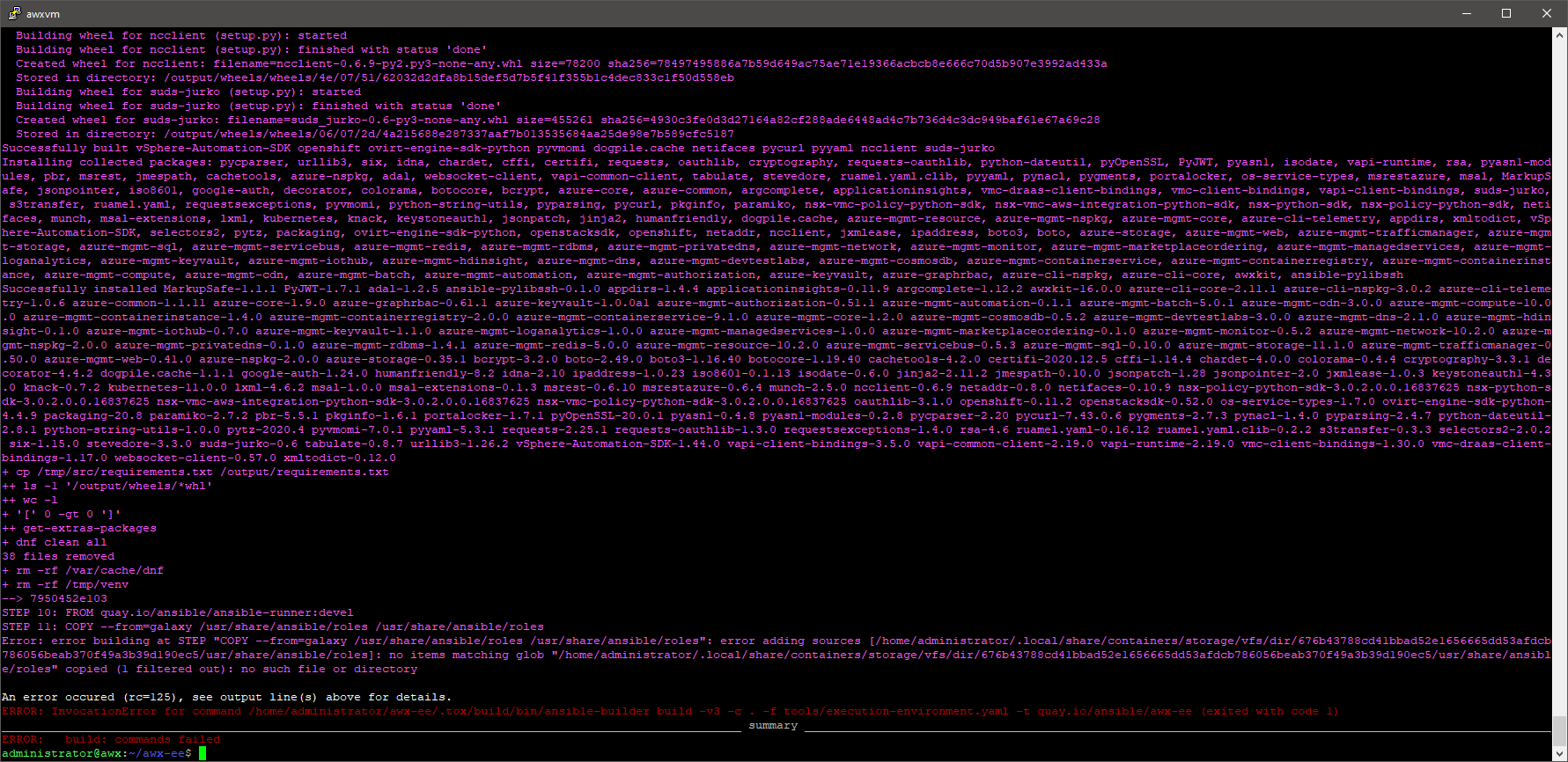
- And now I wonder if you people even use this internally? What am I doing wrong? I am guessing there should be an already-built image somewhere, instead of forcing everyone to rebuild, but I didn't find info.
I do realize this is way off-topic in this issue but, please please please fix the docker-compose method or fix the other one, but don't leave us hanging.
jorgeyanesdiez
on 15 Dec 2020
Ran into this issue myself. Can confirm that running /usr/bin/awx-manage create_preload_data a couple of times in the awx_task container eventually gets it to a correct state:
sh-4.4# /usr/bin/awx-manage create_preload_data
Default organization added.
Demo Credential, Inventory, and Job Template added.
(changed: True)
As an alternative, running the playbook in its entirety a couple of times will have the same result.
For reference: executing the command 3 times (1x playbook, 2x manual inside the task container) got me the correct state.
(tested on the 16.0.0 playbook)
 BitProcessor
on 15 Dec 2020
BitProcessor
on 15 Dec 2020
There seem to be deeper problem between awx django models and postgres. The primary problem in create_preload_data seems to be:
django.db.utils.ProgrammingError: column "custom_virtualenv" of relation "main_organization" does not exist
LINE 1: ...tion", "created_by_id", "modified_by_id", "name", "custom_vi...
Even with create_preload_data=False container keeps on failing with SQL messages:
django.db.utils.ProgrammingError: relation "main_instance" does not exist
LINE 1: SELECT (1) AS "a" FROM "main_instance" WHERE "main_instance"...
 storminteractive
on 16 Dec 2020
storminteractive
on 16 Dec 2020
I too had the same issue, after container creation it took 6 minutes before the install playbook was sucessful. v16.0.0 clean install.
 nickilby
on 16 Dec 2020
nickilby
on 16 Dec 2020
I had the same problem.
Traceback (most recent call last):
 File \"/var/lib/awx/venv/awx/lib/python3.6/site-packages/django/db/backend s/utils.py\", line 84, in _execute
 return self.cursor.execute(sql, params)
psycopg2.errors.UndefinedTable: relation \"main_organization\" does not exist
LINE 1: SELECT COUNT(*) AS \"__count\" FROM \" main_organization\"
 ^
How to reproduce:
- create a clean instance of minimal Debian 10
- follow the instructions available here
 europ
on 17 Dec 2020
europ
on 17 Dec 2020
I may get same error for run
pip3 install requests docker docker-compose
ansible-playbook -i inventory install.yml -vvvv
at ansible-awx 16.0.0
the error log is
"stderr": "Traceback (most recent call last):\n File \"/var/lib/awx/venv/awx/lib/python3.6/site-packages/django/db/backends/utils.py\", line 84, in _execute\n return self.cursor.execute(sql, params)\npsycopg2.errors.UndefinedColumn: column \"approval_role_id\" of relation \"main_organization\" does not exist\nLINE 1: ...ditor_role_id\", \"member_role_id\", \"read_role_id\", \"approval_...\n
I will try other version
 HelloWorDomain
on 19 Dec 2020
HelloWorDomain
on 19 Dec 2020
Did we get any update on this. I am facing the same issue. Here is the error.
{\"changed\": false, \"cmd\": [\"docker\", \"exec\", \"awx_task\", \"bash\", \"-c\", \"/usr/bin/awx-manage create_preload_data\"], \"delta\": \"0:00:11.226940\", \"end\": \"2020-12-20 09:20:38.413263\", \"msg\": \"non-zero return code\", \"rc\": 1, \"start\": \"2020-12-20 09:20:27.186323\", \"stderr\": \"Traceback (most recent call last):\n File \\"/var/lib/awx/venv/awx/lib/python3.6/site-packages/django/db/backends/utils.py\\", line 84, in _execute\n return self.cursor.execute(sql, params)\npsycopg2.errors.UndefinedTable: relation \\"main_organization\\" does not exist\nLINE 1: SELECT COUNT() AS \\"__count\\" FROM \\"main_organization\\"\n ^\n\n\nThe above exception was the direct cause of the following exception:\n\nTraceback (most recent call last):\n File \\"/usr/bin/awx-manage\\", line 8, in
 yantramcloud
on 20 Dec 2020
yantramcloud
on 20 Dec 2020
You can skip the failing task by changing the default value in configuration.
The failing task in awx/installer/roles/local_docker/tasks/compose.yml (line 53):
    - name: Create Preload data
      command: docker exec awx_task bash -c "/usr/bin/awx-manage create_preload_data"
      when: create_preload_data|bool
      register: cdo
      changed_when: "'added' in cdo.stdout"
Default configuration in awx/installer/inventory (line 121)
# Whether or not to create preload data for demonstration purposes
create_preload_data=True
You can set create_preload_data to False in awx/installer/inventory that will make your installation successful.
But of course, this does not solve the root cause of this problem.
europ
on 20 Dec 2020
I too had the same issue, after container creation it took 6 minutes before the install playbook was sucessful. v16.0.0 clean install.
Same thing happened to me, just give it a few min and run playbook again
 aekiratli
on 24 Dec 2020
aekiratli
on 24 Dec 2020
Same error here, tried on different distro, but facing it every time.
 Paul-Michel
on 12 Jan 2021
Paul-Michel
on 12 Jan 2021
Get this error at different OS (ubuntu, centos) Try release 14.0.0, 15.0.0, 15.0.1, 16.0.0 and first run was unsucsessful all times. But... after some number re-run install.yml all work fine.
 temskiy
on 12 Jan 2021
temskiy
on 12 Jan 2021
Thank you europ, changing that option fixed it all for me.
Whether or not to create preload data for demonstration purposes
create_preload_data=True
 loftwah
on 13 Jan 2021
loftwah
on 13 Jan 2021
Every time in run bash-4.4# /usr/bin/awx-manage create_preload_data gets a new column name --does not exits in main_organization.
OS Centos 8.
Any solution yet?
 talvindersingh
on 13 Jan 2021
talvindersingh
on 13 Jan 2021
Finally after running /usr/bin/awx-manage create_preload_data inside awx-task container got it running.
bash-4.4# /usr/bin/awx-manage create_preload_data
An organization is already in the system, exiting.
(changed: False)
UI enabled now.
talvindersingh
on 13 Jan 2021
wait for UI to come up.
then execute docker exec command
bash-4.4# /usr/bin/awx-manage create_preload_data
Default organization added.
Demo Credential, Inventory, and Job Template added.
(changed: True)
 aishvaryaps
on 13 Jan 2021
aishvaryaps
on 13 Jan 2021
Hello! Someone solves this problem?
TASK [local_docker : Create Preload data] ************************************
fatal: [localhost]: FAILED! => {"changed": false, "cmd": ["docker", "exec", "awx_task", "bash", "-c", "/usr/bin/awx-manage create_preload_data"], "delta": "0:00:03.061271", "end": "2021-01-14 09:25:47.089787", "msg": "non-zero return code", "rc": 1, "start": "2021-01-14 09:25:44.028516", "stderr": "Traceback (most recent call last):\n File \"/var/lib/awx/venv/awx/lib/python3.6/site-packages/django/db/backends/utils.py\", line 84, in _execute\n return self.cursor.execute(sql, params)\npsycopg2.errors.UndefinedTable: relation \"main_organization\" does not exist\nLINE 1: SELECT COUNT() AS \"__count\" FROM \"main_organization\"\n ^\n\n\nThe above exception was the direct cause of the following exception:\n\nTraceback (most recent call last):\n File \"/usr/bin/awx-manage\", line 8, in
PLAY RECAP ***********************************************
localhost : ok=15 changed=7 unreachable=0 failed=1 skipped=71 rescued=0 ignored=0
 olegsidokhmetov
on 14 Jan 2021
olegsidokhmetov
on 14 Jan 2021
@olegsidokhmetov, just don`t create prload data.
In inventory
create_preload_data=True
change to False and try re-run plabook some times.
temskiy
on 14 Jan 2021
@olegsidokhmetov, just don`t create prload data.
In inventory
create_preload_data=Truechange to False and try re-run plabook some times.
Waw! Great, it helped!!!!
olegsidokhmetov
on 14 Jan 2021
If you had any issues with websockets after re-running the installation playbook a couple of times, pay attention to broadcast_websocket_secret. Fixing that helped me to get websockets up & running again.
 cl1ent
on 19 Jan 2021
cl1ent
on 19 Jan 2021
Related issues
 darkaxl
·
3Comments
darkaxl
·
3Comments
 worsco
·
3Comments
worsco
·
3Comments
 cs35-owncloud
·
3Comments
cs35-owncloud
·
3Comments
 augabet
·
3Comments
augabet
·
3Comments
 shortsteps
·
3Comments
shortsteps
·
3Comments
Most helpful comment
Same thing happened to me, just give it a few min and run playbook again