ISSUE TYPE
- Bug Report
Just did a fresh install of AWX 9.3.0 and none of the JOBs are being triggered. Project, Jobs, Ad-hoc jobs any jobs.
after a few minutes it Times out with this error:
Call to /api/v2/ad_hoc_commands/1/relaunch/ failed. returned status: 504.
SUMMARY
ENVIRONMENT
- AWX version: 9.3.0
- AWX install method: docker on centos 7
- Ansible version: 2.9.6
- Operating System: Centos 7
- Web Browser: Chrome
STEPS TO REPRODUCE
try to execute ANY job such as project, ad-hoc script, etc..
EXPECTED RESULTS
Jobs are stuck in starting mode they never start, please see screenshots below.
ADDITIONAL INFORMATION
Please review images below:
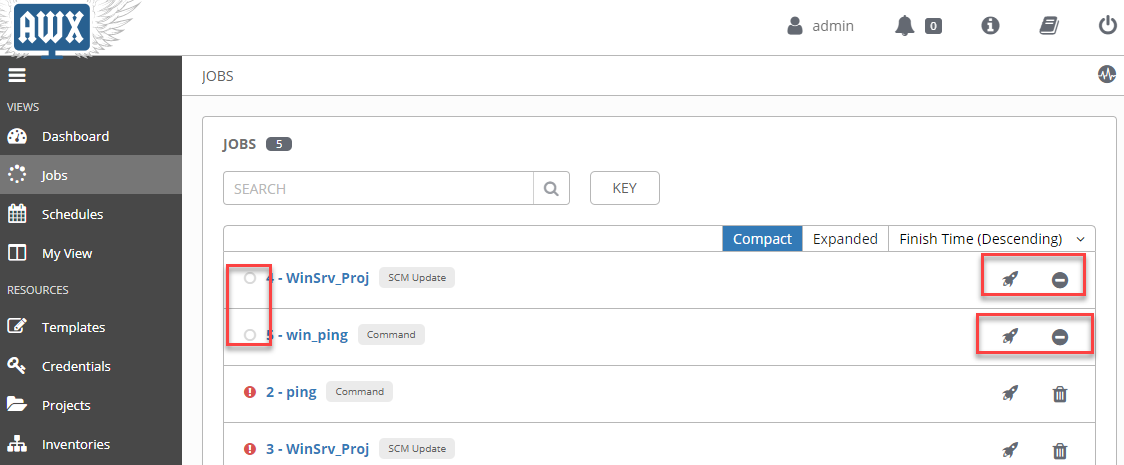
Image from Web continaer
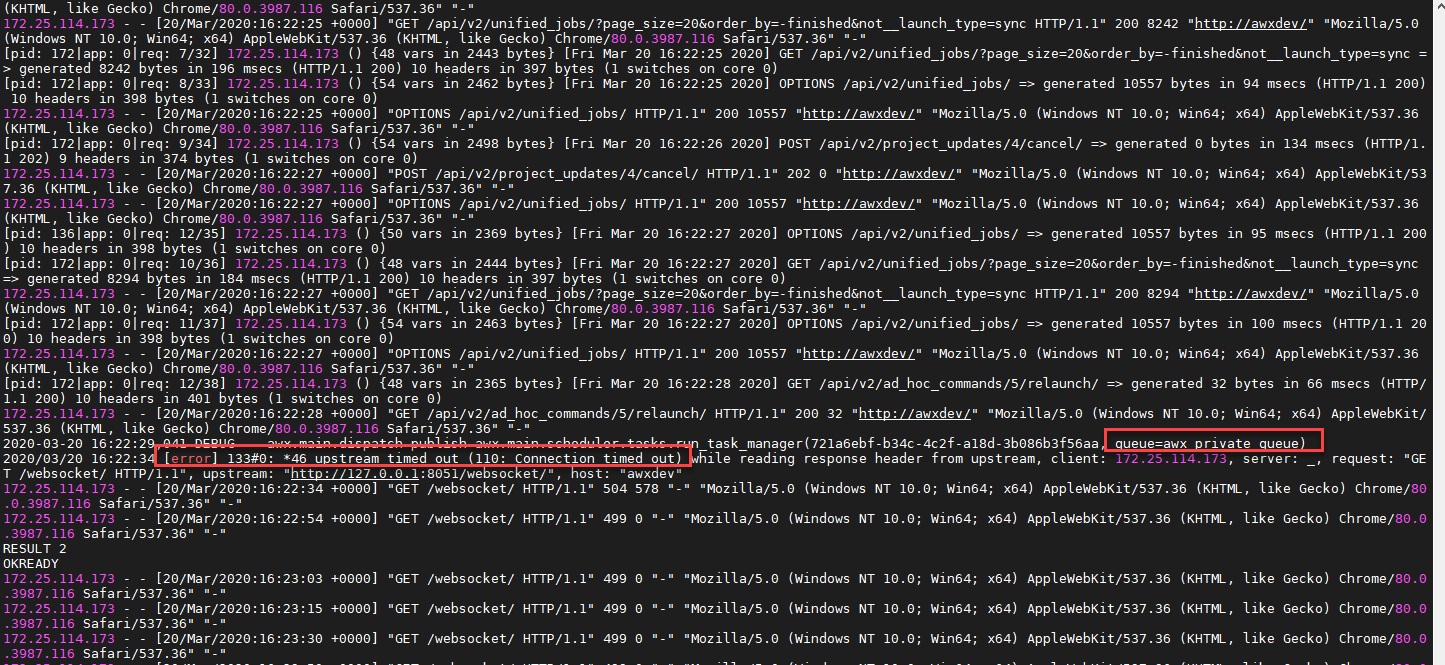
Image from TASK container
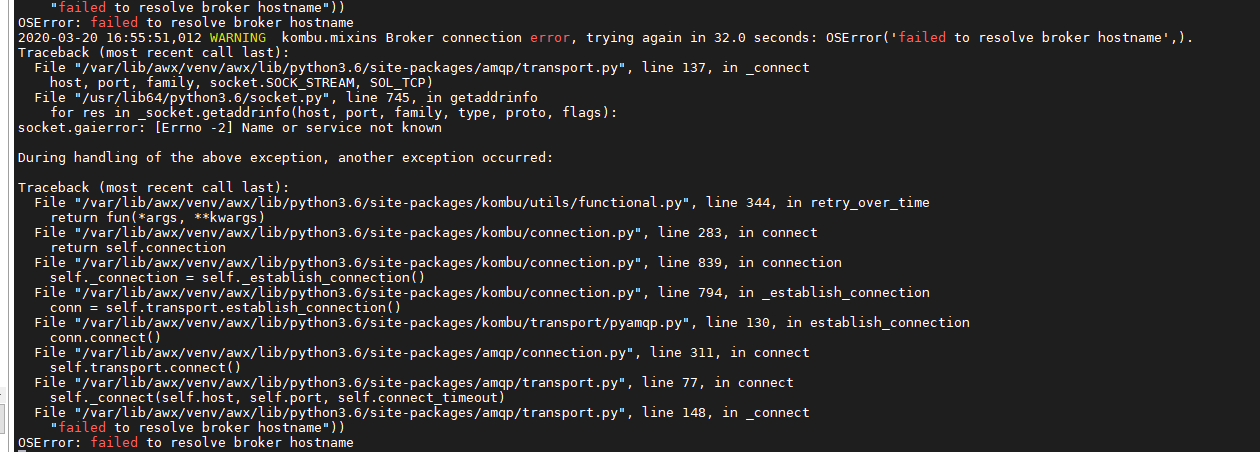
Thank you,
HS
 hs-hub-world
All 8 comments
Is there anything I can do at the moment to manually fix this to proceed forward. Or alternatively, is there a way for me to release an older version that includes the rabbitMQ -? We are working on an ansible project and we have hit a dead end because of this ;( Any assistance would be greatly appreciated.
Thank you
HS
hs-hub-world
on 20 Mar 2020
@hs-hub-world - 9.3.0 should not yet be using redis; it should still be on RabbitMQ. You can use the docker-compose or installer setup from https://github.com/ansible/awx/tree/9.3.0 instead of from devel to make sure you are using all the 9.3.0-compatible setup.
 geerlingguy
on 20 Mar 2020
geerlingguy
on 20 Mar 2020
Hello @geerlingguy, well, looks like RabbitMQ has been removed from 9.3.0 after using this repo for the setup. git clone --depth 50 https://github.com/ansible/awx.git
Not sure if this was done intentionally or by accident -?
in case anyone else runs into this issue.

Thanks,
HS
hs-hub-world
on 21 Mar 2020
In case anyone is interested for a full bash script for Centos to install AWX by specifying the version to install you may find it here: https://devopskbpages.blogspot.com/2020/03/deploying-awx-on-centos-7.html
hs-hub-world
on 21 Mar 2020
@hs-hub-world - 9.3.0 should not yet be using redis; it should still be on RabbitMQ. You can use the docker-compose or installer setup from https://github.com/ansible/awx/tree/9.3.0 instead of from
develto make sure you are using all the 9.3.0-compatible setup.
I always pull the versions from: https://github.com/ansible/awx/releases
Apparently I have been having the same issue, while a minute ago everything worked fine... How can we fix this?
@geerlingguy does the install book pull some file from latest github or something that may cause this?
 MaartenMol
on 21 Mar 2020
MaartenMol
on 21 Mar 2020
Not sure what's going on here at first glance, but 9.3.0 is definitely still RabbitMQ. Note the amqp lib in the screenshot @hs-hub-world posted:
If you're attempting to deploy AWX from devel, it's not going to work with the official 9.3.0 image (which is what I suspect you're doing, @hs-hub-world: https://github.com/ansible/awx/issues/6365#issuecomment-601969522). If you _want_ to use devel (and thus, redis), you'll need to build your own image:
https://github.com/ansible/awx/blob/devel/INSTALL.md#official-vs-building-images
_Most likely_, you want to use the 9.3.0 release:
 ryanpetrello
on 21 Mar 2020
ryanpetrello
on 21 Mar 2020
Hi @ryanpetrello, just to be clear are you saying when I use the git clone command below that is downloading the 'devel' version -?
git clone --depth 50 https://github.com/ansible/awx.git
After that we just do ansible-playbook...
git clone --depth 50 https://github.com/ansible/awx.git
cd /tmp/awx/installer
sed -i 's|admin_password=.*|admin_password=password|g' inventory
sslkey=$(openssl rand -base64 30)

sed -i "s|secret_key=.*|secret_key=$sslkey|g" inventory
grep -v '^#' inventory | grep -v '^$'

ansible-playbook -i inventory install.yml
docker ps
Thank you
HS
hs-hub-world
on 21 Mar 2020
just to be clear are you saying when I use the git clone command below that is downloading the 'devel' version
Yes. The default branch of this git repo is devel. If you want 9.3.0, use git clone -b 9.3.0 ...
ryanpetrello
on 21 Mar 2020
Related issues
 IMOKURI
·
3Comments
IMOKURI
·
3Comments
 beenje
·
3Comments
beenje
·
3Comments
 grahamn-gr
·
3Comments
grahamn-gr
·
3Comments
 agaffney
·
3Comments
agaffney
·
3Comments
 shortsteps
·
3Comments
shortsteps
·
3Comments