Awx: Error running a job: DistutilsFileError: cannot copy tree /var/lib/awx/projects/XXX_Project
ISSUE TYPE
- Bug Report
SUMMARY
Error Details
Traceback (most recent call last): File "/var/lib/awx/venv/awx/lib/python3.6/site-packages/awx/main/tasks.py", line 1275, in run self.pre_run_hook(self.instance, private_data_dir) File "/var/lib/awx/venv/awx/lib/python3.6/site-packages/awx/main/tasks.py", line 1879, in pre_run_hook job.project.scm_type, job_revision File "/var/lib/awx/venv/awx/lib/python3.6/site-packages/awx/main/tasks.py", line 2271, in make_local_copy copy_tree(project_path, destination_folder) File "/usr/lib64/python3.6/distutils/dir_util.py", line 124, in copy_tree "cannot copy tree '%s': not a directory" % src) distutils.errors.DistutilsFileError: cannot copy tree '/var/lib/awx/projects/XXX_Project': not a directory
ENVIRONMENT
- AWX version: 9.2.0
- AWX install method: kubernetes
- Kubernetes Cluster - Ansible version: 2.9.5
- Kubernetes Cluster - Operating System: Fedora 31
 mvrk69
All 26 comments
What is your project layout ?
 wenottingham
on 6 Mar 2020
wenottingham
on 6 Mar 2020
What is your project layout ?
Its a just a normal manual project, i pointed it to that playbook directory XXX_Project, and created a job template to run a test.yml playbook that is on that directory.
mvrk69
on 6 Mar 2020
Are any parts of the path symlinks?
wenottingham
on 6 Mar 2020
Are any parts of the path symlinks?
no
mvrk69
on 6 Mar 2020
Is there any logs i can check and can provide to help check this problem?
/var/lib/awx/projects is a directory on the kubernetes node that hosts the AWX container,
was defined as volume for the container on the inventory file:
project_data_dir=/var/lib/awx/projects
mvrk69
on 8 Mar 2020
I do face the same issue and cannot proceed. Please share if someone got a solution for this issue would be much appriciate
 kusalindika
on 10 Mar 2020
kusalindika
on 10 Mar 2020
I am also stuck on the same issue. please help
 gitsowmiyaa
on 18 Mar 2020
gitsowmiyaa
on 18 Mar 2020
Bump. Same issue.
 Gortex
on 19 Mar 2020
Gortex
on 19 Mar 2020
Hey guys,
I have convert my project into scm integrate with BitBucket. Then it work like a charm.
I know this is the not the way to address this issue. But till its become solved by the admins, I have done that way since I'm running out of time. If there's anything to clarify from that way, feel free to contact us.
kusalindika
on 20 Mar 2020
I share my configuration to avoid this error, if anyone needed,
- For the AWX Project select SCM Type as Git from the drop box
- Provide SCM URL that where your project's clone repository url, branch name and SCM credentials
- For SCM Credentials you can use, key method with its credential type as Source Control - As in back-end you should allow the awx-web container key from whatever the source controller that you are using
- You can save your project and you can see, its automatically get the available repositories from the source controller
After successful project builds, you can create a job template.
- Select your PROJECT, the PLAYBOOK from the field and the inventories with the respected credentials type also.
- After that you can launch your template with JOB TYPE as RUN mode.
- If more verbosity you can select detailed one for identify bugs in your playbook.
Note: Your playbook must contain "all" as for the "hosts:" parameter to get effect by provided inventory.
Try this way and let us know.
kusalindika
on 21 Mar 2020
@ghjm can you try to reproduce this and see if there's any chance of getting a fix in?
 blomquisg
on 8 Apr 2020
blomquisg
on 8 Apr 2020
my guess is that the job is trying to run on a node that doesn't have that manual project in /var/lib/awx/projects/
see the relevant discussions here
https://github.com/ansible/awx/issues/857
https://github.com/ansible/awx/issues/229
https://github.com/ansible/awx/issues/239
If you are trying to manage projects manually (which we don't recomment, btw). You'll need to make sure you load the projects onto both containers and in the same location.
so you would need to copy the projects into each container on your own
If using scm isn't an option, some users have had success by mounting a docker volume from host into each container, so there is only one place you need to put projects, and then each container should have access to these projects.
https://github.com/ansible/awx/issues/857#issuecomment-352266968
@mvrk69 to confirm the above, take note of the execution node the job tries to run on. If you shell into that container, does /var/lib/awx/projects have the right files?
 fosterseth
on 15 Apr 2020
fosterseth
on 15 Apr 2020
Yes, i'm using manual project.
Directory exists on the kubernetes node and was defined as volume to be mounted on the container.
I only have 1 execution node.
Execution Node: awx-0
kb1 root ~ kubectl exec -n awx -it awx-0 -- /bin/bash
Defaulting container name to awx-web.
Use 'kubectl describe pod/awx-0 -n awx' to see all of the containers in this pod.
bash-4.4$ ls -l /var/lib/awx/projects/
total 4
drwxrwxr-x 2 root root 4096 Mar 6 15:07 XXX_Project
bash-4.4$ ls -l /var/lib/awx/projects/XXX_Project/
total 12
-rw-rw-r-- 1 root root 313 Mar 6 15:06 test_expect.yml
-rw-rw-r-- 1 root root 268 Mar 6 15:05 test_sudo.yml
-rw-rw-r-- 1 root root 241 Mar 6 15:04 test.yml
mvrk69
on 15 Apr 2020
Hi,
We have the same problem. Manual project with a local path mounted from the single worker node.
I've opened terminal on the awx-web container and checked with python console, which works well:
sh-4.4$ ls -ld /var/lib/awx/projects/XXXdemo
drwxr-xr-x. 2 awx root 4096 Apr 15 14:37 /var/lib/awx/projects/XXXdemo
sh-4.4$ python3.6
Python 3.6.8 (default, Nov 21 2019, 19:31:34)
[GCC 8.3.1 20190507 (Red Hat 8.3.1-4)] on linux
Type "help", "copyright", "credits" or "license" for more information.
import os
os.path.isdir("/var/lib/awx/projects/XXXdemo")
True
This is from the log when running the template:
File "/usr/lib64/python3.6/distutils/dir_util.py", line 124, in copy_tree "cannot copy tree '%s': not a directory" % src) distutils.errors.DistutilsFileError: cannot copy tree '/var/lib/awx/projects/XXXdemo': not a directory
And this is the local directory on the worker node, which is mounted in container:
[test]# ls -ld /opt/awx/projects/XXXdemo
drwxr-xr-x. 2 1000 root 4096 Apr 15 16:37 /opt/awx/projects/XXXdemo
This is working on my test system, and I've found a difference:
On the working system, in the PV and PVC definition I have volumeMode: Filesystem
I'll change it to remove this, to have the same as on failing system and run a test job.
Will write the result soon.
 lniesz
on 16 Apr 2020
lniesz
on 16 Apr 2020
Hi,
Made some tests, and found that this volumeMode: Filesystem is the default. Sorry for that :-)
But finally I've found the solution:
In the failing system the awx StatefulSet did not have the mount section for the /var/lib/awx/projects volume for the awx-celery container. So it seems that this is the one, which wants to make a copy of the running project when the job is running.
In the working system both awx-web and awx-celery has the mount section:
...
volumeMounts:
- name: awx-project-data-dir
mountPath: /var/lib/awx/projects
...
I don't know, what caused this difference, but it is worth to look the awx StatefulSet for those, who has this problem.
lniesz
on 16 Apr 2020
@mvrk69 /var/lib/awx/projects needs to exist in the awx-task container as well as awx-web container, can you check for that?
fosterseth
on 17 Apr 2020
I can only see it on awx-web, also there is no container called awx-task:
kubectl describe pod awx-0 -n awx
...
Containers:
awx-web:
...
Mounts:
/etc/nginx/nginx.conf from awx-nginx-config (ro,path="nginx.conf")
/etc/tower/SECRET_KEY from awx-secret-key (ro,path="SECRET_KEY")
/etc/tower/conf.d/ from awx-application-credentials (ro)
/etc/tower/settings.py from awx-application-config (ro,path="settings.py")
/var/lib/awx/projects from awx-project-data-dir (rw)
/var/run/secrets/kubernetes.io/serviceaccount from awx-token-dfwhb (ro)
awx-celery:
...
Mounts:
/etc/tower/SECRET_KEY from awx-secret-key (ro,path="SECRET_KEY")
/etc/tower/conf.d/ from awx-application-credentials (ro)
/etc/tower/settings.py from awx-application-config (ro,path="settings.py")
/var/run/secrets/kubernetes.io/serviceaccount from awx-token-dfwhb (ro)
awx-rabbit:
...
Mounts:
/etc/rabbitmq from rabbitmq-config (rw)
/usr/local/bin/healthchecks from rabbitmq-healthchecks (rw)
/var/run/secrets/kubernetes.io/serviceaccount from awx-token-dfwhb (ro)
awx-memcached:
...
Mounts:
/var/run/secrets/kubernetes.io/serviceaccount from awx-token-dfwhb (ro)
mvrk69
on 18 Apr 2020
Hey @mvrk69,
On older versions of AWX, look in awx-celery (not awx-task).
In the working system both awx-web and awx-celery has the mount section:
It does indeed look like your awx-celery is missing the volume mount for the project directory.
 ryanpetrello
on 18 Apr 2020
ryanpetrello
on 18 Apr 2020
ok, celery exists but doesn't have the mount as can be seen on the pod describe on my previous post.
Maybe some bug/problem on deployment ?
mvrk69
on 18 Apr 2020
@mvrk69,
Reading back over this, it sounds like you and @Iniesz have encountered similar problems:
In the failing system the awx StatefulSet did not have the mount section for the /var/lib/awx/projects volume for the awx-celery container.
I'm not certain what would have caused this, but I expect it could be a bug/oversight in specific versions of AWX that use StatefulSets? Newer versions (starting in 11.0.0, I believe), no longer use stateful sets, and may not be susceptible to whatever's going on here.
ryanpetrello
on 19 Apr 2020
My version was 9.2.0, i have not yet tried with newer versions.
As soon as i have more time i will do a clean deploy with 11.0.0
mvrk69
on 19 Apr 2020
I've just deployed an AWX 11.0.0 on GKE:

...but I don't see /var/lib/awx/projects as a volume mount for the awx-task container.
ryanpetrello
on 20 Apr 2020
@mvrk69,
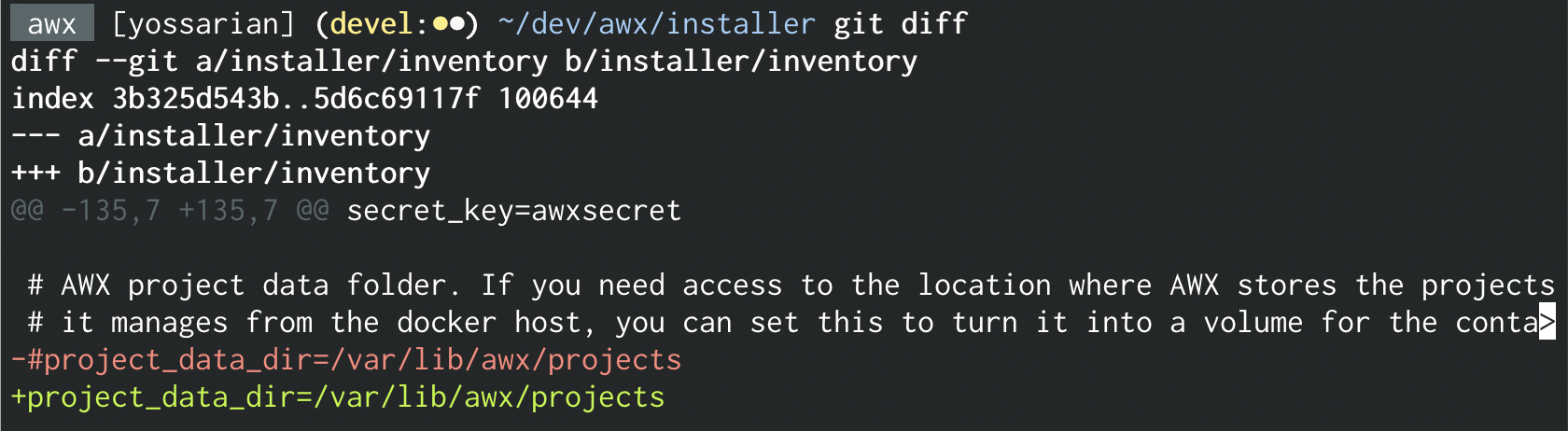
Does something like this help?
diff --git a/installer/roles/kubernetes/templates/deployment.yml.j2 b/installer/roles/kubernetes/templates/deployment.yml.j2
index 1e55dff6f5..41c7901d43 100644
--- a/installer/roles/kubernetes/templates/deployment.yml.j2
+++ b/installer/roles/kubernetes/templates/deployment.yml.j2
@@ -191,6 +191,11 @@ spec:
               mountPath: "/etc/pki/ca-trust/source/anchors/"
               readOnly: true
 {% endif %}
+{% if project_data_dir is defined %}
+            - name: {{ kubernetes_deployment_name }}-project-data-dir
+              mountPath: "/var/lib/awx/projects"
+              readOnly: false
+{% endif %}
 {% if custom_venvs is defined %}
             - name: custom-venvs
               mountPath: {{ custom_venvs_path }}
I had the same problem, however using the compose docker.
I solved this probleme mounting the same volume in the two awx_task and awx_web containers.
Example:
` task:
image: ansible/awx_task:11.2.0
container_name: awx_task
depends_on:
- redis
- memcached
- web
- postgres
hostname: awx
user: root
restart: unless-stopped
volumes:
- supervisor-socket:/var/run/supervisor
- rsyslog-socket:/var/run/awx-rsyslog/
- rsyslog-config:/var/lib/awx/rsyslog/
- "/opt/awx/awxcompose/SECRET_KEY:/etc/tower/SECRET_KEY"
- "/opt/awx/awxcompose/environment.sh:/etc/tower/conf.d/environment.sh"
- "/opt/awx/awxcompose/credentials.py:/etc/tower/conf.d/credentials.py"
- "/opt/awx/awxcompose/redis_socket:/var/run/redis/:rw"
- "/opt/awx/awxcompose/memcached_socket:/var/run/memcached/:rw"
- "/opt/awx/awxcompose/projects:/var/lib/awx/projects"
environment:
http_proxy:
https_proxy:
no_proxy:
SUPERVISOR_WEB_CONFIG_PATH: '/supervisor.conf'
web:
image: ansible/awx_web:11.2.0
container_name: awx_web
depends_on:
- redis
- memcached
- postgres
ports:
- "8090:8052"
hostname: awxweb
user: root
restart: unless-stopped
volumes:
- supervisor-socket:/var/run/supervisor
- rsyslog-socket:/var/run/awx-rsyslog/
- rsyslog-config:/var/lib/awx/rsyslog/
- "/opt/awx/awxcompose/SECRET_KEY:/etc/tower/SECRET_KEY"
- "/opt/awx/awxcompose/environment.sh:/etc/tower/conf.d/environment.sh"
- "/opt/awx/awxcompose/credentials.py:/etc/tower/conf.d/credentials.py"
- "/opt/awx/awxcompose/nginx.conf:/etc/nginx/nginx.conf:ro"
- "/opt/awx/awxcompose/redis_socket:/var/run/redis/:rw"
- "/opt/awx/awxcompose/memcached_socket:/var/run/memcached/:rw"
- "/opt/awx/awxcompose/projects:/var/lib/awx/projects"
environment:
http_proxy:
https_proxy: awx.domain.com
no_proxy:
`
 fabioharry
on 22 May 2020
fabioharry
on 22 May 2020
For anybody seeking to fix this for a Kubernetes deploy, add
{% if project_data_dir is defined %}
            - name: {{ kubernetes_deployment_name }}-project-data-dir
              mountPath: "/var/lib/awx/projects"
              readOnly: false
{% endif %}
To deployment.yml.j2 in the volumeMounts section of {{ kubernetes_deployment_name }}-task.
 D0rmouse
on 15 Sep 2020
D0rmouse
on 15 Sep 2020
For anybody seeking to fix this for a Kubernetes deploy, add
{% if project_data_dir is defined %}
            - name: {{ kubernetes_deployment_name }}-project-data-dir
              mountPath: "/var/lib/awx/projects"
              readOnly: false
{% endif %}
To deployment.yml.j2 in the
volumeMountssection of{{ kubernetes_deployment_name }}-task.
Yup, this fix works perfectly.
Thanks.
mvrk69
on 28 Oct 2020
Related issues
 astraios
·
3Comments
astraios
·
3Comments
 FloThinksPi
·
3Comments
FloThinksPi
·
3Comments
 shortsteps
·
3Comments
shortsteps
·
3Comments
 IshwarKanse
·
3Comments
IshwarKanse
·
3Comments
 kakkotetsu
·
3Comments
kakkotetsu
·
3Comments