Awx: Unable to add labels on job template with admin permission
ISSUE TYPE
- Bug Report
SUMMARY
When I am an Admin of a Job Template, I am unable to add labels to this job. I got a 403 (Forbidden) when I click on the save button
ENVIRONMENT
- AWX version: 7.0.0
- AWX install method: docker on linux
- Ansible version: 2.8.5
- Operating System: CentOS 7.7.1908
- Web Browser: Google Chrome Version 77.0.3865.120 (Official Build) (64-bit)
STEPS TO REPRODUCE
Create an organisation -> then a team -> then a user
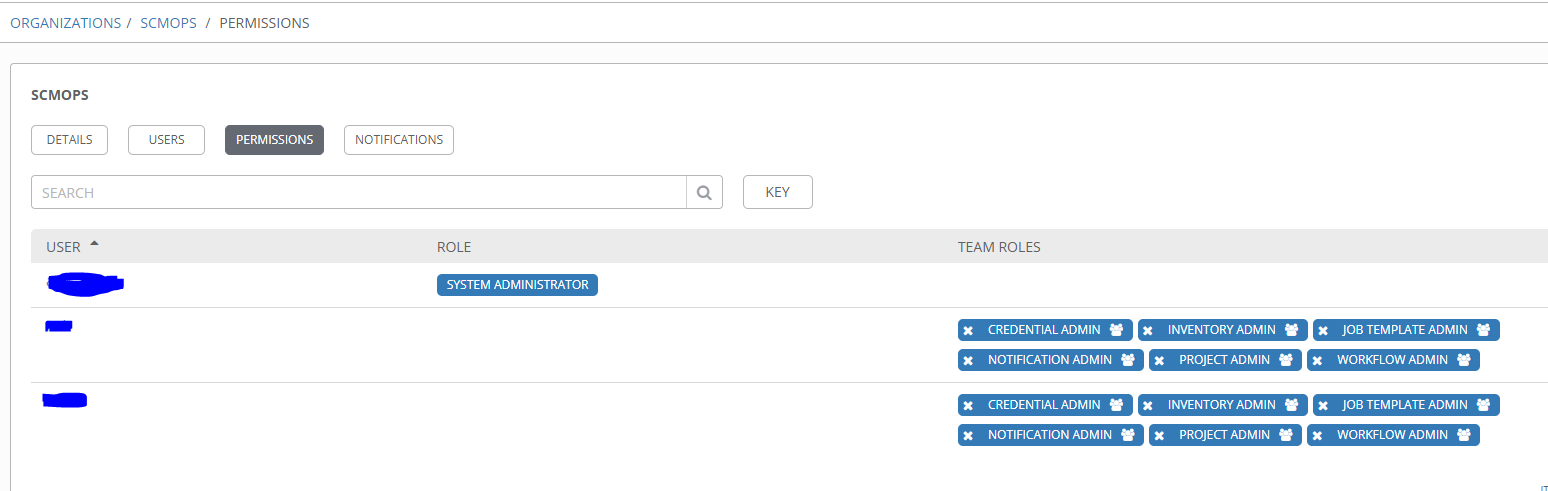
Add job template admin permission to the team (type organization) and other admin permissions.
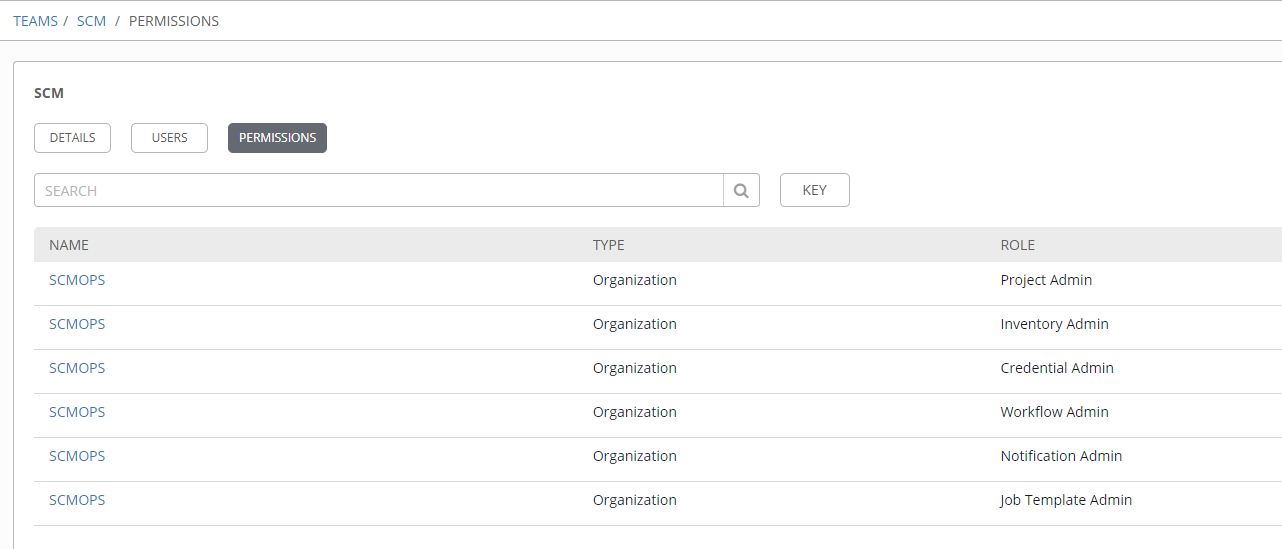
My user is member of the SCM Team and the SCM Team is member of the organization SCMOPS and got the same permissions. I'm logged in with the last user who have the role "ADMIN" for the Job Template and have the team role "JOB TEMPLATE ADMIN"
Create a job template and try to add a labels then click save. Press F12 and check your browser console. You will see 403 (Forbidden) "You do not have permission to perform this action"
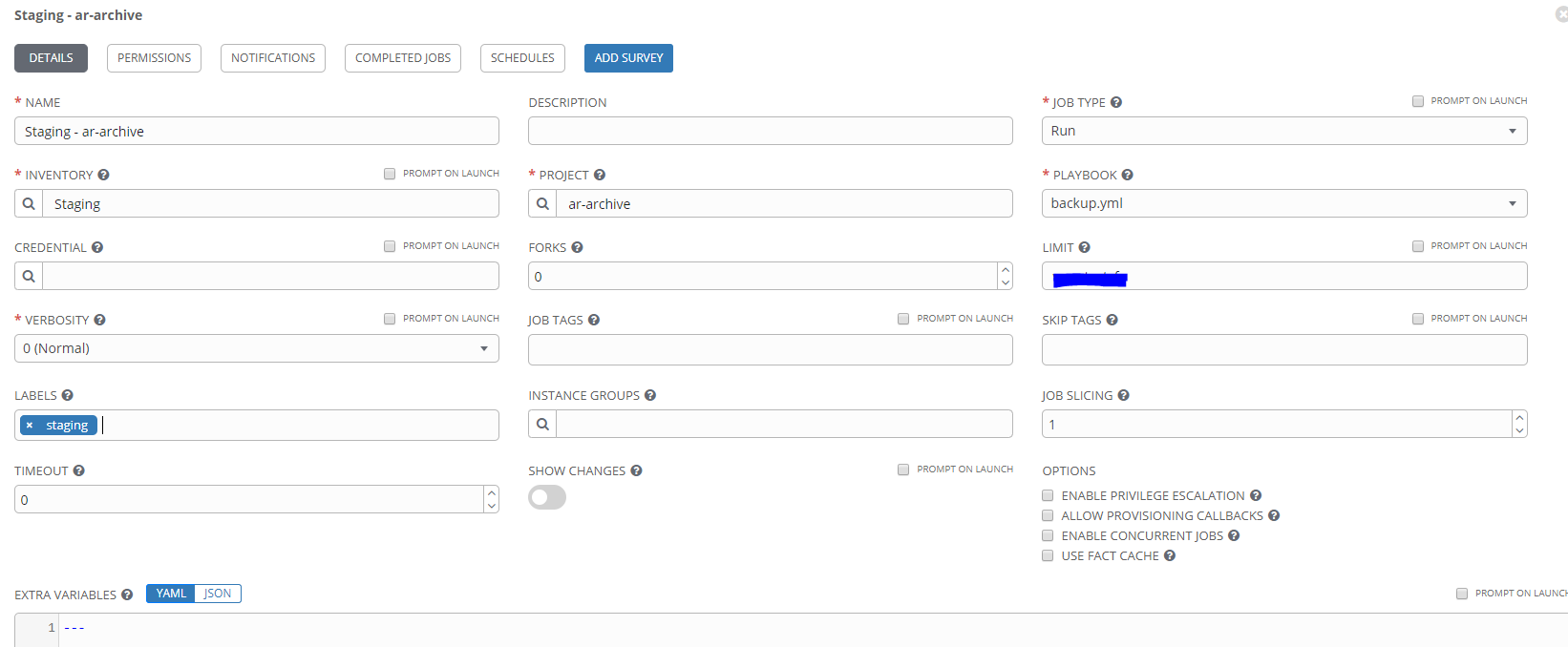


EXPECTED RESULTS
All Job Template admin must be able to add labels on their Job Template as mentionned in the documentation here : https://docs.ansible.com/ansible-tower/latest/html/userguide/job_templates.html#create-a-job-template
Members of the Organization can create labels on a Job Template if they have edit permissions (such as admin role).
ACTUAL RESULTS
ADDITIONAL INFORMATION
The only way to have this working is to add users to the organization too or only in the organization

Another remark, we can remove label without any error but we can't add one.
 craph
craph
All 19 comments
Up on this subject ?
craph
on 7 Nov 2019
Hello all,
Any news about this issue ?
craph
on 13 Nov 2019
This issue is still there in the latest version.
So will you be able to reproduce and plan a fix ?
craph
on 11 Dec 2019
Hello @ryanpetrello,
This issue is still there in the latest version 9.1.1.
Only admin user can add label on a template. I'm using a user with admin rights but I'm unable to add label on my template.
Are you aware of this issue ?
Thank you very much.
Best regards,
craph
on 20 Jan 2020
Hey @craph,
I'm aware of the issue, but haven't had any time to look at it (neither have any of the other AWX contributors).
 ryanpetrello
on 20 Jan 2020
ryanpetrello
on 20 Jan 2020
I really want to investigate this issue.
Can you provide me some advise : where to search and how to debug it ?
Thank you very much.
This problem is really weird because my user is member of a team with Job Template admin role and if I check the response of the organizations endpoint I can see this :
user_capabilities: {edit: false, delete: false}
edit: false
delete: false
May be user_capabilities is related to the user who have created the organization so it's normal ?
craph
on 10 Feb 2020
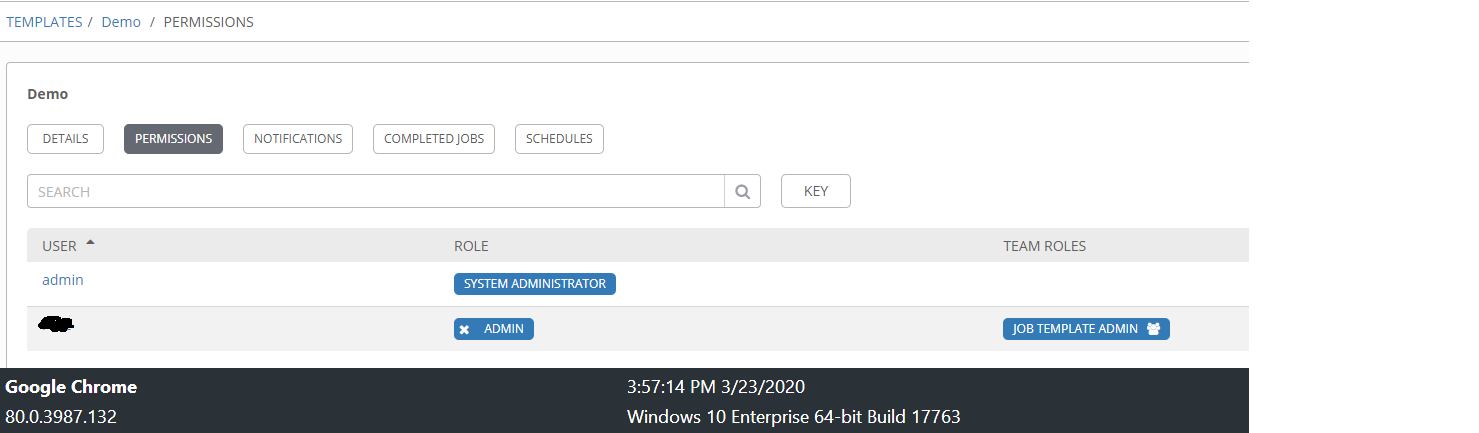
My user is the last line.
You can see the permissions for the project were I'm trying to add a label.
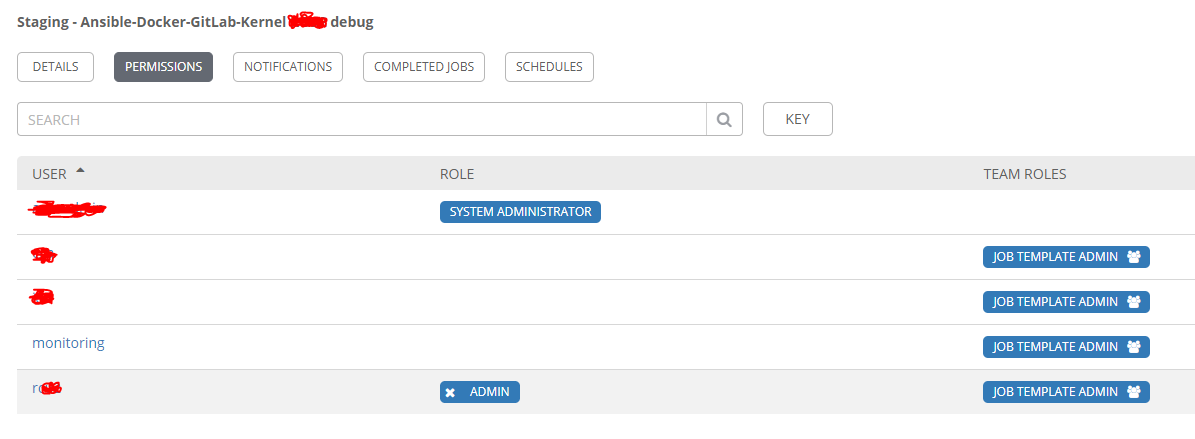
I'm the admin of the job template and have the team role "Job Template Admin".
craph
on 10 Feb 2020
@ryanpetrello , @wenottingham , with little investigation I suppose that the error occured around here :
https://github.com/ansible/awx/blob/devel/awx/api/generics.py#L638
# Verify we have permission to attach.
if not request.user.can_access(self.parent_model, 'attach', parent, sub,
                               self.relationship, data,
                               skip_sub_obj_read_check=created):
    raise PermissionDenied()
Then here : https://github.com/ansible/awx/blob/devel/awx/main/access.py#L115
def check_user_access(user, model_class, action, *args, **kwargs):
    '''
    Return True if user can perform action against model_class with the
    provided parameters.
    '''
    access_class = access_registry[model_class]
    access_instance = access_class(user)
    access_method = getattr(access_instance, 'can_%s' % action)
    result = access_method(*args, **kwargs)
    logger.debug('%s.%s %r returned %r', access_instance.__class__.__name__,
                 getattr(access_method, '__name__', 'unknown'), args, result)
    return result
Here are the logs from awx_web :
10.239.168.31 - - [10/Feb/2020:14:20:01 +0000] "GET /api/v2/organizations/ HTTP/1.1" 200 3092 "https://mydomain.com/" "Mozilla/5.0 (Windows NT 10.0; Win64; x64) AppleWebKit/537.36 (KHTML, like Gecko) Chrome/79.0.3945.130 Safari/537.36" "-"
2020-02-10 14:20:01,509 WARNING  awx.api.generics status 403 received by user myuser attempting to access /api/v2/job_templates/14/labels/ from 10.239.168.31
2020-02-10 14:20:01,522 WARNING  django.request Forbidden: /api/v2/job_templates/14/labels/
2020-02-10 14:20:01,522 WARNING  django.request Forbidden: /api/v2/job_templates/14/labels/
[pid: 208|app: 0|req: 669/3683] 10.239.168.31 () {60 vars in 3992 bytes} [Mon Feb 10 14:20:01 2020] POST /api/v2/job_templates/14/labels/ => generated 63 bytes in 151 msecs (HTTP/1.1 403) 10 headers in 408 bytes (1 switches on core 0)
10.239.168.31 - - [10/Feb/2020:14:20:01 +0000] "POST /api/v2/job_templates/14/labels/ HTTP/1.1" 403 63 "https://mydomain.com/" "Mozilla/5.0 (Windows NT 10.0; Win64; x64) AppleWebKit/537.36 (KHTML, like Gecko) Chrome/79.0.3945.130 Safari/537.36" "-"
But now I'm unable to find the right place to see the relation between organization / team and user with Job Template Admin permissions.
Can you help me to dig in it ?
How can I debug this easily ? I'm using PyCharm but I don't know how to do.
Is that my user is only in a team (the team have admin role... JT incluced)
Thank you very much for your help.
craph
on 10 Feb 2020
@craph
Can you please provide a _minimal_ test case that we could use to reproduce this bug starting from a completely clean environment?
What we're looking for is:
- Exact set of organizations, projects, inventories, credentials, and job template created
- The specific credential(s), project, and inventory associated to the JT.
- Team or organization membership of any test users
- All permissions assigned to individual users, teams, or organizations
 jakemcdermott
on 10 Mar 2020
jakemcdermott
on 10 Mar 2020
@jakemcdermott Sure, here is the _mininal_ test case:
First I have clone AWX from github repo and awx-logo too
Create an organization : MyOrganization
Create a team : MyTeam linked to the Organization MyOrganization
The user is a user from LDAP. So Logout from Admin and connect once with the user.
Logout, then login back with the admin user
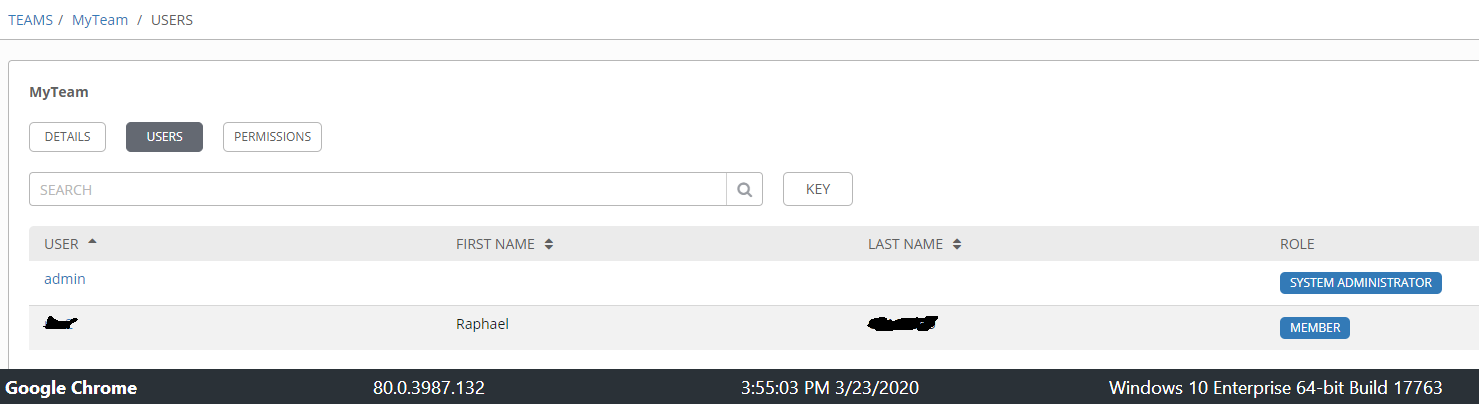
Link the user from LDAP to the team MyTeam
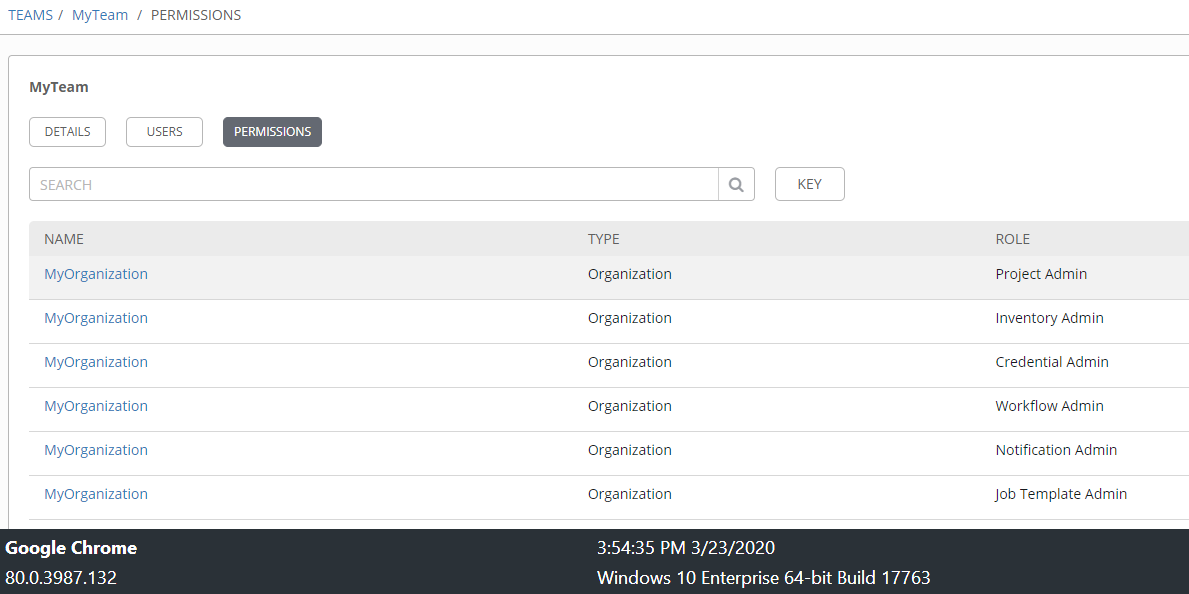
Add permissions to MyTeam
- Select Organization -> MyOrganization
- Add all Admin role (Project, Inventory, Credential, Workflow, Notification, Job Template)
Log out from Admin user and log in with the ldap user you added to MyTeam
Create a demo project from : https://github.com/ansible/ansible-tower-samples
Create a demo inventory with localhost linked to MyOrganization
Create a new Job Template based on the demo inventory and demo project and try to add a label to this JT
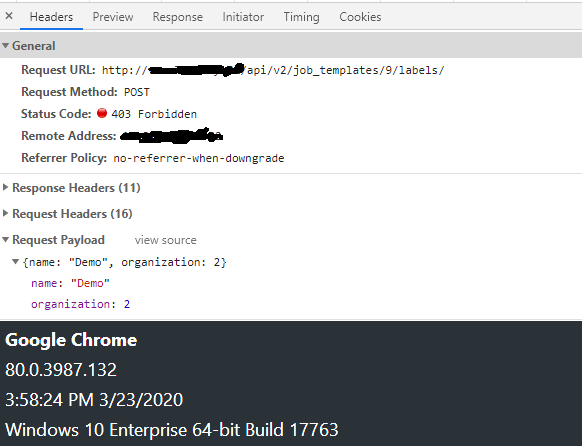
Click save and inspect the console of your browser. You'll see the error like this :
http://myserver/api/v2/job_templates/9/labels/ 403 (Forbidden)
{"detail":"You do not have permission to perform this action."}
craph
on 23 Mar 2020
@craph I'm not able to recreate this issue on my end, but just to clarify, are you attempting to add a new label or one that already exists? If you are trying to have your user create/add a new label that won't be possible, your user won't have those permissions, they can only add existing labels not create new ones.
 rebeccahhh
on 23 Apr 2020
rebeccahhh
on 23 Apr 2020
What @rebeccahhh said - you can only create new labels if you have organization access:
https://github.com/ansible/awx/blob/devel/awx/main/access.py#L2483
ryanpetrello
on 23 Apr 2020
@rebeccahhh, @ryanpetrello ,
I’m trying to add a label to a job.
As mentionned in my previous comment you have all the steps to reproduce the case.
My user are member of a team and the team is in an organization.
Also my user as the admin permission as you can see.
The only one user that can create labels is the admin or i Have to add my user inside my organization instead of the team.
Please could you explain to me the steps you did ? Did you follow all my steps ?
With my steps you’ll be able to reproduce.
If users are inside a team that as all the admin permissions normaly users should be able to do admin things like create / add labels to a job.
Am I wrong ?
Thank you very much for your Help.
craph
on 24 Apr 2020
What @rebeccahhh said - you can only create new labels if you have organization access:
https://github.com/ansible/awx/blob/devel/awx/main/access.py#L2483
I don’t understand that. And I don’t see it in the documentation.
If I am an admin I can’t create labels if I’m not inside an organization ? Which permissions the organization must have ?
If I’m the admin of a JT I thought that I would have been able to complete all the fields of the JT like labels…
Thanks
craph
on 24 Apr 2020
What @rebeccahhh said - you can only _create_ new labels if you have organization access:
https://github.com/ansible/awx/blob/devel/awx/main/access.py#L2483
Another remark, my user is a member of a team and this team is inside an organization so by default if a user is inside a team who is inside an organization normally the user should be member of this organization by inheritence / by default.
craph
on 27 Apr 2020
@ryanpetrello @rebeccahhh any news about this subject ?
craph
on 11 May 2020
yes, @craph
I followed your steps absolutely save being on CentOS and was unable to recreate the same behavior.
Also, the way that inheritance in Tower actually works doesn't give a user any particular permissions from an organization just because they are part of it. Being a member of an organization just associates them with said organization.
@ryanpetrello can correct me if I'm wrong on any of this but given that I can't recreate this issue on my end this is my best thoughts on what is going on here.
rebeccahhh
on 11 May 2020
Another thing as I am looking back at your commentss @craph
Is your user a member of the organization or just the team? based on your reproduction steps and this comment: https://github.com/ansible/awx/issues/5064#issuecomment-619825008 it looks like you added your member to the team but not the organization. I know it seems like you don't have to add the user to the organiztion too because they're already part of the team (which as you said is associated to the organization) but you will have to add the user to the organization too. Those are kept separate on purpose, but because they have different permissions could create situations like this one.
rebeccahhh
on 11 May 2020
closing for now since things looked to be cleared up, can be reopened if needed.
rebeccahhh
on 1 Jun 2020
Related issues
 FloThinksPi
·
3Comments
FloThinksPi
·
3Comments
 astraios
·
3Comments
astraios
·
3Comments
 kakkotetsu
·
3Comments
kakkotetsu
·
3Comments
 Gui13
·
3Comments
Gui13
·
3Comments
 darkaxl
·
3Comments
darkaxl
·
3Comments