Awx: An incorrect folder tree is created during roles download
ISSUE TYPE
- Bug Report
COMPONENT NAME
- UI
SUMMARY
A strange folder tree appears once the roles are downloaded..
ENVIRONMENT
- AWX version: 4.0.0
- AWX install method: docker on linux
- Ansible version: 2.8.0
- Operating System: Ubuntu eoan/Debian buster
- Web Browser: chrome Version 74.0.3729.157 (Official Build) (64-bit)
STEPS TO REPRODUCE
- Settings/Jobs/Enable Role Download: ON

- create playbooks project:
- playbooks SCM type: git
- playbooks SCM URL: valid private URL (not hosted on ansible galaxy)
- playbooks SCM Update Options:
- Clean
- Delete on Update
- Update Revision on Launch
- playbooks git repository contains
roles/requirements.yml
</li>
<li>src: <roles SCM private URL><br />
scm: git<br />
EXPECTED RESULTS
1) playbooks git repository cloned
2) roles downloaded from <roles SCM private URL>
3) the folder tree of the downloaded roles should exactly match the folder tree of the roles within the repository:
├── roles/
│   ├── role-name-1
│   ├── role-name-2
│   ├── ...
│   └── requirements.yml
ACTUAL RESULTS
1) playbooks git repository cloned, including the file roles/requirements.yml
2) roles are downloaded
3) the folder tree of the downloaded roles does not exactly match the folder tree of the roles within the repository:
├── roles
│   ├── git-Roles ------------------> name of the parent folder hosting the git roles repository
│   │   ├── git-Roles --------------> all roles are downloaded except the 'cgit' role
│   │   │   ├── role-name-1
│   │   │   ├── role-name-2
│   │   │   ├── ...
│   │   ├── handlers --------------> from the 'cgit' role
│   │   │   └── main.yml
│   │   ├── meta ------------------> from the 'cgit' role
│   │   │   └── main.yml
│   │   ├── README.md -------------> from the 'cgit' role
│   │   ├── tasks -----------------> from the 'cgit' role
│   │   │   └── main.yml
│   │   ├── tests -----------------> from the 'cgit' role
│   │   │   ├── inventory
│   │   │   └── test.yml
│   │   ├── .travis.yml -----------> from the 'cgit' role
│   │   └── vars ------------------> from the 'cgit' role
│   │       └── main.yml
│   └── requirements.yml
SUGGESTION:
The roles should be cloned within <playbook-dir>/roles with "git clone <roles SCM URL> ." instead of "git clone <roles SCM URL>"
ADDITIONAL INFORMATION:
Private git repositories are located on the host running the AWX containers
 jean-christophe-manciot
All 38 comments
Is this with 2.8 only, or also with other versions?
 wenottingham
on 21 May 2019
wenottingham
on 21 May 2019
It is not specific to ansible 2.8.
jean-christophe-manciot
on 21 May 2019
I meant it happened with older versions as well, as reported in https://github.com/ansible/awx/issues/1632#issuecomment-458520491
jean-christophe-manciot
on 22 May 2019
Does this happen if you run the same playbooks outside of AWX?
 ghjm
on 31 May 2019
ghjm
on 31 May 2019
It does not happen while running the playbooks. It happens while downloading the roles.
This issue does not happen if I download the roles outside of AWX using the same URL: in the latter case, the folder tree is exactly cloned and matches perfectly the original folder tree.
jean-christophe-manciot
on 1 Jun 2019
Exact same issue with 6.1.0, even if I remove the cgit role from within the roles folder, and update.
priority: low: really? This issue makes the downloaded roles unusable.
jean-christophe-manciot
on 9 Aug 2019
I see what you mean, in that the roles/git-Roles/git-Roles isn't expected. But we need to do more troubleshooting to figure out where the issue lies, and I highly suspect this is something to do with how ansible-galaxy processes the contents from the SCM. My best guess as to how this could be fixable is in Ansible core or in how the targeted repo is structured.
If you're using development version of AWX, could you set PROJECT_UPDATE_VVV = True in your local settings, and re-run your job, and then share the stdout / stderr from the task in the project update playbook which processes roles?
If you don't have some recent AWX changes, you could add -vvvvv to the ansible-galaxy task in the project update playbook to get that verbose output.
Specifically after looking at #1632 which you linked to, I suspect that that command might be giving some information relevant to your issue.
We have been primarily testing role downloads from Galaxy, and I have to gather some more information to develop a reference case that is expected to work for this use.
 AlanCoding
on 24 Sep 2019
AlanCoding
on 24 Sep 2019
@AlanCoding
I've tried to update the "SETTINGS/JOBS/EXTRA ENVIRONMENT VARIABLES" with:
{
 "HOME": "/var/lib/awx"
 "PROJECT_UPDATE_VVV": "True"
}
It does not seem to change the verbosity of the runs.
Anyhow, with awx 7.0.0, rerunning the project (which "DELETE ON UPDATE" the downloaded folder) makes the whole process regress as the roles are not downloaded anymore (while the playbooks are), as already reported here:
...
TASK [detect requirements.yml] *************************************************
skipping: [localhost,] => {"changed": false, "skip_reason": "Conditional result was False"}
TASK [fetch galaxy roles from requirements.yml] ********************************
skipping: [localhost,] => {"changed": false, "skip_reason": "Conditional result was False"}
TASK [detect collections/requirements.yml] *************************************
skipping: [localhost,] => {"changed": false, "skip_reason": "Conditional result was False"}
TASK [fetch galaxy collections from collections/requirements.yml] **************
skipping: [localhost,] => {"changed": false, "skip_reason": "Conditional result was False"}
...
although the requirements file has been downloaded:
# ls -al _8__git_playbooks/roles/requirements.yml
-rwxr-xr-x 1 root root 1199 Oct  1 16:22 _8__git_playbooks/roles/requirements.yml
As a reminder, a manual local clone on the host controller works fine with the downloaded roles folder tree matching the source tree perfectly:
git clone <roles SCM URL> .
...
remote: Enumerating objects: 1857, done.
remote: Counting objects: 100% (1857/1857), done.
remote: Compressing objects: 100% (1321/1321), done.
Receiving objects: 100% (1857/1857), 488.08 MiB | 19.78 MiB/s, done.
remote: Total 1857 (delta 804), reused 0 (delta 0)
Resolving deltas: 100% (804/804), done.
Checking out files: 100% (1213/1213), done.
At this point, I think you would just have to add -vvv to the project_update.yml playbook to get more details. And it is expected that the project update will not download them. It is the project sync that is expected to install roles, which is linked to by a green (or red) orb in the job UI next to the project name.
What I'm thinking I can do is that I can make a version of this:
- src: <roles SCM private URL>
  scm: git
That just uses a public URL for testing, and for which the target repo corresponds to the expected roles structure from Ansible documentation. That's something that I could test. If this works on the local CLI, it should work in AWX too.
AlanCoding
on 1 Oct 2019
I'm not sure what difference you make between update & sync.
My previous action was to click on the circular icon "Get latest SCM revision" next to the project name which is supposed to resync the whole project:

jean-christophe-manciot
on 1 Oct 2019
I can try to recreate a similar project from scratch & see what happens.
Downgrading to 6.1.0 creates some inconsistencies.
jean-christophe-manciot
on 1 Oct 2019
- Cloning the project leads to the exact same issue.
- manually creating another project with the same settings leads to the exact same issue.
I have jumped into the awx_task container: I have located theproject_update.yml playbook at /var/lib/awx/venv/awx/lib/python3.6/site-packages/awx/playbooks/project_update.yml; but I don't know where/how it is called in order to add -vvv.
jean-christophe-manciot
on 1 Oct 2019
The sync happen in advance of a job run. There is a link in the UI for a job ran with the project, which is a green circle next to the name of the project. It is not expected that it will install galaxy requirements in a project update.
AlanCoding
on 2 Oct 2019
The "green circle next to the name of the project" is just a link to the job details.
I never used it to sync the project.
jean-christophe-manciot
on 3 Oct 2019
It should be a link to the output of the project_update.yml playbook, which the server automatically runs, without action on your part.
AlanCoding
on 3 Oct 2019
There is no job template nor workflow template defined.
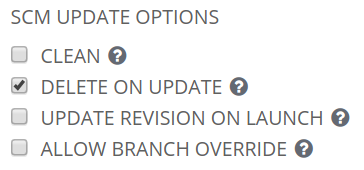
The settings regarding the way the project is updated are:
jean-christophe-manciot
on 3 Oct 2019
If you're looking for a complete log of the manual sync (which is part of its job details):
Enter passphrase for /tmp/awx_39_uu13hgnl/artSAMSUNG-Ubuntuifacts/39/ssh_key_data:
Identity added: /tmp/awx_39_uu13hgnl/artifacts/39/ssh_key_data (xxxxxxx@xxxxxxxxxxxxxxxx)
Using /etc/ansible/ansible.cfg as config file
PLAY [all] *********************************************************************
TASK [delete project directory before update] **********************************
ok: [localhost, -> localhost] => {"changed": false, "path": "/var/lib/awx/projects/_12__git_sdx_live_playbooks_ubuntu", "state": "absent"}
TASK [update project using git] ************************************************
changed: [localhost, -> localhost] => {"after": "8a99bf968aa5c711833c4912ee784cfa06dd463e", "before": null, "changed": true}
TASK [Set the git repository version] ******************************************
ok: [localhost, -> localhost] => {"ansible_facts": {"scm_version": "8a99bf968aa5c711833c4912ee784cfa06dd463e"}, "changed": false}
TASK [update project using hg] *************************************************
skipping: [localhost,] => {"changed": false, "skip_reason": "Conditional result was False"}
TASK [Set the hg repository version] *******************************************
skipping: [localhost,] => {"changed": false, "skip_reason": "Conditional result was False"}
TASK [parse hg version string properly] ****************************************
skipping: [localhost,] => {"changed": false, "skip_reason": "Conditional result was False"}
TASK [update project using svn] ************************************************
skipping: [localhost,] => {"changed": false, "skip_reason": "Conditional result was False"}
TASK [Set the svn repository version] ******************************************
skipping: [localhost,] => {"changed": false, "skip_reason": "Conditional result was False"}
TASK [parse subversion version string properly] ********************************
skipping: [localhost,] => {"changed": false, "skip_reason": "Conditional result was False"}
TASK [Ensure the project directory is present] *********************************
skipping: [localhost,] => {"changed": false, "skip_reason": "Conditional result was False"}
TASK [Fetch Insights Playbook(s)] **********************************************
skipping: [localhost,] => {"changed": false, "skip_reason": "Conditional result was False"}
TASK [Save Insights Version] ***************************************************
skipping: [localhost,] => {"changed": false, "skip_reason": "Conditional result was False"}
TASK [Repository Version] ******************************************************
ok: [localhost,] => {
    "msg": "Repository Version 8a99bf968aa5c711833c4912ee784cfa06dd463e"
}
PLAY [all] *********************************************************************
TASK [detect requirements.yml] *************************************************
skipping: [localhost,] => {"changed": false, "skip_reason": "Conditional result was False"}
TASK [fetch galaxy roles from requirements.yml] ********************************
skipping: [localhost,] => {"changed": false, "skip_reason": "Conditional result was False"}
TASK [detect collections/requirements.yml] *************************************
skipping: [localhost,] => {"changed": false, "skip_reason": "Conditional result was False"}
TASK [fetch galaxy collections from collections/requirements.yml] **************
skipping: [localhost,] => {"changed": false, "skip_reason": "Conditional result was False"}
PLAY RECAP *********************************************************************
localhost,                 : ok=4    changed=1    unreachable=0    failed=0    skipped=13   rescued=0    ignored=0
If there is no job template nor workflow template, then we are not going to know if the roles are installed correctly or not.
AlanCoding
on 3 Oct 2019
Again, the project creation and sync are supposed to respectively download/sync the roles.
Please see for yourself with AWX 6.1.0 by creating a project which has the following characteristics:
- git SCM
- playbook SCM URL pointing to a playbook repository which has a roles/requirements.yml file defining a git repository URL for the roles
- SCM update options as outlined earlier
- appropriate SCM branch & credential
1) Hitting the save button should download the project repository alongside the roles repository with an incorrect roles tree. There is no need to create any job/workflow template in this situation for now.
You can hit the circular sync icon next to the project name to check that the whole process takes place again due to the delete on update setting.
2) Then upgrade to 7.0.0 & check that the roles are not downloaded anymore when hitting the same circular sync icon (although they should). Only the playbooks are re-downloaded (due to the delete on update setting).
jean-christophe-manciot
on 3 Oct 2019
I'm seeing this same problem with awx 7.0.0.0 which I installed via the ansible docker method.
I have enabled role download but roles are never downloaded as far as I can tell.

TASK [detect requirements.yml] *************************************************
skipping: [localhost,] => {"changed": false, "skip_reason": "Conditional result was False"}
I tried commenting out when: roles_enabled|bool but then fetch galaxy roles from requirements.yml task complains about roles_destination being unset.
 shweppsie
on 4 Oct 2019
shweppsie
on 4 Oct 2019
That is correct, it is intended that roles are not downloaded in the project update. They will be installed before the job starts.
AlanCoding
on 4 Oct 2019
At the end of a Project update, Tower searches for a file called requirements.yml in the roles directory, located at
<project-top-level-directory>/roles/requirements.yml. If this file is found, the following command automatically runs:ansible-galaxy install -r roles/requirements.yml -p ./roles/ --force
refs: https://docs.ansible.com/ansible-tower/latest/html/userguide/projects.html#ansible-galaxy-support
I got the same issue like @jean-christophe-manciot in AWX 7.0.0
Maybe this issue is relative to https://github.com/ansible/awx/issues/4675 ?
The path of roles missing with AWX.
 zx1986
on 5 Oct 2019
zx1986
on 5 Oct 2019
You all mind giving this a shot in the latest 8.0.0?
 ryanpetrello
on 21 Oct 2019
ryanpetrello
on 21 Oct 2019
I have been looking more into the use of src:, because I want to add tests for it and more fully support it moving forward (and be prepared if collections adds something like it). Research of this topic leads me to:
https://galaxy.ansible.com/docs/using/installing.html#installing-multiple-roles-from-a-file
# from GitHub
- src: https://github.com/bennojoy/nginx
https://github.com/bennojoy/nginx
This repo has folders like tasks and templates at the root level. My theory on this issue is that the originally reported double-nesting of the roles folders is because the source repo nests content in the roles folder.
AlanCoding
on 23 Oct 2019
@AlanCoding
That is correct, it is intended that roles are not downloaded in the project update. They will be installed before the job starts.
Could you clarify this? What "job" are we talking about? Because neither the creation of the project nor any project sync trigger the roles download.
This repo has folders like tasks and templates at the root level. My theory on this issue is that the originally reported double-nesting of the roles folders is because the source repo nests content in the roles folder.
IIUC, you expect a repository behind the - src: to hold a single role, is that correct?
If that's the case, my repository holds multiple roles as already described in the first post and in the link you give.
Finally, I cannot confirm or refute this issue with 8.0.0, because the roles are not downloaded at all.
jean-christophe-manciot
on 24 Oct 2019
If that's the case, my repository holds multiple roles as already described in the first post and in the link you give.
I'm going to need a little more help with this. If your repository holds multiple roles, then that appears to be inconsistent with that documentation. In addition to the bennojoy/nginx example it gives:
- specifying a tag on github or bitbucket
- using a tar.gz file
In order to support multiple roles, there needs to be some specification or agreement about where to find them in the project. The only example I have here is that the tasks, templates, etc. are at root level in the project. That won't allow multiple roles (you could have multiple tasks in the same role, include_role / tasks_from, but not the same), and I'd expect that any other structure would not work.
AlanCoding
on 24 Oct 2019
According to the documentation you point to:
src
The source of the role, and a required attribute. Specify a role from Galaxy by using the format namespace.role_name, or provide a URL to a repository within a git based SCM.
As pointed out in my first post, I use a git based repository which is not hosted by GitHub, but this detail shouldn't matter at all.
As described in the first post, the repository root folder layout is straightforward, but as you asked, here is a typical structure: each role is created with ansible-galaxy init <role-name> (each sub-folder may contain more than main.yml and all hidden files such as .travis.yml and folders such as .git are not shown):
git--Roles/
├── role-name-1
...
├── role-name-2
...
└── role-name-n
    ├── defaults
    ├── files
    ├── handlers
    │   └── main.yml
    ├── meta
    │   └── main.yml
    ├── README.md
    ├── tasks
    │   ├── main.yml
    ├── templates
    │   └── template.j2
    ├── tests
    │   ├── inventory
    │   └── test.yml
    └── vars
There is nothing special about this roles folders layout.
jean-christophe-manciot
on 25 Oct 2019
I've replicated your bug using this:
https://github.com/ansible/test-playbooks/compare/master...AlanCoding:role_meta
Installing ansible-galaxy install -r roles/requirements.yml gives this following folder tree. This matches your results.
https://gist.github.com/AlanCoding/b3efeb27332ebeba94ac9437f8cc299b
You can see that yatesr.timezone (from Galaxy, for reference) has the correct level of roles nesting. The roles from source control, whatever the specifics, are at least 2 levels deeper, and obviously would not work.
There is nothing special about this roles folders layout.
For a playbook environment, yes. You are using it as a source for the ansible-galaxy install command, and this is different. The exact letter of the docs do not give an example structured in the same way, for the same use. I still agree that it looks like a bug because the command _tries_ to install (detecting the meta.yml) and does so incorrectly.
Either way, the right place for that issue is https://github.com/ansible/ansible/issues, AWX is calling the command correctly and it's behavior is the same as CLI use.
AlanCoding
on 25 Oct 2019
My summary wasn't 100% correct there. I pushed a commit, adding a 2nd role to illustrate the point better.
The issue isn't that the role contents are nested (there are tasks and meta folders at the right level), but that the role name is the name of the repo test-playbooks, as opposed to the name of the role, test_tag_role. With 2 roles present, it only saves 1 of them, which makes no sense.
AlanCoding
on 25 Oct 2019
Actually, I've just discovered a ~ 2 years old discussion about the exact same topic.
As a summary:
- this multi-roles in a git repository feature is not supported yet by ansible-galaxy, although some people manage to make it work by accident with some tricks; I've tried the so-called
dummy meta file, but it's unsuccessful in this context - there is at least one public site which tries to work around the current limitations with an
ansible-galaxy/meta/main.ymlfile from the roles folder. I've also tried to add such a file (describing the platforms) from the root of the git repository and it is not successful in this context - there is an ongoing effort to implement it in 2.9; the experimental project is called mazer
jean-christophe-manciot
on 26 Oct 2019
@AlanCoding
This statement can be applied also to version 9.1.1, the issue I found was that the project_update yaml uses TAGS and the job for the project uses only 1 tag and its update_git and not install-roles therefore no roles will be read and updated from the requirements.yml
Finally, I cannot confirm or refute this issue with 8.0.0, because the roles are not downloaded at all.
I changed the tag to update git and now all repos are updating the roles perfectly.
- name: fetch galaxy roles from requirements.yml
          command: ansible-galaxy install -r requirements.yml -p {{project_path|quote}}/roles/{{ ' -' + 'v' * ansible_verbosity if ansible_verbosity else '' }}
          args:
            chdir: "{{project_path|quote}}/roles"
          register: galaxy_result
          when: doesRequirementsExist.stat.exists
          changed_when: "'was installed successfully' in galaxy_result.stdout"
          environment:
            ANSIBLE_FORCE_COLOR: false

      when: roles_enabled|bool
      tags:
        - update_git  // install-roles tag is not used in project update?
Edit:
Nothing works, the roles are installed but when a job is run they are not found at the temp locations, the requirements_role path is empty and the default location in the project path isn't part of the search anymore.
 mkayontour
on 27 Jan 2020
mkayontour
on 27 Jan 2020
We have exactly the same problem as @mkayontour.
Is this really a low priority bug?
 wiegandsh
on 4 Feb 2020
wiegandsh
on 4 Feb 2020
We now moved from a flexible environment which made changes and role integration very easy back to one static repository with all roles inside the repo.
We used to have the requirements.yml in the roles directory, therefore we could manage, test and publish our code to several environments and in addition include roles from the galaxy if needed.
Right now, this is not possible anymore, we need to transfer single commits into branches to test them in the production repo on the test environment. Which isn't that comfy as before, where we had issues for each role tests with roles in different versions and so on.
So back to the issue, is there any plans or updates for this topic?
Can we expect to use requirements.yml again in the next version?
Will there be the possibility to use roles located from our own Git Server?
Do you need additional information which I could provide?
mkayontour
on 18 Feb 2020
We are having the same issue. In our requirements.yml, when using https our folder structure is as expected. When using ssh, which our new project requires, a folder is exploded to up to the root of the repo. If we remove that folder it will randomly select another folder and move it's contents to the root.
 mrmatt1877
on 9 Apr 2020
mrmatt1877
on 9 Apr 2020
when using https our folder structure is as expected. When using ssh, which our new project requires, a folder is exploded to up to the root of the repo
A recently merged patch, #6488, certainly addresses a problem specific to ssh role requirements (does not apply to https entries), but this is auth-related.
Your issue that ssh, but not https, gives incorrect role _folder structure_ goes well beyond the test case I posted earlier in this thread. There are many independent variables in play here. If you can reproduce the issue locally with the same requirements.yml file, then file an issue in ansible/ansible. If you cannot reproduce the issue locally, but it occurs in AWX, and you have a reproducer with all the details:
- the roles/requirements.yml content
- the folder structure of the source repository that it points to via ssh
- the correct folder structure you get doing the clone locally (the expectation)
- the incorrect results you get when doing it as a job in AWX
then best to enumerate those details in a new issue here.
AlanCoding
on 9 Apr 2020
Maybe I am reading something wrong but this is exactly the issue I am having but only with ssh not https.
EXPECTED RESULTS
playbooks git repository cloned
roles downloaded from
the folder tree of the downloaded roles should exactly match the folder tree of the roles within the repository:
├── roles/
│ ├── role-name-1
│ ├── role-name-2
│ ├── ...
│ └── requirements.yml
ACTUAL RESULTS
playbooks git repository cloned, including the file roles/requirements.yml
roles are downloaded
the folder tree of the downloaded roles does not exactly match the folder tree of the roles within the repository:
├── roles
│ ├── git-Roles ------------------> name of the parent folder hosting the git roles repository
│ │ ├── git-Roles --------------> all roles are downloaded except the 'cgit' role
│ │ │ ├── role-name-1
│ │ │ ├── role-name-2
│ │ │ ├── ...
│ │ ├── handlers --------------> from the 'cgit' role
│ │ │ └── main.yml
│ │ ├── meta ------------------> from the 'cgit' role
│ │ │ └── main.yml
│ │ ├── README.md -------------> from the 'cgit' role
│ │ ├── tasks -----------------> from the 'cgit' role
│ │ │ └── main.yml
│ │ ├── tests -----------------> from the 'cgit' role
│ │ │ ├── inventory
│ │ │ └── test.yml
│ │ ├── .travis.yml -----------> from the 'cgit' role
│ │ └── vars ------------------> from the 'cgit' role
│ │ └── main.yml
│ └── requirements.yml
mrmatt1877
on 9 Apr 2020
@AlanCoding
There is an ongoing effort to implement ansible collections as git repositories in 2.10, which should allow us to declare them in requirements.yml. its syntax should look something like this ('|' symbolizes OR):
collections:
- name: <https_url|git@url>
  scm: git
  version: <tag|commit>
However, it is probably not supported by AWX yet (not tested).
Also, I suppose that the location for the requirements.yml file should be changed from roles/requirements.yml to the project root, shouldn't it?
jean-christophe-manciot
on 28 Apr 2020
Also, I suppose that the location for the requirements.yml file should be changed from roles/requirements.yml to the project root, shouldn't it?
Yes, a conceivable search chain is discussed at https://github.com/ansible/awx/issues/6270
AlanCoding
on 29 Apr 2020
Related issues
 worsco
·
3Comments
worsco
·
3Comments
 grahamn-gr
·
3Comments
grahamn-gr
·
3Comments
 beenje
·
3Comments
beenje
·
3Comments
 darkaxl
·
3Comments
darkaxl
·
3Comments
 augabet
·
3Comments
augabet
·
3Comments
Most helpful comment
We now moved from a flexible environment which made changes and role integration very easy back to one static repository with all roles inside the repo.
We used to have the requirements.yml in the roles directory, therefore we could manage, test and publish our code to several environments and in addition include roles from the galaxy if needed.
Right now, this is not possible anymore, we need to transfer single commits into branches to test them in the production repo on the test environment. Which isn't that comfy as before, where we had issues for each role tests with roles in different versions and so on.
So back to the issue, is there any plans or updates for this topic?
Can we expect to use requirements.yml again in the next version?
Will there be the possibility to use roles located from our own Git Server?
Do you need additional information which I could provide?