Awx: Web performance regression since 4.0.0
ISSUE TYPE
- bug report
SUMMARY
On same installation with empty database (so empty project) when using 4.0.0 I got 10sec for
[pid: 159|app: 0|req: 28/90] 172.28.0.17 () {62 vars in 2732 bytes} [Tue Apr 16 07:33:24 2019] GET / => generated 11339 bytes in 10838 msecs (HTTP/1.1 200) 7 headers in 321 bytes (1 switches on core 0) web_1        |
[pid: 158|app: 0|req: 13/91] 172.28.0.17 () {64 vars in 2707 bytes} [Tue Apr 16 07:33:36 2019] GET /api/ => generated 6859 bytes in 10263 msecs (HTTP/1.1 200) 11 headers in 481 bytes (1 switches on core 0)

Keep in mind that those calls tooks always 10sec or few ms (like in 3.0.1), but never 5sec or more than 10sec. That constant timing execution 10sec is really strange, like a timeout or something like that.
ENVIRONMENT
- AWX version: 4.0.0
- AWX install method: docker on linux
- Ansible version: bundle inside ansible:awx_task and ansible:awx_web
- Operating System: Centos
- Web Browser: Firefox 66 (but same issue on Chrome)
STEPS TO REPRODUCE
version: '2'
services:
  web:
    image: ansible/awx_web:4.0.0
    depends_on:
      - rabbitmq
      - memcached
      - postgres
    ports:
      - "8052:8052"
    hostname: awxweb
    user: root
    restart: unless-stopped
    networks:
      - default
      - nginx_default
    environment:
      # nginx variable
      - VIRTUAL_HOST=awx.foo.com
      - VIRTUAL_PORT=8052
    volumes:
      - ./conf/SECRET_KEY:/etc/tower/SECRET_KEY:ro
      - ./conf/environment.sh:/etc/tower/conf.d/environment.sh
      - ./conf/credentials.py:/etc/tower/conf.d/credentials.py

  task:
    image: ansible/awx_task:4.0.0
    depends_on:
      - rabbitmq
      - memcached
      - web
      - postgres
    hostname: awx
    user: root
    restart: unless-stopped
    networks:
      - default
    volumes:
      - ./conf/SECRET_KEY:/etc/tower/SECRET_KEY:ro
      - ./conf/environment.sh:/etc/tower/conf.d/environment.sh
      - ./conf/credentials.py:/etc/tower/conf.d/credentials.py

  rabbitmq:
    image: ansible/awx_rabbitmq:3.7.4
    restart: unless-stopped
    networks:
      - default
    environment:
      - RABBITMQ_DEFAULT_VHOST=awx
      - RABBITMQ_DEFAULT_USER=guest
      - RABBITMQ_DEFAULT_PASS=awxpass
      - RABBITMQ_ERLANG_COOKIE=cookiemonster

  memcached:
    image: memcached:alpine
    restart: unless-stopped
    networks:
      - default

  postgres:
    image: postgres:9.6
    restart: unless-stopped
    networks:
      - default
    volumes:
      - ./data/postgresql:/var/lib/postgresql/data:Z
    environment:
      - POSTGRES_USER=awx
      - POSTGRES_PASSWORD=awxpass
      - POSTGRES_DB=awx
      - PGDATA=/var/lib/postgresql/data/pgdata

networks:
  default:
  nginx_default:
    external: true
with environment.sh
DATABASE_USER=awx
DATABASE_NAME=awx
DATABASE_HOST=postgres
DATABASE_PORT=5432
DATABASE_PASSWORD=awxpass
MEMCACHED_HOST=memcached
RABBITMQ_HOST=rabbitmq
AWX_ADMIN_USER=admin
AWX_ADMIN_PASSWORD=password
and credentials.py
DATABASES = {
    'default': {
        'ATOMIC_REQUESTS': True,
        'ENGINE': 'django.db.backends.postgresql',
        'NAME': "awx",
        'USER': "awx",
        'PASSWORD': "awxpass",
        'HOST': "postgres",
        'PORT': "5432",
    }
}
BROKER_URL = 'amqp://{}:{}@{}:{}/{}'.format(
    "guest",
    "awxpass",
    "rabbitmq",
    "5672",
    "awx")

CHANNEL_LAYERS = {
    'default': {'BACKEND': 'asgi_amqp.AMQPChannelLayer',
                'ROUTING': 'awx.main.routing.channel_routing',
                'CONFIG': {'url': BROKER_URL}}
}
EXPECTED RESULTS
/, /api, /api/v2, etc... should not stuck on 10sec executions like on 3.0.1
ACTUAL RESULTS
/, /api, /api/v2, etc... takes to much time to be computed.
Keep in mind that those calls tooks always 10sec or few ms (like in 3.0.1), but never 5sec or more than 10sec. That constant timing execution 10sec is really strange, like a timeout or something like that.
ADDITIONAL INFORMATION
I just edited few line of docker-compose.yml to be connected to our reverse proxy. But I tested with and without our reverse proxy to be sure that is not responsible of that regression.
I don't see any error on logs, except access log of the request that take 10sec
 kakawait
All 21 comments
I've been looking into this for the last two days
Can you do: sudo docker exec -it awx_web bash -c "echo \"127.0.0.1 None\" >> /etc/hosts"
go into the web ui and see if it removes the delay
 lijok
on 16 Apr 2019
lijok
on 16 Apr 2019
@lijok Nice that work! Way better. You saved my day 😽
I just update my docker-compose.yml (to persist the tricks)
version: '2'
services:
  web:
    image: ansible/awx_web:4.0.0
    depends_on:
      - rabbitmq
      - memcached
      - postgres
    ports:
      - "8052:8052"
    hostname: awxweb
    user: root
    restart: unless-stopped
    networks:
      - default
      - nginx_default
    command:
      - /bin/bash
      - -c
      - |
        echo "127.0.0.1 None" >> /etc/hosts
        /usr/bin/launch_awx.sh
    environment:
      # nginx variable
      - VIRTUAL_HOST=awx.foo.com
      - VIRTUAL_PORT=8052
    volumes:
      - ./conf/SECRET_KEY:/etc/tower/SECRET_KEY:ro
      - ./conf/environment.sh:/etc/tower/conf.d/environment.sh
      - ./conf/credentials.py:/etc/tower/conf.d/credentials.py
...
But this is still an AWX issue? I mean should I keep the issue open or close it?
kakawait
on 16 Apr 2019
This is what's causing the lag
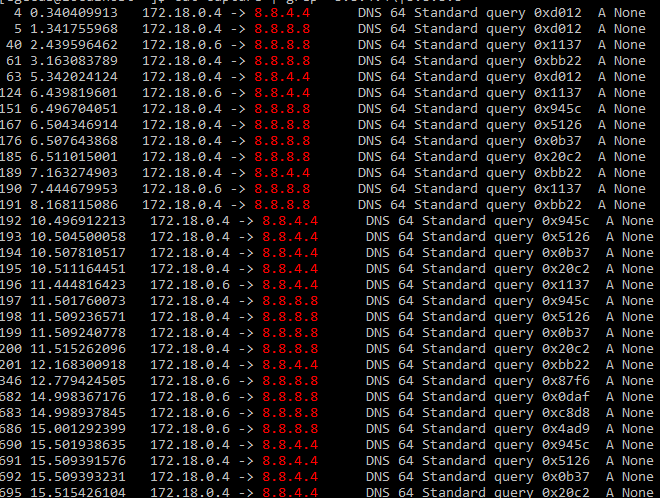
Now why this is happening, I have no idea, leave this open so someone can take a look at this
lijok
on 16 Apr 2019
I also see DNS Requsts for "None" on awx_task container. Adding it there to. I don't see any DNS Query on Google Servers so maybe a local issue on the host?
 tweippert
on 16 Apr 2019
tweippert
on 16 Apr 2019
@shanemcd @matburt this sounds like a Python bug to me where some code is making a DNS lookup for "None".
 ryanpetrello
on 16 Apr 2019
ryanpetrello
on 16 Apr 2019
@lijok @tweippert any idea which process is making those DNS requests? Would be good to try to narrow it down and resolve the actual issue here.
ryanpetrello
on 16 Apr 2019
Does everyone in this thread use awx_alternate_dns_servers? I might have forgotten to test that. I'll take a look.
 shanemcd
on 16 Apr 2019
shanemcd
on 16 Apr 2019
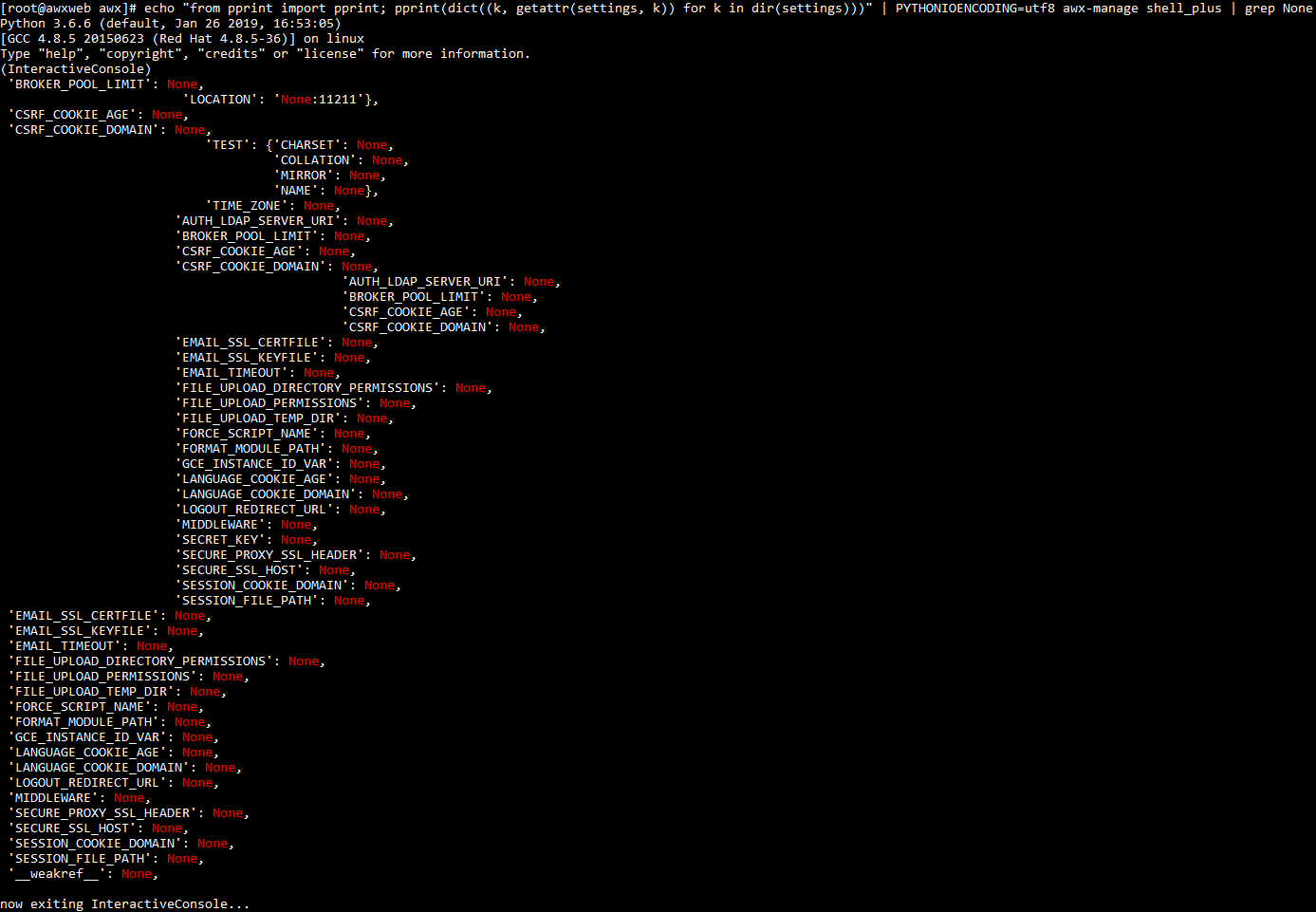
Also, running this (and looking for URIs that contain None) might provide some clues:
echo "from pprint import pprint; pprint(dict((k, getattr(settings, k)) for k in dir(settings)))" | PYTHONIOENCODING=utf8 awx-manage shell_plus | grep None
Scratch that idea. That option seems to work fine. I'm wondering now about DNS issues w/ Docker itself? Or maybe something changed in our base image?
shanemcd
on 16 Apr 2019
@tweippert
I also see DNS Requsts for "None" on awx_task container
Yeah I believe those are the only two containers spamming dns
@ryanpetrello
@lijok @tweippert any idea which process is making those DNS requests? Would be good to try to narrow it down and resolve the actual issue here.
Nope, my linux beard hasn't grown fullsize yet. I'll try and figure that out today
@shanemcd
Does everyone in this thread use awx_alternate_dns_servers? I might have forgotten to test that. I'll take a look.
Nope it's commented out in my inventory
@ryanpetrello
Also, running this (and looking for URIs that contain
None) might provide some clues:echo "from pprint import pprint; pprint(dict((k, getattr(settings, k)) for k in dir(settings)))" | PYTHONIOENCODING=utf8 awx-manage shell_plus | grep None
lijok
on 16 Apr 2019
That None:11211 looks like a potential culprit, @lijok. @shanemcd maybe we've got some installer bug that templates out the memcached connection string wrong?
What does this print?
echo "print(settings.CACHES)" | awx-manage shell_plus
I was thinking memcached as well because of this

when I added "192.168.200.49 None" instead of "127.0.0.1 None" to /etc/hosts in awx_web, 192.168.200.49 being the ip from which I connect to the web ui
Installing v3 right now to check
lijok
on 16 Apr 2019
@lijok is this a k8s install, or standalone Docker?
ryanpetrello
on 16 Apr 2019
@ryanpetrello
What does this print?
echo "print(settings.CACHES)" | awx-manage shell_plus
{'default': {'BACKEND': 'django.core.cache.backends.memcached.MemcachedCache', 'LOCATION': 'None:11211'}, 'ephemeral': {'BACKEND': 'django.core.cache.backends.locmem.LocMemCache'}}
@lijok is this a k8s install, or standalone Docker?
it's docker on centos7
lijok
on 16 Apr 2019
@lijok that's the issue. This looks like an installer bug to me.
ryanpetrello
on 16 Apr 2019
Yep, this is the issue. In the settings.py baked into the image we still try to read that from the environment:
https://github.com/ansible/awx/blob/devel/installer/roles/image_build/files/settings.py#L106-L107
I'll have a PR up shortly and we can cut a release soon.
shanemcd
on 16 Apr 2019
@tweippert @lijok @kakawait so _until_ we have a fix for this merged and a new release, a reasonable way to fix this (instead of your /etc/hosts hack, which is gross) would be to update the settings.CACHES that @shanemcd referenced to correctly be localhost:11211 (through whatever means you deem necessary).
ryanpetrello
on 16 Apr 2019
@tweippert @lijok @kakawait so _until_ we have a fix for this merged and a new release, a reasonable way to fix this (instead of your
/etc/hostshack, which is gross) would be to update thesettings.CACHESthat @shanemcd referenced to _correctly_ belocalhost:11211(through whatever means you deem necessary).
Done, can confirm works
Thanks
lijok
on 16 Apr 2019
Issue resolved by the PR above ^ Fix will be included in the next version of AWX.
shanemcd
on 16 Apr 2019
@ryanpetrello stupid question why should I put localhost has MEMCACHED_HOST in context of _local docker-compose_? I mean there is a _container_ memcached, should I replace localhost by memcached?
memcached:
    image: memcached:alpine
    restart: unless-stopped
@kakawait if you're using a local docker compose install, specify memcached:11211.
This is the value that the local docker compose install _should_ default to:
https://github.com/ansible/awx/blob/devel/awx/settings/defaults.py#L520
~ docker exec -it tools_awx_run_1 bash
bash-4.2$ echo "from django.conf import settings; print(settings.CACHES)" | awx-manage shell
{'default': {'BACKEND': 'django.core.cache.backends.memcached.MemcachedCache', 'LOCATION': 'memcached:11211'}}
Related issues
 worsco
·
3Comments
worsco
·
3Comments
 gamuniz
·
3Comments
gamuniz
·
3Comments
 mwiora
·
3Comments
mwiora
·
3Comments
 kakkotetsu
·
3Comments
kakkotetsu
·
3Comments
 IMOKURI
·
3Comments
IMOKURI
·
3Comments
Most helpful comment
Done, can confirm works
Thanks